
Aactivity和Service之间的通信
一、在activity中定义三个按钮 一个开启服务 一个关闭服务,还有一个是向服务发送广播
当创建出Serevice时先执行Service的onCreate()创建服务后只执行一次 以后每次点击开启服务都不会再执行onCreate()而是去执行onStartCommand()停止服务时执行Service的onDestroy()
二、在Activity中点击发送广播键会向服务发送广播(本例采用LocalBroadcastManager发送和接受广播)服务接收广播吐司出“接收到activity的广播”。服务是在oncreate()里边创建接受者不在onStartcommand()里边创建是因为每次点击开启服务时都会执行onStartcommand() activity创建出service时在service中的oncreate()里向activity发送广播 activity在oncreate()里创建出接受者。
三、其实就是双方都有一个发送者和接收者
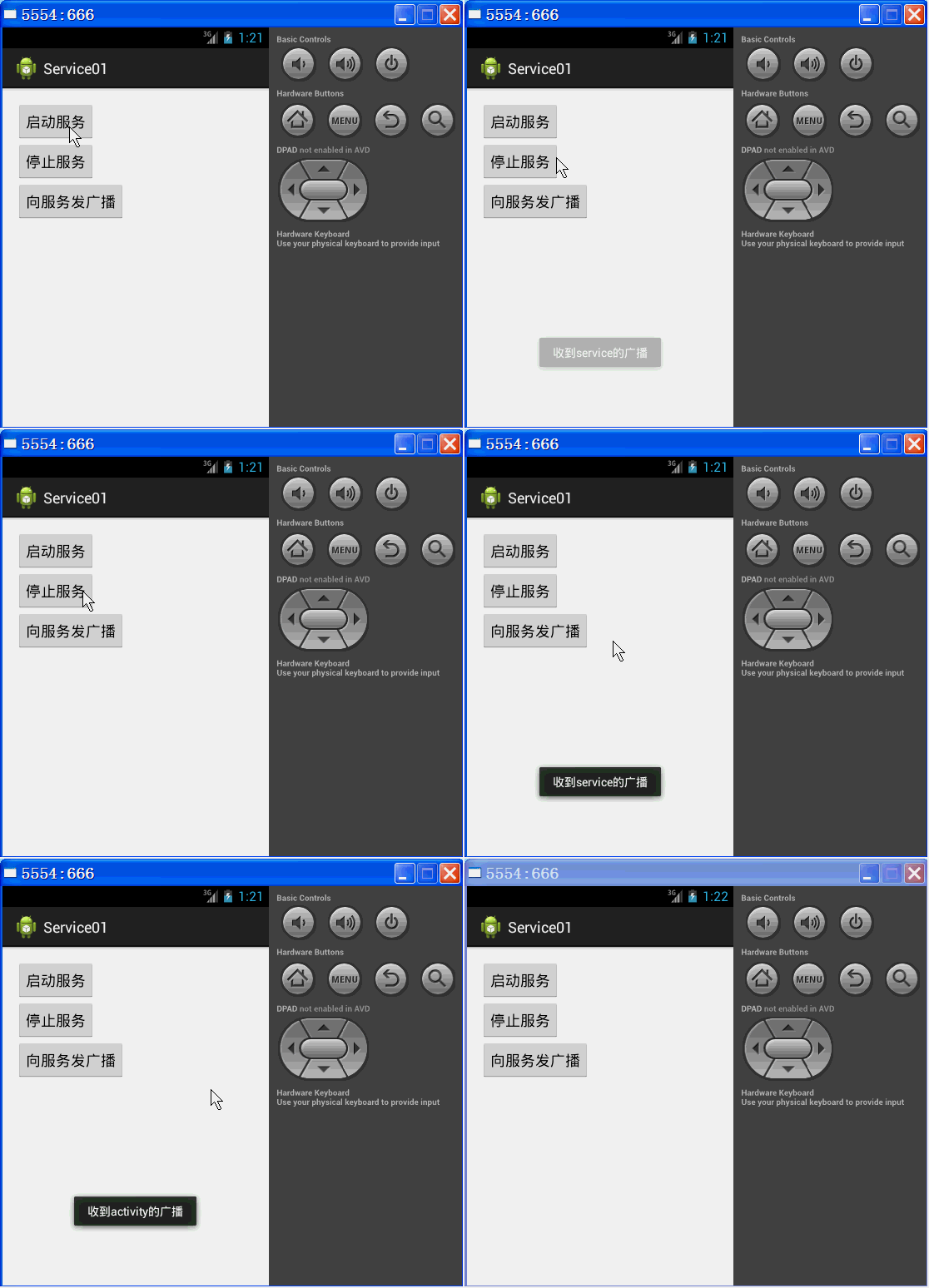
看代码
 package com.qf.service01;

 import android.app.Activity;

 import android.content.BroadcastReceiver;

 import android.content.Context;

 import android.content.Intent;

 import android.content.IntentFilter;

 import android.os.Bundle;

 import android.support.v4.content.LocalBroadcastManager;

 import android.view.View;

 import android.widget.Toast;

 public class MainActivity extends Activity {

     Intent serviceIntent;

     MyReceiver myReceiver;

     LocalBroadcastManager localBroadcastMgr;//本地广播管理器

     @Override

     protected void onCreate(Bundle savedInstanceState) {

         super.onCreate(savedInstanceState);

         setContentView(R.layout.activity_main);

         serviceIntent=new Intent(getApplicationContext(),MyService.class);

         localBroadcastMgr=LocalBroadcastManager.getInstance(getApplicationContext());

         myReceiver=new MyReceiver();

         localBroadcastMgr.registerReceiver(myReceiver, new IntentFilter("com.qf.broadcast.disen_service"));

     }

     class MyReceiver extends BroadcastReceiver{

         @Override

         public void onReceive(Context context, Intent intent) {

             Toast.makeText(MainActivity.this, "收到service的广播", Toast.LENGTH_SHORT).show();

         }

     }

     public void start(View v) {

         startService(serviceIntent);

     }

     public void stop(View v) {

         stopService(serviceIntent);

     }

     public void startService(View v) {

         localBroadcastMgr=LocalBroadcastManager.getInstance(getApplicationContext());

         Intent intent1=new Intent("com.qf.broadcast.activity");

         localBroadcastMgr.sendBroadcast(intent1);

     }

     @Override

     protected void onDestroy() {

         super.onDestroy();

         //取消注册本地广播接收器

         localBroadcastMgr.unregisterReceiver(myReceiver);

     }

 }
MainActivity.java
 package com.qf.service01;

 import android.app.Service;

 import android.content.BroadcastReceiver;

 import android.content.Context;

 import android.content.Intent;

 import android.content.IntentFilter;

 import android.os.IBinder;

 import android.support.v4.content.LocalBroadcastManager;

 import android.util.Log;

 import android.widget.Toast;

 public class MyService extends Service {

     LocalBroadcastManager localBroadcastMgr;//本地广播管理器

     MyReceiver myReceiver;

     public void onCreate() { //只执行一次,用于初始化Service

         super.onCreate();

         Log.i("debug", "onCreate");

         myReceiver=new MyReceiver();

         localBroadcastMgr=LocalBroadcastManager.getInstance(getApplicationContext());

         localBroadcastMgr.registerReceiver(myReceiver, new IntentFilter("com.qf.broadcast.activity"));

     }

     class MyReceiver extends BroadcastReceiver{

         @Override

         public void onReceive(Context context, Intent intent) {

             Toast.makeText(context, "收到activity的广播", Toast.LENGTH_SHORT).show();

         }

     }

     @Override

     public int onStartCommand(Intent intent, int flags, int startId) {

         // TODO 每次启动Service都会执行的方法,在此实现核心的功能

         Log.i("debug", "onStartCommand");

          Intent intent1=new Intent("com.qf.broadcast.disen_service");

         localBroadcastMgr.sendBroadcast(intent1);

         return super.onStartCommand(intent, flags, startId);

     }

     @Override

     public IBinder onBind(Intent intent) {

         return null;

     }

     @Override

     public void onDestroy() { //只执行一次,用于销毁Service组件

         super.onDestroy();

         Log.i("debug", "onDestroy");

         localBroadcastMgr.unregisterReceiver(myReceiver);

     }

 }
Service.java
 <RelativeLayout xmlns:android="http://schemas.android.com/apk/res/android"

     xmlns:tools="http://schemas.android.com/tools"

     android:layout_width="match_parent"

     android:layout_height="match_parent"

     android:paddingBottom="@dimen/activity_vertical_margin"

     android:paddingLeft="@dimen/activity_horizontal_margin"

     android:paddingRight="@dimen/activity_horizontal_margin"

     android:paddingTop="@dimen/activity_vertical_margin"

     tools:context=".MainActivity" >

     <Button

         android:id="@+id/btn1Id"

         android:layout_width="wrap_content"

         android:layout_height="wrap_content"

         android:onClick="start"

         android:text="启动服务" />

     <Button

         android:id="@+id/btn2Id"

         android:layout_width="wrap_content"

         android:layout_height="wrap_content"

         android:onClick="stop"

         android:text="停止服务"

         android:layout_below="@id/btn1Id"/>

     <Button

         android:id="@+id/btn3Id"

         android:layout_width="wrap_content"

         android:layout_height="wrap_content"

         android:onClick="startService"

         android:layout_below="@id/btn2Id"

         android:text="向服务发广播" />

 </RelativeLayout>
activity_main.xml
 <?xml version="1.0" encoding="utf-8"?>

 <manifest xmlns:android="http://schemas.android.com/apk/res/android"

     package="com.qf.service01"

     android:versionCode="1"

     android:versionName="1.0" >

     <uses-sdk

         android:minSdkVersion="8"

         android:targetSdkVersion="17" />

     <application

         android:allowBackup="true"

         android:icon="@drawable/ic_launcher"

         android:label="@string/app_name"

         android:theme="@style/AppTheme" >

         <activity

             android:name="com.qf.service01.MainActivity"

             android:label="@string/app_name" >

             <intent-filter>

                 <action android:name="android.intent.action.MAIN" />

                 <category android:name="android.intent.category.LAUNCHER" />

             </intent-filter>

         </activity>

         <!-- 注册Service组件 -->

        <service android:name="com.qf.service01.MyService"/>

     </application>

 </manifest>
AndroidManifest.xml
Aactivity和Service之间的通信的更多相关文章
- Service 之间如何通信?- 每天5分钟玩转 Docker 容器技术(101)
微服务架构的应用由若干 service 组成.比如有运行 httpd 的 web 前端,有提供缓存的 memcached,有存放数据的 mysql,每一层都是 swarm 的一个 service,每个 ...
- 101、Service 之间如何通信?(Swarm08)
参考https://www.cnblogs.com/CloudMan6/p/7967419.html 微服务架构的应用由若干 service 构成.比如有运行 httpd 的 web 前端,有提供 ...
- activity 与 service 之间的通信
activity和service通信:通过binder 举个我实际项目中的例子:在service中下载更新应用 首先是下载更新apk的service: public class UpdateVersi ...
- Android中Activity、Service和线程之间的通信
Activity.Service和线程应该是Android编程中最常见的几种类了,几乎大多数应用程序都会涉及到这几个类的编程,自然而然的,也就会涉及到三者之间的相互通信,本文就试图简单地介绍一下这三者 ...
- activity与service之间的通信方式
Activity之间的通信 1.activity与activity的通信可以通过Intent来封装数据,startActivityForResult()来实现,当跳转的activity调用finish ...
- android中四大组件之间相互通信
好久没有写有关android有关的博客了,今天主要来谈一谈android中四大组件.首先,接触android的人,都应该知道android中有四大组件,activity,service,broadca ...
- 10月9日Android学习笔记:活动与服务之间的通信
最近在照着<第一行代码>这本书来学安卓,顺便记下笔记.主要的内容是Android中服务的第二种启动方式,通过活动绑定服务来启动服务,实现活动与服务之间的通信. 一. 首先创建一个服务类 p ...
- ionic2+Angular 依赖注入之Subject ——使用Subject来实现组件之间的通信
在Angular+ionic2 开发过程中,我们不难发现,页面之间跳转之后返回时是不会刷新数据的. 场景一:当前页面需要登录之后才能获取数据--去登录,登录成功之后返回--页面需要手动刷新才能获取到数 ...
- c# IPC实现本机进程之间的通信
IPC可以实现本地进程之间通信.这种用法不是太常见,常见的替代方案是使用wcf,remoting,web service,socket(tcp/pipe/...)等其他分布式部署方案来替代进程之间的通 ...
随机推荐
- CentOS 6.2图形界面允许root用户登录
测试环境中,很多操作需要root用户权限,为了提高测试效率,因此有时希望直接使用root用户登陆系统,但是CentOS的图形界面默认不允许root用户登陆,这是由于pam的限制,需要进行如下设定: 1 ...
- Ubuntu安装配置串口通讯工具minicom&&cutecom
原帖地址:https://blog.csdn.net/gatieme/article/details/45310493 2017-04-07更新 发现新的工具gtkterm全名叫serial port ...
- 最简单的TCP、UDP案例及各函数的详细解释
TCP: server #include "stdafx.h" #include<iostream> #define BUF_SZIE 64 #include &quo ...
- 【Unix网络编程】chapter3 套接字编程简介
chapter3套接字编程简介3.1 概述 地址转换函数在地址的文本表达和他们存放在套接字地址结构中的二进制值之间进行转换.多数现存的IPv4代码使用inet_addr和inet_ntoa这两个函数, ...
- ansible的安装与使用
ansible的特点: 1. 基于ssh运行 2. 无需客户端 安装ansible 这里提供四种安装方式,根据自己的需要任选一种即可 1.1使用yum安装 yum install epel-relea ...
- 服务器对cookie信息加密
通过redis的seesion对cookie信息加密 --- 防止cookie记录的用户信息泄露 import tornado.ioloop import tornado.web from data ...
- php的精确计算
引言:一定要确保数据的准确性.这是一个好的程序员的基本素养. <?php /** * 精确加法 * @param [type] $a [description] * @param [type] ...
- windows自带杀毒防火墙
windows自带杀毒防火墙 Windows Defender FireWall
- J2SE 8的输入输出--读取/写入文本文件和读取/写入二进制数据
读取/写入文本文件 // 1. 文本输入 // (1) 短小文本直接转入字符串 String string = new String(Files.readAllBytes(Paths.get(&quo ...
- rssh RSA(非对称密钥)
rssh ,非对称密钥,分为密钥和公钥 ,密钥在对面机器,需要进入的文件中,公钥是放在本地机器上 import paramiko private_key = paramiko.RSAKey.from_ ...