
Aactivity和Service之间的通信
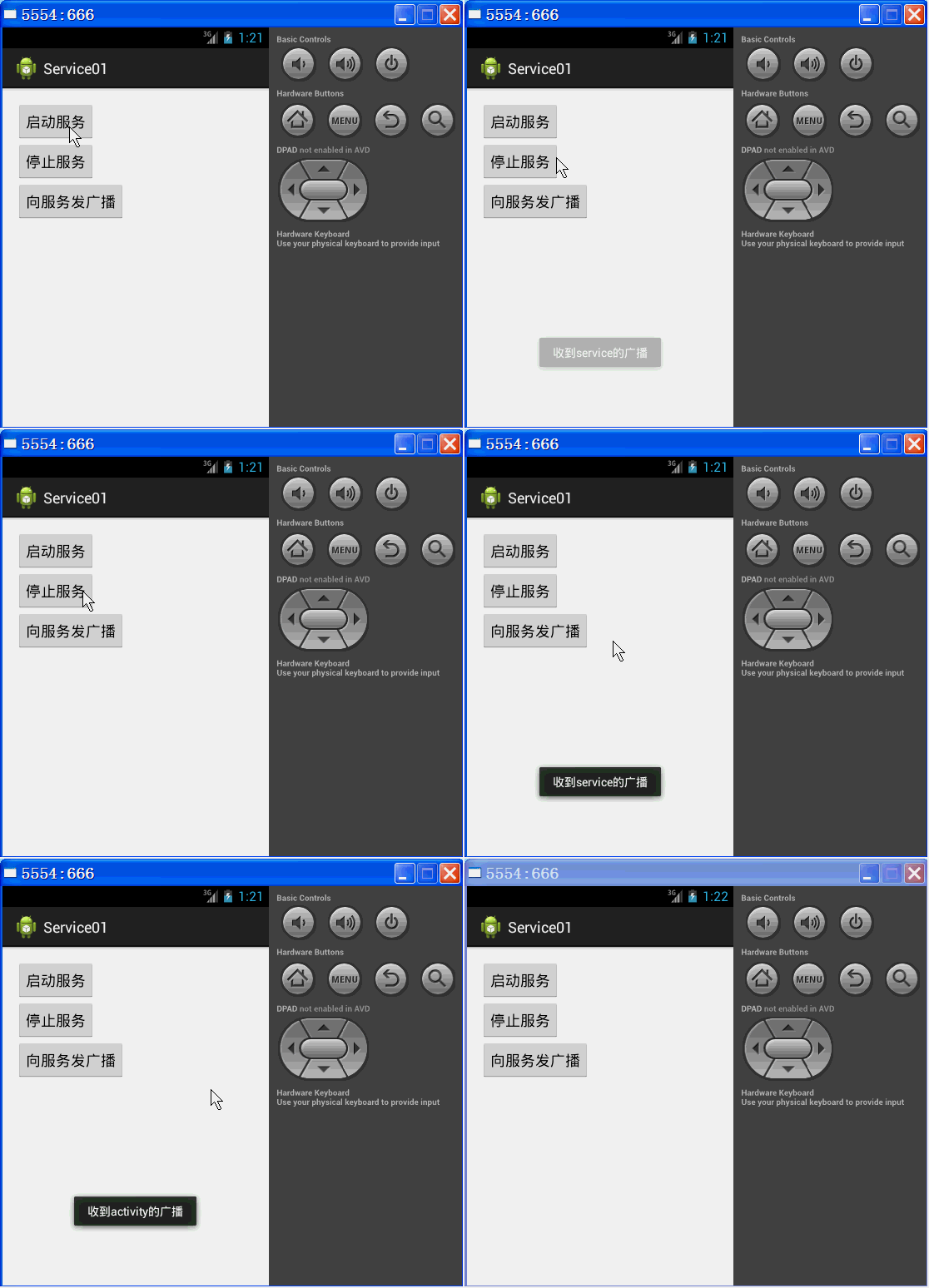
一、在activity中定义三个按钮 一个开启服务 一个关闭服务,还有一个是向服务发送广播
当创建出Serevice时先执行Service的onCreate()创建服务后只执行一次 以后每次点击开启服务都不会再执行onCreate()而是去执行onStartCommand()停止服务时执行Service的onDestroy()
二、在Activity中点击发送广播键会向服务发送广播(本例采用LocalBroadcastManager发送和接受广播)服务接收广播吐司出“接收到activity的广播”。服务是在oncreate()里边创建接受者不在onStartcommand()里边创建是因为每次点击开启服务时都会执行onStartcommand() activity创建出service时在service中的oncreate()里向activity发送广播 activity在oncreate()里创建出接受者。
三、其实就是双方都有一个发送者和接收者
看代码
 package com.qf.service01;

 import android.app.Activity;

 import android.content.BroadcastReceiver;

 import android.content.Context;

 import android.content.Intent;

 import android.content.IntentFilter;

 import android.os.Bundle;

 import android.support.v4.content.LocalBroadcastManager;

 import android.view.View;

 import android.widget.Toast;

 public class MainActivity extends Activity {

     Intent serviceIntent;

     MyReceiver myReceiver;

     LocalBroadcastManager localBroadcastMgr;//本地广播管理器

     @Override

     protected void onCreate(Bundle savedInstanceState) {

         super.onCreate(savedInstanceState);

         setContentView(R.layout.activity_main);

         serviceIntent=new Intent(getApplicationContext(),MyService.class);

         localBroadcastMgr=LocalBroadcastManager.getInstance(getApplicationContext());

         myReceiver=new MyReceiver();

         localBroadcastMgr.registerReceiver(myReceiver, new IntentFilter("com.qf.broadcast.disen_service"));

     }

     class MyReceiver extends BroadcastReceiver{

         @Override

         public void onReceive(Context context, Intent intent) {

             Toast.makeText(MainActivity.this, "收到service的广播", Toast.LENGTH_SHORT).show();

         }

     }

     public void start(View v) {

         startService(serviceIntent);

     }

     public void stop(View v) {

         stopService(serviceIntent);

     }

     public void startService(View v) {

         localBroadcastMgr=LocalBroadcastManager.getInstance(getApplicationContext());

         Intent intent1=new Intent("com.qf.broadcast.activity");

         localBroadcastMgr.sendBroadcast(intent1);

     }

     @Override

     protected void onDestroy() {

         super.onDestroy();

         //取消注册本地广播接收器

         localBroadcastMgr.unregisterReceiver(myReceiver);

     }

 }
MainActivity.java
 package com.qf.service01;

 import android.app.Service;

 import android.content.BroadcastReceiver;

 import android.content.Context;

 import android.content.Intent;

 import android.content.IntentFilter;

 import android.os.IBinder;

 import android.support.v4.content.LocalBroadcastManager;

 import android.util.Log;

 import android.widget.Toast;

 public class MyService extends Service {

     LocalBroadcastManager localBroadcastMgr;//本地广播管理器

     MyReceiver myReceiver;

     public void onCreate() { //只执行一次,用于初始化Service

         super.onCreate();

         Log.i("debug", "onCreate");

         myReceiver=new MyReceiver();

         localBroadcastMgr=LocalBroadcastManager.getInstance(getApplicationContext());

         localBroadcastMgr.registerReceiver(myReceiver, new IntentFilter("com.qf.broadcast.activity"));

     }

     class MyReceiver extends BroadcastReceiver{

         @Override

         public void onReceive(Context context, Intent intent) {

             Toast.makeText(context, "收到activity的广播", Toast.LENGTH_SHORT).show();

         }

     }

     @Override

     public int onStartCommand(Intent intent, int flags, int startId) {

         // TODO 每次启动Service都会执行的方法,在此实现核心的功能

         Log.i("debug", "onStartCommand");

          Intent intent1=new Intent("com.qf.broadcast.disen_service");

         localBroadcastMgr.sendBroadcast(intent1);

         return super.onStartCommand(intent, flags, startId);

     }

     @Override

     public IBinder onBind(Intent intent) {

         return null;

     }

     @Override

     public void onDestroy() { //只执行一次,用于销毁Service组件

         super.onDestroy();

         Log.i("debug", "onDestroy");

         localBroadcastMgr.unregisterReceiver(myReceiver);

     }

 }
Service.java
 <RelativeLayout xmlns:android="http://schemas.android.com/apk/res/android"

     xmlns:tools="http://schemas.android.com/tools"

     android:layout_width="match_parent"

     android:layout_height="match_parent"

     android:paddingBottom="@dimen/activity_vertical_margin"

     android:paddingLeft="@dimen/activity_horizontal_margin"

     android:paddingRight="@dimen/activity_horizontal_margin"

     android:paddingTop="@dimen/activity_vertical_margin"

     tools:context=".MainActivity" >

     <Button

         android:id="@+id/btn1Id"

         android:layout_width="wrap_content"

         android:layout_height="wrap_content"

         android:onClick="start"

         android:text="启动服务" />

     <Button

         android:id="@+id/btn2Id"

         android:layout_width="wrap_content"

         android:layout_height="wrap_content"

         android:onClick="stop"

         android:text="停止服务"

         android:layout_below="@id/btn1Id"/>

     <Button

         android:id="@+id/btn3Id"

         android:layout_width="wrap_content"

         android:layout_height="wrap_content"

         android:onClick="startService"

         android:layout_below="@id/btn2Id"

         android:text="向服务发广播" />

 </RelativeLayout>
activity_main.xml
 <?xml version="1.0" encoding="utf-8"?>

 <manifest xmlns:android="http://schemas.android.com/apk/res/android"

     package="com.qf.service01"

     android:versionCode="1"

     android:versionName="1.0" >

     <uses-sdk

         android:minSdkVersion="8"

         android:targetSdkVersion="17" />

     <application

         android:allowBackup="true"

         android:icon="@drawable/ic_launcher"

         android:label="@string/app_name"

         android:theme="@style/AppTheme" >

         <activity

             android:name="com.qf.service01.MainActivity"

             android:label="@string/app_name" >

             <intent-filter>

                 <action android:name="android.intent.action.MAIN" />

                 <category android:name="android.intent.category.LAUNCHER" />

             </intent-filter>

         </activity>

         <!-- 注册Service组件 -->

        <service android:name="com.qf.service01.MyService"/>

     </application>

 </manifest>
AndroidManifest.xml
Aactivity和Service之间的通信的更多相关文章
- Service 之间如何通信?- 每天5分钟玩转 Docker 容器技术(101)
微服务架构的应用由若干 service 组成.比如有运行 httpd 的 web 前端,有提供缓存的 memcached,有存放数据的 mysql,每一层都是 swarm 的一个 service,每个 ...
- 101、Service 之间如何通信?(Swarm08)
参考https://www.cnblogs.com/CloudMan6/p/7967419.html 微服务架构的应用由若干 service 构成.比如有运行 httpd 的 web 前端,有提供 ...
- activity 与 service 之间的通信
activity和service通信:通过binder 举个我实际项目中的例子:在service中下载更新应用 首先是下载更新apk的service: public class UpdateVersi ...
- Android中Activity、Service和线程之间的通信
Activity.Service和线程应该是Android编程中最常见的几种类了,几乎大多数应用程序都会涉及到这几个类的编程,自然而然的,也就会涉及到三者之间的相互通信,本文就试图简单地介绍一下这三者 ...
- activity与service之间的通信方式
Activity之间的通信 1.activity与activity的通信可以通过Intent来封装数据,startActivityForResult()来实现,当跳转的activity调用finish ...
- android中四大组件之间相互通信
好久没有写有关android有关的博客了,今天主要来谈一谈android中四大组件.首先,接触android的人,都应该知道android中有四大组件,activity,service,broadca ...
- 10月9日Android学习笔记:活动与服务之间的通信
最近在照着<第一行代码>这本书来学安卓,顺便记下笔记.主要的内容是Android中服务的第二种启动方式,通过活动绑定服务来启动服务,实现活动与服务之间的通信. 一. 首先创建一个服务类 p ...
- ionic2+Angular 依赖注入之Subject ——使用Subject来实现组件之间的通信
在Angular+ionic2 开发过程中,我们不难发现,页面之间跳转之后返回时是不会刷新数据的. 场景一:当前页面需要登录之后才能获取数据--去登录,登录成功之后返回--页面需要手动刷新才能获取到数 ...
- c# IPC实现本机进程之间的通信
IPC可以实现本地进程之间通信.这种用法不是太常见,常见的替代方案是使用wcf,remoting,web service,socket(tcp/pipe/...)等其他分布式部署方案来替代进程之间的通 ...
随机推荐
- [jni]Getting Started
写一个java应用程序来调用C函数打印“Hello World!" 这个过程包括以下步骤: 1:创建一个申明了native方法的java类(HelloWorld.java): 2:使用jav ...
- VSCode编辑器编写Python代码
如何用VSCode愉快的写Python https://code.visualstudio.com/ 在学习Python的过程中,一直没有找到比较趁手的第三方编辑器,用的最多的还是Python自带 ...
- Executor框架(四)周期/延时任务ScheduleThreadPoolExecutor
ScheduledThreadPoolExecutor 介绍 ScheduledThreadPoolExecutor 是一个可以实现定时任务的 ThreadPoolExecutor(线程池).比 ...
- 2018-2019-2 《网络对抗技术》Exp6 信息搜集与漏洞扫描 Week9 20165233
Exp6 信息搜集与漏洞扫描 目录 一.基础问题 二.实验步骤 实验点一:各种搜索技巧的应用 实验点二:DNS IP注册信息的查询 实验点三:基本的扫描技术:主机发现.端口扫描.OS及服务版本探测.具 ...
- MVC,MVP 和 MVVM 模式如何选择?
转摘:http://www.linuxidc.com/Linux/2015-10/124622.htm 前言 做客户端开发.前端开发对MVC.MVP.MVVM这些名词不了解也应该大致听过,都是为了解决 ...
- (10/24) 图片跳坑大战--处理html中的图片
补充,在前面的服务启动执行命令中,我们在package.json中的配置信息为: "scripts": { "server": "webpack-de ...
- 20. orcle中统计一个字符串中某个字符的长度
例子1:统计一个字符串中“,”的个数: select lengthb(regexp_replace('[a,b,c,d,e,f]','[^,]',null)) as res from dual; 例 ...
- 1. myeclipse设置jsp默认打开方式为jsp Editor
1.windows - preferences - General - Editors - File Associations
- myBatis连接MySQL报异常:No operations allowed after connection closed.Connection was implicitly closed
网站运行一个晚上,早上来上班,发现报错: ### Error querying database. Cause: com.mysql.jdbc.exceptions.jdbc4.MySQLNonTra ...
- JS时间转时间戳,时间戳转时间。时间显示模式。
函数内容 // 时间转为时间戳 function date2timestamp(datetime) { var timestamp = new Date(Date.parse(datetime)); ...