
MVC二级联动使用$.ajax方法获取后端返回的字符串
在"MVC二级联动使用$.getJSON方法"中使用$.getJSON()获取后端返回的JSon。
本篇使用jQuery的$.ajax()获取后端返回的字符串,实现二级联动。
□ View Models
1: namespace MvcApplication1.Models
2: {
3: public class Province
4: {
5: public int ID { get; set; }
6: public string Name { get; set; }
7: }
8:
9: public class City
10: {
11: public int ID { get; set; }
12: public int ProvinceID { get; set; }
13: public string Name { get; set; }
14: public string ZipCode { get; set; }
15: }
16: }
.csharpcode, .csharpcode pre
{
font-size: small;
color: black;
font-family: consolas, "Courier New", courier, monospace;
background-color: #ffffff;
/*white-space: pre;*/
}
.csharpcode pre { margin: 0em; }
.csharpcode .rem { color: #008000; }
.csharpcode .kwrd { color: #0000ff; }
.csharpcode .str { color: #006080; }
.csharpcode .op { color: #0000c0; }
.csharpcode .preproc { color: #cc6633; }
.csharpcode .asp { background-color: #ffff00; }
.csharpcode .html { color: #800000; }
.csharpcode .attr { color: #ff0000; }
.csharpcode .alt
{
background-color: #f4f4f4;
width: 100%;
margin: 0em;
}
.csharpcode .lnum { color: #606060; }
□ 模拟一个服务层获取数据
1: using System.Collections.Generic;
2: using System.Linq;
3: using MvcApplication1.Models;
4:
5: namespace MvcApplication1
6: {
7: public static class Service
8: {
9: public static List<Province> GetProvices()
10: {
11: List<Province> result = new List<Province>();
12: result.Add(new Province(){ID = 1,Name = "山东省"});
13: result.Add(new Province(){ID = 2,Name = "江苏省"});
14: return result;
15: }
16:
17: public static List<City> GetCitiesByProvince(int provinceId)
18: {
19: List<City> result = new List<City>();
20: result.Add(new City(){ID=1,Name = "济南市",ProvinceID = 1,ZipCode = "001"});
21: result.Add(new City() { ID = 2, Name = "青岛市", ProvinceID = 1, ZipCode = "002"});
22: result.Add(new City() { ID = 3, Name = "南京市", ProvinceID = 2, ZipCode = "003" });
23: result.Add(new City() { ID = 4, Name = "苏州市", ProvinceID = 2, ZipCode = "004" });
24:
25: return result.Where(r => r.ProvinceID == provinceId).ToList();
26: }
27: }
28: }
29:
.csharpcode, .csharpcode pre
{
font-size: small;
color: black;
font-family: consolas, "Courier New", courier, monospace;
background-color: #ffffff;
/*white-space: pre;*/
}
.csharpcode pre { margin: 0em; }
.csharpcode .rem { color: #008000; }
.csharpcode .kwrd { color: #0000ff; }
.csharpcode .str { color: #006080; }
.csharpcode .op { color: #0000c0; }
.csharpcode .preproc { color: #cc6633; }
.csharpcode .asp { background-color: #ffff00; }
.csharpcode .html { color: #800000; }
.csharpcode .attr { color: #ff0000; }
.csharpcode .alt
{
background-color: #f4f4f4;
width: 100%;
margin: 0em;
}
.csharpcode .lnum { color: #606060; }
□ HomeController
直接产生<option></option>传递给前台视图。
1: using System;
2: using System.Collections.Generic;
3: using System.Text;
4: using System.Web.Mvc;
5: using MvcApplication1.Models;
6:
7: namespace MvcApplication1.Controllers
8: {
9: public class HomeController : Controller
10: {
11: public ActionResult Index()
12: {
13: return View();
14: }
15:
16: public ActionResult GetProvinces()
17: {
18: StringBuilder sb = new StringBuilder();
19: var provinces = Service.GetProvices();
20: foreach (Province p in provinces)
21: {
22: sb.AppendFormat("<option value=\"{0}\">{1}</option>",
23: p.ID, p.Name);
24: }
25: return Content(sb.ToString());
26: }
27:
28: [HttpPost]
29: public ActionResult GetCities(string id)
30: {
31: StringBuilder sb = new StringBuilder();
32: if (!string.IsNullOrEmpty(id))
33: {
34: var cities = Service.GetCitiesByProvince(int.Parse(id));
35: foreach (City c in cities)
36: {
37: sb.AppendFormat("<option value=\"{0}\">{1}</option>",
38: c.ID,
39: string.Concat(c.ZipCode, " ", c.Name));
40: }
41: }
42: return Content(sb.ToString());
43: }
44: }
45: }
46:
.csharpcode, .csharpcode pre
{
font-size: small;
color: black;
font-family: consolas, "Courier New", courier, monospace;
background-color: #ffffff;
/*white-space: pre;*/
}
.csharpcode pre { margin: 0em; }
.csharpcode .rem { color: #008000; }
.csharpcode .kwrd { color: #0000ff; }
.csharpcode .str { color: #006080; }
.csharpcode .op { color: #0000c0; }
.csharpcode .preproc { color: #cc6633; }
.csharpcode .asp { background-color: #ffff00; }
.csharpcode .html { color: #800000; }
.csharpcode .attr { color: #ff0000; }
.csharpcode .alt
{
background-color: #f4f4f4;
width: 100%;
margin: 0em;
}
.csharpcode .lnum { color: #606060; }
□ Home/Index.cshtml视图
1: @{
2: ViewBag.Title = "Index";
3: Layout = "~/Views/Shared/_Layout.cshtml";
4: }
5:
6: 选择省:<select id="p"></select> <br/>
7: 选择市:<select id="c"></select>
8:
9: @section scripts
10: {
11: <script type="text/javascript">
12: $(function() {
13: getProvince();
14:
15: $('#p').change(function() {
16: changeCity();
17: });
18: });
19:
20: //加载省
21: function getProvince() {
22: $.ajax({
23: url: '@Url.Action("GetProvinces","Home")',
24: type: 'post',
25: cache: false,
26: async: false,
27: dataType: 'html',
28: success: function(data) {
29: if (data.length > 0) {
30: $('#p').append($('<option></option>').val('').text('请选择'));
31: $('#p').append(data);
32: }
33:
34: }
35: });
36: }
37:
38: //设置城市清空
39: function emptyCity() {
40: $('#c').empty();
41: $('#c').append($('<option></option>').val('').text('请选择'));
42: }
43:
44: //根据省加载城市
45: function changeCity() {
46: var selectedProvinceId = $.trim($('#p option:selected').val());
47: if (selectedProvinceId.length == 0) {
48: emptyCity();
49: } else {
50: $.ajax({
51: url: '@Url.Action("GetCities","Home")',
52: type: 'post',
53: data: { id: selectedProvinceId },
54: cache: false,
55: async: false,
56: success: function(data) {
57: if (data.length > 0) {
58: $('#c').append(data);
59: }
60: }
61: });
62: }
63: }
64: </script>
65: }
66:
.csharpcode, .csharpcode pre
{
font-size: small;
color: black;
font-family: consolas, "Courier New", courier, monospace;
background-color: #ffffff;
/*white-space: pre;*/
}
.csharpcode pre { margin: 0em; }
.csharpcode .rem { color: #008000; }
.csharpcode .kwrd { color: #0000ff; }
.csharpcode .str { color: #006080; }
.csharpcode .op { color: #0000c0; }
.csharpcode .preproc { color: #cc6633; }
.csharpcode .asp { background-color: #ffff00; }
.csharpcode .html { color: #800000; }
.csharpcode .attr { color: #ff0000; }
.csharpcode .alt
{
background-color: #f4f4f4;
width: 100%;
margin: 0em;
}
.csharpcode .lnum { color: #606060; }
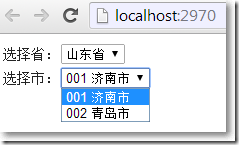
结果:
参考资料:
※ Kevin Tseng
MVC二级联动使用$.ajax方法获取后端返回的字符串的更多相关文章
- MVC二级联动使用$.getJSON方法
本篇使用jQuery的$.getJSON()实现二级联动. □ View Models 1: namespace MvcApplication1.Models 2: { 3: public cla ...
- 用jquery的ajax方法获取return返回值的正确姿势
如果jquery中,想要获取ajax的return返回值,必须注意两方面,ajax的同步异步问题,在ajax方法里面还是外面进行return返回值. 下面列举了三种写法,如果想成功获取到返回值,参考第 ...
- jquery通过ajax方法获取json数据不执行success
1.jquery通过ajax方法获取json数据不执行success回调 问题描述:jquery通过ajax方法获取json数据不执行success回调方法 问题原因:json格式存在问题或不符合标准 ...
- jquery通过ajax方法获取json数据不执行success回调
问题描述:jquery通过ajax方法获取json数据不执行success回调方法 问题原因:json格式存在问题或不符合标准写法,导致总是执行error回调方法 解决方案:使json格式务必符合下述 ...
- 用JQuery中的Ajax方法获取web service等后台程序中的方法
用JQuery中的Ajax方法获取web service等后台程序中的方法 1.准备需要被前台html页面调用的web Service,这里我们就用ws来代替了,代码如下: using System; ...
- 获取的ajax方法return的返回值的问题解析
今天刚上班就偶遇关于获取Ajax方法return的返回值的问题,这里小记一下. 在使用jquery中,如果获取不到ajax返回值,原因有二: 一.ajax未使用同步 ajax未使用同步,导致数据未加载 ...
- 通过Ajax异步提交的方法实现从数据库获取省份和城市信息实现二级联动(xml方法)
之前有写过是从JavaScript数组里获取省市信息来实现二级联动,但是似乎有很多需求是要从数据库里获取信息,所以就需要根据异步提交,局部刷新的思想来实现来提高用户交互问题 第一种方法是xml方法 1 ...
- 用jquery的ajax方法获取不到return返回值
如果jquery中,获取不到ajax返回值. 两个错误写法会导致这种情况:1.ajax未用同步 2.在ajax方法中直接return返回值. 下面列举了三种写法,如果想成功获取到返回值,参考第三种写法 ...
- JQuery的ajax方法获取返回值得到了值还包含了不要的html源码 (Ajax相关知识)
因为后台使用了response.Write():这个方法,当输出完了以后,没有结束掉会继续输出,所以需要用到response.End():这样问题就解决了 jquery的ajax 除了通过url传值, ...
随机推荐
- MySQL学习笔记:从一个表update到另外一个表
# ---- 测试数据 ---- # 表1 CREATE TABLE temp_x AS AS c_id, 1.11 AS c_amount FROM DUAL UNION ALL AS c_id, ...
- 动态页面技术JSP/EL/JSTL
本节内容: jsp脚本和注释 jsp运行原理 jsp指令(3个) jsp内置/隐式对象(9个) jsp标签(动作) EL技术 JSTL技术 JavaEE的开发模式 动态页面技术:就是在html中嵌入j ...
- Pg168-1
1.Pg168-1 package org.hanqi.pn0120; public class Computer { private double neicundx=10; public doubl ...
- swift中Double转String
swift上手有好几天了.发现swift除了本身的几个基本类型转换,一些比较特殊的数值类型转换需要“桥接”到Objective-C来进行- 代码当然也很简单- var numString = &quo ...
- s12-day01-work01用户登录接口
README # README.md # day001-work-1 @南非波波 功能实现:登录接口 流程图:  程序实现: 1. ...
- spring boot 之使用mapstruct
最近在阅读swagger源码,当看到 springfox.documentation.swagger2.mappers.ModelMapper 类时,无意中看到该类上面使用的 org.mapstruc ...
- myql root用户远程访问
虚拟机搭建的lnmp开发环境,mysql在虚拟机正常访问,想在物理机通过数据库管理工具Navicat远程登录,方便建表查询等操作.经网上一查,有答案了. [以下是转载]http://www.cnblo ...
- 黑马程序员_java基础笔记(06)...集合
—————————— ASP.Net+Android+IOS开发..Net培训.期待与您交流! —————————— JavaApi(其实就是java给我们提供的已经定义好的对象.工具对象:集合框架) ...
- if函数判断日期在某个时间段
SELECT ') a FROM `t_activity`;
- thinkphp3.2开启静态缓存与缓存规则设置
网站的静态缓存对大访问量有很好的缓解作用,尤其对网站的大并发,可有效的缓解数据库的压力.在thinkphp中实现静态缓存很简单,thinkphp都已经封装好了直接调用即可. 静态缓存 首先设置 H ...