
用PopupWindow做下拉框
最近在做下拉框,本来想用spinner,可是spinner达不到项目要求,跟同学同事问了一圈,都在用popwindow,
网上看了一下,popwindow挺简单的,可定制性挺强的,符合我的要求,所以,借鉴网上看的代码,自己撸了一
遍。写篇博客以防忘记。
首先,先写个自定义布局,代码如下
<?xml version="1.0" encoding="utf-8"?>

<LinearLayout xmlns:android="http://schemas.android.com/apk/res/android"

    xmlns:tools="http://schemas.android.com/tools"

    android:layout_width="110dp"

    android:layout_height="wrap_content">

    <LinearLayout

        android:layout_width="100dp"

        android:layout_height="wrap_content"

        android:background="@drawable/bg_circle_drop_down_qr_code"

        android:orientation="vertical"

        android:layout_marginRight="@dimen/padding_10"

        android:paddingBottom="0dp"

        android:paddingLeft="@dimen/padding_5"

        android:paddingRight="@dimen/padding_5"

        android:paddingTop="@dimen/padding_5">

        <LinearLayout

            android:id="@+id/lin_scan_qr_code"

            android:layout_width="match_parent"

            android:layout_height="0dp"

            android:layout_weight="1"

            android:gravity="center"

            android:orientation="horizontal"

            android:paddingBottom="@dimen/padding_5"

            android:paddingTop="@dimen/padding_5">

            <ImageView

                android:layout_width="wrap_content"

                android:layout_height="wrap_content"

                android:src="@drawable/ic_circle_scan_qr_code" />

            <TextView

                android:layout_width="wrap_content"

                android:layout_height="wrap_content"

                android:layout_marginLeft="@dimen/padding_10"

                android:gravity="center"

                android:text="扫一扫"

                android:textColor="@color/color_white"

                android:textSize="@dimen/text_16" />

        </LinearLayout>

        <View

            android:layout_width="wrap_content"

            android:layout_height="1px"

            android:layout_marginLeft="@dimen/padding_3"

            android:layout_marginRight="@dimen/padding_3"

            android:background="@color/color_white" />

        <LinearLayout

            android:id="@+id/lin_my_qr_code"

            android:layout_width="match_parent"

            android:layout_height="0dp"

            android:layout_weight="1"

            android:gravity="center"

            android:orientation="horizontal"

            android:paddingBottom="@dimen/padding_5"

            android:paddingTop="@dimen/padding_5">

            <ImageView

                android:layout_width="wrap_content"

                android:layout_height="wrap_content"

                android:src="@drawable/ic_circle_my_qr_code" />

            <TextView

                android:layout_width="wrap_content"

                android:layout_height="wrap_content"

                android:layout_marginLeft="@dimen/padding_10"

                android:gravity="center"

                android:text="二维码"

                android:textColor="@color/color_white"

                android:textSize="@dimen/text_16" />

        </LinearLayout>

    </LinearLayout>

</LinearLayout>
第二步,在代码中定义popwindow样式,绑定点击事件,代码如下:
// // 获取自定义布局文件pop.xml的视图

        View customView = getActivity().getLayoutInflater().inflate(R.layout.lay_circle_pop_drop_down_qr_code,

                null, false);

        // 创建PopupWindow实例,200,150分别是宽度和高度

        mQrCodePopWindow = new PopupWindow(customView, CommonUtil.dipToPx(getContext(),110), ViewGroup.LayoutParams.WRAP_CONTENT,true);

        // 设置动画效果 [R.style.AnimationFade 是自己事先定义好的]

//        popupwindow.setAnimationStyle(R.style.AnimationFade);

//        popupwindow.setTouchable(true);

//        popupwindow.setOutsideTouchable(true);

        mQrCodePopWindow.setBackgroundDrawable(new BitmapDrawable());

        customView.findViewById(R.id.lin_scan_qr_code).setOnClickListener(v -> {

            ToastUtil.show(getContext(),"扫一扫");

            dismissQrCodePopWindow();

        });

        customView.findViewById(R.id.lin_my_qr_code).setOnClickListener(v -> ToastUtil.show(getContext(),"二维码"));
注意,代码中的true为setFoucusable,如要点击空白处隐藏popwindow的话,setFocusable(true)和setBackground()两者必不可少(亲测)。
最后,为空间添加点击事件,控制下拉框的显示隐藏,代码如下:
@OnClick(R.id.lin_top_right)

    public void onClick(View v) {

        if (mQrCodePopWindow != null&& mQrCodePopWindow.isShowing()) {

            mQrCodePopWindow.dismiss();

        } else {

            initQrCodePopWindow();

            mQrCodePopWindow.showAsDropDown(v);

        }

    }
(由于暂时没有发现好的动画效果,所以没有添加动画,如果大家有发现好的动画,还请告知一二,在此谢过)
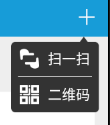
效果图:
用PopupWindow做下拉框的更多相关文章
- 用PopWindow做下拉框
最近在做下拉框,本来想用spinner,可是spinner达不到项目要求,跟同学同事问了一圈,都在用popwindow, 网上看了一下,popwindow挺简单的,可定制性挺强的,符合我的要求,所以, ...
- C# 生成月份及天选择列表,方便做下拉框联动
月份及天选择列表,很方便做下拉框联动 /// <summary> /// 获取月份选择列表(根据当前语言环境显示月份名称) /// </summary> private IEn ...
- GridControl控件绑定RepositoryItemImageComboBox 作为下拉框使用
如果,时间长时了,已前做过的东西,都记不得了,所以记录一下. 废话不多说. 1.拖出gridview控件,然后将字段绑定上去 2.将要做下拉框的控件加入RepositoryItemImageCombo ...
- devpress GridControl控件绑定RepositoryItemImageComboBox 作为下拉框使用 zt
1.拖出gridview控件,然后将字段绑定上去 2.将要做下拉框的控件加入RepositoryItemImageComboBox控件 3.绑定数据 ; i < ; i++) { //如果取值时 ...
- 月薪10K必备--C#下拉框联动
下拉框联动 很多网站上都用到下拉框联动,就是第一个下拉框没有选择任何项,第二个下拉框就没有选项.这样的做法更加谨慎,更加紧密. 下面我就教大家怎么做下拉框联动: 首先在窗 ...
- Ext 下拉框联动第一次显示不正常的问题
做下拉框联动,异步加载数据,第一次显示时数据不准确,不要在combo_2的下拉框直接绑定store,在combo_1的改变事件里调用下面的方法 function GetAllCustomerBrand ...
- 下拉框选择blur与click冲突问题
缘由:今天在做下拉框选择时,遇到click和blur冲突问题:具体现象如下 1.intput框获取焦点(focus事件)时显示隐藏的下拉框,失去焦点(blur事件)则隐藏下拉框 2.点击选择(clic ...
- easyui datagrid combobox下拉框获取数据问题
最近在使用easyui的datagrid,在可编辑表格中添加一个下拉框,查了下API,可以设置type : 'combobox',来做下拉框,这下拉框是有了,可是这后台数据怎么传过来呢,通过查API可 ...
- PHP.TP框架下商品项目的优化3-php封装下拉框函数
php封装下拉框函数 因为在项目中会经常使用到下拉框,所以根据一个表中的数据制作下拉框函数,以便调用 //使用一个表的数据做下拉框函数 function buildSelect($tableName, ...
随机推荐
- python实现base64算法加密
python本身有base64加密的模块,不过是用C写的,封装成了.so文件,无法查看源码,本着学习的心态,自己实现了一遍,算法 原理参考 浅谈Base64编码算法. 代码如下: # coding:u ...
- Codeforces805B. 3-palindrome 2017-05-05 08:33 156人阅读 评论(0) 收藏
B. 3-palindrome time limit per test 1 second memory limit per test 256 megabytes input standard inpu ...
- HDU1078 FatMouse and Cheese(DFS+DP) 2016-07-24 14:05 70人阅读 评论(0) 收藏
FatMouse and Cheese Problem Description FatMouse has stored some cheese in a city. The city can be c ...
- MyEclipse2014中Java类右键Run as没有JUnit Test
Java初学,想试试连接本地数据库,按照百度经验中的方法,在最后执行测试的卡住了,为啥?因为MyEclipse中右键Run as没有JUnit Test选项! 6.1.测试数据库mysql是在项目中连 ...
- REST格式
首先要明确一点:REST 实际上只是一种设计风格,它并不是标准.(所以你可以看到网上一大堆的各种最佳实践,设计指南,但是没有人说设计标准).aisuhua/restful-api-design-ref ...
- cxgrid动态显示行号
uses cxLookAndFeelPainters; type TMyCxGrid = class(TObject) class procedure DrawIndicatorCell( ...
- Delphi for iOS开发指南(1):在Mac上配置你的开发环境
http://cache.baiducontent.com/c?m=9d78d513d99516f11ab7cf690d678c3b584380122ba7a0020fd18438e4732b4050 ...
- Excel中使用VBA进行度分秒与十进制度的转换
发现Excel的VBA功能真是批量处理的一把利刃,工作中小试牛刀了一把,将Excel中度分秒形式的坐标批量处理成十进制度形式,处理完后用于GIS展点制图. 原Excel数据如下: VBA代码如下: S ...
- ActiveMq 总结(二)
4.2.6 MessageConsumer MessageConsumer是一个由Session创建的对象,用来从Destination接收消息. 4.2.6.1 创建MessageConsumer ...
- 蚂蚁男孩.缓存组件(Framework.Mayiboy.Caching)
它能做什么? 主要是用来方便使用缓存而诞生,该组件封装了RunTimeCache.Memcached.Redis的使用,通过简单配置就能高效快速使用起来. 使用说明 一. 下载源码,自己手动编译 ...