
创建一个pre标签展开折叠的UI组件(原创)
这些天练习UI组件的编写,顺便模仿一个h5版本的pre标签收缩展开的效果组件:
兼容ie8、9,谷歌,火狐;
图片效果如下:
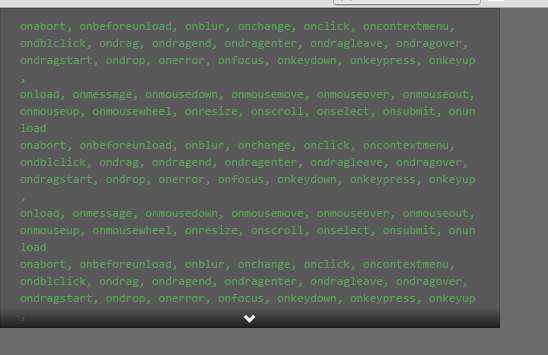
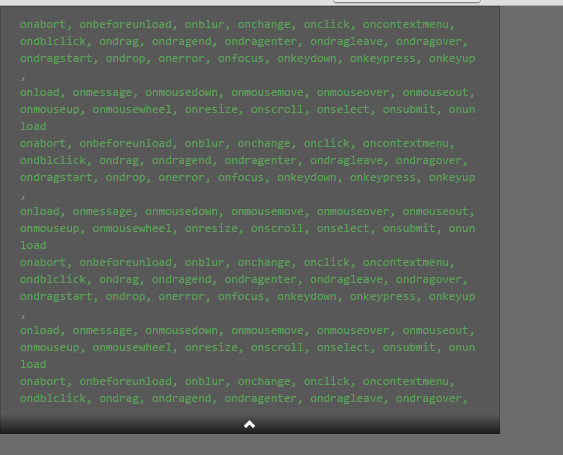
demo.html代码:
<!DOCTYPE html>

<html lang="zh-CN">

<head>

    <meta charset="utf-8">

    <meta http-equiv="X-UA-Compatible" content="IE=edge">

    <meta name="viewport" content="width=device-width, initial-scale=1">

    <link href="js/cnExpandPanel/cnExpandPanel.css" rel="stylesheet"/>

    <style>

        /*可以更改这两个参数来调整内容高度以及放大后的最小高度*/

        .banner-expand{

            height:200px;
            min-height:200px;
}
        .banner-expand.on {

            min-height:200px;

        }

        /*可以设置内容宽度,以及其他css样式*/

        .banner{

            width:500px;

        }

    </style>

</head>

<body style="background-color:#6C6B6B;margin:0;padding:0">

<div class="banner">

     <pre class="banner-expand">

onabort, onbeforeunload, onblur, onchange, onclick, oncontextmenu,

ondblclick, ondrag, ondragend, ondragenter, ondragleave, ondragover,

ondragstart, ondrop, onerror, onfocus, onkeydown, onkeypress, onkeyup,

onload, onmessage, onmousedown, onmousemove, onmouseover, onmouseout,

onmouseup, onmousewheel, onresize, onscroll, onselect, onsubmit, onunload

onabort, onbeforeunload, onblur, onchange, onclick, oncontextmenu,

ondblclick, ondrag, ondragend, ondragenter, ondragleave, ondragover,

ondragstart, ondrop, onerror, onfocus, onkeydown, onkeypress, onkeyup,

onload, onmessage, onmousedown, onmousemove, onmouseover, onmouseout,

onmouseup, onmousewheel, onresize, onscroll, onselect, onsubmit, onunload

onabort, onbeforeunload, onblur, onchange, onclick, oncontextmenu,

ondblclick, ondrag, ondragend, ondragenter, ondragleave, ondragover,

ondragstart, ondrop, onerror, onfocus, onkeydown, onkeypress, onkeyup,

onload, onmessage, onmousedown, onmousemove, onmouseover, onmouseout,

onmouseup, onmousewheel, onresize, onscroll, onselect, onsubmit, onunload

onabort, onbeforeunload, onblur, onchange, onclick, oncontextmenu,

ondblclick, ondrag, ondragend, ondragenter, ondragleave, ondragover,

ondragstart, ondrop, onerror, onfocus, onkeydown, onkeypress, onkeyup,

onload, onmessage, onmousedown, onmousemove, onmouseover, onmouseout,

onmouseup, onmousewheel, onresize, onscroll, onselect, onsubmit, onunload

onabort, onbeforeunload, onblur, onchange, onclick, oncontextmenu,

ondblclick, ondrag, ondragend, ondragenter, ondragleave, ondragover,

ondragstart, ondrop, onerror, onfocus, onkeydown, onkeypress, onkeyup,

onload, onmessage, onmousedown, onmousemove, onmouseover, onmouseout,

onmouseup, onmousewheel, onresize, onscroll, onselect, onsubmit, onunload

onabort, onbeforeunload, onblur, onchange, onclick, oncontextmenu,

ondblclick, ondrag, ondragend, ondragenter, ondragleave, ondragover,

ondragstart, ondrop, onerror, onfocus, onkeydown, onkeypress, onkeyup,

onload, onmessage, onmousedown, onmousemove, onmouseover, onmouseout,

onmouseup, onmousewheel, onresize, onscroll, onselect, onsubmit, onunload

     </pre>

    <div class="banner-footer J_BannerFooter">

        <i class="icon-chevron-down icon-white J_ExpandDown i-show"></i>

        <i class="icon-chevron-up icon-white J_ExpandUp i-hid"></i>

    </div>

</div>

<script src="js/jquery-1.8.3.min.js"></script>

<script src="js/cnExpandPanel/cnExpandPanel.js"></script>

<script>

    cnExpandPanel.initDom();

</script>

</body>

</html>
cnExpandPanel.css代码:
/* 该组件依赖于bootstrap2的图标,如果引用了bootstrap2的css文件,则该段css可以删掉 start */

.icon-chevron-down {

    background-position: -313px -119px;

}

.icon-chevron-up {

    background-position: -288px -120px;

}

.icon-white{

    width: 14px;

    height: 14px;

    margin-top: 1px;

    *margin-right: .3em;

    line-height: 14px;

    vertical-align: text-top;

    background-image: url("img/glyphicons-halflings-white.png");

    background-repeat: no-repeat;

}

/* 该组件依赖于bootstrap2的图标,如果引用了bootstrap2的css文件,则该段css可以删掉 end */

.banner {

    position: relative;

}

.banner-expand {

    white-space: pre;

    white-space: pre-wrap;       /* css-3 */

    white-space: -moz-pre-wrap;  /* Mozilla, since 1999 */

    word-wrap: break-word;       /* Internet Explorer 5.5+ */

    display: block;

    margin: 0 0 10px;

    line-height: 1.42857143;

    word-break: break-all;

    background: rgba(0,0,0,0.17);

    border:0 #2b2b2b;

    border-radius:;

    color: #5ca258;

    font-family: Monaco,Consolas,"Lucida Console",monospace;

    font-size: 12px;

    min-height: 100px;

    padding: 10px 20px;

    transition: height .2s ease;

    box-shadow: inset 0 0 1px rgba(0,0,0,0.71);

    height: 200px;

    overflow: hidden;

    position: relative;

}

.banner-expand.on {

    overflow: visible;

    height:auto;

    min-height:200px;

}

.banner-footer{

    bottom:;

    text-align:center;

    background-color: #1d1d1d;

    background: -moz-linear-gradient(top,rgba(0,0,0,0) 0,rgba(0,0,0,0.59) 90%,rgba(0,0,0,0.65) 100%);

    background: -webkit-gradient(linear,left top,left bottom,color-stop(0%,rgba(0,0,0,0)),color-stop(90%,rgba(0,0,0,0.59)),color-stop(100%,rgba(0,0,0,0.65)));

    background: -webkit-linear-gradient(top,rgba(0,0,0,0) 0,rgba(0,0,0,0.59) 90%,rgba(0,0,0,0.65) 100%);

    background: -o-linear-gradient(top,rgba(0,0,0,0) 0,rgba(0,0,0,0.59) 90%,rgba(0,0,0,0.65) 100%);

    background: -ms-linear-gradient(top,rgba(0,0,0,0) 0,rgba(0,0,0,0.59) 90%,rgba(0,0,0,0.65) 100%);

    background: linear-gradient(to bottom,rgba(0,0,0,0) 0,rgba(0,0,0,0.59) 90%,rgba(0,0,0,0.65) 100%);

    filter:alpha(opacity=0,finishOpacity=80,style=1,startx=0,startY=0,finishx=0,finishY=150);

    -ms-filter:alpha(opacity=0,finishOpacity=80,style=1,startx=0,startY=0,finishx=0,finishY=150);

    cursor: pointer;

    position:absolute;

    width:100%;

}

.banner-footer:hover{

    background: rgba(0,0,0,0.74);

    filter:none;

    -ms-filter:none;

}

.i-show{

    display:inline-block;

}

.i-hid{

    display:none;

}
cnExpandPanel.js代码:
/**

 * Created by rise_horizon on 2015/4/3.

 * 依赖于jquery语法

 */

var cnExpandPanel = (function($){

    function _troggleDom($this) {

        var $J_ExpandUp = $this.find(".J_ExpandUp");

        var $J_ExpandDown = $this.find(".J_ExpandDown");

        if($J_ExpandDown.css("display") != "none") {

            _collapseDom($J_ExpandUp, $J_ExpandDown, $this);

        } else {

            _expandDom($J_ExpandUp, $J_ExpandDown, $this);

        }

    }

    function _collapseDom($J_ExpandUp, $J_ExpandDown, $this) {

        $this.siblings("pre").addClass("on");

        $J_ExpandUp.removeClass("i-hid");

        $J_ExpandUp.addClass("i-show");

        $J_ExpandDown.removeClass("i-show");

        $J_ExpandDown.addClass("i-hid");

    }

    function _expandDom($J_ExpandUp, $J_ExpandDown, $this) {

        $this.siblings("pre").removeClass("on");

        $J_ExpandDown.removeClass("i-hid");

        $J_ExpandDown.addClass("i-show");

        $J_ExpandUp.removeClass("i-show");

        $J_ExpandUp.addClass("i-hid");

    }

    function initDom() {

        $(".J_BannerFooter").on("click",function(){

            var $this = $(this);

            _troggleDom($this);

        });

    }

    return {initDom : initDom}

})(jQuery);
代码都在这里了,两张img图片是bootstrap2里的,可以自行找到,也可下载上传到csdn网站的实例,地址是http://download.csdn.net/detail/tv151579/8576589
创建一个pre标签展开折叠的UI组件(原创)的更多相关文章
- new Option() 创建一个option标签
//add() 方法用于向 <select> 添加一个 <option> 元素. //new Option() 创建一个option标签 school.add(new Opti ...
- js如何动态创建一个新的标签
var DS; DS = CallIVRAjaxClass.GetBranchCallCount().value; var obj = {}; obj.branch = "_branch&q ...
- 聊一聊HTML <pre>标签
聊一聊HTML <pre>标签 我们经常会在要保持文本格式的时候使用pre标签,比如当我们要展示源代码的时候,只要放一个pre标签,然后把源代码直接复制,粘贴,然后在页面上就可以保持好格式 ...
- HTML中pre标签的用法
我们经常会在要保持文本格式的时候使用pre标签,比如当我们要展示源代码的时候,只要放一个pre标签,然后把源代码直接复制,粘贴,然后在页面上就可以保持好格式.不会像放在其它标签里那样,把换行和空格都自 ...
- 用Backbone.js创建一个联系人管理系统(五)
原文: Build a Contacts Manager Using Backbone.js: Part 5 这是这系列教程最后一部分了. 之前所有的增删改都在前端完成. 这部分我们要把Contact ...
- 16款优秀的Vue UI组件库推荐
16款优秀的Vue UI组件库推荐 Vue 是一个轻巧.高性能.可组件化的MVVM库,API简洁明了,上手快.从Vue推出以来,得到众多Web开发者的认可.在公司的Web前端项目开发中,多个项目采用基 ...
- [转载]前端——实用UI组件库
https://www.cnblogs.com/xuepei/p/7920888.html Angular UI 组件 ngx-bootstrap 是一套Bootstrap 组件 官网:https:/ ...
- 强烈推荐优秀的Vue UI组件库
Vue 是一个轻巧.高性能.可组件化的MVVM库,API简洁明了,上手快.从Vue推出以来,得到众多Web开发者的认可.在公司的Web前端项目开发中,多个项目采用基于Vue的UI组件框架开发,并投入正 ...
- ui组件库
基于Vue的Quasar Framework 中文网 http://www.quasarchs.com/ quasarframework/quasar: Quasar Frameworkhttps:/ ...
随机推荐
- BZOJ 2120: 数颜色 带修改的莫队算法 树状数组套主席树
https://www.lydsy.com/JudgeOnline/problem.php?id=2120 标题里是两种不同的解法. 带修改的莫队和普通莫队比多了个修改操作,影响不大,但是注意一下细节 ...
- 极域电子教室3个没被发现的bug(V6 2007)
bug1:破坏文件传输 在教师端文件分发时利用各种方法退出极域电子教室(包括http://sunnysab.blog.163.com/blog/static/180375009201323191111 ...
- Codeforces Round #349 (Div. 1) A. Reberland Linguistics 动态规划
A. Reberland Linguistics 题目连接: http://www.codeforces.com/contest/666/problem/A Description First-rat ...
- Codeforces Round #256 (Div. 2) C. Painting Fence
C. Painting Fence Bizon the Champion isn't just attentive, he also is very hardworking. Bizon the Ch ...
- HDU 1698 just a hook 线段树,区间定值,求和
Just a Hook Time Limit: 1 Sec Memory Limit: 256 MB 题目连接 http://acm.hdu.edu.cn/showproblem.php?pid=1 ...
- Null 和 Undefined
在JavaScript中存在这样两种原始类型:Null与Undefined.这两种类型常常会使JavaScript的开发人员产生疑惑,在什么时候是Null,什么时候又是Undefined? Undef ...
- LAMP架构之NFS
需求分析: 前端需支持更大的访问量,单台Web服务器已无法满足需求了,则需扩容Web服务器: 虽然动态内容可交由后端的PHP服务器执行,但静态页面还需要Web服务器自己解析,那是否意味着多台Web服务 ...
- MySQL的mysql.sock文件作用(转)
mysql.sock是可用于本地服务器的套接字文件.它只是另一种连接机制. 不包含任何数据,但仅用于从客户端到本地服务器来进行交换数据.
- How to install WP 8.0 SDK if WP 8.1 SDK is installed?
I have the Windows Phone 8.1 SDK on my dev pc installed together with VS 2013. I need to open some W ...
- HDU2838 Cow Sorting 树状数组 区间求和加逆序数的应用
这题目意思非常easy,就是给你一个数组,然后让你又一次排好序,排序有要求的,每次仅仅能交换两个元素的位置,交换须要一个代价 就是两个元素之和,问你把数组重小到大排好最少须要多少代价 可能一開始想不到 ...