
TurtleBot教程
TurtleBot
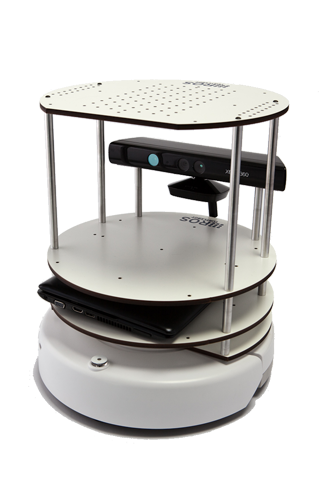
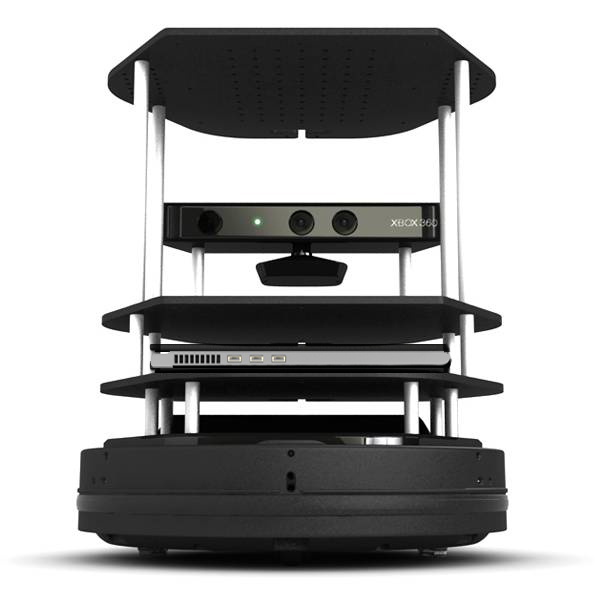
TurtleBot combines popular off-the-shelf robot components like the iRobot Create, Yujin Robot's Kobuki, Microsoft's Kinect and Asus' Xtion Pro into an integrated development platform for ROS applications. For more information about hardware, please see http://turtlebot.com.
TurtleBot结合了流行的现成的机器人组件,像iRobot Create(底盘),Yujin Robot的Kobuki,微软的Kinect(感应器)和Asus的Xtion Pro(体感设备),从而组成了一个ROS应用开发平台。对于关于硬件的更多信息,请看:http://turtlebot.com。
BDFLs(Benevolent Dictator for Life): Tully Foote (OSRF), Melonee Wise (Fetch Robotics)
ROS SW Maintainers: Michael Ferguson (Fetch Robotics), Tully Foote (OSRF), JihoonLee (Yujin Robot), Daniel Stonier (Yujin Robot)
Recently overhauled entire tutorial for indigo (24/03/15).最近大修完全教程为indigo(24/03/15)。
1. 概况
Migration - what's new and shiny in your indigo turtlebot software!
迁移:在你的indigo turtlebot软件中什么是新的和闪亮的?:http://wiki.ros.org/Robots/TurtleBot/indigo/Migration
2. 关于
- Turtlebot-Developer Habitats TurtleBot开发者园地
Various
usage scenarios for turtlebots and their
developers.对于turtlebot和它的开发者多样的用途全景:http://wiki.ros.org/turtlebot/Tutorials/indigo/Turtlebot-Developer%20Habitats - Interacting with your Turtlebot 和你的Turtlebot交互
The
many ways you can provoke/inspire your turtlebot to action!
你可以使用多种方法来激起/激发你的turtlebot运动起来!:http://wiki.ros.org/turtlebot/Tutorials/indigo/Interacting%20with%20your%20Turtlebot
3.准备
- Turtlebot Installation Turtlebot安装
Installing software onto the turtlebot.向turtlebot上安装软件。:http://wiki.ros.org/turtlebot/Tutorials/indigo/Turtlebot%20Installation
- PC Installation PC安装
Installing the software for your monitoring workstation pc.为监控站PC安装软件 :http://wiki.ros.org/turtlebot/Tutorials/indigo/PC%20Installation
- Network Configuration 网络设置
Get turtlebot and your pc chatting to each other.使turtlebot和你的PC相互交流 :http://wiki.ros.org/turtlebot/Tutorials/indigo/Network%20Configuration
4.开始
- TurtleBot Bringup TurtleBot开始
How to start the TurtleBot software.开始TurtleBot软件:http://wiki.ros.org/turtlebot_bringup/Tutorials/indigo/TurtleBot%20Bringup
- PC Bringup PC开始
Connecting to the turtlebot from the PC.从PC连接turtlebot:http://wiki.ros.org/turtlebot_bringup/Tutorials/indigo/PC%20Bringup
- TurtleBot Care and Feeding TurtleBot维护和充电
This tutorials explains how to charge and maintain your TurtleBot.该教程解释了如何为你的TurtleBot充电和维护。
- Create Odometry and Gyro Calibration 创建测程和陀螺仪校正
 This is only necessary if you have a Create base. The Kobuki comes with a factory calibrated gyro. This will show you how to calibrate or test the calibration of a TurtleBot which is highly recommended when running any navigation based application.只有当你有一个Create基盘的话这是需要的。Koburi带有一个工厂校准的陀螺仪。这将向你展示如何校准或测试TurtleBot校准,这是非常建议的如果运行任何导航应用的话。
5.应用
1)四处看看
- A First Interaction 第一个交互
Run your first interaction with the turtlebot - chatter!运行你的第一个turtlebot交互——chatter!:http://wiki.ros.org/turtlebot/Tutorials/indigo/A%20First%20Interaction。
- Visualisation 可视化
Find and call launchers to visualise the turtle and its data streams.寻找并呼叫启动器来可视化turtle和它的数据流。
- 3D Visualisation 3D可视化
Visualising 3d and camera data from the kinect/asus.来自kinect/asus的3D可视化和相机数据
2)遥控操作
- Keyboard Teleop 键盘遥控操作turtlebot
Keyboard teleoperation of a turtlebot.turtlebot的键盘遥控操作。:http://wiki.ros.org/turtlebot_teleop/Tutorials/indigo/Keyboard%20Teleop
- Joystick Teleop Joystick遥控操作
Joystick teleoperation of a turtlebot.turtlebot的Joystick遥控操作。:http://wiki.ros.org/turtlebot_teleop/Tutorials/indigo/Joystick%20Teleop
- Qt Teleop Qt的遥控操作
Qt teleoperation of a turtlebot. turtlebot的Qt遥控操作:http://wiki.ros.org/rocon_qt_teleop/Tutorials/indigo/Qt%20Teleop%20a%20turtlebot
- Interactive Markers Teleop 交互标记遥控操作
A tutorial describing how to use rviz interactive markers for controlling the TurtleBot. 一个描述如何使用rviz交互标记操作turtlebot的教程。
3)导航
- SLAM Map Building with TurtleBot 使用TurtleBot进行SLAM地图构建
How to generate a map using gmapping 如何使用gmapping生成一个地图:http://wiki.ros.org/turtlebot_navigation/Tutorials/indigo/Build%20a%20map%20with%20SLAM
- Autonomous Navigation of a Known Map with TurtleBot 使用TurtleBot一个已知地图的同步导航
This tutorial describes how to use the TurtleBot with a previously known map. 该教程描述了如何使用TurtleBot在一个已知地图上。
4)一些有趣的事
- The TurtleBot Follower Demo TurtleBot跟随者Demo
This describes how to run the TurtleBot Follower Demo on your TurtleBot. 这个描述了如何在你的TurtleBot上运行TurtleBot跟随者Demo。
- The TurtleBot Panorama Demo TurtleBotDemo TurtleBot全景图Demo
This describes how to run the TurtleBot Panorama Demo on your TurtleBot. 这个描述了如何在你的TurtleBot上运行TurtleBot全景图Demo。
5)Android交互
- Download Turtlebot Android Apps from Play Store 从Play Store上下载Turtlebot Android Apps
Download android apps from Play Store to run turtlebot rapps on your turtlebot via android device 从Play Store上下载android apps在你的turtlebot上通过android设备运行turtlebot apps。
- How to Run Turtlebot Andorid Application 如何运行Turtlebot Android程序
Instructions how to run turtlebot android application 关于如何运行turtlebot android程序的指导教程。
- Turtlebot Android Application Dev Tutorial Turtlebot Android程序开发教程
Instructions how to develop turtlebot android app 关于如何开发turtlebot android程序的指导教程
6. 模拟
1)舞台
- TurtleBot in Stage Simulator 在舞台模拟器中的TurtleBot
How to start turtlebot stage simulation 如何开始turtlebot舞台模拟
- Customizing the Stage Simulator 自定义舞台模拟器
Explains how to use your own map with the stage simulator for turtlebot and adjust configurations for your needs 解释如何使用为turtlebot舞台模拟器的你自己的地图,然后调整位置满足你的需要
2)眺望台
- Gazebo Bringup Guide 眺望台调试指导
See the simulated turtlebot in Gazebo. 在眺望台看模拟的turtlebot。
- Explore the Gazebo world 探究Gazebo世界
Cruise around in the Gazebo world and use RViz to "see" what's in it. 在Gazebo世界浏览,使用RViz来“看”里面有什么。
- Make a map and navigate with it 制作一张地图并用它导航
Use the navigation stack to create a map of the Gazebo world and start navigation based on it. 使用导航stack栈来创建一张Gazebo世界的地图,然后基于它开始导航
7. 开发角
- Customising the Turtle 自定义Turtle
Pre-load your own customisations/configuration on the turtle. 在turtle上预加载你自己的定制/配置。
- Create your First Rapp 创建你的第一个Rapp
Create, load and execute a 'babbler' rapp, and, is it really worth the effort? 创建,加载然后执行一个'babbler'rapp,是不是很值得努力呢?
- Create your First Interaction 创建你的第一个交互
Create, load and execute a 'babbler' interaction. 创建,加载并执行一个'babbler'交互。
- Adding New 3D Sensor 添加新的3D传感器
Add support for a new 3D sensor to the turtlebot stack. 支持向turtlebot栈上添加一个新的3D传感器。
Tutorials describing how to develop android interactions can be found in the android corner.
描述如何开发android交互的教程可以在android corner找到:http://wiki.ros.org/android%20corner。
8.附录
(1)Rocon QT App管理器
- Start Rapp with QT App manager 开始使用QT App管理器的Rapp
How to start implementation rapps with Rocon Qt App manager 如何通过Rocon Qt App管理器开始使用rapp
(2)多TurtleBot协调
Teleop Concert 遥控协同
Teleoperate multiple turtlebots! 遥控操作多个turtlebots!
- TurtleBot Concert Bringup TurtleBot协同尝试
how to start the turtlebot concert 如何开始turtlebot协同
- Bring up Turtlebot as Concert Client 用Turtlebot作协同客户端
how to start the turtlebot concert 如何开始turtlebot协同
- Teleop a turtlebot via Concert 通过协同遥控操作一个turtlebot
how to teleoperate turtlebot in concert 如何在协同中遥控操作turtlebot
(3)其他资源
Turtlebot Quick Start Tutorials - Gaitech EDU Portal Turtlebot快速开始教程 - Gaitech EDU Portal:http://edu.gaitech.hk/turtlebot/turtlebot-tutorials.html
learn.turtlebot.com learn.turtlebot.com:http://learn.turtlebot.com/
Getting Start TurtleBot with Matlab 让我们使用Matlab开始TurtleBot:http://mathworks.com/help/robotics/examples/getting-started-with-a-real-turtlebot.html
地址:http://wiki.ros.org/Robots/TurtleBot
TurtleBot教程的更多相关文章
- Turtlebot入门篇
0.什么是TurtleBot? 我自己的理解就是:TurtleBot是一款移动机器人,就是主要研究让机器人自主决定应该想那个方向走,怎么绕过障碍物,最终到达目的地.与之对应还有很多机器人,比如goog ...
- ROS探索总结(三)——ROS新手教程【转】
转自:http://blog.csdn.net/hcx25909/article/details/8811313 版权声明:本文为博主原创文章,未经博主允许不得转载. 目录(?)[-] 一ROS的 ...
- ROS_Kinetic_28 turtlebot gazebo demo例子
ROS_Kinetic_28 turtlebot gazebo demo例子 官方教程:http://wiki.ros.org/turtlebot_gazebo/Tutorials/indigo/Ma ...
- ROS进阶学习笔记(11)- Turtlebot Navigation and SLAM
(写在前面: 这里参考rbx书中第八章和ROS社区教程进行学习,先看社区教程) === Doing the Turtlebot Navigation === ref ros wiki: http ...
- ROS教程
Learning ROS 学习ROS Depending on your learning style and preferences, you can take two approaches to ...
- 入门ROS教程与视频汇总(kinetic)
参考网址: Richard Wang 3 Shawn Chen 部分视频网址: http://v.youku.com/v_show/id_XMjUxMTc5MzE5Mg http://i.you ...
- ROS探索总结(三)——ROS新手教程
转自古-月 http://blog.csdn.net/hcx25909 前面我们介绍了ROS的特点和结构,接下来就要开始准备动手感受一下ROS的强大了. ROS官网的wiki上针对新手的教程很详细,最 ...
- Angular2入门系列教程7-HTTP(一)-使用Angular2自带的http进行网络请求
上一篇:Angular2入门系列教程6-路由(二)-使用多层级路由并在在路由中传递复杂参数 感觉这篇不是很好写,因为涉及到网络请求,如果采用真实的网络请求,这个例子大家拿到手估计还要自己写一个web ...
- Angular2入门系列教程6-路由(二)-使用多层级路由并在在路由中传递复杂参数
上一篇:Angular2入门系列教程5-路由(一)-使用简单的路由并在在路由中传递参数 之前介绍了简单的路由以及传参,这篇文章我们将要学习复杂一些的路由以及传递其他附加参数.一个好的路由系统可以使我们 ...
随机推荐
- 关于EL表达式取值的问题
EL表达式取值时,如果没有指定作用域,EL表达式会自动按照作用域的大小,从小到大依次去找;比如${s},会自动按照"pageContext,request,session,applicati ...
- 大型运输行业实战_day10_1_自定义事务管理类
1.创建事务管理类 TransactionManager.java package com.day02.sation.transaction; import com.day02.sation.uti ...
- 调用webservices报错 原因是没有导入commons-logging和commons-discovery
Exception in thread "main" java.lang.NoClassDefFoundError: org/apache/commons/discovery/to ...
- Alberta family's QR code is world's largest corn maze
BY DARREN WEIR SEP 10, 2012 IN ODD NEWS Link:http://www.digitaljournal.com/article/332512 Laco ...
- 第五章 二叉树(a)树
- SUSE11&12 永久关闭防火墙
SUSE11下:关闭操作为:service SuSEfirewall2_setup stopservice SuSEfirewall2_init stop取消开机启动防火墙:chkconfig SuS ...
- 【c++】多层次继承类对象的构造函数参数的传递方法
#include <iostream.h> //基类CBase class CBase { int a; public: CBase(int na) { a=na; cout<< ...
- OOP的几个不常用的方法
from OOP_多态 import cat c = cat("cat") print(c.__doc__) print(cat.__doc__) # # 打印类的描述信息,也就是 ...
- 表单数据转换成json格式数据
<!DOCTYPE html><html lang="en"><head> <meta charset="UTF-8" ...
- Spring框架中的工厂(了解)
1. ApplicationContext接口 * 使用ApplicationContext工厂的接口,使用该接口可以获取到具体的Bean对象 * 该接口下有两个具体的实现类 * ClassPathX ...