
Android-------------fragment的学习
一、fragment的静态使用
1.使用步骤:
a.继承fragment 重写onCreatevVew()的回调方法
b.设置Fragment的布局
c.在Activity中声明Fragment 使用方式与控件相同
2.代码展示:
 a.继承fragment   重写onCreatevVew()的回调方法
public class TileFragment extends Fragment {
    @Nullable
    @Override
    public View onCreateView(@NonNull LayoutInflater inflater, @Nullable ViewGroup container, @Nullable Bundle savedInstanceState) {
        return inflater.inflate(R.layout.tilefragment, null);
    }
}
b.设置Fragment的布局<LinearLayout xmlns:android="http://schemas.android.com/apk/res/android"
    android:layout_width="match_parent"
    android:layout_height="50dp"
    android:orientation="horizontal">      //忘记写会有控件覆盖,会报错的

    <ImageView
        android:id="@+id/iv_bck"
        android:layout_width="35dp"
        android:layout_height="35dp"
        android:src="@mipmap/ic_launcher" />

    <TextView
        android:gravity="center"
        android:layout_marginLeft="10dp"
        android:layout_width="match_parent"
        android:layout_height="match_parent"
        android:text="我是标题"
        />
</LinearLayout>

c.在Activity中声明Fragment  使用方式与控件相同
<LinearLayout xmlns:android="http://schemas.android.com/apk/res/android"
    xmlns:app="http://schemas.android.com/apk/res-auto"
    xmlns:tools="http://schemas.android.com/tools"
    android:layout_width="match_parent"
    android:layout_height="match_parent"
    android:orientation="vertical"        //这个忘写会报错误,很难找出来的
    tools:context=".MainActivity">

    <fragment
        android:name="com.example.zhang.myapplication.TileFragment" ----------->引用标签来静态加载fragment的数据
        android:layout_width="match_parent"
        android:layout_height="50dp"></fragment>
</LinearLayout>

二、fragment的动态使用
  a.创建Fragment的管理器对象
  b.获取Fragment的事物对象并开启
  c.调用事物的动态方法:动态的添加、动态的删除、动态的替换
  d.提交事物

  在xml文件中的代码,在布局文件中写好布局并设置ID,通过FragmentTransation.add去动态添加
  <LinearLayout
    android:orientation="vertical"
    android:layout_width="match_parent"
    android:layout_height="50dp"
    android:id="@+id/fragment_tile"
    />
  <LinearLayout
    android:orientation="vertical"
    android:layout_width="match_parent"
    android:layout_height="match_parent"
    android:id="@+id/frag_content"
    />
  //获得FragmentManager的对象
  FragmentManager manager = getSupportFragmentManager();
  //获取Fragment的事物对象并开始
  FragmentTransaction transaction = manager.beginTransaction();
  //动态添加fragment (add remove replace)
  transaction.add(R.id.fragment_tile, new TileFragment());
  transaction.add(R.id.frag_content, new ContentFragment());
  //提交获得的事物
  transaction.commit();

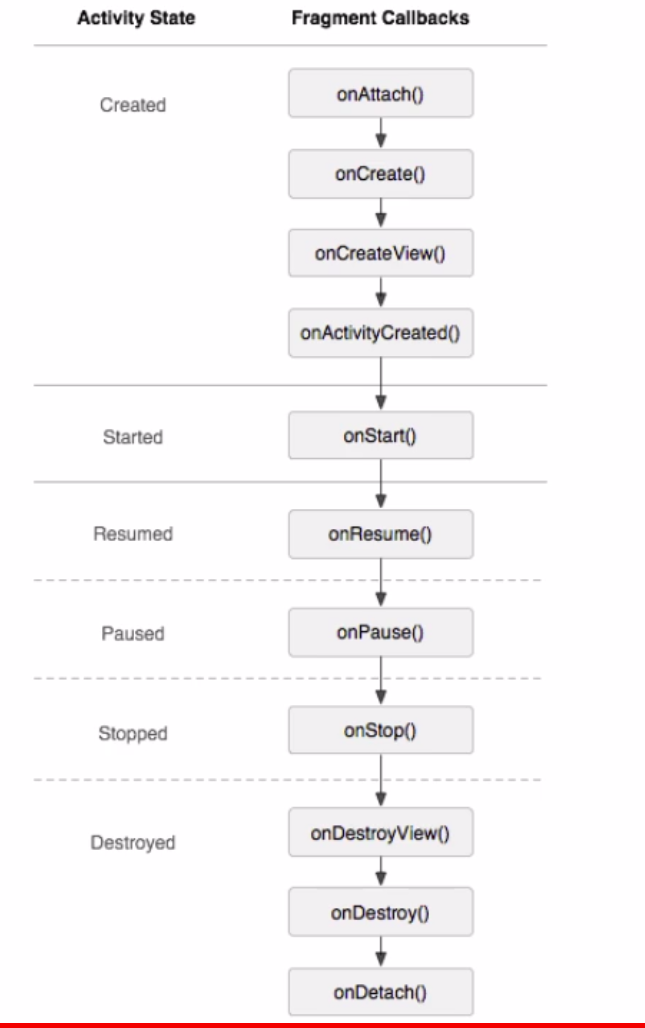
三、Fragment的生命周期
  1.第一次启动app的时候
    onAttach:activity与fragment的产生关联时候进行回调
    onCreateView : 用户第一次绘制界面
    onActivityCreate : fragment与activity创建成功进行回调

2.切换其他fragment的时候

3.返回第一次启动的fragment的时候

4.按home键的时候

5.home键之后再重新返回当前界面

6.按back键的时候

7.fragment和activity的生命周期
Android-------------fragment的学习的更多相关文章
- android fragment 博客 学习记录
转载请标明出处:http://blog.csdn.net/lmj623565791/article/details/37992017 上篇博客中已经介绍了Fragment产生原因,以及一些基本的用法和 ...
- Android Fragment应用实战
现在Fragment的应用真的是越来越广泛了,之前Android在3.0版本加入Fragment的时候,主要是为了解决Android Pad屏幕比较大,空间不能充分利用的问题,但现在即使只是在手机上, ...
- Android Fragment应用实战,使用碎片向ActivityGroup说再见
转载请注明出处:http://blog.csdn.net/guolin_blog/article/details/13171191 现在Fragment的应用真的是越来越广泛了,之前Android在3 ...
- 【转】基于Android Fragment功能的例子
原文网址:http://blog.csdn.net/eyu8874521/article/details/8252216 通过最近空闲时候对Fragment的学习,尝试着写了一个小Demo,将在开发的 ...
- 基于Android Fragment功能的样例
通过近期空暇时候对Fragment的学习,尝试着写了一个小Demo,将在开发的时候能经常使用到的Fragment知识放在一起,写过了这个Demo对Android Fragment的了解更加深入了,以后 ...
- Android编程权威指南笔记3:Android Fragment讲解与Android Studio中的依赖关系,如何添加依赖关系
Android Fragment 当我在学习时,了解了Fragment词汇 Fragment是一种控制器对象,我就把所了解的简单说一下.activity可以派fragment完成一些任务,就是管理用户 ...
- 【Android自学日记】【转】Android Fragment 真正的完全解析(下)
上篇博客中已经介绍了Fragment产生原因,以及一些基本的用法和各种API,如果你还不了解,请看:Android Fragment 真正的完全解析(上). 本篇将介绍上篇博客提到的:如何管理Frag ...
- Android Fragment使用(四) Toolbar使用及Fragment中的Toolbar处理
Toolbar作为ActionBar使用介绍 本文介绍了在Android中将Toolbar作为ActionBar使用的方法. 并且介绍了在Fragment和嵌套Fragment中使用Toolbar作为 ...
- Android Fragment使用(三) Activity, Fragment, WebView的状态保存和恢复
Android中的状态保存和恢复 Android中的状态保存和恢复, 包括Activity和Fragment以及其中View的状态处理. Activity的状态除了其中的View和Fragment的状 ...
- Android Fragment使用(二) 嵌套Fragments (Nested Fragments) 的使用及常见错误
嵌套Fragment的使用及常见错误 嵌套Fragments (Nested Fragments), 是在Fragment内部又添加Fragment. 使用时, 主要要依靠宿主Fragment的 ge ...
随机推荐
- linux下memcache安装
安装配置 1. 安装libevent # tar zxf libevent-1.4.6-stable.tar.gz # cd libevent-1.4.6-stable # ./configure # ...
- 都是假的!这位小姐姐 P 的图,认真看你就输了!
开门见山,先来看张图: 肯定有不少小伙伴用不屑的语气说,嗬!一看就是 P 的! 是的,任谁都能一眼看出来是假的.但你可能想象不到,这张图的原始素材是有多么……支离破碎,熊是动物园里的,小孩是在家门口站 ...
- 谈谈我对Ui设计师的一些观点
做ui设计师3年多了,对ui设计师在工作中也了解了许多. 作为UI设计师,在工作中需要清楚了解设计的目的,尤其是你做的不是大众化产品,不能以个人认知.很强的主题性来确定. 例如针对儿童人群的app时, ...
- 另辟蹊径:vue单页面,多路由,前进刷新,后退不刷新
目的:vue-cli构建的vue单页面应用,某些特定的页面,实现前进刷新,后退不刷新,类似app般的用户体验.注: 此处的刷新特指当进入此页面时,触发ajax请求,向服务器获取数据.不刷新特指当进入此 ...
- springmvc 测试项目示例
新建一个 maven项目 pom.xml <project xmlns="http://maven.apache.org/POM/4.0.0" xmlns:xsi=" ...
- setTimeout setInterval 详解
http://www.jb51.net/article/74606.htm var tttt=setTimeout('northsnow()',1000);//执行一次 clearTimeou ...
- 分组取前N记录
分组取前N记录 经常看到问题,如何取出每组的前N条记录.方便大家参考于是便把常见的几种解法列出于下. 问题:有表 如下,要求取出各班前两名(允许并列第二)Table1+----+------+-- ...
- 十年前,女:“对不起,我不会喜欢你的,你不要再坚持了,就好比让 Linux 和 Windows 同时运行在一台PC机上,可能吗?
1.十年前,女:“对不起,我不会喜欢你的,你不要再坚持了,就好比让 Linux 和 Windows 同时运行在一台PC机上,可能吗?”男生听后默默走开, 十年后,在一次虚拟技术大会上,我听到一名虚拟技 ...
- 2018.08.27 rollcall(非旋treap)
描述 初始有一个空集,依次插入N个数Ai.有M次询问Bj,表示询问第Bj个数加入集合后的排名为j的数是多少 输入 第一行是两个整数N,M 接下来一行有N个整数,Ai 接下来一行有M个整数Bj,保证数据 ...
- linux CentOS 7 安装 RabbitMQ Erlang 21.0
1. 安装erlang 安装依赖环境 yum -y install make gcc gcc-c++ kernel-devel m4 ncurses-devel openssl-devel unixO ...