
Python Machine Learning: Scikit-Learn Tutorial
这是一篇翻译的博客,原文链接在这里。这是我看的为数不多的介绍scikit-learn简介而全面的文章,特别适合入门。我这里把这篇文章翻译一下,英语好的同学可以直接看原文。
大部分喜欢用Python来学习数据科学的人,应该听过scikit-learn,这个开源的Python库帮我们实现了一系列有关机器学习,数据处理,交叉验证和可视化的算法。其提供的接口非常好用。
这就是为什么DataCamp(原网站)要为那些已经开始学习Python库却没有一个简明且方便的总结的人提供这个总结。(原文是cheat sheet,翻译过来就是小抄,我这里翻译成总结,感觉意思上更积极点)。或者你压根都不知道scikit-learn如何使用,那这份总结将会帮助你快速的了解其相关的基本知识,让你快速上手。
你会发现,当你处理机器学习问题时,scikit-learn简直就是神器。
这份scikit-learn总结将会介绍一些基本步骤让你快速实现机器学习算法,主要包括:读取数据,数据预处理,如何创建模型来拟合数据,如何验证你的模型以及如何调参让模型变得更好。
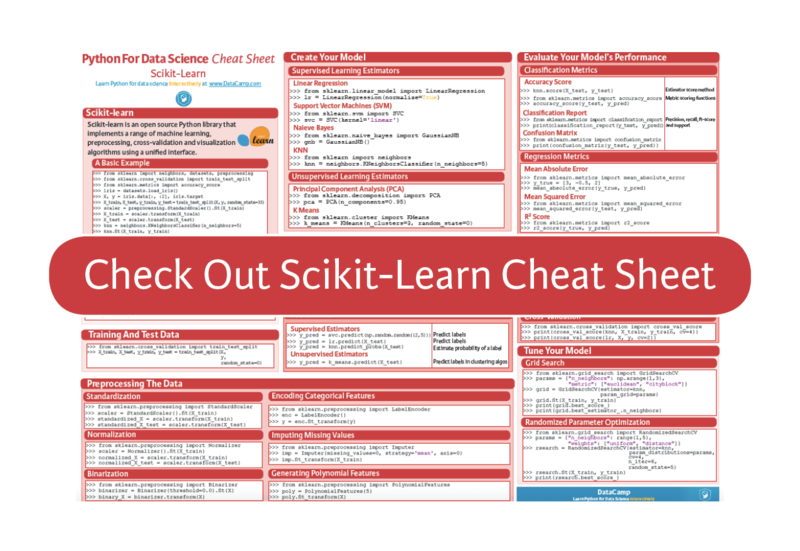
总的来说,这份总结将会通过示例代码让你开始你的数据科学项目,你能立刻创建模型,验证模型,调试模型。(原文提供了pdf版的下载,内容和原文差不多)
A Basic Example
>>> from sklearn import neighbors, datasets, preprocessing

>>> from sklearn.cross_validation import train_test_split

>>> from sklearn.metrics import accuracy_score

>>> iris = datasets.load_iris()

>>> X, y = iris.data[:, :2], iris.target

>>> X_train, X_test, y_train, y_test = train_test_split(X, y, random_state=33)

>>> scaler = preprocessing.StandardScaler().fit(X_train)

>>> X_train = scaler.transform(X_train)

>>> X_test = scaler.transform(X_test)

>>> knn = neighbors.KNeighborsClassifier(n_neighbors=5)

>>> knn.fit(X_train, y_train)

>>> y_pred = knn.predict(X_test)

>>> accuracy_score(y_test, y_pred)
(补充,这里看不懂不要紧,其实就是个小例子,后面会详细解答)
Loading The Data
你的数据需要是numeric类型,然后存储成numpy数组或者scipy稀疏矩阵。我们也接受其他能转换成numeric数组的类型,比如Pandas的DataFrame。
>>> import numpy as np

>>> X = np.random.random((10,5))

>>> y = np.array(['M','M','F','F','M','F','M','M','F','F','F'])

>>> X[X < 0.7] = 0
Preprocessing The Data
Standardization
>>> from sklearn.preprocessing import StandardScaler

>>> scaler = StandardScaler().fit(X_train)

>>> standardized_X = scaler.transform(X_train)

>>> standardized_X_test = scaler.transform(X_test)
Normalization
>>> from sklearn.preprocessing import Normalizer

>>> scaler = Normalizer().fit(X_train)

>>> normalized_X = scaler.transform(X_train)

>>> normalized_X_test = scaler.transform(X_test)
Binarization
>>> from sklearn.preprocessing import Binarizer

>>> binarizer = Binarizer(threshold=0.0).fit(X)

>>> binary_X = binarizer.transform(X)
Encoding Categorical Features
>>> from sklearn.preprocessing import LabelEncoder

>>> enc = LabelEncoder()

>>> y = enc.fit_transform(y)
Imputing Missing Values
>>>from sklearn.preprocessing import Imputer

>>>imp = Imputer(missing_values=0, strategy='mean', axis=0)

>>>imp.fit_transform(X_train)
Generating Polynomial Features
>>> from sklearn.preprocessing import PolynomialFeatures)

>>> poly = PolynomialFeatures(5))

>>> oly.fit_transform(X))
Training And Test Data
>>> from sklearn.cross_validation import train_test_split)

>>> X_train, X_test, y_train, y_test = train_test_split(X,y,random_state=0))
Create Your Model
Supervised Learning Estimators
Linear Regression
>>> from sklearn.linear_model import LinearRegression)

>>> lr = LinearRegression(normalize=True))
Support Vector Machines (SVM)
>>> from sklearn.svm import SVC)

>>> svc = SVC(kernel='linear'))
Naive Bayes
>>> from sklearn.naive_bayes import GaussianNB)

>>> gnb = GaussianNB())
KNN
>>> from sklearn import neighbors)

>>> knn = neighbors.KNeighborsClassifier(n_neighbors=5))
Unsupervised Learning Estimators
Principal Component Analysis (PCA)
>>> from sklearn.decomposition import PCA)

>>> pca = PCA(n_components=0.95))
K Means
>>> from sklearn.cluster import KMeans)

>>> k_means = KMeans(n_clusters=3, random_state=0))
Model Fitting
Supervised learning
>>> lr.fit(X, y))

>>> knn.fit(X_train, y_train))

>>> svc.fit(X_train, y_train))
Unsupervised Learning
>>> k_means.fit(X_train))

>>> pca_model = pca.fit_transform(X_train))
Prediction
Supervised Estimators
>>> y_pred = svc.predict(np.random.random((2,5))))
>>> y_pred = lr.predict(X_test))
>>> y_pred = knn.predict_proba(X_test))
Unsupervised Estimators
>>> y_pred = k_means.predict(X_test))
Evaluate Your Model's Performance
Classification Metrics
Accuracy Score
>>> knn.score(X_test, y_test))

>>> from sklearn.metrics import accuracy_score)

>>> accuracy_score(y_test, y_pred))
Classification Report
>>> from sklearn.metrics import classification_report)

>>> print(classification_report(y_test, y_pred)))
Confusion Matrix
>>> from sklearn.metrics import confusion_matrix)

>>> print(confusion_matrix(y_test, y_pred)))
Regression Metrics
Mean Absolute Error
>>> from sklearn.metrics import mean_absolute_error)

>>> y_true = [3, -0.5, 2])

>>> mean_absolute_error(y_true, y_pred))
Mean Squared Error
>>> from sklearn.metrics import mean_squared_error)

>>> mean_squared_error(y_test, y_pred))
R2 Score
>>> from sklearn.metrics import r2_score)

>>> r2_score(y_true, y_pred))
Clustering Metrics
Adjusted Rand Index
>>> from sklearn.metrics import adjusted_rand_score)

>>> adjusted_rand_score(y_true, y_pred))
Homogeneity
>>> from sklearn.metrics import homogeneity_score)

>>> homogeneity_score(y_true, y_pred))
V-measure
>>> from sklearn.metrics import v_measure_score)

>>> metrics.v_measure_score(y_true, y_pred))
Cross-Validation
>>> print(cross_val_score(knn, X_train, y_train, cv=4))

>>> print(cross_val_score(lr, X, y, cv=2))
Tune Your Model
Grid Search
>>> from sklearn.grid_search import GridSearchCV

>>> params = {"n_neighbors": np.arange(1,3), "metric": ["euclidean", "cityblock"]}

>>> grid = GridSearchCV(estimator=knn,param_grid=params)

>>> grid.fit(X_train, y_train)

>>> print(grid.best_score_)

>>> print(grid.best_estimator_.n_neighbors)
Randomized Parameter Optimization
>>> from sklearn.grid_search import RandomizedSearchCV

>>> params = {"n_neighbors": range(1,5), "weights": ["uniform", "distance"]}

>>> rsearch = RandomizedSearchCV(estimator=knn,

   param_distributions=params,

   cv=4,

   n_iter=8,

   random_state=5)

>>> rsearch.fit(X_train, y_train)

>>> print(rsearch.best_score_)
Going Further
学习完上面的例子后,你可以通过our scikit-learn tutorial for beginners来学习更多的例子。另外你可以学习matplotlib来可视化数据。
不要错过后续教程 Bokeh cheat sheet, the Pandas cheat sheet or the Python cheat sheet for data science.
Python Machine Learning: Scikit-Learn Tutorial的更多相关文章
- Python机器学习 (Python Machine Learning 中文版 PDF)
Python机器学习介绍(Python Machine Learning 中文版) 机器学习,如今最令人振奋的计算机领域之一.看看那些大公司,Google.Facebook.Apple.Amazon早 ...
- [Python & Machine Learning] 学习笔记之scikit-learn机器学习库
1. scikit-learn介绍 scikit-learn是Python的一个开源机器学习模块,它建立在NumPy,SciPy和matplotlib模块之上.值得一提的是,scikit-learn最 ...
- Python -- machine learning, neural network -- PyBrain 机器学习 神经网络
I am using pybrain on my Linuxmint 13 x86_64 PC. As what it is described: PyBrain is a modular Machi ...
- Python机器学习介绍(Python Machine Learning 中文版)
Python机器学习 机器学习,如今最令人振奋的计算机领域之一.看看那些大公司,Google.Facebook.Apple.Amazon早已展开了一场关于机器学习的军备竞赛.从手机上的语音助手.垃圾邮 ...
- 《Python Machine Learning》索引
目录部分: 第一章:赋予计算机从数据中学习的能力 第二章:训练简单的机器学习算法——分类 第三章:使用sklearn训练机器学习分类器 第四章:建立好的训练集——数据预处理 第五章:通过降维压缩数据 ...
- How do I learn machine learning?
https://www.quora.com/How-do-I-learn-machine-learning-1?redirected_qid=6578644 How Can I Learn X? ...
- Getting started with machine learning in Python
Getting started with machine learning in Python Machine learning is a field that uses algorithms to ...
- 【机器学习Machine Learning】资料大全
昨天总结了深度学习的资料,今天把机器学习的资料也总结一下(友情提示:有些网站需要"科学上网"^_^) 推荐几本好书: 1.Pattern Recognition and Machi ...
- 机器学习算法之旅A Tour of Machine Learning Algorithms
In this post we take a tour of the most popular machine learning algorithms. It is useful to tour th ...
随机推荐
- 超级好用的解析JSON数据的网站
超级好用的解析JSON数据的网站 网址 http://json.parser.online.fr/beta/ 效果图 测试数据 {,},,,,,,},{,,,,},{,,,,},{,,,,,,,,,, ...
- 关于php优化 你必须知道的一些事情
1. 用单引号代替双引号来包含字符串,这样做会更快一些.因为 PHP 会在双引号包围的 字符串中搜寻变量,单引号则不会,注意:只有 echo 能这么做,它是一种可以把多个字符 串当作参数的“函数”(译 ...
- September 02nd 2017 Week 35th Saturday
Some things are more precious because they don't last long. 有些东西之所以弥足珍贵,是因为它们总是昙花一现. Life is ephemer ...
- casperjs,phantomjs,slimerjs and spooky
1.casperjs http://casperjs.org/ CasperJS is a navigation scripting & testing utility for Phantom ...
- java微信小程序解密AES/CBC/PKCS7Padding
摘要:微信小程序解密建议使用1.6及以上的环境使用maven下载jar包org.bouncycastlebcprov-jdk15on1.55加密类代码importorg.bouncycastle.jc ...
- python第十七课——列表生成式
1.列表生成式: 什么是列表生成式? 它就是一串表达式,专门用于生成列表对象,当中包含一系列的业务逻辑: 结构:简介.优雅.阅读性好:比传统获取列表对象来的更加的方便: 它是语法糖的一种: 什么是语法 ...
- hadoop学习;hdfs操作;执行抛出权限异常: Permission denied;api查看源代码方法;源代码不停的向里循环;抽象类通过debug查找源代码
版权声明:本文为博主原创文章,未经博主同意不得转载. https://blog.csdn.net/u010026901/article/details/26587251 eclipse快捷键alt+s ...
- window7远程桌面到server不能复制粘贴解决的方法
用远程桌面登陆server不能在本机和远程server之间粘贴文本了,即不能从本机复制文本粘贴到server,也不能从server复制文本粘贴到本机. 下面是解决方法之中的一个,试了几次都非常管用户: ...
- Azkaban时区问题导致调度差1天
设置了Azkaban调度是每日凌晨一次,如下: 但是调度历史上显示最近一次调度时间是 初步怀疑是因为时区问题导致,查看服务器时区如下 cat /etc/timezone 为Asia/Shanghai. ...
- MySQL - FEDERATED引擎实现跨服务器查询
1. MySQL插件的安装与卸载 # 查看插件信息 mysql> show plugins; mysql> select plugin_name,plugin_status,plugin_ ...