
Xcode6中如何使用自定义的类模板
说到IOS类的模板,有些人感觉很陌生,但是只要有开发过IOS程序的人,其实都用过类的模板,只不过是用的系统自带的类的模板。
例如创建一个ClassTemplateVC继承于UIViewController 创建出来的ClassTemplateVC如下:
#import "ClassTemplateVC.h"

@interface  ()

@end

@implementation ClassTemplateVC

- (void)viewDidLoad {

    [super viewDidLoad];

    // Do any additional setup after loading the view.

}

- (void)didReceiveMemoryWarning {

    [super didReceiveMemoryWarning];

    // Dispose of any resources that can be recreated.

}

/*

#pragma mark - Navigation

// In a storyboard-based application, you will often want to do a little preparation before navigation

- (void)prepareForSegue:(UIStoryboardSegue *)segue sender:(id)sender {

    // Get the new view controller using [segue destinationViewController].

    // Pass the selected object to the new view controller.

}

*/

@end
会有viewDidLoad 和 didReceiveMemoryWarning方法,其实我们无时不刻的使用系统给咱们提供的类模板。
使用类的模板会提高开发的效率,例如在一些大的项目中,我们经常封装一个出一个VC,让其他VC都继承于这个VC 在这个VC中实现基本的方法和逻辑。这样在Xcode中添加自定义的类模板时,其他人继承这个VC的时候,这些基本的方法和逻辑就不用写了。
那如何添加自定义的类模板呢??
举个简单的例子,在一个VC中经常有点击按钮返回上一级页面的操作。要想以后继承这个VC的时候都会有下面新添加的方法
第一步:添加想要的方法和逻辑
- (void)viewDidLoad {

    [super viewDidLoad];

    // Do any additional setup after loading the view.

}

// 新添加的方法

- (void)backBtnClick:(UIButton *)sender

{

    [self.navigationController popViewControllerAnimated:YES];

}

- (void)didReceiveMemoryWarning {

    [super didReceiveMemoryWarning];

    // Dispose of any resources that can be recreated.

}
第二步:把.h文件替换成如下的代码(粘贴复制即可)
//

//  ___FILENAME___

//  ___PROJECTNAME___

//

//  Created by ___FULLUSERNAME___ on ___DATE___.

//___COPYRIGHT___

//

___IMPORTHEADER_cocoaTouchSubclass___

@interface ___FILEBASENAMEASIDENTIFIER___ : ___VARIABLE_cocoaTouchSubclass___

@end
第三步:把对应的.m文件的后替换成如下代码:
//

//  ___FILENAME___

//  ___PROJECTNAME___

//

//  Created by ___FULLUSERNAME___ on ___DATE___.

//___COPYRIGHT___

//

#import "___FILEBASENAME___.h"

@interface ___FILEBASENAMEASIDENTIFIER___ ()

@end

@implementation ___FILEBASENAMEASIDENTIFIER___

- (void)viewDidLoad {

    [super viewDidLoad];

    // Do any additional setup after loading the view.

}

// 新添加的方法

- (void)backBtnClick:(UIButton *)sender

{

    [self.navigationController popViewControllerAnimated:YES];

}

- (void)didReceiveMemoryWarning {

    [super didReceiveMemoryWarning];

    // Dispose of any resources that can be recreated.

}

/*

#pragma mark - Navigation

// In a storyboard-based application, you will often want to do a little preparation before navigation

- (void)prepareForSegue:(UIStoryboardSegue *)segue sender:(id)sender {

    // Get the new view controller using [segue destinationViewController].

    // Pass the selected object to the new view controller.

}

*/

@end
第四步:在桌面上或者其他地方新建一个文件夹如下图

命名规范为:类模板的名(ClassTemplateVC)+Objective-C
第五步:把刚才修改的.h,.m文件复制到第四步创建的文件夹中如下图

第六步:把.h,.m文件命名为如下:

注:每个类模板的文件夹下面都是这样命名的___FILEBASENAME___.h,___FILEBASENAME___.m(复制粘贴即可)
第七步:找到系统类模板存放的目录
这里是Xcode6类模板的路径:/Applications/Xcode.app/Contents/Developer/Platforms/iPhoneOS.platform/Developer/Library/Xcode/Templates/File Templates/Source
图片如下:

注:这个路径是Xcode6中的路径。以后有可能会变的。
第八步:修改系统的模板配置文件(或者把TemplateInfo.plist文件复制出来修改完成后,替换原有的,这时候需要输入密码)
利用上面的路径找到TemplateInfo.plist文件如下图

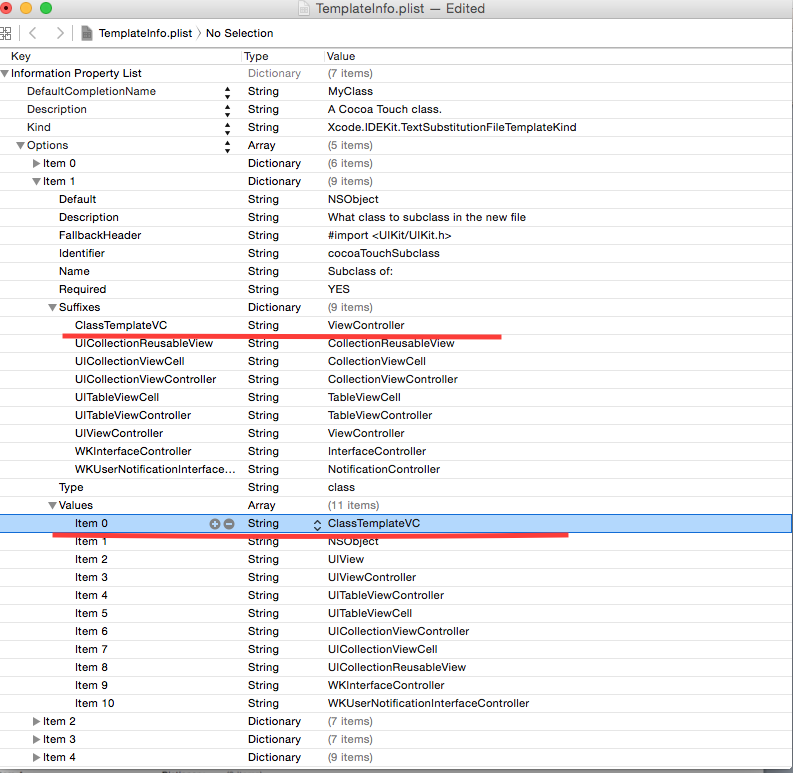
打开这个文件点击Option->Item 1->Suffixes/Values
1.在Suffixes里面添加自定义的模板类的类名以及模板类所继承的类名
2.在Values下面添加自定义模板类的类名
如下图:
第九步:把第四步创建的文件夹复制到第七步的路径下(TemplateInfo.plist 同级目录下)
大功告成。。。。
测试一下新建一个 ClassTemplateTestVC如下:

成功创建后:
ClassTemplateTestVC.m里面的内容如下:
//

//  ClassTemplateTestVC.m

//  ClassTemplate

//

//  Created by StephenLi  on 15/7/16.

//  Copyright (c) 2015年 StephenLi . All rights reserved.

//

#import "ClassTemplateTestVC.h"

@interface ClassTemplateTestVC ()

@end

@implementation ClassTemplateTestVC

- (void)viewDidLoad {

    [super viewDidLoad];

    // Do any additional setup after loading the view.

}

// 新添加的方法

- (void)backBtnClick:(UIButton *)sender

{

    [self.navigationController popViewControllerAnimated:YES];

}

- (void)didReceiveMemoryWarning {

    [super didReceiveMemoryWarning];

    // Dispose of any resources that can be recreated.

}

/*

#pragma mark - Navigation

// In a storyboard-based application, you will often want to do a little preparation before navigation

- (void)prepareForSegue:(UIStoryboardSegue *)segue sender:(id)sender {

    // Get the new view controller using [segue destinationViewController].

    // Pass the selected object to the new view controller.

}

*/

@end
有了刚才的- (void)backBtnClick:(UIButton *)sender方法了。说明添加自定义类模板已成功。。。
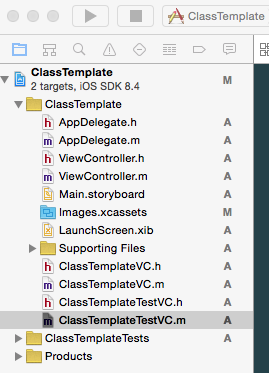
测试工程的目录如下:
以上就是自定义模板的全过程。希望对大家有所帮助。
Xcode6中如何使用自定义的类模板的更多相关文章
- YTU 2618: B 求类中数据成员的最大值-类模板
2618: B 求类中数据成员的最大值-类模板 时间限制: 1 Sec 内存限制: 128 MB 提交: 430 解决: 300 题目描述 声明一个类模板,类模板中有三个相同类型的数据成员,有一函 ...
- 2.3在LeetCode中使用我们自定义的类
在上一节中我们使用的是java提供了的类,这一小节中我们就来学习一下如何在LeetCode中使用我们自定义的类. 其实很简单,我们只需把我们编写的自定义类,拷贝到LeetCode提供的类中,形成类中类 ...
- 分布式项目中Spring security自定义权限类
package cn.lijun.core.service; import cn.lijun.core.pojo.seller.Seller;import org.springframework.se ...
- 如何在Web引用中使用项目自定义的类
这个是老架构了,不推荐现在这么用,维护一个老项目记录一下. 项目中WebService和客户端是在一个解决方案下,实体类是一个公用的Project,如果使用Web引用自动生成的类会缺少一些实体类定义的 ...
- Spring Boot中使用Lombok消除POJO类模板代码
首先,要让IDE支持Lombok,这里以idea为例进行介绍. 点击项目的“File”-—>"settings"—>"Plugins",在marke ...
- C++进阶-1-模板基础(函数模板、类模板)
C++进阶 模板 1.1 函数模板 1 #include<iostream> 2 using namespace std; 3 4 // 模板 5 6 // 模板的简单实例 7 // 要求 ...
- C++学习笔记36:类模板
类模板的目的 设计通用的类型式,以适应广泛的成员数据型式 类模板的定义格式 template<模板形式参数列表>class 类名称{...}; 原型:template<typenam ...
- C++:类模板与模板类
6.3 类模板和模板类 所谓类模板,实际上是建立一个通用类,其数据成员.成员函数的返回值类型和形参类型不具体指定,用一个虚拟的类型来代表.使用类模板定义对象时,系统会实参的类型来取代类模板中虚拟类型从 ...
- C++_进阶之函数模板_类模板
C++_进阶之函数模板_类模板 第一部分 前言 c++提供了函数模板(function template.)所谓函数模板,实际上是建立一个通用函数,其函数类型和形参类型不具体制定,用一个虚拟的类型来 ...
随机推荐
- ASP.NET MVC4 请不要将你的Control命名为APIController
今天小猪就遇到了这个坑,虽然小猪知道MVC4已经默认提供了APIController类,这样如果某Control继承自这个APIController的话会使用其自带的REST服务等等,但是之前小猪想我 ...
- 解决POST数据时因启用Csrf出现的400错误
第一种解决办法是关闭Csrf public function init(){ $this->enableCsrfValidation = false; } 第二种解决办法是在form表单中加入隐 ...
- C++变量初始化问题
初始化和赋值的区别 在C++中,变量初始化和赋值操作符是两个完全不同的概念. 初始化不是赋值,初始化的含义是创建变量分配存储空间时为其赋一个初始值,而赋值的含义是把内存空间的当前值擦除,用一个新值代替 ...
- HDU 4937 Lucky Number(2014 Multi-University Training Contest 7)
思路:先枚举 a*bas +b = n 求出 bas 在sqrt(n)到n的 (bas>a&&bas>b) 再枚举 a*bas*bas+b*bas+c =n 求出 ...
- Mac上部署JDK/Ant/Jmeter/Jenkins
一.安装JDK 1. 下载JDK 2. 下完后直接双击安装,默认安装到/Library/Java/JavaVirtualMachine下 3. 验证是否安装成功 java -version 二.安装J ...
- MEAN.JS入门
MEAN stands for: 下载:MongoDB下载文件 百度盘共享 运行命令:mongod 提示你dbpath(/data/db/) does not exist, terminating 创 ...
- PL/SQL Developer记住用户名密码
在使用PL/SQL Developer时,为了工作方便希望PL/SQL Developer记住登录Oracle的用户名和密码: 设置方法:PL/SQL Developer ->tools-> ...
- 纯js开发防win7日历控件
不久前项目开发中遇到需要用js实现选择日期的需求,百度了下,确实一大把一大把的,但多少还是有些不符合当前需求,遂down了一份最接近的,然后修修改改,基本符合了... 先上几张效果图~~~ 需要输入时 ...
- Remove openjdk in Ubuntu/Configure jdk and running adb in 64-bit Ubuntu
sudo apt-get autoremove openjdk-7-jre sudo apt-get purge openjdk* java -version No openjdk available ...
- 关闭键盘导致tableView:didSelectRowAtIndexPath:失效解决办法
今天公司的小兄弟问了tableView:didSelectRowAtIndexPath:不能执行的问题. 从经验看觉得可能是控制器没有成为tableView的代理所致.但代码中已经添加了代码 _tab ...