
启用CentOS6.5 64位安装时自带的MySQL数据库服务器
本人在虚拟机上又安装了一台linux机器,作为MySQL数据库服务器用,在安装时选择了系统自带的MySQL服务器端,以下是启用步骤。
首先开启mysqld服务
#service mysqld start
进入/usr/bin目录
#cd /usr/bin
设定mysql数据库root用户的密码
#mysqladmin -u root password '123456'
进入mysql数据库管理控制台
#./mysql -u root -p
Enter password:
Welcome to the MySQL monitor. Commands end with ; or \g.
Your MySQL connection id is 4
Server version: 5.0.67 Source distribution
Type 'help;' or '\h' for help. Type '\c' to clear the buffer.
mysql> grant all privileges on *.* to root@'%' identified by "root";
Query OK, 0 rows affected (0.00 sec)
mysql> flush privileges;
Query OK, 0 rows affected (0.00 sec)
mysql> grant select,update,insert,delete on *.* to root@192.168.0.100 identified by "root";
Query OK, 0 rows affected (0.00 sec)
mysql> flush privileges;
Query OK, 0 rows affected (0.00 sec)
mysql> quit
Bye
上面的步骤是进行授权
然后重启mysqld服务
# service mysqld restart
Stopping MySQL: [ OK ]
Starting MySQL: [ OK ]
再次进入mysql管理控制台
# mysql -u root -p
Enter password:
Welcome to the MySQL monitor. Commands end with ; or \g.
Your MySQL connection id is 2
Server version: 5.0.67 Source distribution
Type 'help;' or '\h' for help. Type '\c' to clear the buffer.
mysql> use mysql
Reading table information for completion of table and column names
You can turn off this feature to get a quicker startup with -A
Database changed
mysql> update user set password=password('12345678') where user='root';
Query OK, 5 rows affected (0.00 sec)
Rows matched: 5 Changed: 5 Warnings: 0
mysql> flush privileges;
Query OK, 0 rows affected (0.00 sec)
mysql> quit
Bye
以上步骤是修改root用户的密码
之后开启防火墙的3306端口
# vi /etc/sysconfig/iptables
以下是/etc/sysconfig/iptables的内容,其中蓝色一行是新加的。这一行可以由上一行复制得到,方法是在22哪行按下yy,然后按p,然后点insert键进入编辑模式,修改22为3306,然后点esc,输入wq保存退出。
# Firewall configuration written by system-config-firewall
# Manual customization of this file is not recommended.
*filter
:INPUT ACCEPT [0:0]
:FORWARD ACCEPT [0:0]
:OUTPUT ACCEPT [0:0]
-A INPUT -m state --state ESTABLISHED,RELATED -j ACCEPT
-A INPUT -p icmp -j ACCEPT
-A INPUT -i lo -j ACCEPT
-A INPUT -m state --state NEW -m tcp -p tcp --dport 22 -j ACCEPT
-A INPUT -m state --state NEW -m tcp -p tcp --dport 3306 -j ACCEPT
-A INPUT -j REJECT --reject-with icmp-host-prohibited
-A FORWARD -j REJECT --reject-with icmp-host-prohibited
COMMIT
防火墙重启
# service iptables restart
iptables: Flushing firewall rules: [ OK ]
iptables: Setting chains to policy ACCEPT: filter [ OK ]
iptables: Unloading modules: [ OK ]
iptables: Applying firewall rules: [ OK ]
之后就可以在192.168.0.100上用mysqlfront连接数据库了。
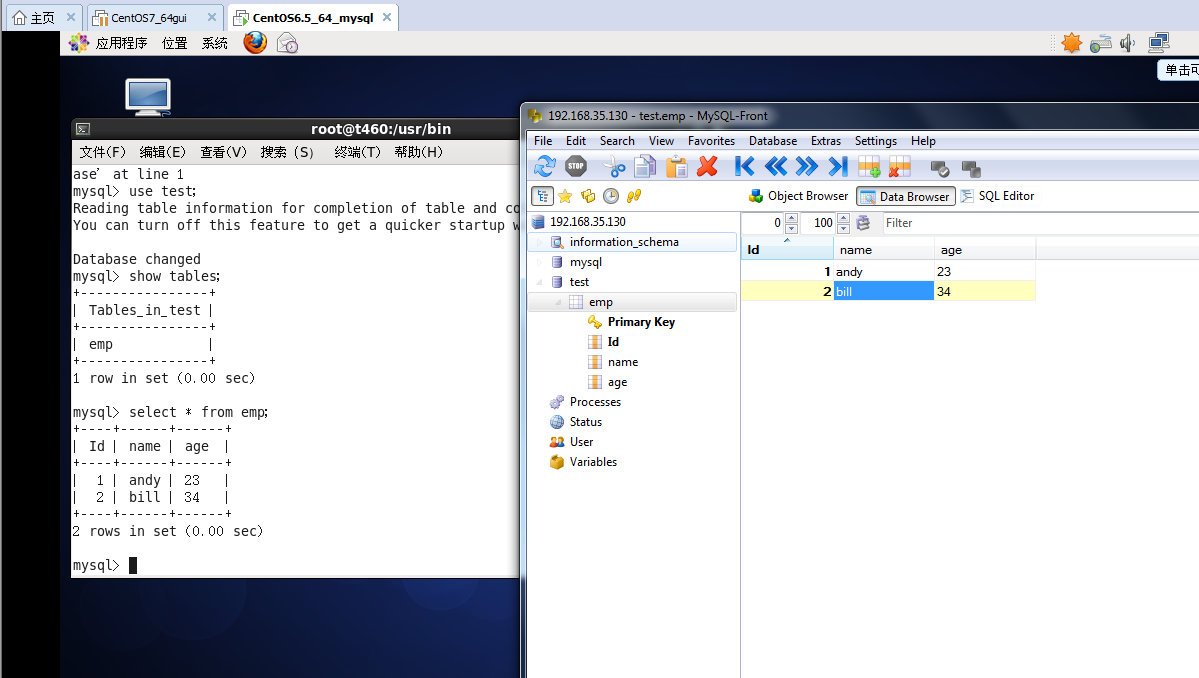
2016年8月23日15:03:45
启用CentOS6.5 64位安装时自带的MySQL数据库服务器的更多相关文章
- 启用CentOS6.5 64位安装时自带的MySQL
#service mysqld start#cd /usr/bin#mysqladmin -u root password '123456'#./mysql -u root -pEnter passw ...
- CentOS6.0(64位)安装Apache+PHP+Mysql教程,安装Magento(解决DOM,Mcrypt,GD问题)完整教程
CentOS6.0(64位)安装Apache+PHP+Mysql教程,安装Magento(解决DOM,Mcrypt,GD问题)完整教程 0 Posted by :小黑 On : 2012 年 9 ...
- Oracle 11G R2 在windows server 2008 64位安装时提示:无法在windows "开始"菜单或桌面上创建项
错误代码及解释: 在windows server 2008 64 位操作系统中安装 oracle 11G R2 64位 版本时提示:无法在windows "开始"菜单或桌面上创建 ...
- Centos6.7 64位安装配置kvm虚拟化
首先,需要我们的cpu支持虚拟化,有的机器支持但是并未在bios开启,这个需要事先开启. 1. Dell R710安装centos6.7 64位 ,Dell R710在开机后按F2进入BIOS,Pro ...
- centos6.3(64位) 安装apr
安装apr来提高tomcat 的可伸缩性和性能 ? 1 cd /usr/local/ 1 下载apr 和 apr-util最新版 ? 1 2 3 wget http://apache.fayea. ...
- Centos6.x 64位 安装JDK
JDK下载地址: http://www.oracle.com/technetwork/cn/java/javase/downloads/jdk7-downloads-1880260-zhs.html ...
- centos vmware centos6.6 64位 kvm虚拟化安装配置 第四十二节课
centos vmware centos6.6 64位 kvm虚拟化安装配置 第四十二节课 上半节课 下半节课 f
- CentOS6.3(64位)下安装Oracle11gR2(64)服务器
安装环境 Linux服务器:Centos6.3 64位 Oracle服务器:Oracle11gR2 64位 系统要求 1.Linux安装Oracle系统要求 系统要求 说明 内存 必须高于1G的物理内 ...
- Linux中CentOS6.5 64位 系统下安装docker步骤
CentOS6.5 64位 (docker目前仅支持64位)内核必须在3.10及以上 1. uname -r 查看内核版本 2. 升级内核到3.10版本(带aufs模块) cd /etc ...
随机推荐
- Redis初探
Redis如今已经成为Web开发社区中最火热的内存数据库之一,而他的诞生距离现在不过才6年的时间,随着Web2.0的蓬勃发展,网站数据快速增长,对高性能读写的需求也越来越多,再加上半结构化的数据比重逐 ...
- 继承的小DEMO
代码如下 Student.java package four.com; public class Student extends Person { // private String name; // ...
- @Html.Partial和@Html.Action区别
1.首先看一下它们的对等关系 @Html.Partial 对应 @{Html.RenderPartial();}@Html.Action 对应 @{Html.RenderAction();} 以上相互 ...
- 数据库错误:check the manual that corresponds to your MySQL server version for the right sy
检查对应到您的MySQL服务器版本附近使用正确的语法手册 数据库插入的时候出现上述问题,总结了两方面原因: 1.语法错误,这是百度之得到的大部分结果,但是没有解决我的问题 2.仔细观察我的sql语句, ...
- java导出word(带图片)
public class CreateWordDemo { public void createDocContext(String file) throws DocumentException,IOE ...
- Xcode修改storyboard大小
1: 2:
- 10月wish me luck
10/13 明天开始的三天 就要跟历史地理化学说拜拜了 以诚待之 好运 10/20 P三角形计数:一看就是叉积.因为去年迪子讲过.但是我已经忘记了.所以重新写了一遍.把所有的点有序化,将三角形面积转化 ...
- block fomating context
http://www.w3help.org/zh-cn/kb/010/ 它与普通的块框类似,不同之处在于: 1可以包含浮动元素 2可以阻止外边距折叠 3可以防止元素被浮动元素覆盖 placeholde ...
- 转载:Tomcat的JVM设置和连接数设置
Windows环境下修改“%TOMCAT_HOME%\bin\catalina.bat”文件,在文件开头增加如下设置:set JAVA_OPTS=-Xms256m -Xmx512m Linux环境下修 ...
- strncpy,strcpy
strncpy不会为des自动添加“\0” strcpy遇空结束,自动添加结束符 结论: 1.使用strcpy时一定不能用于无结束符的字符串,因为strcpy依赖\0判断源字符串的结束 2.使用str ...