
C#并行编程-Parallel
菜鸟学习并行编程,参考《C#并行编程高级教程.PDF》,如有错误,欢迎指正。
目录
TPL中引入了一个新命名空间System.Threading.Tasks,在该命名空间下Task是主类,表示一个类的异步的并发的操作,创建并行代码的时候不一定要直接使用Task类,在某些情况下可以直接使用Parallel静态类(System.Threading.Tasks.Parallel)下所提供的方法,而不用底层的Task实例。
Parallel.Invoke
试图将很多方法并行运行,如果传入的是4个方法,则至少需要4个逻辑内核才能足以让这4个方法并发运行,逻辑内核也称为硬件线程。
需要注意的是:1.即使拥有4个逻辑内核,也不一定能够保证所需要运行的4个方法能够同时启动运行,如果其中的一个内核处于繁忙状态,那么底层的调度逻辑可能会延迟某些方法的初始化执行。
2.通过Parallel.Invoke编写的并发执行代码一定不能依赖与特定的执行顺序,因为它的并发执行顺序也是不定的。
3.使用Parallel.Invoke方法一定要测量运行结果、实现加速比以及逻辑内核的使用率,这点很重要。
4.使用Parallel.Invoke,在运行并行方法前都会产生一些额外的开销,如分配硬件线程等。
好处:这是一种并行运行很多方法的简单方式,使用Parallel.Invoke,不需要考虑任务和线程的问题。
下面贴代码:
    class Program

    {

        private static List<Product> ProductList = null;

        /*  coder:释迦苦僧

         *  没有特定的执行顺序

         *  示例中 基于电脑配置 采用了4个方法的并行编程

         *  Parallel.Invoke 首先会尝试并行启动4个方法,充分利用一个或多个物理处理器所提供的多个逻辑内核

         *  但是在实际的并行执行中,至少要有4个逻辑内核才能满足4个方法的并行运行

         *  如果有个或者多个逻辑内核处于繁忙状态,那么底层的调度逻辑可能会延迟某些方法的初始化执行

         *  通过Parallel.Invoke编写的并发执行代码一定不能依赖与特定的执行顺序,因为它的并发执行顺序也是不定的。

         */

        static void Main(string[] args)

        {

            ProductList = new List<Product>();

            Thread.Sleep();

            Stopwatch swTask = new Stopwatch();

            swTask.Start();

            /*执行并行操作*/

            Parallel.Invoke(SetProcuct1_500, SetProcuct2_500, SetProcuct3_500, SetProcuct4_500);

            swTask.Stop();

            Console.WriteLine("500条数据 并行编程所耗时间:" + swTask.ElapsedMilliseconds);

            ProductList = new List<Product>();

            Thread.Sleep();/*防止并行操作 与 顺序操作冲突*/

            Stopwatch sw = new Stopwatch();

            sw.Start();

            SetProcuct1_500();

            SetProcuct2_500();

            SetProcuct3_500();

            SetProcuct4_500();

            sw.Stop();

            Console.WriteLine("500条数据  顺序编程所耗时间:" + sw.ElapsedMilliseconds);

            ProductList = new List<Product>();

            Thread.Sleep();

            swTask.Restart();

            /*执行并行操作*/

            Parallel.Invoke(() => SetProcuct1_10000(), () => SetProcuct2_10000(), () => SetProcuct3_10000(), () => SetProcuct4_10000());

            swTask.Stop();

            Console.WriteLine("10000条数据 并行编程所耗时间:" + swTask.ElapsedMilliseconds);

            ProductList = new List<Product>();

            Thread.Sleep();

            sw.Restart();

            SetProcuct1_10000();

            SetProcuct2_10000();

            SetProcuct3_10000();

            SetProcuct4_10000();

            sw.Stop();

            Console.WriteLine("10000条数据 顺序编程所耗时间:" + sw.ElapsedMilliseconds);

            Console.ReadLine();

        }

        private static void SetProcuct1_500()

        {

            for (int index = ; index < ; index++)

            {

                Product model = new Product();

                model.Category = "Category" + index;

                model.Name = "Name" + index;

                model.SellPrice = index;

                ProductList.Add(model);

            }

            Console.WriteLine("SetProcuct1 执行完成");

        }

        private static void SetProcuct2_500()

        {

            for (int index = ; index < ; index++)

            {

                Product model = new Product();

                model.Category = "Category" + index;

                model.Name = "Name" + index;

                model.SellPrice = index;

                ProductList.Add(model);

            }

            Console.WriteLine("SetProcuct2 执行完成");

        }

        private static void SetProcuct3_500()

        {

            for (int index = ; index < ; index++)

            {

                Product model = new Product();

                model.Category = "Category" + index;

                model.Name = "Name" + index;

                model.SellPrice = index;

                ProductList.Add(model);

            }

            Console.WriteLine("SetProcuct3 执行完成");

        }

        private static void SetProcuct4_500()

        {

            for (int index = ; index < ; index++)

            {

                Product model = new Product();

                model.Category = "Category" + index;

                model.Name = "Name" + index;

                model.SellPrice = index;

                ProductList.Add(model);

            }

            Console.WriteLine("SetProcuct4 执行完成");

        }

        private static void SetProcuct1_10000()

        {

            for (int index = ; index < ; index++)

            {

                Product model = new Product();

                model.Category = "Category" + index;

                model.Name = "Name" + index;

                model.SellPrice = index;

                ProductList.Add(model);

            }

            Console.WriteLine("SetProcuct1 执行完成");

        }

        private static void SetProcuct2_10000()

        {

            for (int index = ; index < ; index++)

            {

                Product model = new Product();

                model.Category = "Category" + index;

                model.Name = "Name" + index;

                model.SellPrice = index;

                ProductList.Add(model);

            }

            Console.WriteLine("SetProcuct2 执行完成");

        }

        private static void SetProcuct3_10000()

        {

            for (int index = ; index < ; index++)

            {

                Product model = new Product();

                model.Category = "Category" + index;

                model.Name = "Name" + index;

                model.SellPrice = index;

                ProductList.Add(model);

            }

            Console.WriteLine("SetProcuct3 执行完成");

        }

        private static void SetProcuct4_10000()

        {

            for (int index = ; index < ; index++)

            {

                Product model = new Product();

                model.Category = "Category" + index;

                model.Name = "Name" + index;

                model.SellPrice = index;

                ProductList.Add(model);

            }

            Console.WriteLine("SetProcuct4 执行完成");

        }

    }

    class Product

    {

        public string Name { get; set; }

        public string Category { get; set; }

        public int SellPrice { get; set; }

    }
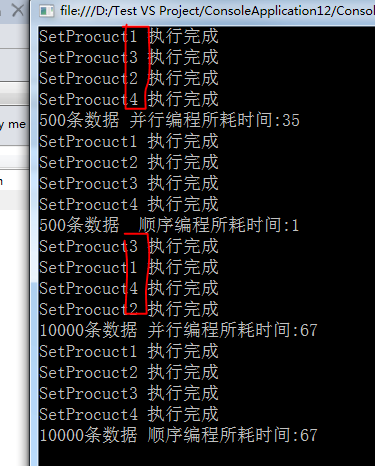
图中我们可以看出利用 Parallel.Invoke编写的并发执行代,它的并发执行顺序也是不定的。
但是所执行的时间上比不采用并行编程所耗的时间差不多。
这是因为我们在并行编程中操作了共享资源 ProductList ,如果我把代码做出以下修改,采用并行编程的好处就显现出来了。
    class Program

    {

        /*  coder:释迦苦僧

         *  没有特定的执行顺序

         *  示例中 基于电脑配置 采用了4个方法的并行编程

         *  Parallel.Invoke 首先会尝试并行启动4个方法,充分利用一个或多个物理处理器所提供的多个逻辑内核

         *  但是在实际的并行执行中,至少要有4个逻辑内核才能满足4个方法的并行运行

         *  如果有个或者多个逻辑内核处于繁忙状态,那么底层的调度逻辑可能会延迟某些方法的初始化执行

         *  通过Parallel.Invoke编写的并发执行代码一定不能依赖与特定的执行顺序,因为它的并发执行顺序也是不定的。

         */

        static void Main(string[] args)

        {

            Thread.Sleep();

            Stopwatch swTask = new Stopwatch();

            swTask.Start();

            /*执行并行操作*/

            Parallel.Invoke(SetProcuct1_500, SetProcuct2_500, SetProcuct3_500, SetProcuct4_500);

            swTask.Stop();

            Console.WriteLine("500条数据 并行编程所耗时间:" + swTask.ElapsedMilliseconds);

            Thread.Sleep();/*防止并行操作 与 顺序操作冲突*/

            Stopwatch sw = new Stopwatch();

            sw.Start();

            SetProcuct1_500();

            SetProcuct2_500();

            SetProcuct3_500();

            SetProcuct4_500();

            sw.Stop();

            Console.WriteLine("500条数据  顺序编程所耗时间:" + sw.ElapsedMilliseconds);

            Thread.Sleep();

            swTask.Restart();

            /*执行并行操作*/

            Parallel.Invoke(() => SetProcuct1_10000(), () => SetProcuct2_10000(), () => SetProcuct3_10000(), () => SetProcuct4_10000());

            swTask.Stop();

            Console.WriteLine("10000条数据 并行编程所耗时间:" + swTask.ElapsedMilliseconds);

            Thread.Sleep();

            sw.Restart();

            SetProcuct1_10000();

            SetProcuct2_10000();

            SetProcuct3_10000();

            SetProcuct4_10000();

            sw.Stop();

            Console.WriteLine("10000条数据 顺序编程所耗时间:" + sw.ElapsedMilliseconds);

            Console.ReadLine();

        }

        private static void SetProcuct1_500()

        {

            List<Product> ProductList = new List<Product>();

            for (int index = ; index < ; index++)

            {

                Product model = new Product();

                model.Category = "Category" + index;

                model.Name = "Name" + index;

                model.SellPrice = index;

                ProductList.Add(model);

            }

            Console.WriteLine("SetProcuct1 执行完成");

        }

        private static void SetProcuct2_500()

        {

            List<Product> ProductList = new List<Product>();

            for (int index = ; index < ; index++)

            {

                Product model = new Product();

                model.Category = "Category" + index;

                model.Name = "Name" + index;

                model.SellPrice = index;

                ProductList.Add(model);

            }

            Console.WriteLine("SetProcuct2 执行完成");

        }

        private static void SetProcuct3_500()

        {

            List<Product> ProductList = new List<Product>();

            for (int index = ; index < ; index++)

            {

                Product model = new Product();

                model.Category = "Category" + index;

                model.Name = "Name" + index;

                model.SellPrice = index;

                ProductList.Add(model);

            }

            Console.WriteLine("SetProcuct3 执行完成");

        }

        private static void SetProcuct4_500()

        {

            List<Product> ProductList = new List<Product>();

            for (int index = ; index < ; index++)

            {

                Product model = new Product();

                model.Category = "Category" + index;

                model.Name = "Name" + index;

                model.SellPrice = index;

                ProductList.Add(model);

            }

            Console.WriteLine("SetProcuct4 执行完成");

        }

        private static void SetProcuct1_10000()

        {

            List<Product> ProductList = new List<Product>();

            for (int index = ; index < ; index++)

            {

                Product model = new Product();

                model.Category = "Category" + index;

                model.Name = "Name" + index;

                model.SellPrice = index;

                ProductList.Add(model);

            }

            Console.WriteLine("SetProcuct1 执行完成");

        }

        private static void SetProcuct2_10000()

        {

            List<Product> ProductList = new List<Product>();

            for (int index = ; index < ; index++)

            {

                Product model = new Product();

                model.Category = "Category" + index;

                model.Name = "Name" + index;

                model.SellPrice = index;

                ProductList.Add(model);

            }

            Console.WriteLine("SetProcuct2 执行完成");

        }

        private static void SetProcuct3_10000()

        {

            List<Product> ProductList = new List<Product>();

            for (int index = ; index < ; index++)

            {

                Product model = new Product();

                model.Category = "Category" + index;

                model.Name = "Name" + index;

                model.SellPrice = index;

                ProductList.Add(model);

            }

            Console.WriteLine("SetProcuct3 执行完成");

        }

        private static void SetProcuct4_10000()

        {

            List<Product> ProductList = new List<Product>();

            for (int index = ; index < ; index++)

            {

                Product model = new Product();

                model.Category = "Category" + index;

                model.Name = "Name" + index;

                model.SellPrice = index;

                ProductList.Add(model);

            }

            Console.WriteLine("SetProcuct4 执行完成");

        }

    }

    class Product

    {

        public string Name { get; set; }

        public string Category { get; set; }

        public int SellPrice { get; set; }

    }
我将每个方法中的资源隔离,性能显而易见。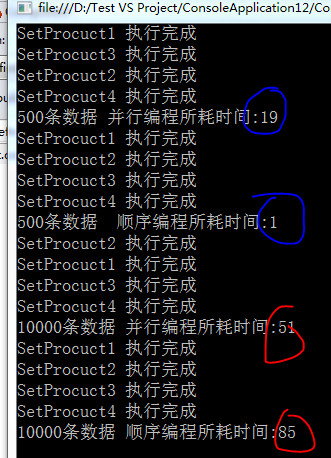
但是在操作500条数据时,显然采用并行操作并不明智,并行所带来的损耗比较大,在实际的开发中,还是要注意下是否有必要进行并行编程。
Parallel.For
将for循环替换成Parallel.For,并采用适合这个新方法的参数,就可以对这个已有的for循环进行重构,使其能够充分利用并行化优势。
需要注意的是:1.Parallel.For不支持浮点数的步进,使用的是Int32或Int64,每一次迭代的时候加1
2.由于循环体是并行运行,去迭代执行的顺序无法保证
下面贴代码
    class Program

    {

        /*  coder:释迦苦僧*/

        static void Main(string[] args)

        {

            Thread.Sleep();

            ForSetProcuct_100();

            Thread.Sleep();

            ParallelForSetProcuct_100();

            Console.ReadLine();

        }

        private static void ForSetProcuct_100()

        {

            Stopwatch sw = new Stopwatch();

            sw.Start();

            List<Product> ProductList = new List<Product>();

            for (int index = ; index < ; index++)

            {

                Product model = new Product();

                model.Category = "Category" + index;

                model.Name = "Name" + index;

                model.SellPrice = index;

                ProductList.Add(model);

                Console.WriteLine("for SetProcuct index: {0}", index);

            }

            sw.Stop();

            Console.WriteLine("for SetProcuct 10 执行完成 耗时:{0}", sw.ElapsedMilliseconds);

        }

        private static void ParallelForSetProcuct_100()

        {

            Stopwatch sw = new Stopwatch();

            sw.Start();

            List<Product> ProductList = new List<Product>();

            Parallel.For(, , index =>

            {

                Product model = new Product();

                model.Category = "Category" + index;

                model.Name = "Name" + index;

                model.SellPrice = index;

                ProductList.Add(model);

                Console.WriteLine("ForSetProcuct SetProcuct index: {0}", index);

            });

            sw.Stop();

            Console.WriteLine("ForSetProcuct SetProcuct 20000 执行完成 耗时:{0}", sw.ElapsedMilliseconds);

        }

    }

    class Product

    {

        public string Name { get; set; }

        public string Category { get; set; }

        public int SellPrice { get; set; }

    }
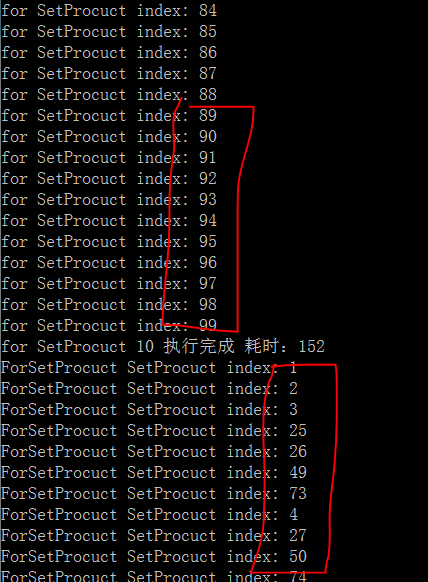
由图中我们可以看出,使用Parallel.For所迭代的顺序是无法保证的。
Parallel.ForEach
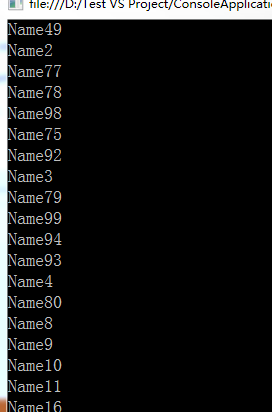
Parallel.ForEach提供一个并行处理一组数据的机制,可以利用一个范围的整数作为一组数据,然后通过一个自定义的分区器将这个范围转换为一组数据块,每一块数据都通过循环的方式进行处理,而这些循环式并行执行的。
下面贴代码:
    class Program

    {

        /*  coder:释迦苦僧*/

        static void Main(string[] args)

        {

            List<Product> ProductList =GetProcuctList();

            Parallel.ForEach(ProductList, (model) => {

                Console.WriteLine(model.Name);

            });

            Console.ReadLine();

        }

        private static List<Product> GetProcuctList()

        {

            List<Product> result = new List<Product>();

            for (int index = ; index < ; index++)

            {

                Product model = new Product();

                model.Category = "Category" + index;

                model.Name = "Name" + index;

                model.SellPrice = index;

                result.Add(model);

            }

            return result;

        }

    }

    class Product

    {

        public string Name { get; set; }

        public string Category { get; set; }

        public int SellPrice { get; set; }

    }
ParallelLoopState
ParallelLoopState该实例提供了以下两个方法用于停止 Parallel.For,Parallel.ForEach
Break-这个方法告诉并行循环应该在执行了当前迭代后尽快地停止执行。吐过调用Break时正在处理迭代100,那么循环仍然会处理所有小于100的迭代。
Stop-这个方法告诉并行循环应该尽快停止执行,如果调用Stop时迭代100正在被处理,那么循环无法保证处理完所有小于100的迭代
下面贴代码
    class Program

    {

        /*  coder:释迦苦僧*/

        static void Main(string[] args)

        {

            List<Product> productList = GetProcuctList_500();

            Thread.Sleep();

            Parallel.For(, productList.Count, (i, loopState) =>

            {

                if (i < )

                {

                    Console.WriteLine("采用Stop index:{0}", i);

                }

                else

                {

                    /* 满足条件后 尽快停止执行,无法保证小于100的索引数据全部输出*/

                    loopState.Stop();

                    return;

                }

            });

            Thread.Sleep();

            Parallel.For(, productList.Count, (i, loopState) =>

            {

                if (i < )

                {

                    Console.WriteLine("采用Break index:{0}", i);

                }

                else

                {

                    /* 满足条件后 尽快停止执行,保证小于100的索引数据全部输出*/

                    loopState.Break();

                    return;

                }

            });

            Thread.Sleep();

            Parallel.ForEach(productList, (model, loopState) =>

            {

                if (model.SellPrice < )

                {

                    Console.WriteLine("采用Stop index:{0}", model.SellPrice);

                }

                else

                {

                    /* 满足条件后 尽快停止执行,无法保证满足条件的数据全部输出*/

                    loopState.Stop();

                    return;

                }

            });

            Thread.Sleep();

            Parallel.ForEach(productList, (model, loopState) =>

            {

                if (model.SellPrice < )

                {

                    Console.WriteLine("采用Break index:{0}", model.SellPrice);

                }

                else

                {

                    /* 满足条件后 尽快停止执行,保证满足条件的数据全部输出*/

                    loopState.Break();

                    return;

                }

            });

            Console.ReadLine();

        }

        private static List<Product> GetProcuctList_500()

        {

            List<Product> result = new List<Product>();

            for (int index = ; index < ; index++)

            {

                Product model = new Product();

                model.Category = "Category" + index;

                model.Name = "Name" + index;

                model.SellPrice = index;

                result.Add(model);

            }

            return result;

        }

    }
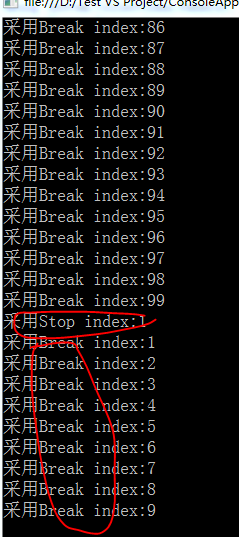
由图中可以看出Break可以保证输出满足所有条件的数据,而Stop则无法保证。
关于 Parallel 类提供的 Parallel.Invoke ,Parallel.For,Parallel.ForEach 的简介入门到这,如有错误欢迎指正
作者:释迦苦僧 出处:http://www.cnblogs.com/woxpp/p/3925094.html
本文版权归作者和博客园共有,欢迎转载,但未经作者同意必须保留此段声明,且在文章页面明显位置给出原文连接。
C#并行编程-Parallel的更多相关文章
- 第九节:深究并行编程Parallel类中的三大方法 (For、ForEach、Invoke)和几大编程模型(SPM、APM、EAP、TAP)
一. 并行编程 1. 区分串行编程和串行编程 ①. 串行编程:所谓的串行编程就是单线程的作用下,按顺序执行.(典型代表for循环 下面例子从1-100按顺序执行) ②. 并行编程:充分利用多核cpu的 ...
- 学习笔记——并行编程Parallel
Parallel 并行运算 参考资料:http://www.cnblogs.com/woxpp/p/3925094.html 1.并行运算 使用Parallel并行运算时,跟task很像,相当于tas ...
- Parallel并行编程
Parallel并行编程 Parallel并行编程可以让我们使用极致的使用CPU.并行编程与多线程编程不同,多线程编程无论怎样开启线程,也是在同一个CPU上切换时间片.而并行编程则是多CPU核心同时工 ...
- C#并行编程系列-文章导航
菜鸟初步学习,不对的地方请大神指教,参考<C#并行编程高级教程.pdf> 目录 C#并行编程-相关概念 C#并行编程-Parallel C#并行编程-Task C#并行编程-并发集合 C# ...
- C#并行编程-相关概念
菜鸟初步学习,不对的地方请大神指教,参考<C#并行编程高级教程.pdf> 目录 C#并行编程-相关概念 C#并行编程-Parallel C#并行编程-Task C#并行编程-并发集合 C# ...
- C#并行编程-Task
菜鸟学习并行编程,参考<C#并行编程高级教程.PDF>,如有错误,欢迎指正. 目录 C#并行编程-相关概念 C#并行编程-Parallel C#并行编程-Task C#并行编程-并发集合 ...
- C#并行编程-并发集合
菜鸟学习并行编程,参考<C#并行编程高级教程.PDF>,如有错误,欢迎指正. 目录 C#并行编程-相关概念 C#并行编程-Parallel C#并行编程-Task C#并行编程-并发集合 ...
- C#并行编程-线程同步原语
菜鸟学习并行编程,参考<C#并行编程高级教程.PDF>,如有错误,欢迎指正. 目录 C#并行编程-相关概念 C#并行编程-Parallel C#并行编程-Task C#并行编程-并发集合 ...
- C#并行编程-PLINQ:声明式数据并行
目录 C#并行编程-相关概念 C#并行编程-Parallel C#并行编程-Task C#并行编程-并发集合 C#并行编程-线程同步原语 C#并行编程-PLINQ:声明式数据并行 背景 通过LINQ可 ...
随机推荐
- Swift基础语法(一)
swift是一个基于objc进化过来的一个新的 OS X/IOS编程语言,而objc是基于c语言进化过来的一门编程语言.所以理论上说objc与c++是同一代产物并且objc与c++是相互独立的两套体系 ...
- [转]redis-cli的一些有趣也很有用的功能
本文转至:http://www.tuicool.com/articles/Yvqm2ev http://mdba.cn/category/redis/ redis-cli我们最常用的两个参数就是-h. ...
- Web调用FastReport的配置问题
1.修改配置webconfig文件 IIS6: <system.web> <httpHandlers> <add path="FastReport.Export ...
- Evaluation Clustering methods
There are many evaluation measures available like entropy, recall, precision, F-measure, silhouette ...
- node开发
1. 国内使用npm安装某些插件的时候,偶尔会有网络问题,可以使用cnpm:(后续所有使用 npm 无法正常安装的,都改成 cnpm 试试) a. 首先使用 npm 安装 cnpm:npm insta ...
- :尝试加载 Oracle 客户端库时引发 BadImageFormatException。如果在安装 32 位 Oracle 客户端组件的情况下以 64 位模式运行,将出现此问题。 ---> System.BadImageFormatException: 试图加载格式不正确的程序。
iis有程序池有一个属性 是否启用32位应用程序默认是true的特别注意windows2008 服务器系统iis默认的是true 这样发布一下也是必须要做的
- Usart的单线半双工模式(stm32F10x系列)
这两天折腾CTS/RTS硬件流控,看到说232协议的CTS/RTS只是用来做半双工换向使用的.正好手头上有块stm32的板子,看了看stm32的Usart,竟然发现支持的是单线半双工.232里面毕竟4 ...
- redis/php redis扩展 安装
作者:silenceper 日期:2013-10-03 原文地址: http://silenceper.com/archives/952.html 我是在CentOS 6.3 中进行的. 使用到的软件 ...
- 如何让MVC6在IIS上面跑
asp.net5的MVC6发布出来的结果和MVC5之前版本的相差太远了,直接在本地的IIS服务器上面是不可能运行的. 看了汤姆大叔的MVC6项目发布与部署,讲了很多丰富的知识点.但是对于立即要解决问题 ...
- 快速学习C语言四: 造轮子,ArrayList
高级语言里的列表是最常用的数据结构,在C里造个轮子玩玩,C没有泛型,先用int练习. Collection的ADT一般有hasnext,next,add, remove操作,List一般还加了remo ...