
在IBM Bluemix上部署Hyperledger应用
简介
IBM Bluemix (http://www.ibm.com/bluemix)是一个基于cloud的应用开发和部署平台,提供包括多种服务和运行环境的支持。对Hyperledger应用开发者而言,IBM Bluemix提供免费的入门级区块运行环境。本文介绍了在IBM Bluemix上部署Hyperledger应用的基本过程。
第一步: 在 Bluemix中选择区块服务
登录Bluemix后,在Catalog页面中选择Application Services下的Blochain服务。
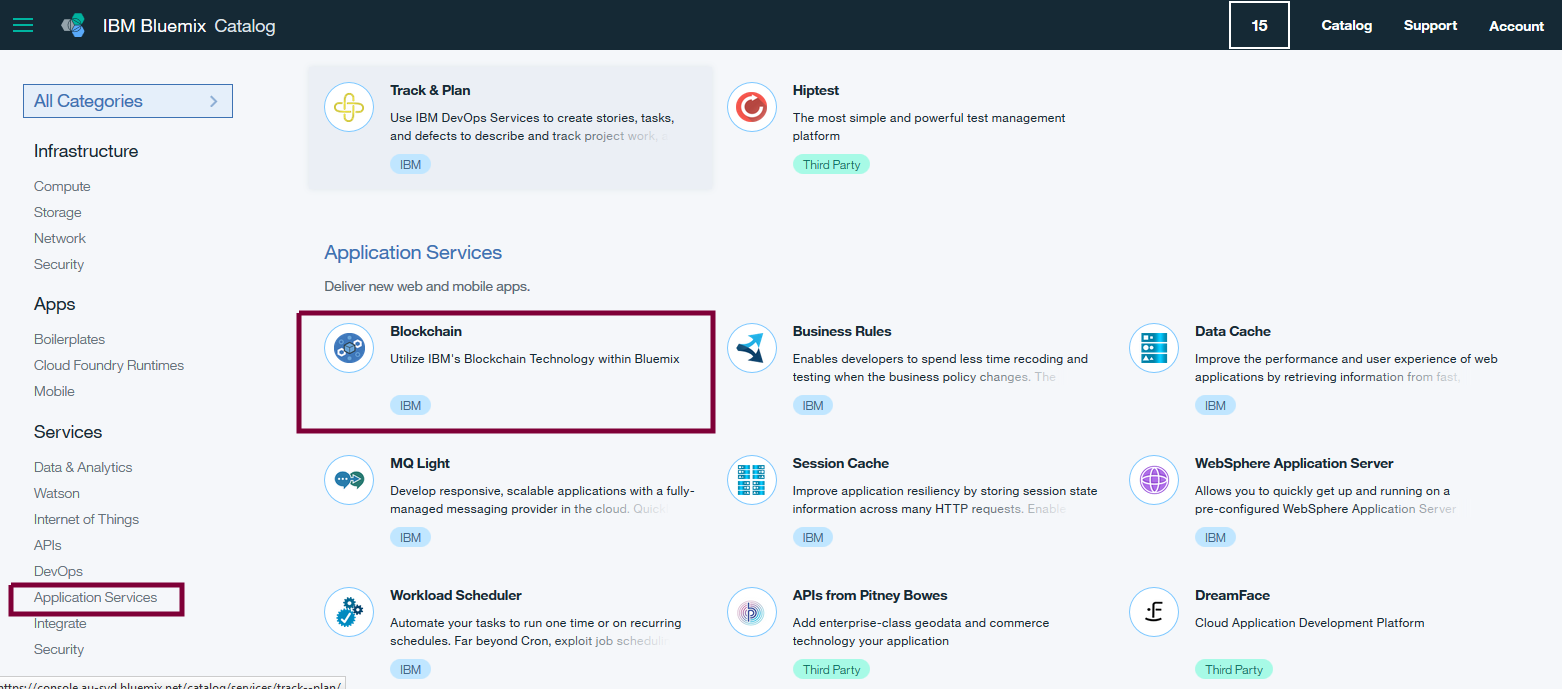
确认区块服务的名称,然后点击Create按钮以创建区块服务。

在新建的区块服务页面上点击LAUNCH按钮以启动区块服务,并显示其具体信息。


第二步: 在 Bluemix区块服务中注册用户
首先在区块服务页面中选择 APIs, 然后展开Network's Enroll IDs列表以获取预置的用户名和密码列表 。

然后向选定的区块节点发送如下请求以注册用户
    POST https://e1bb641577f249a88acca04da0272249-vp3.us.blockchain.ibm.com:444/registrar

    Content-Type: application/json

    {

        "enrollId": "admin",

        "enrollSecret": "19725f3d88"

    }
注册成功的响应为
  {

    "OK": "Login successful for user 'admin'."

  }
第三步: 在 Bluemix区块服务中发布应用代码, 前提是应用的GoLang代码必须在github.com上。
    POST https://e1bb641577f249a88acca04da0272249-vp3.us.blockchain.ibm.com:444/chaincode

    Content-Type: application/json

    {

        "jsonrpc": "2.0",

        "method": "deploy",

        "params": {

            "type": 1,

            "chaincodeID": {

                "path": "https://github.com/huyouhengbc/Hyperledger/HelloWorld"

            },

            "ctorMsg": {

                "function": "init",

                "args": [

                ]

            },

            "secureContext": "admin"

        },

        "id": 1

    }
发布成功的响应为
    {

        "jsonrpc": "2.0",

        "result": {

            "status": "OK",

            "message": "e2623e76371a16ca86d97bfb90bdab95885939bf4f2fa40133d65bca4aace27eaf94d8cd10438b80de097442916f6bfef87fb45a6cd678e3cb6ec0bd8dd008c2"

        },

        "id": 1

    }
第四步: 测试应用代码,
Query请求
    POST https://e1bb641577f249a88acca04da0272249-vp3.us.blockchain.ibm.com:444/chaincode

    Content-Type: application/json

    {

        "jsonrpc": "2.0",

        "method": "query",

        "params": {

            "type": 1,

            "chaincodeID": {

                "name": "e2623e76371a16ca86d97bfb90bdab95885939bf4f2fa40133d65bca4aace27eaf94d8cd10438b80de097442916f6bfef87fb45a6cd678e3cb6ec0bd8dd008c2"

            },

            "ctorMsg": {

                "function": "hello",

                "args": [

                ]

            },

            "secureContext": "admin"

        },

        "id": 3

    }
Query响应
    200 OK

    access-control-allow-headers:  accept, content-type

    Access-Control-Allow-Origin:  *

    Content-Type:  application/json

    Date:  Sun, 30 Oct 2016 05:13:58 GMT

    Content-Length:  73

    Server:  nghttpx nghttp2/1.14.0-DEV

    Via:  1.1 nghttpx

    X-Firefox-Spdy:  h2

    {"jsonrpc":"2.0","result":{"status":"OK","message":"Hello World"},"id":3}
Invoke请求
    POST https://e1bb641577f249a88acca04da0272249-vp3.us.blockchain.ibm.com:444/chaincode

    Content-Type: application/json

    {

        "jsonrpc": "2.0",

        "method": "invoke",

        "params": {

            "type": 1,

            "chaincodeID": {

                "name": "e2623e76371a16ca86d97bfb90bdab95885939bf4f2fa40133d65bca4aace27eaf94d8cd10438b80de097442916f6bfef87fb45a6cd678e3cb6ec0bd8dd008c2"

            },

            "ctorMsg": {

                "function": "hello",

                "args": [

                ]

            },

            "secureContext": "admin"

        },

        "id": 3

    }
Invoke响应
    200 OK

    access-control-allow-headers:  accept, content-type

    Access-Control-Allow-Origin:  *

    Content-Type:  application/json

    Date:  Sun, 30 Oct 2016 05:13:22 GMT

    Content-Length:  98

    Server:  nghttpx nghttp2/1.14.0-DEV

    Via:  1.1 nghttpx

    X-Firefox-Spdy:  h2

    {"jsonrpc":"2.0","result":{"status":"OK","message":"d74495ff-f3d3-44ba-acc6-5fbc767bbf21"},"id":3}
后记
- 发布应用代码中的path指向的是GoLang代码所在的目录,而不是GoLang源码文件, 错误响应如下:
    POST  https://e1bb641577f249a88acca04da0272249-vp0.us.blockchain.ibm.com:444/chaincode

    Content-Type: application/json

        {

            "jsonrpc": "2.0",

            "method": "deploy",

            "params": {

                "type": 1,

                "chaincodeID": {

                    "path": "https://github.com/huyouhengbc/Hyperledger/blob/master/HelloWorld/HelloWorld.go"

                },

                "ctorMsg": {

                    "function": "init",

                    "args": [

                    ]

                },

                "secureContext": "user_type8_0"

            },

            "id": 1

        }

    -- response --

    200 OK

    access-control-allow-headers:  accept, content-type

    Access-Control-Allow-Origin:  *

    Content-Type:  application/json

    Date:  Sun, 30 Oct 2016 04:00:14 GMT

    Content-Length:  721

    Server:  nghttpx nghttp2/1.14.0-DEV

    Via:  1.1 nghttpx

    X-Firefox-Spdy:  h2

    {"jsonrpc":"2.0","error":{"code":-32001,"message":"Deployment failure","data":"Error when deploying chaincode: Error getting chaincode package bytes: Error getting code 'go get' failed with error: 'exit status 1'\npackage github.com/huyouhengbc/Hyperledger/blob/master/HelloWorld/HelloWorld.go: cannot find package 'github.com/huyouhengbc/Hyperledger/blob/master/HelloWorld/HelloWorld.go' in any of:\n\t/usr/local/go/src/github.com/huyouhengbc/Hyperledger/blob/master/HelloWorld/HelloWorld.go (from $GOROOT)\n\t/go/_usercode_/234208637/src/github.com/huyouhengbc/Hyperledger/blob/master/HelloWorld/HelloWorld.go (from $GOPATH)\n\t/go/src/github.com/huyouhengbc/Hyperledger/blob/master/HelloWorld/HelloWorld.go\n"},"id":1}
- Bluemix提供基于基于Hyperledger Fabric v0.5的服务,如果使用最新的Hyperledger Fabric接口, 发布应用时错误响应如下:
    {

        "jsonrpc": "2.0",

        "error": {

            "code": -32001,

            "message": "Deployment failure",

            "data": "Error when deploying chaincode: Error getting chaincode package bytes: Error getting code 'go get' failed with error: 'exit status 2'\n# github.com/huyouhengbc/Hyperledger/HelloWorld\n/go/_usercode_/730749822/src/github.com/huyouhengbc/Hyperledger/HelloWorld/HelloWorld.go:15: undefined: shim.ChaincodeStubInterface\n/go/_usercode_/730749822/src/github.com/huyouhengbc/Hyperledger/HelloWorld/HelloWorld.go:21: undefined: shim.ChaincodeStubInterface\n/go/_usercode_/730749822/src/github.com/huyouhengbc/Hyperledger/HelloWorld/HelloWorld.go:27: undefined: shim.ChaincodeStubInterface\n"

        },

        "id": 1

    }
- 发布应用报错
    {

        "jsonrpc": "2.0",

        "error": {

            "code": -32001,

            "message": "Deployment failure",

            "data": "Error when deploying chaincode: Failed loading TCerts from TCA"

        },

        "id": 1

    }
解决方法: 在 Demo Chaincoded下发布示例应用,选择Show API details输出中使用的节点。
总结
本文介绍了在IBM Bluemix上部署Hyperledger应用的基本过程。
在IBM Bluemix上部署Hyperledger应用的更多相关文章
- Eclipse上开发IBM Bluemix应用程序
林炳文Evankaka原创作品. 转载请注明出处http://blog.csdn.net/evankaka 摘要:本文主要解说了怎样使用安装EclipseIBM Bluemix插件.并在Eclipse ...
- 基于IBM Bluemix的数据缓存应用实例
林炳文Evankaka原创作品.转载请注明出处http://blog.csdn.net/evankaka 摘要:IBM® Data Cache for Bluemix 是快速缓存服务.支持 Web 和 ...
- 使用 Bluemix™ Live Sync 高速更新 Bluemix 上执行的应用程序实例
假设您要构建 Node.js 应用程序,那么能够使用 IBM® Bluemix® Live Sync 高速更新 Bluemix 上的应用程序实例,并像在桌面上进行操作一样进行开发,而无需又一次部署.执 ...
- IBM Bluemix体验:Containers
国际版的Bluemix目前有三个region,US South,United Kingdom和Sydney.其中US South是功能最全的,UK其次,Sydney功能最少.Containers服务在 ...
- fedora上部署ASP.NET——(卡带式电脑跑.NET WEB服务器)
andrew,20130601,guilin 本文记录在树莓派(fedora)上部署ASP.NET MVC2 的过程. 本文共分为六部分,分别是前置条件,Apache的安装,Mysql的安装,安装mo ...
- CentOS 7 上部署Mono 4 和Jexus 5.6
概述 在这篇文章中我们将讨论如何在CentOS 7操作系统,安装 jexus. mono 和 配置 jexus,因此它将能够在这种环境中运行一个asp.net mvc 4 应用.这篇文章是描述如何在 ...
- deepsooncms在Ubuntu 14.04上部署教程
deepsooncms在Ubuntu 14.04上部署教程 一.安装mono1.在命令行运行sudo apt-key adv --keyserver keyserver.ubuntu.com --re ...
- 基于Kubernetes在AWS上部署Kafka时遇到的一些问题
作者:Jack47 转载请保留作者和原文出处 欢迎关注我的微信公众账号程序员杰克,两边的文章会同步,也可以添加我的RSS订阅源. 交代一下背景:我们的后台系统是一套使用Kafka消息队列的数据处理管线 ...
- 在 CentOS7 上部署 MySQL 主从
在 CentOS7 上部署 MySQL 主从 通过 SecureCRT 连接至 MySQL 主服务器: 找到 my.cnf 文件所在的目录: mysql --help | grep my.cnf 一般 ...
随机推荐
- goalng 发布的版本中自动加上 git revision
概述 起因是这样的,在编译发布 golang 工程时,希望版本号中包含有 git revision number. 但是,没有commit之前,是没法知道 revision number 的,comm ...
- JQuery图片轮播滚动效果(网页效果--每日一更)
今天,带来的是一个图片的轮播滚动效果! 先来看一下效果展示:亲,请点击这里 原理很简单,设置一个定时器,使图片列表在每隔一段时间后滚动一次.而循环效果,就是在每一滚动的时候,将第一张图片放到最后一张的 ...
- (转)解释一下SQLSERVER事务日志记录
本文转载自桦仔的博客http://www.cnblogs.com/lyhabc/archive/2013/07/16/3194220.html 解释一下SQLSERVER事务日志记录 大家知道在完整恢 ...
- [.net 面向对象编程基础] (8) 基础中的基础——修饰符
[.net 面向对象编程基础] (8) 基础中的基础——修饰符 在进入C#面向对象核心之前,我们需要先对修饰符有所了解,其实我们在前面说到变量和常量的时候,已经使用了修饰符,并且说明了变量和常量的修改 ...
- [异常解决] ubuntu上安采用sudo启动的firefox,ibus输入法失效问题解决
采用sudo启动的应用是root权限的应用, ibus失效是因为ibus的初始配置采用user权限: 而root下运行的firefox输入法的配置还是停留在默认情况~ 解决方案是在shell下以roo ...
- Visual Studio 2015速递(1)——C#6.0新特性怎么用
系列文章 Visual Studio 2015速递(1)——C#6.0新特性怎么用 Visual Studio 2015速递(2)——提升效率和质量(VS2015核心竞争力) Visual Studi ...
- 机械革命 USB装系统各种坑
买了个号称超强性价比的游戏本- 机械革命, i7+ssd+hd+4G RAM+ GTX850M, 很直接, 直接出厂就一个DOS系统,回来要自己装机. 好吧, 先下了个大白菜软件,用来刻录ISO系统到 ...
- ehcache2拾遗之cache持久化
问题描述 应用在使用过程中会需要重启等,但是如果ehcache随着应用一起重启,那么刚重启的时候就会出现大量的miss,需要一定的访问量来重建缓存,如果缓存能够持久化,重启之后可以复用将会有助于缓解重 ...
- Atitit Atitit 图像处理之 Oilpaint油画滤镜 水彩画 源码实现
Atitit Atitit 图像处理之 Oilpaint油画滤镜 水彩画 源码实现 1.1. 具体原理参考1 2. 水彩画滤镜算法如下:1 2.1. 这个其实就是灰度层次降低维度的过程.2 2.2. ...
- PHP 函数基础
1.简单函数 函数四要素:返回类型,函数名,参数列表,函数体 function Show(){ echo "hello";}Show(); 输出了 ...