
JQuery插件:遮罩+数据加载中。。。(特点:遮你想遮,罩你想罩)
在很多项目中都会涉及到数据加载。数据加载有时可能会是2-3秒,为了给一个友好的提示,一般都会给一个【数据加载中。。。】的提示。今天就做了一个这样的提示框。
先去jQuery官网看看怎么写jQuery插件,然后就开始写了。写下来这么一个插件,稍作优化,就在项目中使用了。下面贴的是我写这个插件时的测试图:
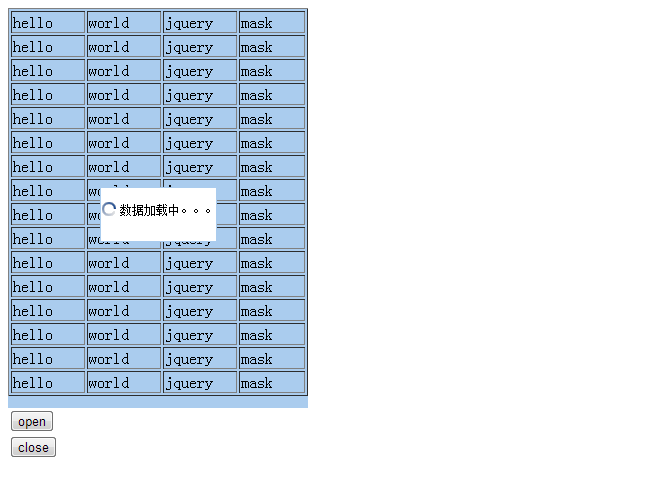
这张图模拟数据加载前提示框的展示,这个表格是一个写在页面上的。蓝色的底纹就是遮罩层。
(function($){

    $.fn.extend({

        /**

         * 打开遮罩,并显示一段文字。

         * @param  {String} msg    [显示的文字]

         * @param  {String} imgsrc [图片的位置]

         * @return {void}

         */

        openMask:function(msg, imgsrc){

//            var loadDiv=$("body").find("._mask_loadDiv");

            var loadDiv=this.find("._mask_loadDiv");

            if(!loadDiv || !loadDiv[0]){    // add Mask

                var loadDiv=$("<div class='_mask_loadDiv' style='position:absolute; z-index:99999; height:40px; background:#FFF; border:1px solid #ACE'></div>");

                if(!imgsrc){    // 指定默认的图片

                    var scripts=document.getElementsByTagName("script");

                    for(var i=0; i<scripts.length; i++){

                        if(scripts[i].src.indexOf("mask")!=-1){

                            var scriptSrc=scripts[i].src;

                            var uri=scriptSrc.substring(0,scriptSrc.lastIndexOf("/"));

                            imgsrc=uri+"/images/mask_loading.gif";

                        }

                    }

                }

                var contentDiv=$("<div class='_mask_content' style='position:relative;text-align:center;' >");

                var fontsize=12;

                //loadDiv的宽度= msg的宽度+img的宽度

                var loadDiv_width=msg.length*fontsize+16+3;

                contentDiv.css("width",loadDiv_width);

                loadDiv.css("width",loadDiv_width);

                if(imgsrc){

                    contentDiv.append("<img src='"+imgsrc+"' alt='"+msg+"' style='width:16px; height:16px'>")

                            .append("<span style='font-size:"+fontsize+"px; margin-left:2px; vertical-align:text-top'>"+msg+"</span>");

                }

                this.append(loadDiv.append(contentDiv));

            //    $("body").append(loadDiv.append(contentDiv));

                /*

                loadDiv[0].style.top=this[0].offsetTop+(this[0].offsetHeight-loadDiv[0].offsetHeight)/2;

                loadDiv[0].style.left=this[0].offsetLeft+(this[0].offsetWidth-loadDiv[0].offsetWidth)/2;

                loadDiv[0].style.paddingTop=(loadDiv[0].offsetHeight-contentDiv[0].offsetHeight)/2;

                */

                loadDiv.css("top",this[0].offsetTop+(this[0].offsetHeight-loadDiv[0].offsetHeight)/2);

                loadDiv.css("left",this[0].offsetLeft+(this[0].offsetWidth-loadDiv[0].offsetWidth)/2);

                loadDiv.css("padding-top",(loadDiv[0].offsetHeight-contentDiv[0].offsetHeight)/2);

            }

            loadDiv.css("z-index",99999).css("display","block");

            return this;

        },

        closeMask:function(){

    //        var loadDiv=$("body").find("._mask_loadDiv");

            var loadDiv=this.find("._mask_loadDiv");

            if(loadDiv)

                loadDiv.css("display","none").css("z-index",-99999);

            return this;

        }

    });

})(jQuery);

/*

// 这个是遮罩层里信息展示框,这个会添加到 <body> 或者 target 元素中

<div class="_mask_loadDiv">

    <div class="_mask_content">

        <img src='imgsrc' alt='msg' >

        <span>msg</span>

    </div>

</div>

//这个是目标,要在它上显示遮罩层

<div id="target">

</div>

// 只需要下面的代码:

$("#target").openMask("数据加载中。。。");

// 隐藏对话框,只需要:

$("#target").closeMask();

*/
因为涉及到的CSS并不多,就没有遵循HTML、JS、CSS分离的原则,而是将CSS都在这个JS 中写了。
测试页面代码:
<html>

    <head>

        <script type="text/javascript" src="./jquery-mask/jquery-1.7.2.min.js"></script>

        <script type="text/javascript" src="./jquery-mask/jquery.mask.js"></script>

        <script type="text/javascript">

            var helloDiv;

            $(function(){

                var tbl=$("#tableContent");

                for(var i=0; i< 16;i++){

                    tbl.append('<tr><td width="25%">hello</td><td width="25%">world</td><td width="25%">jquery</td><td width="22%">mask</td></tr>');

                }

                helloDiv=$("#hello");

                helloDiv.openMask('数据加载中。。。');

            });

            function openMask(){

                helloDiv.openMask("数据加载中。。。。");

            }

            function closeMask(){

                helloDiv.closeMask("数据加载中。。。。");

            }

        </script>

        <body>

            <div id="hello" style="width:300px; height:400px; background-color:#ACE;">

            <table border="1" width="100%" id="tableContent">

            </table>

            </div>

            <input value="open" type="button" onclick="openMask();"><br>

            <input type="button" value="close" onclick="closeMask();">

        </body>

    </head>

</html>
test.html
写这个插件的重点是:计算提示框的位置问题(top, left)、提示框层次问题(z-index)。
要理解这些属性可以看看:CSS位置和布局的相关博客。
源码参见:http://files.cnblogs.com/f1194361820/jquery-mask.zip
JQuery插件:遮罩+数据加载中。。。(特点:遮你想遮,罩你想罩)的更多相关文章
- jQuery插件--根据数据加载的进度动画案例
css: *{ margin:; padding:; } @media screen and (min-width:320px){ html{font-size:12px;}} @media scre ...
- JQuery 数据加载中禁止操作页面
比较常见的做法,但对我而言是第一次做,记录一下. 为了把找来的loading.gif 的背景色设置为透明,还特意装了quicktime. 有学到一些额外的东西. 先将div及img定义好 <bo ...
- JQuery 之 在数据加载完成后才自动执行函数
数据加载完成执行: $(window).load(function(){ ... }); 进入页就执行,不论等数据是否加载完成: $(document).ready(function(){ ... } ...
- jquery插件图片延时加载实例详解
效果预览:http://keleyi.com/keleyi/phtml/image/index.htm 使用方法:1.导入JS插件 <script src="http://keleyi ...
- jQuery插件图片懒加载lazyload
来自XXX的前言: 什么是ImageLazyLoad技术 在页面上图片比较多的时候,打开一张页面必然引起与服务器大数据量的 交互.尤其是对于高清晰的图片,占的几M的空间.ImageLazyLoad技术 ...
- layui数据加载中遮罩层的实现
1.load方法提供三种风格供选择. 方法一:loadIndex = layer.load(); //不传参,默认0 方法二:loadIndex = layer.load(1); // 1,另外一种风 ...
- dwz ie10一直提示数据加载中
dwz js资源jquery.validate.js 搜索 this.attr('novalidate', 'novalidate'); 在33行左右 用if (typeof (Worker) !== ...
- APP中数据加载的6种方式-b
我们看到的APP,往往有着华丽的启动界面,然后就是漫长的数据加载等待,甚至在无网络的时候,整个处于不可用状态.那么我们怎么处理好界面交互中的加载设计,保证体验无缝衔接,保证用户没有漫长的等待感,而可以 ...
- 一个mui扩展插件mui.showLoading加载框【转】
转:http://ask.dcloud.net.cn/article/12856 写在前面:好像mui目前dialog系列唯独缺少showLoading加载框(加载中)组件,为了统一组件样式和体验,写 ...
随机推荐
- 编译gcc
下载源码 自GNU FTP站下载GCC. 自Infrastructure页面下载四个库的源代码,即GMP.MPFR.MPC以及ISL(ISL非必需). 也可以不手工下载,执行源码中的./contrib ...
- JPA一对多循环引用的解决
说是解决,其实不是很完美的解决的,写出来只是想记录一下这个问题或者看一下有没有哪位仁兄会的,能否知道一二. 下面说说出现问题: 问题是这样的,当我查询一个一对多的实体的时候,工具直接就爆了,差不多我就 ...
- webservice入门(1)
前段时间学习了webservice的用法,虽然只是一些简单的用法,但是如果久了还是会忘记的,所以将学到了记录下来. 一:schema和http协议. 1.schema约束: schema规范中: . ...
- Hibernate多对多关系映射(建表)
下边讲述Hibernate多对多关系映射. 多对多关系的表的结构为: 两个实体表,还包含一个关系表,关系表为复合主键,如果要使用Hibernate多对多关系映射,则关系表必须只包含两个字段,如果生成了 ...
- hash简单介绍
hash也称"散列", 是一种基于映射关系的存储方式,将任意长度的二进制值输出为固定长度的较小的二进制值,这种输出的小的固定长度的值为hash值: 1. 散列技术是在关键字key与 ...
- 12款高质量的响应式 HTML5/CSS3 网站模板
HTML5 已经成为众所周知的语言,大量的 HTML5 资源和工具正在建立,以帮助开发人员和设计人员.今天,我们展示12款免费的响应式 HTML5/CSS3 网站模板,帮助你创建醒目和视觉震撼的网站. ...
- Web Uploader - 功能齐全,完美兼容 IE 的上传组件
文件上传是网站和 Web 应用程序的常用功能,一直没有一款完美的文件上传组件,因此让很多开发人员碰到头疼的浏览器兼容问题. WebUploader 是由 Baidu FEX 团队开发的一款以 HTML ...
- NavigationBar隐藏后,返回时表现不完美
是这样的,app首页头部可能要自定义,所以选择把NavigationBar隐藏,所以在viewWillAppear时这样写: self.navigationController?.setNavigat ...
- iOS 适配iOS9
1.网络接口不支持https协议,在iOS9下 在iOS9下,系统默认会拦截对http协议接口的访问,因此无法获取http协议接口的数据. 解决方案(以下方法2选1): (1)暂时退回到http协议 ...
- html ul li的学习
DIV+CSS里,我们用得最多的就是ul li来显示数据,如新闻按钮等. <div id="menu"> <ul> <li><a href ...