
利用nginx打造个人简历网页
1.下载nginx
nginx官方网址:http://nginx.org/
2.下载和解压
#下载:[root@iZwz9cl4i8oy1reej7o8pmZ soft]# wget http://nginx.org/download/nginx-1.10.3.tar.gz
[root@iZwz9cl4i8oy1reej7o8pmZ soft]# .tar.gz
[root@iZwz9cl4i8oy1reej7o8pmZ soft]#
3.安装
[root@iZwz9cl4i8oy1reej7o8pmZ nginx-1.10.3]# ./configure --prefix=/usr/local/nginx-1.10
4.出现的错误
./configure: error: the HTTP rewrite module requires the PCRE library.
You can either disable the module by using --without-http_rewrite_module
option, or install the PCRE library into the system, or build the PCRE library
statically from the source with nginx by using --with-pcre=<path> option.
5.安装必要的插件
[root@iZwz9cl4i8oy1reej7o8pmZ nginx-]# yum install -y pcre pcre-devel
#安装完pcre and pcre-devel后继续编译[root@iZwz9cl4i8oy1reej7o8pmZ nginx-]# ./configure --prefix=/usr/local/nginx-1.10
#出现以下问题
./configure: error: the HTTP gzip module requires the zlib library.
You can either disable the module by using --without-http_gzip_module
option, or install the zlib library into the system, or build the zlib library
statically from the source with nginx by using --with-zlib=<path> option.
#再次安装必要插件
[root@iZwz9cl4i8oy1reej7o8pmZ nginx-]# yum install -y zlib zlib-devel
6.再次编译
#再次编译
[root@iZwz9cl4i8oy1reej7o8pmZ nginx-]# ./configure --prefix=/usr/local/nginx-1.10

#出现如下,则OK
Configuration summary
  + using system PCRE library
  + OpenSSL library is not used
  + using builtin md5 code
  + sha1 library is not found
  + using system zlib library

  nginx path prefix: "/usr/local/nginx-1.10"
  nginx binary file: "/usr/local/nginx-1.10/sbin/nginx"
  nginx modules path: "/usr/local/nginx-1.10/modules"
  nginx configuration prefix: "/usr/local/nginx-1.10/conf"
  nginx configuration file: "/usr/local/nginx-1.10/conf/nginx.conf"
  nginx pid file: "/usr/local/nginx-1.10/logs/nginx.pid"
  nginx error log file: "/usr/local/nginx-1.10/logs/error.log"
  nginx http access log file: "/usr/local/nginx-1.10/logs/access.log"
  nginx http client request body temporary files: "client_body_temp"
  nginx http proxy temporary files: "proxy_temp"
  nginx http fastcgi temporary files: "fastcgi_temp"
  nginx http uwsgi temporary files: "uwsgi_temp"
  nginx http scgi temporary files: "scgi_temp"
7.执行make and make install
[root@iZwz9cl4i8oy1reej7o8pmZ nginx-]# make && make install && echo $?
#如果最后一行是0的话,那么安装完成
test -d '/usr/local/nginx-1.10/logs' \
        || mkdir -p '/usr/local/nginx-1.10/logs'
]: Leaving directory `/root/soft/nginx-'
8.搭建个人简历网页
8.1 修改配置文件如下
#进入已经编安装完成的nginx服务器下
[root@iZwz9cl4i8oy1reej7o8pmZ ~]# cd /usr/local/nginx-1.10/

#进入安装后的nginx下的conf配置文件下
[root@iZwz9cl4i8oy1reej7o8pmZ nginx-1.10]# cd conf/;ls
fastcgi.conf          fastcgi_params          koi-utf  mime.types          nginx.conf          scgi_params          uwsgi_params          win-utf
fastcgi.conf.default  fastcgi_params.default  koi-win  mime.types.default  nginx.conf.default  scgi_params.default  uwsgi_params.default
[root@iZwz9cl4i8oy1reej7o8pmZ conf]#
#修改配置
[root@iZwz9cl4i8oy1reej7o8pmZ conf]# vim nginx.conf
#修改nginx.conf如下:#其中:listen是监听的端口#server_name是虚拟机的名称
 server {
        listen       你需要监听的端口;
        server_name  网址;

        #charset koi8-r;

        #access_log  logs/host.access.log  main;

        location / {
            root   html;
            index  index.html index.htm;
        }

        #error_page                /.html;

        # redirect server error pages to the static page /50x.html
        #
        error_page        /50x.html;
        location = /50x.html {
            root   html;
        }
8.2 上传html文档
#进入到html文件夹下上传html文件
[root@iZwz9cl4i8oy1reej7o8pmZ html]# pwd
/usr/local/nginx-1.10/html
[root@iZwz9cl4i8oy1reej7o8pmZ html]# ls
50x.html  index.html  li.tar.gz
[root@iZwz9cl4i8oy1reej7o8pmZ html]#
#解压li.tar.gz文件
[root@iZwz9cl4i8oy1reej7o8pmZ html]# tar xf li.tar.gz
#删除html目录下的index.html文件,否则待会可能会出错
[root@iZwz9cl4i8oy1reej7o8pmZ html]# rm -f index.html
#查看当前目录下的文件
[root@iZwz9cl4i8oy1reej7o8pmZ html]# ls
50x.html  li.tar.gz  www
#进入到www文件夹
[root@iZwz9cl4i8oy1reej7o8pmZ html]# cd www
#移动www下所有文件至上一层目录
[root@iZwz9cl4i8oy1reej7o8pmZ www]# mv * ../
#返回上一层目录
[root@iZwz9cl4i8oy1reej7o8pmZ www]# cd ..
#查看文件
[root@iZwz9cl4i8oy1reej7o8pmZ html]# ls
50x.html  html  index.html  li.tar.gz  LiWang1.docx  LiWang1.pdf  LiWang.jpg  trash  www
9..检测nginx软件,开启服务
#检测nginx语法
[root@iZwz9cl4i8oy1reej7o8pmZ html]# /usr/local/nginx-1.10/sbin/nginx -t
nginx: the configuration file /usr/local/nginx-1.10/conf/nginx.conf syntax is ok
nginx: configuration file /usr/local/nginx-1.10/conf/nginx.conf test is successful
[root@iZwz9cl4i8oy1reej7o8pmZ html]#
#启动nginx服务器
[root@iZwz9cl4i8oy1reej7o8pmZ html]# /usr/local/nginx-1.10/sbin/nginx
#查看是否有进程启动
[root@iZwz9cl4i8oy1reej7o8pmZ html]# ps aux | grep nginx
root           ?        Ss   :   : nginx: master process /usr/local/nginx-1.10/sbin/nginx
nobody        ?        S    :   : nginx: worker process
root           pts/    S+   :   : grep nginx
[root@iZwz9cl4i8oy1reej7o8pmZ html]#
#利用curl命令查看服务器是否正常工作
[root@iZwz9cl4i8oy1reej7o8pmZ html]# curl -I 网址
HTTP/ OK
Server: nginx/
Date: Mon,  Apr  :: GMT
Content-Type: text/html
Content-Length:
Last-Modified: Sun,  Mar  :: GMT
Connection: keep-alive
ETag: "58d7c75c-230"
Accept-Ranges: bytes

[root@iZwz9cl4i8oy1reej7o8pmZ html]# #其中:200 OK 代表正常访问
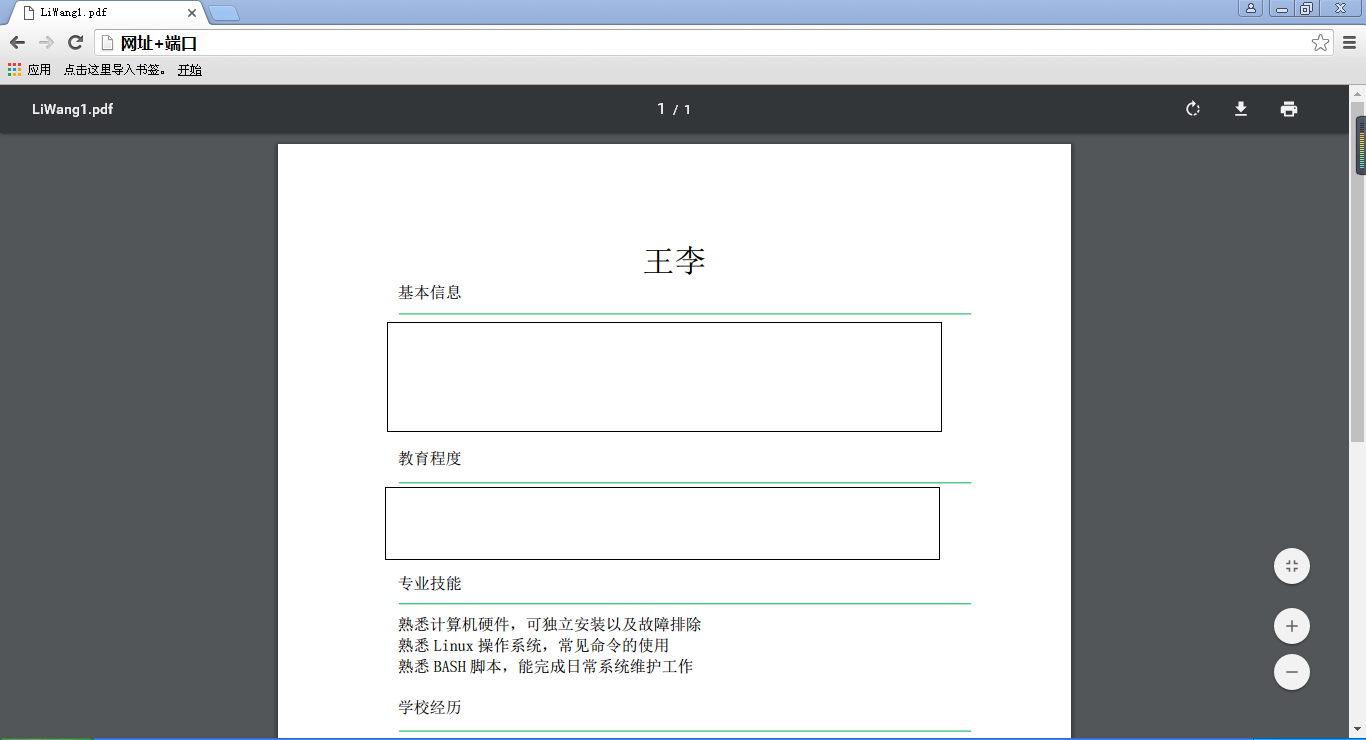
通过域名加端口的形式进行访问,OK
利用nginx打造个人简历网页的更多相关文章
- OFBIZ分享:利用Nginx +Memcached架设高性能的服务
近年来利用Nginx和Memcached来提高站点的服务性能的作法,如一夜春风般的遍及大江南北,越来越多的门户站点和电子商务平台都採用它们来为自己的用户提供更好的服务体验.如:网易.淘宝.京东.凡客等 ...
- 利用 NGINX 最大化 Python 性能,第二部分:负载均衡和监控
[编者按]本文主要介绍 NGINX 的主要功能以及如何通过 Nginx 优化 Python 应用性能.本文系国内 ITOM 管理平台 OneAPM 编译呈现. 本文上一篇系: 利用 NGINX 最大化 ...
- 使用 Docker 和 Nginx 打造高性能的二维码服务
使用 Docker 和 Nginx 打造高性能的二维码服务 本文将演示如何使用 Docker 完整打造一个基于 Nginx 的高性能二维码服务,以及对整个服务镜像进行优化的方法.如果你的网络状况良好, ...
- 利用Nginx轻松实现Ajax的跨域请求(前后端分离开发调试必备神技)
利用Nginx轻松实现浏览器中Ajax的跨域请求(前后端分离开发调试必备神技) 前言 为什么会出现跨域? 造成跨域问题的原因是因为浏览器受到同源策略的限制,也就是说js只能访问和操作自己域下的资源,不 ...
- 利用nginx泛域名解析配置二级域名和多域名
利用nginx泛域名解析配置二级域名和多域名 网站的目录结构为 html ├── bbs └── www html为nginx的安装目录下默认的存放源代码的路径. bbs为论坛程序源代码路径 www为 ...
- 利用Nginx+Mono+Fastcgi代替IIS对Asp.Net进行反向代理
Nginx的好处相信我不必多说了,它作为一个相当轻量级的开源Web 服务器以及反向代理服务器而深受欢迎.越来越多的公司已经对它产生兴趣,包括我们公司的许多部门,利用它进行负载均衡和资源管理,之前写过一 ...
- 怎样利用App打造自明星实现自盈利
怎样利用App打造自明星实现自盈利 1.了解各个概念 为了大家都能看懂这篇文章,先说明几个概念. App(Application):能够在移动设备上使用,满足人们咨询.购物. ...
- FMS+NGINX打造高带宽利用率的流媒体(音频+视频)环境
fms自身已经拥有了httpd,用来给客户端访问用,例如通过http的音频播放.众所周知,非专业的httpd自然有不专业之处,例如我遇到的情况就是经常http服务假死,或者在访问量庞大的时候会无缘无故 ...
- 利用nginx实现负载均衡和动静分离
1.Nginx介绍 Nginx ("engine x") 是一个高性能的 HTTP 和 反向代理 服务器,也是一个 IMAP/POP3/SMTP 代理服务器 . Nginx 是由 ...
随机推荐
- YII2中使用RBAC对模块,控制器,方法的权限控制以及规则的使用
在使用YII2中自带的RBAC时,需要先配置config/web.php: return [ // ... 'components' => [ 'authManager' => [ 'cl ...
- OnActionExecuting验证用户登录
代码 using Common; using Service; using Service.IService; using System; using System.Collections.Gener ...
- springboot报错Unable to start EmbeddedWebApplicationContext due to missing EmbeddedServletContainerFactory bean
springboot项目在启动时需要把servlet容器编译进去,这时候如果你的maven依赖里面没有配置jetty或者tomcat相关依赖就会报错. 解决方法: jetty添加 <depend ...
- u-boot之NAND启动与NOR启动的区别
nand启动与nor启动的区别主要分为以下几部分说明: 1.nand flash与nor flash的最主要区别 2.s3c2440的nand启动与nor启动原理 3.nand启动与nor启动的时候u ...
- C#—Dev XtraTabControl操作总结如动态增加Tab和关闭选项卡方法等
1:显示行号 找到gridview属性 点击事件 CustomDrawRowIndicator private void gridView1_CustomDrawRowIndicator(object ...
- Python 官方文件
7.2. 文件读写 函数 open() 返回 文件对象,通常的用法需要两个参数:open(filename, mode). >>> f = open('workfile', 'w') ...
- sql server 查询不为空的字段
经常用,经常忘 select * from table where content is not null and datalength(content)<>0
- java8 数据结构的改变(二) 对ConcurrentHashMap影响
https://www.cnblogs.com/study-everyday/p/6430462.html http://www.importnew.com/22007.html
- kvm介绍 转载
KVM 介绍(1):简介及安装 学习 KVM 的系列文章: (1)介绍和安装 (2)CPU 和 内存虚拟化 (3)I/O QEMU 全虚拟化和准虚拟化(Para-virtulizaiton) (4)I ...
- BZOJ 2733 [HNOI2012]永无乡 - 启发式合并主席树
Description 1: 查询一个集合内的K大值 2: 合并两个集合 Solution 启发式合并主席树板子 Code #include<cstdio> #include<cst ...