
博客系统实战——SprintBoot 集成Thymeleaf 实现用户增删查改(含源码)
近来在学习SprintBoot +Thymeleaf +Maven搭建自己的博客系统,故在学习过程中在此记录一下,也希望能给广大正在学习SprintBoot和Thymeleaf的朋友们一个参考。
以下是目录结构:
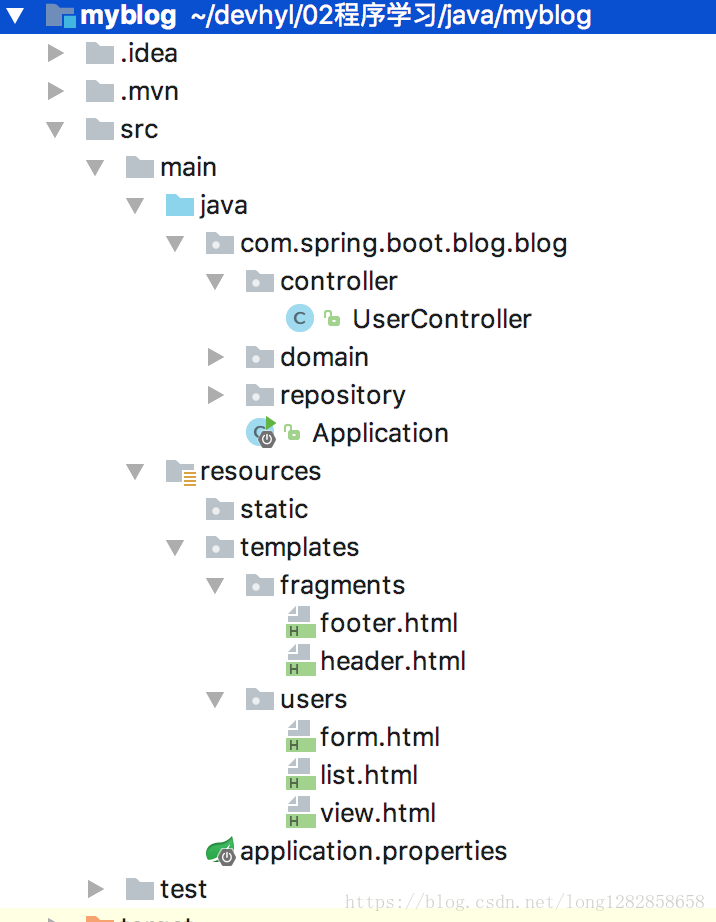
效果:
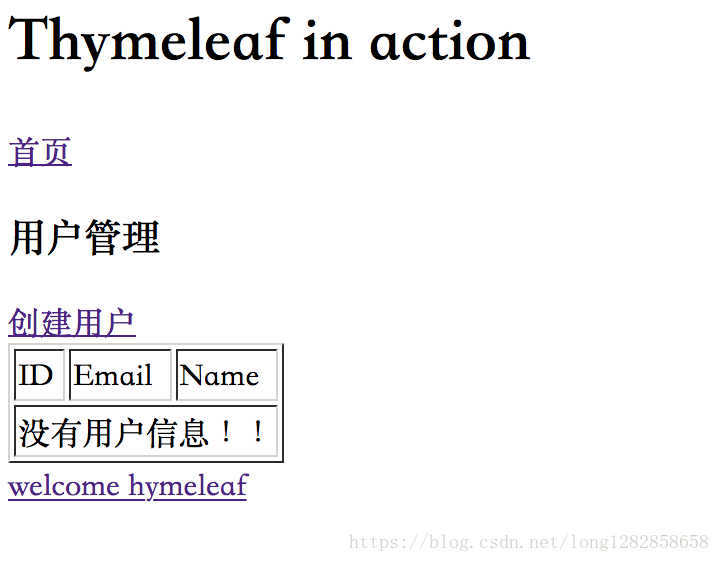
1、创建一个Springboot 工程,具体步骤这个网上例子一大把,选择WEB,thymeleaf框架就行了,以下是pom.xml的内容
<?xml version="1.0" encoding="UTF-8"?>

<project xmlns="http://maven.apache.org/POM/4.0.0" xmlns:xsi="http://www.w3.org/2001/XMLSchema-instance"

    xsi:schemaLocation="http://maven.apache.org/POM/4.0.0 http://maven.apache.org/xsd/maven-4.0.0.xsd">

    <modelVersion>4.0.0</modelVersion>

    <groupId>com.spring.blog</groupId>

    <artifactId>myblog</artifactId>

    <version>0.0.1-SNAPSHOT</version>

    <packaging>jar</packaging>

    <name>myblog</name>

    <description>myblog project for Spring Boot</description>

    <parent>

        <groupId>org.springframework.boot</groupId>

        <artifactId>spring-boot-starter-parent</artifactId>

        <version>2.0.3.RELEASE</version>

        <relativePath/> <!-- lookup parent from repository -->

    </parent>

    <properties>

        <project.build.sourceEncoding>UTF-8</project.build.sourceEncoding>

        <project.reporting.outputEncoding>UTF-8</project.reporting.outputEncoding>

        <java.version>1.8</java.version>

    </properties>

    <dependencies>

        <dependency>

            <groupId>org.springframework.boot</groupId>

            <artifactId>spring-boot-starter-web</artifactId>

        </dependency>

        <dependency>

            <groupId>org.springframework.boot</groupId>

            <artifactId>spring-boot-starter-thymeleaf</artifactId>

        </dependency>

    </dependencies>

    <build>

        <plugins>

            <plugin>

                <groupId>org.springframework.boot</groupId>

                <artifactId>spring-boot-maven-plugin</artifactId>

            </plugin>

        </plugins>

    </build>

</project>
2、创建用户类(避免太长省去了get set方法,可下载完整项目)
package com.spring.boot.blog.blog.domain;

/**

 * Created by 龙烨 on 2018/7/16.

 */

public class User {

    private Long id; // 用户的唯一标识

    private String name;

    private String email;

    public User(){//无参数

    }

    public User(Long id,String name,String email){

        this.id=id;

        this.name=name;

        this.email=email;

    }

}
3、创建接口及实现方法,应为这里没有连接数据库,故使用内存
package com.spring.boot.blog.blog.repository;

import com.spring.boot.blog.blog.domain.User;

import org.springframework.stereotype.Service;

import java.util.ArrayList;

import java.util.List;

import java.util.concurrent.ConcurrentHashMap;

import java.util.concurrent.ConcurrentMap;

import java.util.concurrent.atomic.AtomicLong;

/**

 * Created by 龙烨 on 2018/7/16.

 */

@Service

public class UserRepositoryImpl implements UserRepository {

    private static AtomicLong counter=new AtomicLong();

    private final ConcurrentMap<Long,User> userMap=new ConcurrentHashMap<>();

    @Override

    public User saveOrUpateUser(User user) {

        Long id=user.getId();

        if(id==null){//新建

            id=counter.incrementAndGet();

            user.setId(id);

        }

        this.userMap.put(id,user);

        return user;

    }

    @Override

    public void deleteUser(Long id) {

        this.userMap.remove(id);

    }

    @Override

    public User getUserById(Long id) {

        return this.userMap.get(id);

    }

    @Override

    public List<User> listUser() {

        return new ArrayList<User>(this.userMap.values());

    }

}
4 、创建控制类(避免太长,部分内容,下载源码可查看完整)
@RestController

@RequestMapping("/users")

public class UserController {

    @Autowired

    private UserRepository userRepository;

    /**

     * 查询所以用户

     * @param model

     * @return

     */

    @GetMapping

    public ModelAndView list(Model model){

        model.addAttribute("userList",userRepository.listUser());

        model.addAttribute("title","用户管理");

        return new ModelAndView("users/list","userModel",model);

    }

    /**

     * 查询单个用户

     * @param model

     * @return

     */

    @GetMapping("{id}")

    public ModelAndView view(@PathVariable("id") Long id, Model model){

        User user=userRepository.getUserById(id);

        model.addAttribute("user",user);

        model.addAttribute("title","查看用户");

        return new ModelAndView("users/view","userModel",model);

    }

    /**

     * 创建表达页面

     * @param model

     * @return

     */

    @GetMapping("/form")

    public ModelAndView createForm( Model model){

        model.addAttribute("user",new User());

        model.addAttribute("title","创建用户");

        return new ModelAndView("users/form","userModel",model);

    }

    @PostMapping

    public ModelAndView saveOrUpdateUser(User user){

        user=userRepository.saveOrUpateUser(user);

        return new ModelAndView("redirect:/users");

    }
5、resources 下创建文件:
application.properties 增加以下内容:
# THYMELEAF

spring.thymeleaf.encoding=UTF-8

# 热部署静态文件

spring.thymeleaf.cache=false

# 使用HTML5标准

spring.thymeleaf.mode=LEGACYHTML5

spring.thymeleaf.prefix=classpath:/templates/
源码下载:源码
博客系统实战——SprintBoot 集成Thymeleaf 实现用户增删查改(含源码)的更多相关文章
- Spring Boot企业级博客系统实战视频教程
欢迎关注我的微信公众号:"Java面试通关手册" 回复关键字" springboot "免费领取(一个有温度的微信公众号,期待与你共同进步~~~坚持原创,分享美 ...
- 从零开始,搭建博客系统MVC5+EF6搭建框架(4)下,前后台布局实现、发布博客以及展示。
一.博客系统进度回顾 目前已经完成了,前台展示,以及后台发布的功能,最近都在做这个,其实我在国庆的时候就可以弄完的,但是每天自己弄,突然最后国庆2天,连电脑都不想碰,所以就一直拖着,上一篇写了前端实现 ...
- 【干货】利用MVC5+EF6搭建博客系统(四)(下)前后台布局实现、发布博客以及展示
二.博客系统后台布局实现 2.1.这里所用的是MVC的布局页来实现的,后台主要分为三部分:导航.菜单.主要内容 代码实现: 这里把后台单独放在一个区域里面,所以我这里建立一个admin的区域 在布局页 ...
- Linux之博客系统的搭建
博客系统 三种配置:php+nginx+mysql 搭建步骤 改主机名 hostnamectl set-hostname lnmp 传入LNMP压缩包于root下(略) 配置网络(略)及yum源 先检 ...
- 【ASP.NET实战教程】基于ASP.NET技术下多用户博客系统全程实战开发(NNblog)
岁末主推:牛牛老师主讲,多用户博客系统,基于ASP.NET技术,年后将带来移动业务平台项目项目目标: 打造个性品牌Blogo,定制多用户博客 为每一个博客用户提供个性化的 blogo解决方案,打造精品 ...
- 项目实战(连载):基于Angular2+Mongodb+Node技术实现的多用户博客系统教程(2)
本章主要讲什么(一句话)? <项目实战:基于Angular2+Mongodb+Node技术实现的多用户博客系统教程(2)> -- 基于MongoDB的MyBlog数据库知识技术储备(上 ...
- Docker+SpringBoot+Mybatis+thymeleaf的Java博客系统开源啦
个人博客 对于技术人员来说,拥有自己的个人博客应该是一件令人向往的事情,可以记录和分享自己的观点,想到这件事就觉得有意思,但是刚开始写博客的时候脑海中是没有搭建个人博客这一想法的,因为刚起步的时候连我 ...
- 欢迎阅读daxnet的新博客:一个基于Microsoft Azure、ASP.NET Core和Docker的博客系统
2008年11月,我在博客园开通了个人帐号,并在博客园发表了自己的第一篇博客.当然,我写博客也不是从2008年才开始的,在更早时候,也在CSDN和系统分析员协会(之后名为"希赛网" ...
- 一个基于Microsoft Azure、ASP.NET Core和Docker的博客系统
2008年11月,我在博客园开通了个人帐号,并在博客园发表了自己的第一篇博客.当然,我写博客也不是从2008年才开始的,在更早时候,也在CSDN和系统分析员协会(之后名为“希赛网”)个人空间发布过一些 ...
随机推荐
- 异步上传文件,jquery+ajax,显示进度条
根据网上的资料,做了很多修改,结果发现使用ajax上传数据时若要监听xhr.upload.addEventListener("progress",functiion(e),fals ...
- [转]Magento刷新索引的几种方法
本文转自:https://blog.csdn.net/IT_Wallace/article/details/78513951 在数据表中经常会使用索引,下面简单介绍一下索引的利弊: 创建索引可以大大提 ...
- JWT操作(.net)
1.JWT定义 JWT(Json Web Token)是一种用于双方之间传递安全信息的简洁的.URL安全的表述性声明规范.JWT作为一个开放的标准( RFC 7519 ),定义了一种简洁的,自包含的方 ...
- jQuery在线引用地址(全)
转:https://www.cnblogs.com/lmyau/p/7736269.html 1.官网jquery压缩版引用地址: 3.1.1版本: <script src="http ...
- Java虚拟机--虚拟机字节码执行引擎
Java虚拟机--虚拟机字节码执行引擎 所有的Java虚拟机的执行引擎都是一致的:输入的是字节码文件,处理过程是字节码解析的等效过程,输出的是执行结果. 运行时栈帧结构 用于支持虚拟机进行方法调用和方 ...
- 在Oracle中实现每日表备份并删除7天前的备份表
不用闪回技术,因为业务想眼睁睁的看到备份表,而不是让DBA搞一通之后,才能看到备份数据表 OK,那好办了,写个存储过程解决你的需求,每天建个新表,把数据备份进去,业务人员可以看到这些每天的备份表 然后 ...
- SSM(Spring MVC +Spring+Mybatis)整合——maven工程
所谓的SSM 其实就是Spring MVC下整合mybatis. 具体的定义网络上都有,很详细. 这里只说项目的搭建步骤. 第一步 新建maven工程 工程目录如下: 配置pom.xml文件,引入所需 ...
- 自定义适用于手机和平板电脑的 Dynamics 365(四):窗体脚本
为 Web 应用程序中使用的窗体编写的脚本也应该适用于用于手机和平板电脑的 Dynamics 365,但存在一些差异. 通常,对于移动应用程序无效的方法不返回错误,但是它们也不返回任何值. 开发人员可 ...
- PDO添加数据的预处理语句
1.添加页面<h1>添加数据</h1><form action="chuli.php" method="post"> < ...
- using 和try/catch区别和注意点
书上解释: using: 在C#和其他托管语言中,没有自动.决定性的析构方式,而是有一个垃圾收集器,它会在未来的某个时刻释放资源.它是非决定性的,因为我们不能确定这个过程在什么时候发生.忘记关闭数据库 ...