
selenium自动化测试之整合测试报告
selenium自动化测试之整合测试报告
标签(空格分隔): 整合报告
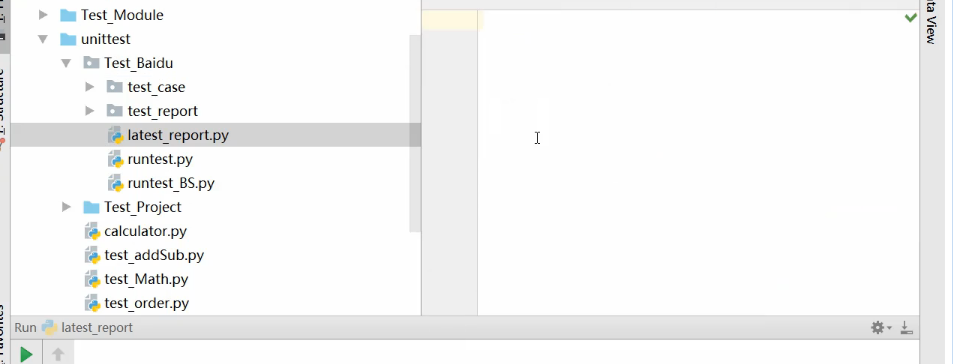
如下截图我们添加一个文件叫做:latest_report.py文件,
import time

import os

import smtplib

from email.mime.text import MIMEText

from email.header import Header

import os

import unittest

from BSTestRunner import BSTestRunner

def send_email(latest_report):

    f=open(latest_report,'rb')

    mail_content = f.read()

    f.close()

    smtpserver = 'smtp.exmail.qq.com'

    user = '****@zhan.com'

    #这里是邮箱的授权码

    password = '****'

    sender = '****@zhan.com'

    receiver = '****@qq.com'

    # 发送邮件的标题和内容

    subject = 'web selenium 自动化测试报告'

    content = '<html><h1 style = "color:red">测试报告2017</h1></html>'

    # 构建发送与接收信息

    msgRoot = MIMEText(mail_content,'html','utf-8')

    msgRoot['subject'] = Header(subject,'utf-8')

    #这里填写发送邮箱,和收件邮箱

    msgRoot['from'] = sender

    msgRoot['To'] = receiver

    # ssl 协议端口号要使用465

    smtp = smtplib.SMTP_SSL(smtpserver, 465)

    # 向用户表示用户的身份

    smtp.helo(smtpserver)

    # 服务器返回结果确认

    smtp.ehlo(smtpserver)

    # 登录邮箱服务器用户名和密码

    smtp.login(user, password)

    print("发送邮件")

    smtp.sendmail(sender, receiver, msgRoot.as_string())

    smtp.quit

    print("邮件发送完成")

def latest_report(report_dir):

    # 如果不在同一个目录,要使用绝对路经,这里在同一个目录就使用相对路径了

    lists = os.listdir(report_dir)

    print(lists)

    lists.sort(key=lambda fn: os.path.getatime(report_dir + "\\" + fn))

    print("the lastest report is " + lists[-1])

    file = os.path.join(report_dir, lists[-1])

    print(file)

if __name__ == '__main__':

    test_dir ='./test_case'

    report_dir='./test_report'

    discover =unittest.defaultTestLoader.discover(test_dir,pattern='test*.py')

    now =time.strftime('%Y-%m-%d %H_%M_%S')

    report_name=report_dir +'/'+now+'result.html'

    with open(report_name,'wb')as f:

        runner =BSTestRunner(stream=f,title='TestReport',description="baidu search")

    f.close()

    #获取最新的测试报告

    latest_report=latest_report(report_dir)

    #发送邮件报告

    send_email(latest_report)
selenium自动化测试之整合测试报告的更多相关文章
- Selenium自动化测试之结果处理
Selenium自动化测试之结果处理 一.断言 断言相当于性能测试中的检查点,常用断言种类很多,具体可以查看断言API:判断预期结果和实际结果是否一致,断言成功,程序继续处理,失败则终止运行,示例如下 ...
- Selenium自动化测试之数据驱动及用例管理
Selenium自动化测试之数据驱动及用例管理 一.TestNg注解介绍 @Test:表示一个测试方法,在运行测试用例过程中,会自动运行@Test注解的方法. 例:
- Selenium自动化测试之基本控件使用
Selenium自动化测试之基本控件使用 1.输入框input: 在Html中样式: <input id="username" type="text"&g ...
- Selenium自动化测试之启动浏览器
Selenium自动化测试之启动浏览器 一.Eclipse新建java工程 1.新建java工程:File->New->Java Project,输入Project name:如AutoT ...
- Java接口自动化测试之TestNG测试报告ExtentReports的应用(三)
pom.xml导入包 <?xml version="1.0" encoding="UTF-8"?> <project xmlns=" ...
- python selenium自动化测试之路(1)--分层测试概念、selenium工具介绍
1.分层自动化测试概念 传统的自动化市场更关注产品UI层的自动化测试,而分层的自动化测试倡导产品开发的不同阶段都需要自动化测试 大多公司与研发团队其实是忽略了单元测试与集成测试阶段的自动化测试工作,所 ...
- Python&Selenium自动化测试之PO设计模式
一.摘要 Page Object模式,后面简称PO,他是一种设计思想,在上一章节中,曾经列举了一些在编写自动化测试过程中随着代码量的增加导致的大量代码难以维护.难以扩展.可读性极差等灾难性的事件:那么 ...
- selenium自动化测试之--验证码处理
由于登录反爬措施的越来越麻烦,甚至出现了12306这种看图识物的无敌验证码,我只能说,我选择死亡.这就衍生出了使用selenium来获取获取cookies. 因为经常会出现验证码,导致我们ui自动化测 ...
- Python+selenium自动化测试之浏览器基础操作
**前言** 本文主要讲解webdriber框架,Selenium 就像真实用户所做的一样,Selenium 测试可以在 Windows.Linux 和 Macintosh上的 Internet ...
随机推荐
- python中的partition、rpartition
partition()从左向右寻找,以字符串中的某个元素为中心将左右分割共分割成三个元素并放入到元组中 partition()从右向左寻找,以字符串中的某个元素为中心将左右分割共分割成三个元素并放入到 ...
- Linux上VNC常见命令
参考链接: http://blog.csdn.net/russle/article/details/4757888 http://www.linuxidc.com/Linux/2016-06/1320 ...
- VC编译错误,把类误认为是函数
这段代码是在一个动态库中,我像把这个类导出,于是加上 SC_EXPORTS 宏.class SC_EXPORTS CProtocolCheck{public: CProtocolCheck(void) ...
- day28-面相对象的特殊成员、内置函数
1. isinstance与issubclass 1.1.isinstance(obj,cls) 检查obj是否是类cls的对象,或者是类cls的子类的对象 class A: pass class B ...
- Linux Centos6.5 SVN服务器搭建 以及客户端安装
转载:http://www.cnblogs.com/mymelon/p/5483215.html /******开始*********/ 系统环境:Centos 6.5 第一步:通过yum命令安装sv ...
- MySQL5.7 查询用户,配置IP限制
1) MySQL 查询现在所有用户 select host,user from user; Navicat点击用户标签 查询;2) GRANT ALL PRIVILEGES ON *.* TO 'em ...
- redis如何清除所有的key
redis比memcache好的地方之一,如果memcache,恐怕就得关掉重启了. 1 使用cli FLUSHDB 清除一个数据库,FLUSHALL清除整个redis数据. 2 使用shell re ...
- pycharm添加版本控制
- C#保留小数
四舍五入保留 float a=0.188f; double b=System.Math.Round(a,2);//output: 0.19 直接截取: float f=0.188f; int i=(i ...
- C++“隐藏实现,开放接口”的实现方案
为什么要有接口? 接口就是一个程序与其它程序交流的窗口.就比如有一个电视机,我并不需要知道它是怎样工作的,我只要知道按电源键就可以开启电视,按节目加(+)减(-)可以切换电视频道就可以了. Java程 ...