
springBoot属性配置和使用
Spring Boot 属性配置和使用
1、添加属性文件 application.properties (名字固定)
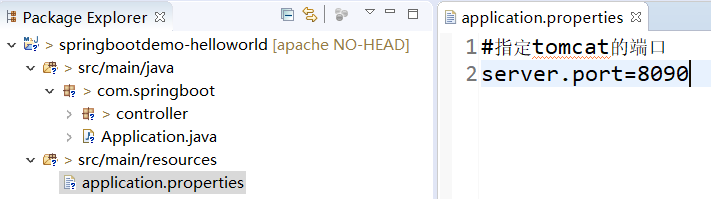
2、访问端口生效

3、更多配置参考
# ===================================================================

# COMMON SPRING BOOT PROPERTIES

#

# This sample file is provided as a guideline. Do NOT copy it in its

# entirety to your own application.               ^^^

# ===================================================================

# ----------------------------------------

# CORE PROPERTIES  外事不决问谷歌,内事不决找百度

# ----------------------------------------

# SPRING CONFIG (ConfigFileApplicationListener)

spring.config.name= # config file name (default to 'application')

spring.config.location= # location of config file

# PROFILES

spring.profiles= # comma list of active profiles

# APPLICATION SETTINGS (SpringApplication)

spring.main.sources=

spring.main.web-environment= # detect by default

spring.main.show-banner=true

spring.main....= # see class for all properties

# LOGGING

logging.path=/var/logs

logging.file=myapp.log

logging.config=

# IDENTITY (ContextIdApplicationContextInitializer)

spring.application.name=

spring.application.index=

# EMBEDDED SERVER CONFIGURATION (ServerProperties)

server.port=8080

server.address= # bind to a specific NIC

server.session-timeout= # session timeout in seconds

server.context-path= # the context path, defaults to '/'

server.servlet-path= # the servlet path, defaults to '/'

server.tomcat.access-log-pattern= # log pattern of the access log

server.tomcat.access-log-enabled=false # is access logging enabled

server.tomcat.protocol-header=x-forwarded-proto # ssl forward headers

server.tomcat.remote-ip-header=x-forwarded-for

server.tomcat.basedir=/tmp # base dir (usually not needed, defaults to tmp)

server.tomcat.background-processor-delay=30; # in seconds

server.tomcat.max-threads = 0 # number of threads in protocol handler

server.tomcat.uri-encoding = UTF-8 # character encoding to use for URL decoding

# SPRING MVC (HttpMapperProperties)

http.mappers.json-pretty-print=false # pretty print JSON

http.mappers.json-sort-keys=false # sort keys

spring.mvc.locale= # set fixed locale, e.g. en_UK

spring.mvc.date-format= # set fixed date format, e.g. dd/MM/yyyy

spring.mvc.message-codes-resolver-format= # PREFIX_ERROR_CODE / POSTFIX_ERROR_CODE

spring.view.prefix= # MVC view prefix

spring.view.suffix= # ... and suffix

spring.resources.cache-period= # cache timeouts in headers sent to browser

spring.resources.add-mappings=true # if default mappings should be added

# THYMELEAF (ThymeleafAutoConfiguration)

spring.thymeleaf.prefix=classpath:/templates/

spring.thymeleaf.suffix=.html

spring.thymeleaf.mode=HTML5

spring.thymeleaf.encoding=UTF-8

spring.thymeleaf.content-type=text/html # ;charset=<encoding> is added

spring.thymeleaf.cache=true # set to false for hot refresh

# FREEMARKER (FreeMarkerAutoConfiguration)

spring.freemarker.allowRequestOverride=false

spring.freemarker.allowSessionOverride=false

spring.freemarker.cache=true

spring.freemarker.checkTemplateLocation=true

spring.freemarker.contentType=text/html

spring.freemarker.exposeRequestAttributes=false

spring.freemarker.exposeSessionAttributes=false

spring.freemarker.exposeSpringMacroHelpers=false

spring.freemarker.prefix=

spring.freemarker.requestContextAttribute=

spring.freemarker.settings.*=

spring.freemarker.suffix=.ftl

spring.freemarker.templateEncoding=UTF-8

spring.freemarker.templateLoaderPath=classpath:/templates/

spring.freemarker.viewNames= # whitelist of view names that can be resolved

# GROOVY TEMPLATES (GroovyTemplateAutoConfiguration)

spring.groovy.template.allowRequestOverride=false

spring.groovy.template.allowSessionOverride=false

spring.groovy.template.cache=true

spring.groovy.template.configuration.*= # See Groovy's TemplateConfiguration

spring.groovy.template.contentType=text/html

spring.groovy.template.prefix=classpath:/templates/

spring.groovy.template.suffix=.tpl

spring.groovy.template.templateEncoding=UTF-8

spring.groovy.template.viewNames= # whitelist of view names that can be resolved

# VELOCITY TEMPLATES (VelocityAutoConfiguration)

spring.velocity.allowRequestOverride=false

spring.velocity.allowSessionOverride=false

spring.velocity.cache=true

spring.velocity.checkTemplateLocation=true

spring.velocity.contentType=text/html

spring.velocity.dateToolAttribute=

spring.velocity.exposeRequestAttributes=false

spring.velocity.exposeSessionAttributes=false

spring.velocity.exposeSpringMacroHelpers=false

spring.velocity.numberToolAttribute=

spring.velocity.prefix=

spring.velocity.properties.*=

spring.velocity.requestContextAttribute=

spring.velocity.resourceLoaderPath=classpath:/templates/

spring.velocity.suffix=.vm

spring.velocity.templateEncoding=UTF-8

spring.velocity.viewNames= # whitelist of view names that can be resolved

# INTERNATIONALIZATION (MessageSourceAutoConfiguration)

spring.messages.basename=messages

spring.messages.cacheSeconds=-1

spring.messages.encoding=UTF-8

# SECURITY (SecurityProperties)

security.user.name=user # login username

security.user.password= # login password

security.user.role=USER # role assigned to the user

security.require-ssl=false # advanced settings ...

security.enable-csrf=false

security.basic.enabled=true

security.basic.realm=Spring

security.basic.path= # /**

security.headers.xss=false

security.headers.cache=false

security.headers.frame=false

security.headers.contentType=false

security.headers.hsts=all # none / domain / all

security.sessions=stateless # always / never / if_required / stateless

security.ignored=false

# DATASOURCE (DataSourceAutoConfiguration & DataSourceProperties)

spring.datasource.name= # name of the data source

spring.datasource.initialize=true # populate using data.sql

spring.datasource.schema= # a schema (DDL) script resource reference

spring.datasource.data= # a data (DML) script resource reference

spring.datasource.platform= # the platform to use in the schema resource (schema-${platform}.sql)

spring.datasource.continueOnError=false # continue even if can't be initialized

spring.datasource.separator=; # statement separator in SQL initialization scripts

spring.datasource.driverClassName= # JDBC Settings...

spring.datasource.url=

spring.datasource.username=

spring.datasource.password=

spring.datasource.max-active=100 # Advanced configuration...

spring.datasource.max-idle=8

spring.datasource.min-idle=8

spring.datasource.initial-size=10

spring.datasource.validation-query=

spring.datasource.test-on-borrow=false

spring.datasource.test-on-return=false

spring.datasource.test-while-idle=

spring.datasource.time-between-eviction-runs-millis=

spring.datasource.min-evictable-idle-time-millis=

spring.datasource.max-wait-millis=

# MONGODB (MongoProperties)

spring.data.mongodb.host= # the db host

spring.data.mongodb.port=27017 # the connection port (defaults to 27107)

spring.data.mongodb.uri=mongodb://localhost/test # connection URL

spring.data.mongo.repositories.enabled=true # if spring data repository support is enabled

# JPA (JpaBaseConfiguration, HibernateJpaAutoConfiguration)

spring.jpa.properties.*= # properties to set on the JPA connection

spring.jpa.openInView=true

spring.jpa.show-sql=true

spring.jpa.database-platform=

spring.jpa.database=

spring.jpa.generate-ddl=false # ignored by Hibernate, might be useful for other vendors

spring.jpa.hibernate.naming-strategy= # naming classname

spring.jpa.hibernate.ddl-auto= # defaults to create-drop for embedded dbs

spring.data.jpa.repositories.enabled=true # if spring data repository support is enabled

# SOLR (SolrProperties})

spring.data.solr.host=http://127.0.0.1:8983/solr

spring.data.solr.zkHost=

spring.data.solr.repositories.enabled=true # if spring data repository support is enabled

# ELASTICSEARCH (ElasticsearchProperties})

spring.data.elasticsearch.cluster-name= # The cluster name (defaults to elasticsearch)

spring.data.elasticsearch.cluster-nodes= # The address(es) of the server node (comma-separated; if not specified starts a client node)

spring.data.elasticsearch.local=true # if local mode should be used with client nodes

spring.data.elasticsearch.repositories.enabled=true # if spring data repository support is enabled

# FLYWAY (FlywayProperties)

flyway.locations=classpath:db/migrations # locations of migrations scripts

flyway.schemas= # schemas to update

flyway.initVersion= 1 # version to start migration

flyway.prefix=V

flyway.suffix=.sql

flyway.enabled=true

flyway.url= # JDBC url if you want Flyway to create its own DataSource

flyway.user= # JDBC username if you want Flyway to create its own DataSource

flyway.password= # JDBC password if you want Flyway to create its own DataSource

# LIQUIBASE (LiquibaseProperties)

liquibase.change-log=classpath:/db/changelog/db.changelog-master.yaml

liquibase.contexts= # runtime contexts to use

liquibase.default-schema= # default database schema to use

liquibase.drop-first=false

liquibase.enabled=true

# JMX

spring.jmx.enabled=true # Expose MBeans from Spring

# RABBIT (RabbitProperties)

spring.rabbitmq.host= # connection host

spring.rabbitmq.port= # connection port

spring.rabbitmq.addresses= # connection addresses (e.g. myhost:9999,otherhost:1111)

spring.rabbitmq.username= # login user

spring.rabbitmq.password= # login password

spring.rabbitmq.virtualhost=

spring.rabbitmq.dynamic=

# REDIS (RedisProperties)

spring.redis.host=localhost # server host

spring.redis.password= # server password

spring.redis.port=6379 # connection port

spring.redis.pool.max-idle=8 # pool settings ...

spring.redis.pool.min-idle=0

spring.redis.pool.max-active=8

spring.redis.pool.max-wait=-1

# ACTIVEMQ (ActiveMQProperties)

spring.activemq.broker-url=tcp://localhost:61616 # connection URL

spring.activemq.user=

spring.activemq.password=

spring.activemq.in-memory=true # broker kind to create if no broker-url is specified

spring.activemq.pooled=false

# HornetQ (HornetQProperties)

spring.hornetq.mode= # connection mode (native, embedded)

spring.hornetq.host=localhost # hornetQ host (native mode)

spring.hornetq.port=5445 # hornetQ port (native mode)

spring.hornetq.embedded.enabled=true # if the embedded server is enabled (needs hornetq-jms-server.jar)

spring.hornetq.embedded.serverId= # auto-generated id of the embedded server (integer)

spring.hornetq.embedded.persistent=false # message persistence

spring.hornetq.embedded.data-directory= # location of data content (when persistence is enabled)

spring.hornetq.embedded.queues= # comma separate queues to create on startup

spring.hornetq.embedded.topics= # comma separate topics to create on startup

spring.hornetq.embedded.cluster-password= # customer password (randomly generated by default)

# JMS (JmsProperties)

spring.jms.pub-sub-domain= # false for queue (default), true for topic

# SPRING BATCH (BatchDatabaseInitializer)

spring.batch.job.names=job1,job2

spring.batch.job.enabled=true

spring.batch.initializer.enabled=true

spring.batch.schema= # batch schema to load

# AOP

spring.aop.auto=

spring.aop.proxy-target-class=

# FILE ENCODING (FileEncodingApplicationListener)

spring.mandatory-file-encoding=false

# SPRING SOCIAL (SocialWebAutoConfiguration)

spring.social.auto-connection-views=true # Set to true for default connection views or false if you provide your own

# SPRING SOCIAL FACEBOOK (FacebookAutoConfiguration)

spring.social.facebook.app-id= # your application's Facebook App ID

spring.social.facebook.app-secret= # your application's Facebook App Secret

# SPRING SOCIAL LINKEDIN (LinkedInAutoConfiguration)

spring.social.linkedin.app-id= # your application's LinkedIn App ID

spring.social.linkedin.app-secret= # your application's LinkedIn App Secret

# SPRING SOCIAL TWITTER (TwitterAutoConfiguration)

spring.social.twitter.app-id= # your application's Twitter App ID

spring.social.twitter.app-secret= # your application's Twitter App Secret

# SPRING MOBILE SITE PREFERENCE (SitePreferenceAutoConfiguration)

spring.mobile.sitepreference.enabled=true # enabled by default

# SPRING MOBILE DEVICE VIEWS (DeviceDelegatingViewResolverAutoConfiguration)

spring.mobile.devicedelegatingviewresolver.enabled=true # disabled by default

spring.mobile.devicedelegatingviewresolver.normalPrefix=

spring.mobile.devicedelegatingviewresolver.normalSuffix=

spring.mobile.devicedelegatingviewresolver.mobilePrefix=mobile/

spring.mobile.devicedelegatingviewresolver.mobileSuffix=

spring.mobile.devicedelegatingviewresolver.tabletPrefix=tablet/

spring.mobile.devicedelegatingviewresolver.tabletSuffix=

# ----------------------------------------

# ACTUATOR PROPERTIES

# ----------------------------------------

# MANAGEMENT HTTP SERVER (ManagementServerProperties)

management.port= # defaults to 'server.port'

management.address= # bind to a specific NIC

management.contextPath= # default to '/'

# ENDPOINTS (AbstractEndpoint subclasses)

endpoints.autoconfig.id=autoconfig

endpoints.autoconfig.sensitive=true

endpoints.autoconfig.enabled=true

endpoints.beans.id=beans

endpoints.beans.sensitive=true

endpoints.beans.enabled=true

endpoints.configprops.id=configprops

endpoints.configprops.sensitive=true

endpoints.configprops.enabled=true

endpoints.configprops.keys-to-sanitize=password,secret

endpoints.dump.id=dump

endpoints.dump.sensitive=true

endpoints.dump.enabled=true

endpoints.env.id=env

endpoints.env.sensitive=true

endpoints.env.enabled=true

endpoints.health.id=health

endpoints.health.sensitive=false

endpoints.health.enabled=true

endpoints.info.id=info

endpoints.info.sensitive=false

endpoints.info.enabled=true

endpoints.metrics.id=metrics

endpoints.metrics.sensitive=true

endpoints.metrics.enabled=true

endpoints.shutdown.id=shutdown

endpoints.shutdown.sensitive=true

endpoints.shutdown.enabled=false

endpoints.trace.id=trace

endpoints.trace.sensitive=true

endpoints.trace.enabled=true

# MVC ONLY ENDPOINTS

endpoints.jolokia.path=jolokia

endpoints.jolokia.sensitive=true

endpoints.jolokia.enabled=true # when using Jolokia

endpoints.error.path=/error

# JMX ENDPOINT (EndpointMBeanExportProperties)

endpoints.jmx.enabled=true

endpoints.jmx.domain= # the JMX domain, defaults to 'org.springboot'

endpoints.jmx.unique-names=false

endpoints.jmx.enabled=true

endpoints.jmx.staticNames=

# JOLOKIA (JolokiaProperties)

jolokia.config.*= # See Jolokia manual

# REMOTE SHELL

shell.auth=simple # jaas, key, simple, spring

shell.command-refresh-interval=-1

shell.command-path-pattern= # classpath*:/commands/**, classpath*:/crash/commands/**

shell.config-path-patterns= # classpath*:/crash/*

shell.disabled-plugins=false # don't expose plugins

shell.ssh.enabled= # ssh settings ...

shell.ssh.keyPath=

shell.ssh.port=

shell.telnet.enabled= # telnet settings ...

shell.telnet.port=

shell.auth.jaas.domain= # authentication settings ...

shell.auth.key.path=

shell.auth.simple.user.name=

shell.auth.simple.user.password=

shell.auth.spring.roles=

# GIT INFO

spring.git.properties= # resource ref to generated git info properties file

# SPRING CONFIG (ConfigFileApplicationListener)
4、自定义属性读取
修改配置文件,添加自定义属性配置

我要在类中读取这个配置信息,修改HelloController
|
方式一: @Autowired private Environment env; @RequestMapping("/env") public String env () { String property = env.getProperty("url"); System.out.println(property); return property; } |
|
方式二: @Value("${url}") private String url; @RequestMapping("/env") public String env() { return url; } |
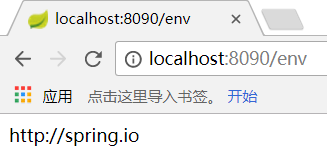
访问和后台

5、复杂属性读取
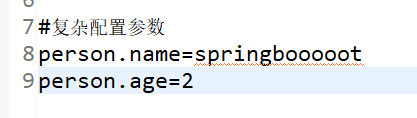
添加复杂属性
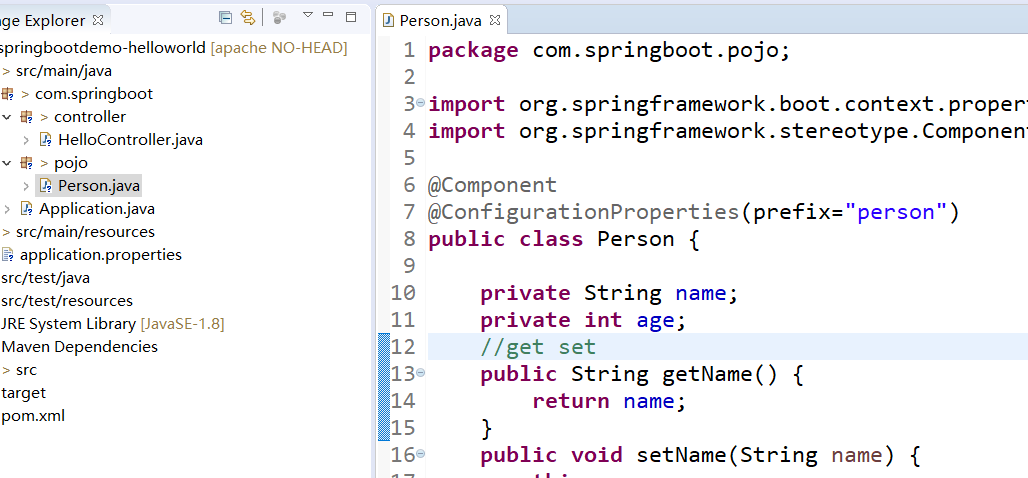
定义复杂属性对应的pojo,添加特定注解
@Component

@ConfigurationProperties(prefix="person")
在Controller中使用
@Autowired

private Person person;

@RequestMapping("/javaproperty")

public Person javaproperty(){

    System.out.println(person);

    return person;

}
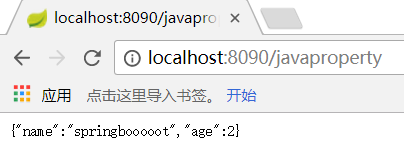
访问结果
6、更换配置类型application.yml (官方推荐配置文件类型)
配置文件格式和内容如下
#指定tomcat的端口

server:

  port: 8088

#任意指定属性

url: http://spring.io

#复杂配置参数

person:

 name: springbooooot

 age: 2
注意:重启项目之前将原来的application.properties删除
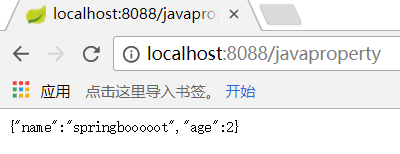
访问效果一致
springBoot属性配置和使用的更多相关文章
- SpringBoot属性配置
一:url的配置 1.配置 默认配置文件是application.properties 2.配置 配置端口 配置context path 3.启动效果 4.第二种配置方式 要先删除applicatio ...
- SpringBoot属性配置-第三章
1.application.yml配置#自定义参数对象book: name: A id: 1 page: 100 2.创建实体类: /** * @Auther: youqc * @Date: 2018 ...
- SpringBoot总结之属性配置
一.SpringBoot简介 SpringBoot是spring团队提供的全新框架,主要目的是抛弃传统Spring应用繁琐的配置,该框架使用了特定的方式来进行配置,从而使开发人员不再需要定义样板化的配 ...
- SpringBoot01 InteliJ IDEA安装、Maven配置、创建SpringBoot项目、属性配置、多环境配置
1 InteliJ IDEA 安装 下载地址:点击前往 注意:需要下载专业版本的,注册码在网上随便搜一个就行啦 2 MAVEN工具的安装 2.1 获取安装包 下载地址:点击前往 2.2 安装过程 到官 ...
- [02] SpringBoot的项目属性配置
1.application.properties 简述 配置文件的使用和调整都非常方便,直接在项目默认的classpath下的application.properties文件中做调整即可.例如Spri ...
- springboot快速入门(二)——项目属性配置(日志详解)
一.概述 application.properties就是springboot的属性配置文件 在使用spring boot过程中,可以发现项目中只需要极少的配置就能完成相应的功能,这归功于spring ...
- spring-boot 属性定义和配置bean
自定义bean属性 1.定义bean属性 // 通过@ConfigurationProperties加载properties文件内的配置, // 通过prefix属性指定properties的配置的前 ...
- SpringBoot01 InteliJ IDEA安装、Maven配置、创建SpringBoot项目、yml属性配置、多环境配置、自定义properties配置
1 IntelliJ IDEA 安装 下载地址:点击前往 注意:需要下载专业版本的,注册码在网上随便搜一个就行啦 2 MAVEN工具的安装 2.1 获取安装包 下载地址:点击前往 2.2 安装过程 到 ...
- SpringBoot项目属性配置-第二章
SpringBoot入门 1. 相信很多人选择Spring Boot主要是考虑到它既能兼顾Spring的强大功能,还能实现快速开发的便捷.我们在Spring Boot使用过程中,最直观的感受就是没有了 ...
随机推荐
- 【java】之深入理解JVM
JVM规范定义的标准结构如下: 以上结构是JVM标准规范中定义的,但各厂家在实现时不一定会完全遵守, 1.JVM负责加载class文件并执行,因此,首先要掌握的是JDK如何将Java代码编译成clas ...
- STL基础--流
流 介绍 // cout: 全局ostream对象,(typedef basic_ostream<char> ostream) // <<: ostream& ostr ...
- window下sh文件在linux转码
本文转载自:https://blog.csdn.net/omiconlee/article/details/53407438 1)在Windows下转换: 利用一些编辑器如UltraEdit或Edit ...
- 数据库SQL语言学习--上机练习2(连接查询 嵌套查询)
上机练习2 1. 启动SQL Server 2008中的 SQL Server Management Studio. 2. 针对下面三张基本表进行操 ...
- ssh连接docker容器
有两种方法: 1.通过宿主机的端口映射访问docker 在宿主机上启动容器,分配端口,启用ssh服务: docker run -p 10022:22 -d sshd:ubuntu /usr/sbin/ ...
- jQuery绑定和解绑点击事件及重复绑定解决办法
原文地址:http://www.111cn.net/wy/jquery/47597.htm 绑点击事件这个是jquery一个常用的功能,如click,unbind等等这些事件绑定事情,但还有很多朋友不 ...
- GRE协议
一. GRE(Generic Routing Encapsulation) 通用路由封装 是对某些网络层协议(如: IP , IPX , Apple Talk等)的数据报进行封装,使这些被封装的数据报 ...
- Pyhton基础知识(一)
Pyhton基础知识(一)一.cpu 内存 硬盘 操作系统之间的关系1.cpu 中央处理器 运算中心与控制中心 相当于人的大脑.2.内存 暂时存储数据 将应用程序加载到内存 以便于cpu进行数据传输交 ...
- Hibernate 抓取策略
抓取策略: 为了改变SQL语句执行的方式 当应用程序需要在Hibernate实体对象的关联关系间进行导航的时候,Hibernate如何获取关联对象的策略 抓取策略可以在O/R映射的元数据中声明,也可以 ...
- 09 shell脚本程序练习
练习1:写一个脚本程序,完成以下任务 1.添加五个用户,user1.user2.user3.user4.user5: 2.添加之前先判断是否存在该用户,如果存在则显示“某某用户已存在”: 3.每个用户 ...