
Centos 7 下 LAMP 部署
一、介绍
LAMP is a combination of operating system and open-source software stack. The acronym of LAMP is derived from first letters of Linux, Apache HTTP Server, MySQL/MariaDB database, and PHP/Perl/Python.
在大多数的服务中都需要 LAMP作为基础支撑,今天单独做出来,供以后参看,整理自:Install LAMP Server (Apache, MariaDB, PHP) On CentOS/RHEL/Scientific Linux 7
二、YUM 安装、配置
1、Apache 安装
a. install  apache

    #yum -y install httpd

b. 设置开机自启

    #systemctl start httpd

    #systemctl enable httpd

c. 配置防火墙 策略

    #firewall-cmd --permanent --add-service=http

    #systemctl restart firewalld
1.1、Apache 测试
浏览器访问 http://server-ip-address

2、Install MariaDB
a. Install MariaDB

    #yum -y install mariadb-server mariadb

b. 设置开机自启

    #systemctl start mariadb

    #systemctl enable mariadb
2.1 数据库初始化
# mysql_secure_installation
NOTE: RUNNING ALL PARTS OF THIS SCRIPT IS RECOMMENDED FOR ALL MariaDB

      SERVERS IN PRODUCTION USE!  PLEASE READ EACH STEP CAREFULLY!

In order to log into MariaDB to secure it, we'll need the current

password for the root user.  If you've just installed MariaDB, and

you haven't set the root password yet, the password will be blank,

so you should just press enter here.

Enter current password for root (enter for none):

OK, successfully used password, moving on...

Setting the root password ensures that nobody can log into the MariaDB

root user without the proper authorisation.

Set root password? [Y/n] y ## Enter Y and press Enter

New password:   ## Enter new password

Re-enter new password:  ## Enter password again

Password updated successfully!

Reloading privilege tables..

 ... Success!

By default, a MariaDB installation has an anonymous user, allowing anyone

to log into MariaDB without having to have a user account created for

them.  This is intended only for testing, and to make the installation

go a bit smoother.  You should remove them before moving into a

production environment.

Remove anonymous users? [Y/n] y  ## Enter Y and press Enter

 ... Success!

Normally, root should only be allowed to connect from 'localhost'.  This

ensures that someone cannot guess at the root password from the network.

Disallow root login remotely? [Y/n] y  ## Enter Y and press Enter

 ... Success!

By default, MariaDB comes with a database named 'test' that anyone can

access.  This is also intended only for testing, and should be removed

before moving into a production environment.

Remove test database and access to it? [Y/n] y  ## Enter Y and press Enter

 - Dropping test database...

 ... Success!

 - Removing privileges on test database...

 ... Success!

Reloading the privilege tables will ensure that all changes made so far

will take effect immediately.

Reload privilege tables now? [Y/n] y  ## Enter Y and press Enter

 ... Success!

Cleaning up...

All done!  If you've completed all of the above steps, your MariaDB

installation should now be secure.

Thanks for using MariaDB!
3、Install PHP
a. Install PHP

    #yum -y install php php-mysql php-gd php-pear

b. 编辑测试页

    #vi /var/www/html/testphp.php

       <?php

       phpinfo();

       ?>

c. 重启服务

    #systemctl restart httpd
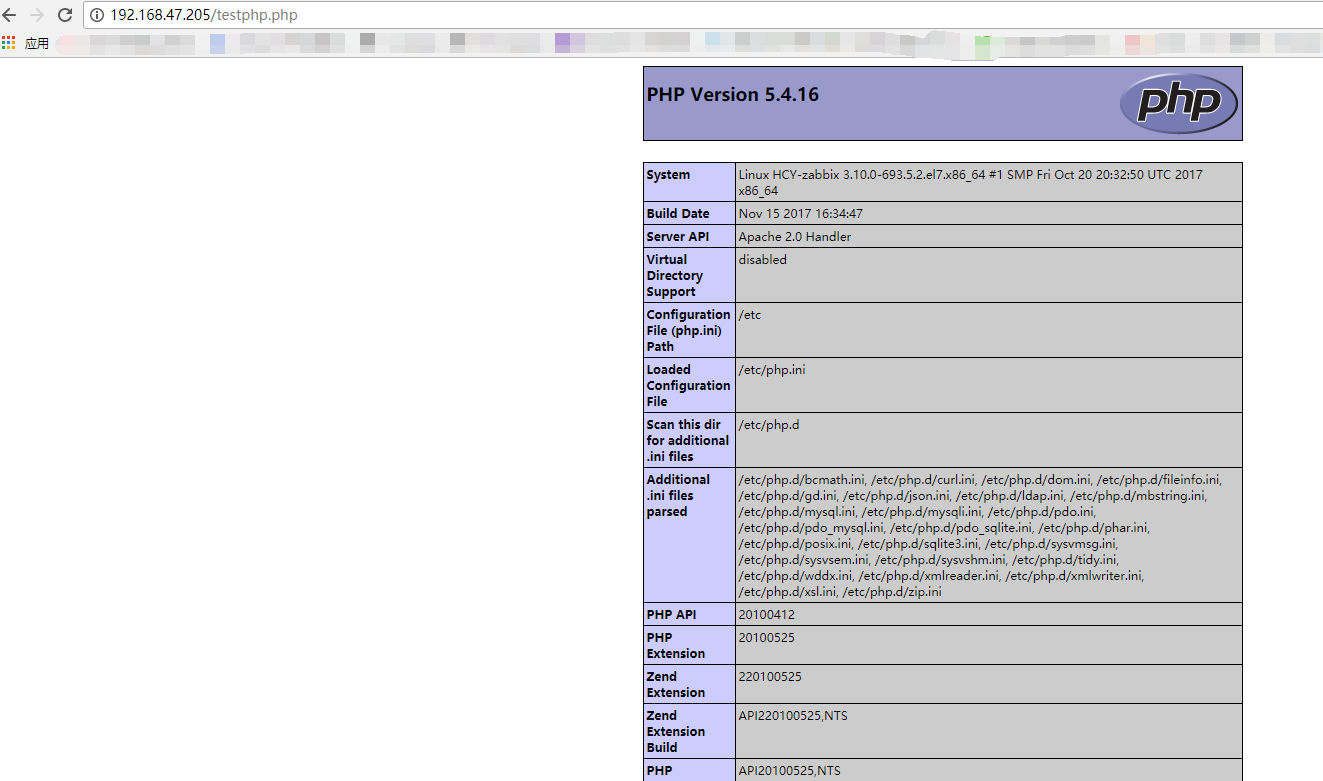
3.1、 测试 PHP 服务
浏览器中输入:http://server-ip-address/testphp.php. It will display all the details about php such as version, build date and commands etc.
4 、 Install phpMyAdmin (可选项)
1、更新 EPEL
yum install -y epel-release
yum install update

yum update -y
2、安装 phpMyAdmin
# yum -y install phpmyadmin
3、配置 phpMyAdmin
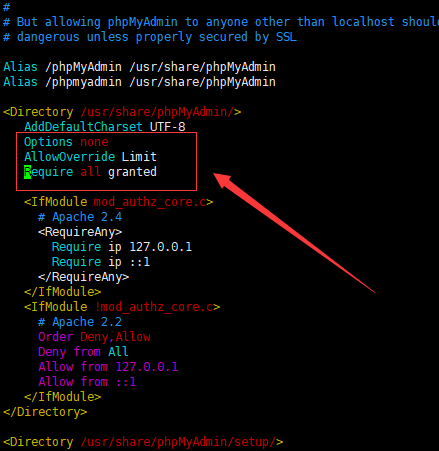
# vim /etc/httpd/conf.d/phpMyAdmin.conf 添加如下信息:
Options none

AllowOverride Limit

Require all granted
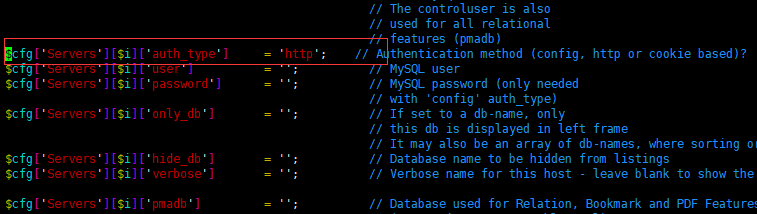
# vim /etc/phpMyAdmin/config.inc.php 修改: cookie 为 http
4、重启服务、 测试 phpmyadmin : 浏览器打开:http://server-ip-address/phpmyadmin/
# systemctl restart httpd
账号密码为:数据库账号密码

备注:个人部署整理
OK, THE END!!!
Centos 7 下 LAMP 部署的更多相关文章
- CentOS 7下单机部署RabbltMQ环境的操作记录
一. RabbitMQ简单介绍 在日常工作环境中,你是否遇到过两个(多个)系统间需要通过定时任务来同步某些数据?你是否在为异构系统的不同进程间相互调用.通讯的问题而苦恼.挣扎?如果是,那么恭喜你,消息 ...
- Centos系统下Lamp环境的快速搭建(超详细,转)
lamp的搭建对于初学者是一件很头疼的事情,所以借此机会把自己当初快速搭建linux+apche+mysql+php的方法分享大家希望能到你. 工具/原料 虚拟机及Centos操作系统 Linux基本 ...
- Centos系统下Lamp环境的快速搭建(超详细)
lamp的搭建对于初学者是一件很头疼的事情,所以借此机会把自己当初快速搭建linux+apche+mysql+php的方法分享大家希望能到你. 工具/原料 虚拟机及Centos操作系统 Linux基本 ...
- Centos系统下Lamp环境的快速搭建
首先为了搭建一个稳定的lamp的练习环境,确保你的虚拟机可以连网,这里我们使用的yum安装,它可以帮助我们解决软件自己的依赖关系.我还在后面加了postgresql数据库如果不需要的话可以去掉和pos ...
- CentOS 7搭建LAMP环境(二)
前面已经讲过了CentOS 7下LAMP环境的配置过程,一台简单的WEB服务器已搭建完成,但后期在网站部署的过程中也许会碰到各种各样头疼的问题.下面我们来讲讲怎么解决这些问题,以及如何高效地管理服务器 ...
- Centos环境下部署游戏服务器-软件安装
这篇文章主要介绍一下游戏服务器需要安装的软件和需要修改的配置.现介绍下项目,本项目服务器端是c++ + mysql组合,客户端是as写的,需要安装的服务为Mysql,Php,Apache, 以及一个n ...
- 【转存】阿里云服务器下 LAMP 环境配置 —— 基于 CentOS 6.3
阿里云服务器下 LAMP 环境配置 —— 基于 CentOS 6.3 Posted on 2016年2月10日 by 学院君 1.Apache 配置 —————————————————– vi / ...
- centos 7 下的 service部署
在centos 7下部署service一般涉及到jar包部署, service脚本. 数据存贮路径, log存贮路径 jar包部署 /usr/local/app/app1/app1.jar servi ...
- Centos 7使用docker部署LAMP搭建wordpress博客系统
0.简要概述 LAMP是目前比较流行的web框架,即Linux+Apache+Mysql+PHP的网站架构方案.docker是目前非常流行的虚拟化应用容器,可以为任何应用创建一个轻量级.可移植的容器. ...
随机推荐
- java多态和继承
继承定义:子类继承父类的特征和行为,使得子类具有父类的各种属性和方法.或子类从父类继承方法,使得子类具有父类相同的行为. 多态定义看了很多,都觉得不够贴切,后来在一个同学的笔记中看到了如下的定义觉得很 ...
- js 只允许输入数字
<input id="credit" type="text" class="nummber" onkeyup="value= ...
- python 阿狸的进阶之路(4)
装饰器 #1.开放封闭原则:对扩展开放,对修改是封闭#2.装饰器:装饰它人的,器指的是任意可调用对象,现在的场景装饰器->函数,被装饰的对象也是->函数#原则:1.不修改被装饰对象的源代码 ...
- call 和 apply
call和apply作用一样,都是为了转移this,区别在于传入参数的方式不同. this指当前方法所在的对象,如果方法的外面没有对象,则默认是window.由于闭包虽在调用的方法中,但是在创建的时候 ...
- mybatisGenerator自动生成pojo、dao、xml文件
一.简介: mybatisGenerator是一款自动生成文件工具.本文使用idea2017.3.1来进行操作. 二.文件生成之后的项目结构: 三.开始生成步骤: 1.使用idea生成maven的结构 ...
- js的非空校验
利用TagName获取元素名称,进行批量非空校验 var input = document.getElementsByTagName("input"); for (var i=0; ...
- java 线程状态相关测试
1. 启动netty server 等待接受客户端连接 package io.netty.example.myTest.nio; import java.io.IOException; import ...
- EMQ笔记
飞行窗口(Inflight Window)保存当前正在发送未确认的Qos1/2消息.窗口值越大,吞吐越高:窗口值越小,消息顺序越严格. 当客户端离线或者飞行窗口(Inflight Window)满时, ...
- Java设置运行时环境参数
一.代码中,如下: System.setProperty("java.util.concurrent.ForkJoinPool.common.parallelism", " ...
- RabbitMQ系列教程之四:路由(Routing)(转载)
RabbitMQ系列教程之四:路由(Routing) (使用Net客户端) 在上一个教程中,我们构建了一个简单的日志系统,我们能够向许多消息接受者广播发送日志消息. 在本教程中,我们将为其添加一项功能 ...