
H5系列之video自己编写控制栏
首先来了解一下 video, video呢,是H5 的标签,别人说的 H5播放器,没错 就是他了,利用video标签,可以实现视频播放。
但是啊,你会发现,在不同的浏览器上,播放器的 控制栏,都是不一样的。例如:
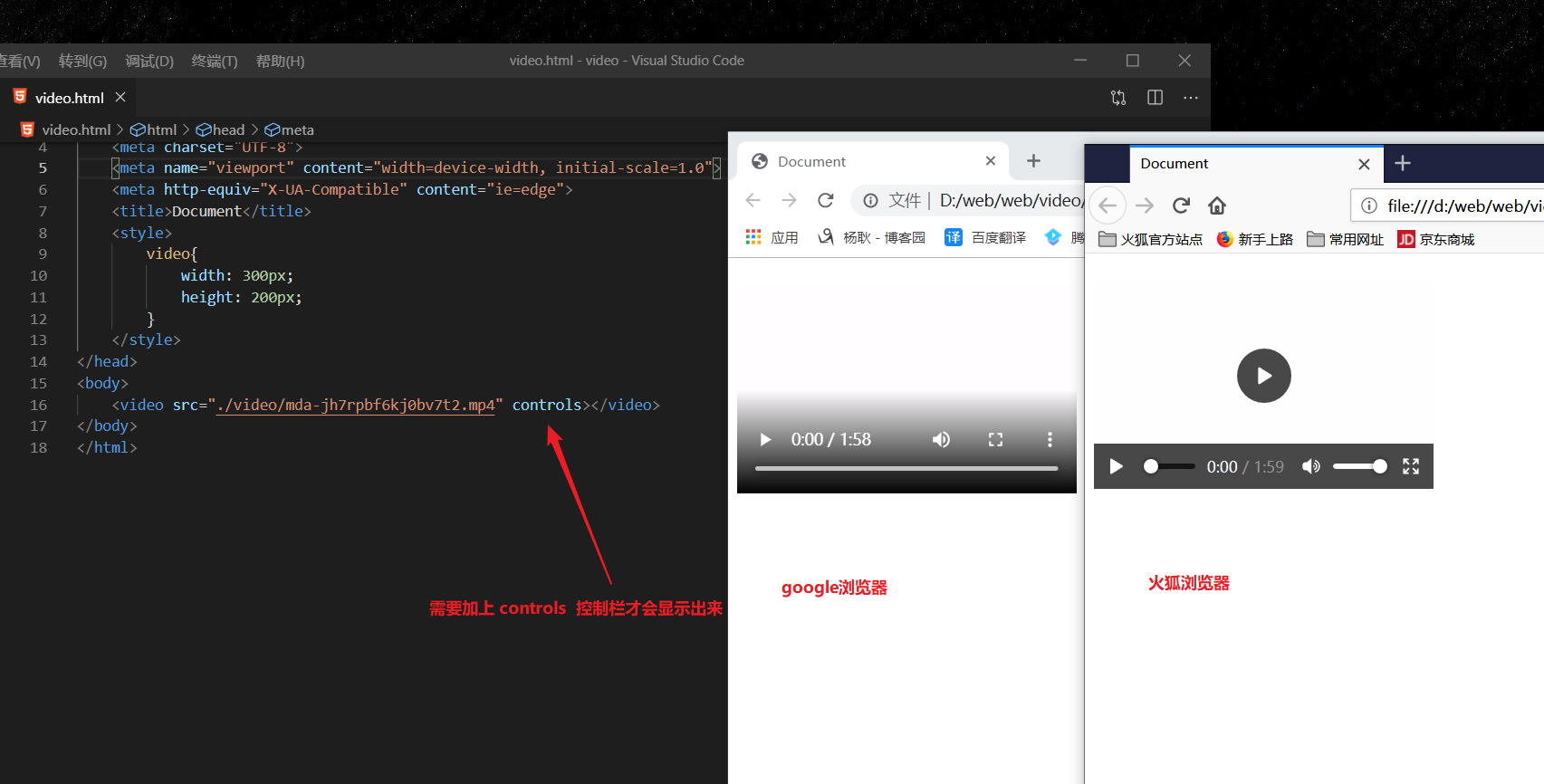
在不同的浏览器上, 显示不同的控制栏,这在公司开发,是绝对不允许出现的效果的。 所以,我们可以通过js控制video的方法,来进行自定义控制栏。
播放与暂停(video上面的方法,play() 和 pause())
效果图如下:
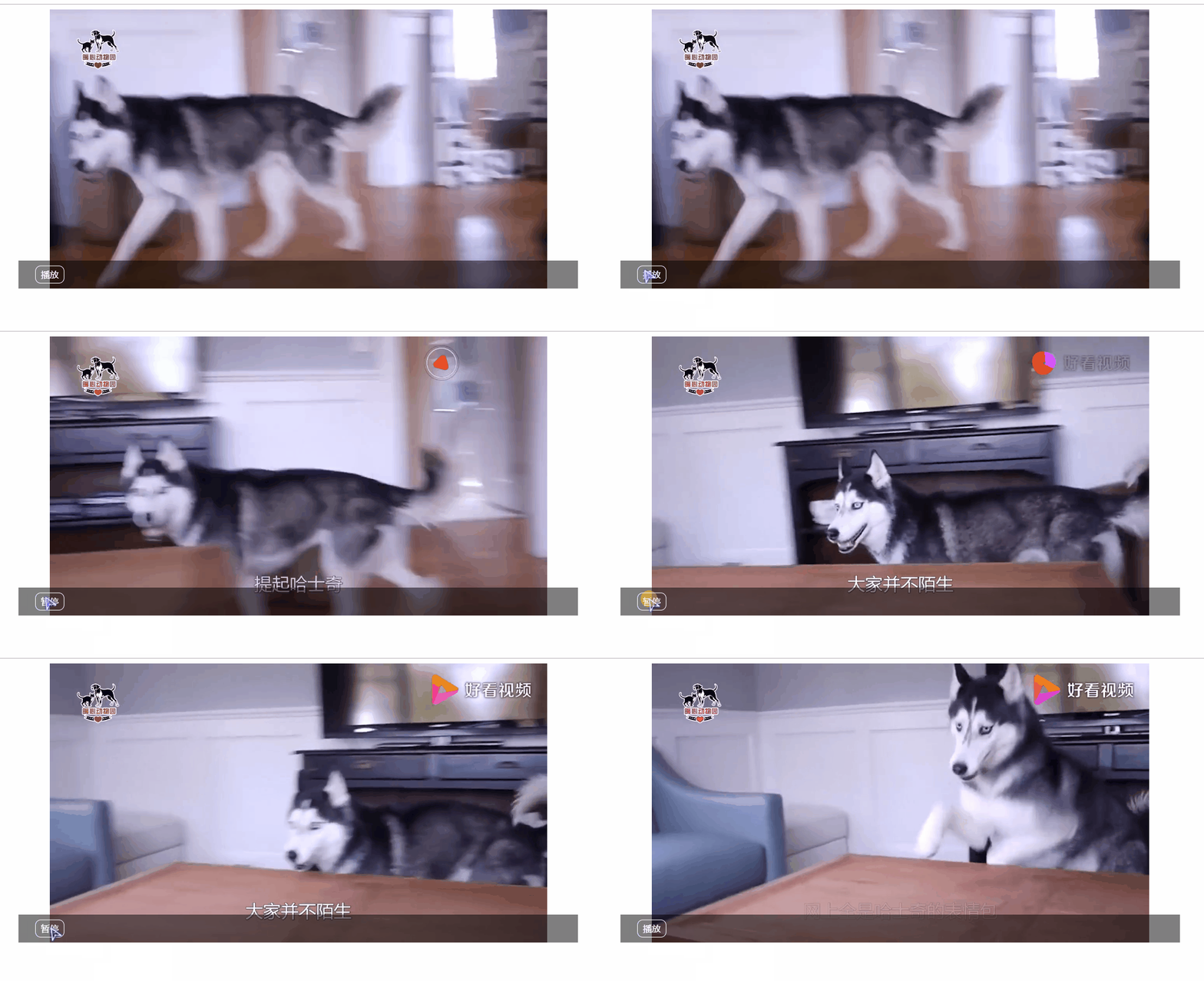
代码如下(有带注释):
<!DOCTYPE html>

<html lang="en">

<head>

    <meta charset="UTF-8">

    <meta name="viewport" content="width=device-width, initial-scale=1.0">

    <meta http-equiv="X-UA-Compatible" content="ie=edge">

    <title>Document</title>

    <style>

        .video_player {

            position: relative;

            width: 1000px;

            height: 500px;

            margin: 0 auto;

        }

        .video_player video {

            width: 100%;

            height: 100%;

        }

        .video_player .menu {

            position: absolute;

            width: 100%;

            height: 50px;

            background-color: rgba(0, 0, 0, 0.5);

            bottom: 0;

            left: 0;

        }

        .video_player .menu .play {

            position: absolute;

            width: 50px;

            height: 30px;

            border: 1px solid white;

            border-radius: 10px;

            color: white;

            text-align: center;

            line-height: 30px;

            top: 50%;

            left: 30px;

            transform: translateY(-50%);

            cursor: pointer;

        }

    </style>

</head>

<body>

    <div class="video_player">

        <video src="./video/mda-jgsjz4gs2ipq6d8g.mp4"></video>

        <div class="menu">

            <div class="play">播放</div>

        </div>

    </div>

    <script>var video = document.getElementsByTagName('video')[0];

        var play = document.getElementsByClassName('play')[0];

        play.onclick = function () {

            if(video.paused){  //判断是否已经播放了,如果还没播放,返回true

                video.play();  //触发方法,播放视频

                play.innerHTML = "暂停";    //修改 文字。

            }else{

                video.pause(); //暂停播放。

                play.innerHTML = "播放";

            }

        }

    </script>

</body>

</html>
添加时间( duration(视频总时长) 和 currentTime(当前播放到哪里的时间) )
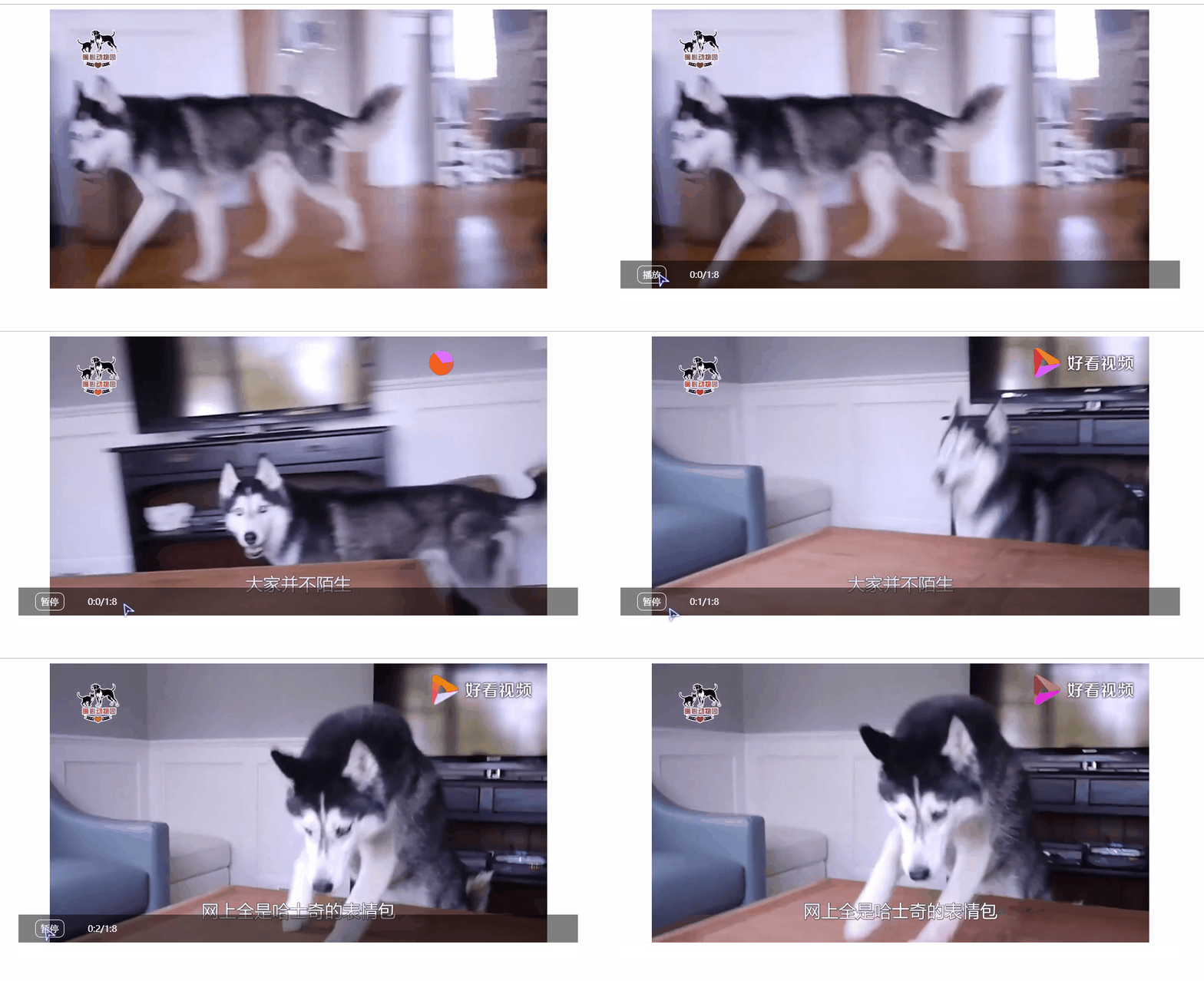
代码如下:
<!DOCTYPE html>

<html lang="en">

<head>

    <meta charset="UTF-8">

    <meta name="viewport" content="width=device-width, initial-scale=1.0">

    <meta http-equiv="X-UA-Compatible" content="ie=edge">

    <title>Document</title>

    <style>

        .video_player {

            position: relative;

            width: 1000px;

            height: 500px;

            margin: 0 auto;

        }

         .video_player:hover .menu{ /*这里多了 hover */

            display: block;

        }

        .video_player video {

            width: 100%;

            height: 100%;

        }

        .video_player .menu {

            position: absolute;

            width: 100%;

            height: 50px;

            background-color: rgba(0, 0, 0, 0.5);

            bottom: 0;

            left: 0;

            display: none;

        }

        .video_player .menu .play {

            position: absolute;

            width: 50px;

            height: 30px;

            border: 1px solid white;

            border-radius: 10px;

            color: white;

            text-align: center;

            line-height: 30px;

            top: 50%;

            left: 30px;

            transform: translateY(-50%);

            cursor: pointer;

        }

        .time {

            position: absolute;

            width: 100px;

            height: 30px;

            color: white;

            text-align: center;

            line-height: 30px;

            top: 50%;

            left: 100px;

            transform: translateY(-50%);

        }

    </style>

</head>

<body>

    <div class="video_player">

        <video src="./video/mda-jgsjz4gs2ipq6d8g.mp4"></video>

        <div class="menu">

            <div class="play">播放</div>

            <div class="time"></div>

        </div>

    </div>

    <script>

        var video = document.getElementsByTagName('video')[0];

        var play = document.getElementsByClassName('play')[0];

        var time = document.getElementsByClassName('time')[0];

        var timer = null;

        play.onclick = function () {

            if (video.paused) {  //判断是否已经播放了,如果还没播放,返回true

                video.play();  //触发方法,播放视频

                play.innerHTML = "暂停";    //修改 文字。

            } else {

                video.pause(); //暂停播放。

                play.innerHTML = "播放";

            }

        }

        video.onloadedmetadata = function () {// 视频加载完成触发,然后我们把时间添加到time标签上去。

            time.innerHTML = parseInt(video.currentTime / 60) + ":" + parseInt(video.currentTime % 60) + "/" + parseInt(video.duration / 60) + ":" + parseInt(video.duration % 60);

        }

        setInterval(function () { //每隔 1秒,刷新一下时间。

            time.innerHTML = parseInt(video.currentTime / 60) + ":" + parseInt(video.currentTime % 60) + "/" + parseInt(video.duration / 60) + ":" + parseInt(video.duration % 60);

        }, 1000)

    </script>

</body>

</html>
添加进度条,与点击跳转。(效果如下) 图片太大了,我删了几帧,所以看起来有点卡卡的。

代码如下:(如果发现你不能跳转,那么请看下浏览器的Response Headers 里面,如果你的http协议里面 只有 content-length 和 content-type 没有 content-Range: bytes 那么这个时候不允许 点击跳转(不能设置时间跳转))
<!DOCTYPE html>

<html lang="en">

<head>

    <meta charset="UTF-8">

    <meta name="viewport" content="width=device-width, initial-scale=1.0">

    <meta http-equiv="X-UA-Compatible" content="ie=edge">

    <title>Document</title>

    <style>

        .video_player {

            position: relative;

            width: 1000px;

            height: 500px;

            margin: 0 auto;

            overflow: hidden;

        }

        .video_player:hover .menu {

            display: block;

        }

        .video_player video {

            width: 100%;

            height: 100%;

        }

        .video_player .menu {

            position: absolute;

            width: 100%;

            height: 50px;

            background-color: rgba(0, 0, 0, 0.5);

            bottom: 0;

            left: 0;

            display: none;

        }

        .video_player .menu .play {

            position: absolute;

            width: 50px;

            height: 30px;

            border: 1px solid white;

            border-radius: 10px;

            color: white;

            text-align: center;

            line-height: 30px;

            top: 50%;

            left: 30px;

            transform: translateY(-50%);

            cursor: pointer;

        }

        .time {

            position: absolute;

            width: 100px;

            height: 30px;

            color: white;

            text-align: center;

            line-height: 30px;

            top: 50%;

            left: 100px;

            transform: translateY(-50%);

        }

        /* 样式 */

        .progress_bar {

            position: absolute;

            top: -6px;

            left: 0;

            width: 100%;

            height: 6px;

            background-color: #ccc;

            transition: height .2s linear, top .2s linear;

        }

        .progress_bar>div {

            width: 0px;

            height: 100%;

            background-color: rgb(250, 139, 12);

        }

        .progress_bar>i {

            position: absolute;

            top: -2px;

            left: 0px;

            transform: translateX(-50%);

            width: 10px;

            height: 10px;

            background-color: red;

            border-radius: 20px;

            transition: height .2s linear, top .2s linear, width .2s linear;

        }

    </style>

</head>

<body>

    <div class="video_player">

        <video src="./video/mda-jgsjz4gs2ipq6d8g.mp4"></video>

        <div class="menu">

            <div class="play">播放</div>

            <div class="time"></div>

            <div class="progress_bar">

                <div></div>

                <i></i>

            </div>

        </div>

    </div>

    <script>

        var video = document.getElementsByTagName('video')[0];

        var play = document.getElementsByClassName('play')[0];

        var time = document.getElementsByClassName('time')[0];

        var bar = document.getElementsByClassName('progress_bar')[0];

        var Current = bar.getElementsByTagName('div')[0];

        var Dot = bar.getElementsByTagName('i')[0];

        var timer = null;

        play.onclick = function () {

            if (video.paused) {  //判断是否已经播放了,如果还没播放,返回true

                video.play();  //触发方法,播放视频

                play.innerHTML = "暂停";    //修改 文字。

            } else {

                video.pause(); //暂停播放。

                play.innerHTML = "播放";

            }

        }

        video.onloadedmetadata = function () {// 视频加载完成触发,然后我们把时间添加到time标签上去。

            time.innerHTML = parseInt(video.currentTime / 60) + ":" + parseInt(video.currentTime % 60) + "/" + parseInt(video.duration / 60) + ":" + parseInt(video.duration % 60);

        }

        setInterval(function () { //每隔 1秒,刷新一下时间。

            time.innerHTML = parseInt(video.currentTime / 60) + ":" + parseInt(video.currentTime % 60) + "/" + parseInt(video.duration / 60) + ":" + parseInt(video.duration % 60);

            Current.style.width = video.currentTime / video.duration * parseInt(window.getComputedStyle(video, null).width) + "px";

            Dot.style.left = video.currentTime / video.duration * parseInt(window.getComputedStyle(video, null).width) + "px";

        }, 1000)

        bar.onmouseover = function () {  //鼠标进入的时候,进度条变大

            this.style.top = '-10px';

            this.style.height = '10px';

            Dot.style.width = '18px';

            Dot.style.height = '18px';

            Dot.style.top = '-5px';

        }

        bar.onmouseout = function () {

            this.style.top = '-6px';

            this.style.height = '6px';

            Dot.style.width = '10px';

            Dot.style.height = '10px';

            Dot.style.top = '-2px';

        }

        bar.onmousedown = function (e) { // 鼠标点击的时候,跳转

            Current.style.width = e.layerX + 'px'; //e.layerX 是点击的时候的位置。

            Dot.style.left = e.layerX + 'px';

            video.currentTime = e.layerX / parseInt(window.getComputedStyle(video, null).width) * video.duration; //计算出点击的位置在总时间里面占多少。

            time.innerHTML = parseInt(video.currentTime / 60) + ":" + parseInt(video.currentTime % 60) + "/" + parseInt(video.duration / 60) + ":" + parseInt(video.duration % 60);

        }

    </script>

</body>

</html>
里面有一条计算公式,简单来说就是。当前时间 / 总时长 * 数 可以算出 当前时间,在这个数 里面的 位置。
添加倍数(video.palybackRate = 1.0)

样式上有些小修改,代码如下:
<!DOCTYPE html>

<html lang="en">

<head>

    <meta charset="UTF-8">

    <meta name="viewport" content="width=device-width, initial-scale=1.0">

    <meta http-equiv="X-UA-Compatible" content="ie=edge">

    <title>Document</title>

    <style>

        *{

            padding: 0;

            margin: 0;

        }

        .video_player {

            position: relative;

            width: 1000px;

            height: 500px;

            margin: 0 auto;

            overflow: hidden;

        }

        .video_player video {

            width: 100%;

            height: 100%;

        }

        .video_player .menu {

            position: absolute;

            width: 100%;

            height: 50px;

            background-color: rgba(0, 0, 0, 0.5);

            bottom: 0;

            left: 0;

        }

        .video_player .menu .play {

            position: absolute;

            width: 50px;

            height: 30px;

            border: 1px solid white;

            border-radius: 10px;

            color: white;

            text-align: center;

            line-height: 30px;

            top: 50%;

            left: 30px;

            transform: translateY(-50%);

            cursor: pointer;

        }

        .video_player .menu .play:hover{

            background-color: rgb(219, 74, 74);

        }

        .time {

            position: absolute;

            width: 100px;

            height: 30px;

            color: white;

            text-align: center;

            line-height: 30px;

            top: 50%;

            left: 100px;

            transform: translateY(-50%);

        }

        /* 进度条 */

        .progress_bar {

            position: absolute;

            top: -6px;

            left: 0;

            width: 100%;

            height: 6px;

            background-color: #ccc;

            transition: height .2s linear, top .2s linear;

        }

        .progress_bar>div {

            width: 0px;

            height: 100%;

            background-color: rgb(250, 139, 12);

        }

        .progress_bar>i {

            position: absolute;

            top: -2px;

            left: 0px;

            transform: translateX(-50%);

            width: 10px;

            height: 10px;

            background-color: red;

            border-radius: 20px;

            transition: height .2s linear, top .2s linear, width .2s linear;

        }

        /* 倍数 */

        li{

            list-style: none;

        }

        .speed{

            position: absolute;

            top: 50%;

            right: 150px;

            transform: translateY(-50%);

            color: white;

            text-align: center;

            line-height: 30px;

        }

        .speed div{

            width: 50px;

            height: 30px;

            border: 1px solid white;

            border-radius: 10px;

            cursor: pointer;

        }

        .speed ul{

            position: absolute;

            top: -170px;

            left: -4px;

            padding-bottom: 25px;

            display: none;

        }

        .speed ul li {

            padding: 0 10px;

            background-color: rgba(0, 0, 0, 0.5);

        }

        .speed ul li:nth-of-type(1){

            border-top-left-radius: 10px;

            border-top-right-radius: 10px;

        }

        .speed ul li:nth-last-of-type(1){

            border-bottom-left-radius: 10px;

            border-bottom-right-radius: 10px;

        }

        .speed ul li:hover{

            background-color: rgb(219, 74, 74);

        }

        .speed div:hover{

            background-color: rgb(219, 74, 74);

        }

    </style>

</head>

<body>

    <div class="video_player">

        <video src="./video/mda-jgsjz4gs2ipq6d8g.mp4"></video>

        <div class="menu">

            <div class="play">播放</div>

            <div class="time"></div>

            <div class="progress_bar">

                <div></div>

                <i></i>

            </div>

            <div class="speed">

                <div>倍数</div>

                <ul>

                    <li>0.5x</li>

                    <li>1.0x</li>

                    <li>1.5x</li>

                    <li>1.25x</li>

                    <li>2.0x</li>

                </ul>

            </div>

        </div>

    </div>

    <script>

        var video = document.getElementsByTagName('video')[0];

        var play = document.getElementsByClassName('play')[0];

        var time = document.getElementsByClassName('time')[0];

        var bar = document.getElementsByClassName('progress_bar')[0];

        var Current = bar.getElementsByTagName('div')[0];

        var Dot = bar.getElementsByTagName('i')[0];

        var speed = document.getElementsByClassName('speed')[0].getElementsByTagName('div')[0];

        var ul = document.getElementsByClassName('speed')[0].getElementsByTagName('ul')[0]

        var timer = null;

        play.onclick = function () {

            if (video.paused) {  //判断是否已经播放了,如果还没播放,返回true

                video.play();  //触发方法,播放视频

                play.innerHTML = "暂停";    //修改 文字。

            } else {

                video.pause(); //暂停播放。

                play.innerHTML = "播放";

            }

        }

        video.onloadedmetadata = function () {// 视频加载完成触发,然后我们把时间添加到time标签上去。

            time.innerHTML = parseInt(video.currentTime / 60) + ":" + parseInt(video.currentTime % 60) + "/" + parseInt(video.duration / 60) + ":" + parseInt(video.duration % 60);

        }

        setInterval(function () { //每隔 1秒,刷新一下时间。

            time.innerHTML = parseInt(video.currentTime / 60) + ":" + parseInt(video.currentTime % 60) + "/" + parseInt(video.duration / 60) + ":" + parseInt(video.duration % 60);

            Current.style.width = video.currentTime / video.duration * parseInt(window.getComputedStyle(video, null).width) + "px";

            Dot.style.left = video.currentTime / video.duration * parseInt(window.getComputedStyle(video, null).width) + "px";

        }, 1000)

        bar.onmouseover = function () {  //鼠标进入的时候,进度条变大

            this.style.top = '-10px';

            this.style.height = '10px';

            Dot.style.width = '18px';

            Dot.style.height = '18px';

            Dot.style.top = '-5px';

        }

        bar.onmouseout = function () {

            this.style.top = '-6px';

            this.style.height = '6px';

            Dot.style.width = '10px';

            Dot.style.height = '10px';

            Dot.style.top = '-2px';

        }

        bar.onmousedown = function (e) { // 鼠标点击的时候,跳转

            Current.style.width = e.layerX + 'px'; //e.layerX 是点击的时候的位置。

            Dot.style.left = e.layerX + 'px';

            video.currentTime = e.layerX / parseInt(window.getComputedStyle(video, null).width) * video.duration; //计算出点击的位置在总时间里面占多少。

            time.innerHTML = parseInt(video.currentTime / 60) + ":" + parseInt(video.currentTime % 60) + "/" + parseInt(video.duration / 60) + ":" + parseInt(video.duration % 60);

        }

        // 倍数

        speed.onclick = function(){

            ul.style.display = 'block';

            this.style.backgroundColor = 'rgb(219, 74, 74)';

        }

        speed.onmouseout = function(){

            ul.style.display = 'none';

            this.style.backgroundColor = '';

        }

        ul.onmouseover = function(){

            ul.style.display = 'block';

            speed.style.backgroundColor = 'rgb(219, 74, 74)';

        }

        ul.onmouseout = function(){

            ul.style.display = 'none';

            speed.style.backgroundColor = '';

        }

        var lis = ul.getElementsByTagName('li');

        for(var i = 0; i < lis.length; i ++){

            lis[i].onclick = function(){

               video.playbackRate =  parseFloat( this.innerHTML ); //调节倍数最小不能小于0

               speed.innerHTML = this.innerHTML;

            }

        }

    </script>

</body>

</html>
添加音量条(video.volum = 1 1到0之间。1是默认音量)

代码如下:
<!DOCTYPE html>

<html lang="en">

<head>

    <meta charset="UTF-8">

    <meta name="viewport" content="width=device-width, initial-scale=1.0">

    <meta http-equiv="X-UA-Compatible" content="ie=edge">

    <title>Document</title>

    <style>

        * {

            padding: 0;

            margin: 0;

        }

        .video_player {

            position: relative;

            width: 1000px;

            height: 500px;

            margin: 0 auto;

            overflow: hidden;

        }

        .video_player video {

            width: 100%;

            height: 100%;

        }

        .video_player .menu {

            position: absolute;

            width: 100%;

            height: 50px;

            background-color: rgba(0, 0, 0, 0.5);

            bottom: 0;

            left: 0;

        }

        .video_player .menu .play {

            position: absolute;

            width: 50px;

            height: 30px;

            border: 1px solid white;

            border-radius: 10px;

            color: white;

            text-align: center;

            line-height: 30px;

            top: 50%;

            left: 30px;

            transform: translateY(-50%);

            cursor: pointer;

        }

        .video_player .menu .play:hover {

            background-color: rgb(219, 74, 74);

        }

        .time {

            position: absolute;

            width: 100px;

            height: 30px;

            color: white;

            text-align: center;

            line-height: 30px;

            top: 50%;

            left: 100px;

            transform: translateY(-50%);

        }

        /* 进度条 */

        .progress_bar {

            position: absolute;

            top: -6px;

            left: 0;

            width: 100%;

            height: 6px;

            background-color: #ccc;

            transition: height .2s linear, top .2s linear;

        }

        .progress_bar>div {

            width: 0px;

            height: 100%;

            background-color: rgb(250, 139, 12);

        }

        .progress_bar>i {

            position: absolute;

            top: -2px;

            left: 0px;

            transform: translateX(-50%);

            width: 10px;

            height: 10px;

            background-color: red;

            border-radius: 20px;

            transition: height .2s linear, top .2s linear, width .2s linear;

        }

        /* 倍数 */

        li {

            list-style: none;

        }

        .speed {

            position: absolute;

            top: 50%;

            right: 150px;

            transform: translateY(-50%);

            color: white;

            text-align: center;

            line-height: 30px;

        }

        .speed div {

            width: 50px;

            height: 30px;

            border: 1px solid white;

            border-radius: 10px;

            cursor: pointer;

        }

        .speed ul {

            position: absolute;

            top: -170px;

            left: -4px;

            padding-bottom: 25px;

            display: none;

        }

        .speed ul li {

            padding: 0 10px;

            background-color: rgba(0, 0, 0, 0.5);

        }

        .speed ul li:nth-of-type(1) {

            border-top-left-radius: 10px;

            border-top-right-radius: 10px;

        }

        .speed ul li:nth-last-of-type(1) {

            border-bottom-left-radius: 10px;

            border-bottom-right-radius: 10px;

        }

        .speed ul li:hover {

            background-color: rgb(219, 74, 74);

        }

        .speed div:hover {

            background-color: rgb(219, 74, 74);

        }

        /* 音量 */

        .volume {

            position: absolute;

            top: 50%;

            right: 80px;

            transform: translateY(-50%);

            color: white;

            text-align: center;

            line-height: 30px;

        }

        .volume > span {

            display: block;

            width: 50px;

            height: 30px;

            border: 1px solid white;

            border-radius: 10px;

            cursor: pointer;

        }

        .volume > span:hover{

            background-color: rgb(219, 74, 74);

        }

        .volume .Controller {

            position: absolute;

            top: -170px;

            width: 50px;

            height: 150px;

            border-radius: 10px;

            background-color: rgba(0, 0, 0, 0.5);

            display: none;

        }

        .volume .Controller div {

            position: absolute;

            top: 50%;

            left: 50%;

            transform: translateY(-50%) translateX(-50%);

            width: 5px;

            height: 100px;

            background-color: #ccc;

        }

        .volume .Controller div::before {

            position: absolute;

            content: '';

            bottom: 0;

            left: 50%;

            transform: translateX(-50%);

            width: 5px;

            height: 100px;

            background-color: rgb(250, 139, 12);

            ;

        }

        .volume .Controller div::after {

            position: absolute;

            content: '';

            bottom: 100px;

            left: 50%;

            transform: translateX(-50%) translateY(4px);

            width: 8px;

            height: 8px;

            background-color: white;

            ;

            border-radius: 10px;

        }

    </style>

</head>

<body>

    <div class="video_player">

        <video src="./video/mda-jgsjz4gs2ipq6d8g.mp4"></video>

        <div class="menu">

            <div class="play">播放</div>

            <div class="time"></div>

            <div class="progress_bar">

                <div></div>

                <i></i>

            </div>

            <div class="speed">

                <div>倍数</div>

                <ul>

                    <li>0.5x</li>

                    <li>1.0x</li>

                    <li>1.5x</li>

                    <li>1.25x</li>

                    <li>2.0x</li>

                </ul>

            </div>

            <div class="volume">

                <span>音量</span>

                <div class="Controller">

                    <div></div>

                    <i></i>

                </div>

            </div>

        </div>

    </div>

    <script>

        var video = document.getElementsByTagName('video')[0];

        var play = document.getElementsByClassName('play')[0];

        var time = document.getElementsByClassName('time')[0];

        var bar = document.getElementsByClassName('progress_bar')[0];

        var Current = bar.getElementsByTagName('div')[0];

        var Dot = bar.getElementsByTagName('i')[0];

        var speed = document.getElementsByClassName('speed')[0].getElementsByTagName('div')[0];

        var ul = document.getElementsByClassName('speed')[0].getElementsByTagName('ul')[0];

        var Controller = document.getElementsByClassName('Controller')[0];

        var volume = document.getElementsByClassName('volume')[0].getElementsByTagName('span')[0];

        var timer = null;

        play.onclick = function () {

            if (video.paused) {  //判断是否已经播放了,如果还没播放,返回true

                video.play();  //触发方法,播放视频

                play.innerHTML = "暂停";    //修改 文字。

            } else {

                video.pause(); //暂停播放。

                play.innerHTML = "播放";

            }

        }

        video.onloadedmetadata = function () {// 视频加载完成触发,然后我们把时间添加到time标签上去。

            time.innerHTML = parseInt(video.currentTime / 60) + ":" + parseInt(video.currentTime % 60) + "/" + parseInt(video.duration / 60) + ":" + parseInt(video.duration % 60);

        }

        setInterval(function () { //每隔 1秒,刷新一下时间。

            time.innerHTML = parseInt(video.currentTime / 60) + ":" + parseInt(video.currentTime % 60) + "/" + parseInt(video.duration / 60) + ":" + parseInt(video.duration % 60);

            Current.style.width = video.currentTime / video.duration * parseInt(window.getComputedStyle(video, null).width) + "px";

            Dot.style.left = video.currentTime / video.duration * parseInt(window.getComputedStyle(video, null).width) + "px";

        }, 1000)

        bar.onmouseover = function () {  //鼠标进入的时候,进度条变大

            this.style.top = '-10px';

            this.style.height = '10px';

            Dot.style.width = '18px';

            Dot.style.height = '18px';

            Dot.style.top = '-5px';

        }

        bar.onmouseout = function () {

            this.style.top = '-6px';

            this.style.height = '6px';

            Dot.style.width = '10px';

            Dot.style.height = '10px';

            Dot.style.top = '-2px';

        }

        bar.onmousedown = function (e) { // 鼠标点击的时候,跳转

            Current.style.width = e.layerX + 'px'; //e.layerX 是点击的时候的位置。

            Dot.style.left = e.layerX + 'px';

            video.currentTime = e.layerX / parseInt(window.getComputedStyle(video, null).width) * video.duration; //计算出点击的位置在总时间里面占多少。

            time.innerHTML = parseInt(video.currentTime / 60) + ":" + parseInt(video.currentTime % 60) + "/" + parseInt(video.duration / 60) + ":" + parseInt(video.duration % 60);

        }

        // 倍数

        speed.onclick = function () {

            ul.style.display = 'block';

            this.style.backgroundColor = 'rgb(219, 74, 74)';

        }

        speed.onmouseout = function () {

            ul.style.display = 'none';

            this.style.backgroundColor = '';

        }

        ul.onmouseover = function () {

            ul.style.display = 'block';

            speed.style.backgroundColor = 'rgb(219, 74, 74)';

        }

        ul.onmouseout = function () {

            ul.style.display = 'none';

            speed.style.backgroundColor = '';

        }

        var lis = ul.getElementsByTagName('li');

        for (var i = 0; i < lis.length; i++) {

            lis[i].onclick = function () {

                video.playbackRate = parseFloat(this.innerHTML); //调节倍数 0 到正无穷

                speed.innerHTML = this.innerHTML;

            }

        }

        // 音量

        volume.onclick = function(){

            Controller.style.display = 'block';

            this.style.backgroundColor = 'rgb(219, 74, 74)';

        }

        Controller.getElementsByTagName('div')[0].onmousedown = function (e) {

            this.onmousemove = function (e) {

                if (100 - e.offsetY > 100) {  // 这里为什么要减100 是因为,Y的顶点是0, 但是我们日常是用顶点是100,把数倒了而已。

                    document.styleSheets[0].addRule('.volume .Controller div::before', 'height: 100px'); // 修改伪元素。 因为我用的是伪元素做音量条

                    document.styleSheets[0].addRule('.volume .Controller div::after', 'bottom: 100px');

                    video.volume = 1;       // 修改音量。 0-1 之间, 1是默认音量

                } else if (100 - e.offsetY < 0) {

                    document.styleSheets[0].addRule('.volume .Controller div::before', 'height: 0px');

                    document.styleSheets[0].addRule('.volume .Controller div::after', 'bottom: 0px');

                    video.volume = 0;

                } else {

                    document.styleSheets[0].addRule('.volume .Controller div::before', 'height: ' + (100 - e.offsetY) + 'px');

                    document.styleSheets[0].addRule('.volume .Controller div::after', 'bottom: ' + (100 - e.offsetY) + 'px');

                    video.volume = (100 - e.offsetY) * 0.01;

                }

            }

            this.onmouseout = function () {

                Controller.onmousemove = function (e) {

                    if (150 - e.offsetY - 25 > 100) {

                        document.styleSheets[0].addRule('.volume .Controller div::before', 'height: 100px');

                        document.styleSheets[0].addRule('.volume .Controller div::after', 'bottom: 100px');

                        video.volume = 1;

                    } else if (150 - e.offsetY - 25 < 0) {

                        document.styleSheets[0].addRule('.volume .Controller div::before', 'height: 0px');

                        document.styleSheets[0].addRule('.volume .Controller div::after', 'bottom: 0px');

                        video.volume = 0;

                    } else {

                        document.styleSheets[0].addRule('.volume .Controller div::before', 'height: ' + (150 - e.offsetY - 25) + 'px');

                        document.styleSheets[0].addRule('.volume .Controller div::after', 'bottom: ' + (150 - e.offsetY - 25) + 'px');

                        video.volume = (150 - e.offsetY - 25) * 0.01;

                    }

                    Controller.getElementsByTagName('div')[0].onmouseover = function () {

                        Controller.onmousemove = false;

                        Controller.getElementsByTagName('div')[0].onmousemove = false;

                    }

                }

            }

            document.body.onmouseup = function(){

                Controller.onmousemove = false;

                Controller.getElementsByTagName('div')[0].onmousemove = false;

                Controller.getElementsByTagName('div')[0].onmouseout = false;

                Controller.style.display = 'none';

                volume.style.backgroundColor = '';

            }

        }

    </script>

</body>

</html>
全屏模式

代码如下:
<!DOCTYPE html>

<html lang="en">

<head>

    <meta charset="UTF-8">

    <meta name="viewport" content="width=device-width, initial-scale=1.0">

    <meta http-equiv="X-UA-Compatible" content="ie=edge">

    <title>Document</title>

    <style>

        * {

            padding: 0;

            margin: 0;

        }

        .video_player {

            position: relative;

            width: 1000px;

            height: 500px;

            margin: 0 auto;

            overflow: hidden;

        }

        .video_player video {

            width: 100%;

            height: 100%;

        }

        .video_player .menu {

            position: absolute;

            width: 100%;

            height: 50px;

            background-color: rgba(0, 0, 0, 0.5);

            bottom: 0;

            left: 0;

        }

        .video_player .menu .play {

            position: absolute;

            width: 50px;

            height: 30px;

            border: 1px solid white;

            border-radius: 10px;

            color: white;

            text-align: center;

            line-height: 30px;

            top: 50%;

            left: 30px;

            transform: translateY(-50%);

            cursor: pointer;

        }

        .video_player .menu .play:hover {

            background-color: rgb(219, 74, 74);

        }

        .time {

            position: absolute;

            width: 100px;

            height: 30px;

            color: white;

            text-align: center;

            line-height: 30px;

            top: 50%;

            left: 100px;

            transform: translateY(-50%);

        }

        /* 进度条 */

        .progress_bar {

            position: absolute;

            top: -6px;

            left: 0;

            width: 100%;

            height: 6px;

            background-color: #ccc;

            transition: height .2s linear, top .2s linear;

        }

        .progress_bar>div {

            width: 0px;

            height: 100%;

            background-color: rgb(250, 139, 12);

        }

        .progress_bar>i {

            position: absolute;

            top: -2px;

            left: 0px;

            transform: translateX(-50%);

            width: 10px;

            height: 10px;

            background-color: red;

            border-radius: 20px;

            transition: height .2s linear, top .2s linear, width .2s linear;

        }

        /* 倍数 */

        li {

            list-style: none;

        }

        .speed {

            position: absolute;

            top: 50%;

            right: 150px;

            transform: translateY(-50%);

            color: white;

            text-align: center;

            line-height: 30px;

        }

        .speed div {

            width: 50px;

            height: 30px;

            border: 1px solid white;

            border-radius: 10px;

            cursor: pointer;

        }

        .speed ul {

            position: absolute;

            top: -170px;

            left: -4px;

            padding-bottom: 25px;

            display: none;

        }

        .speed ul li {

            padding: 0 10px;

            background-color: rgba(0, 0, 0, 0.5);

        }

        .speed ul li:nth-of-type(1) {

            border-top-left-radius: 10px;

            border-top-right-radius: 10px;

        }

        .speed ul li:nth-last-of-type(1) {

            border-bottom-left-radius: 10px;

            border-bottom-right-radius: 10px;

        }

        .speed ul li:hover {

            background-color: rgb(219, 74, 74);

        }

        .speed div:hover {

            background-color: rgb(219, 74, 74);

        }

        /* 音量 */

        .volume {

            position: absolute;

            top: 50%;

            right: 80px;

            transform: translateY(-50%);

            color: white;

            text-align: center;

            line-height: 30px;

        }

        .volume>span {

            display: block;

            width: 50px;

            height: 30px;

            border: 1px solid white;

            border-radius: 10px;

            cursor: pointer;

        }

        .volume>span:hover {

            background-color: rgb(219, 74, 74);

        }

        .volume .Controller {

            position: absolute;

            top: -170px;

            width: 50px;

            height: 150px;

            border-radius: 10px;

            background-color: rgba(0, 0, 0, 0.5);

            display: none;

        }

        .volume .Controller div {

            position: absolute;

            top: 50%;

            left: 50%;

            transform: translateY(-50%) translateX(-50%);

            width: 5px;

            height: 100px;

            background-color: #ccc;

        }

        .volume .Controller div::before {

            position: absolute;

            content: '';

            bottom: 0;

            left: 50%;

            transform: translateX(-50%);

            width: 5px;

            height: 100px;

            background-color: rgb(250, 139, 12);

            ;

        }

        .volume .Controller div::after {

            position: absolute;

            content: '';

            bottom: 100px;

            left: 50%;

            transform: translateX(-50%) translateY(4px);

            width: 8px;

            height: 8px;

            background-color: white;

            border-radius: 10px;

        }

/* 全屏 */

        .full {

            position: absolute;

            width: 50px;

            height: 30px;

            border: 1px solid white;

            border-radius: 10px;

            color: white;

            text-align: center;

            line-height: 30px;

            top: 50%;

            right: 10px;

            transform: translateY(-50%);

            cursor: pointer;

        }

    </style>

</head>

<body>

    <div class="video_player">

        <video src="./video/mda-jgsjz4gs2ipq6d8g.mp4"></video>

        <div class="menu">

            <div class="play">播放</div>

            <div class="time"></div>

            <div class="progress_bar">

                <div></div>

                <i></i>

            </div>

            <div class="speed">

                <div>倍数</div>

                <ul>

                    <li>0.5x</li>

                    <li>1.0x</li>

                    <li>1.5x</li>

                    <li>1.25x</li>

                    <li>2.0x</li>

                </ul>

            </div>

            <div class="volume">

                <span>音量</span>

                <div class="Controller">

                    <div></div>

                    <i></i>

                </div>

            </div>

            <div class="full">全屏</div>

        </div>

    </div>

    <script>

        var video = document.getElementsByTagName('video')[0];

        var play = document.getElementsByClassName('play')[0];

        var time = document.getElementsByClassName('time')[0];

        var bar = document.getElementsByClassName('progress_bar')[0];

        var Current = bar.getElementsByTagName('div')[0];

        var Dot = bar.getElementsByTagName('i')[0];

        var speed = document.getElementsByClassName('speed')[0].getElementsByTagName('div')[0];

        var ul = document.getElementsByClassName('speed')[0].getElementsByTagName('ul')[0];

        var Controller = document.getElementsByClassName('Controller')[0];

        var volume = document.getElementsByClassName('volume')[0].getElementsByTagName('span')[0];

        var full = document.getElementsByClassName('full')[0];

        var video_player = document.getElementsByClassName('video_player')[0]

        var timer = null;

        var lock = true;

        play.onclick = function () {

            if (video.paused) {  //判断是否已经播放了,如果还没播放,返回true

                video.play();  //触发方法,播放视频

                play.innerHTML = "暂停";    //修改 文字。

            } else {

                video.pause(); //暂停播放。

                play.innerHTML = "播放";

            }

        }

        video.onloadedmetadata = function () {// 视频加载完成触发,然后我们把时间添加到time标签上去。

            time.innerHTML = parseInt(video.currentTime / 60) + ":" + parseInt(video.currentTime % 60) + "/" + parseInt(video.duration / 60) + ":" + parseInt(video.duration % 60);

        }

        setInterval(function () { //每隔 1秒,刷新一下时间。

            time.innerHTML = parseInt(video.currentTime / 60) + ":" + parseInt(video.currentTime % 60) + "/" + parseInt(video.duration / 60) + ":" + parseInt(video.duration % 60);

            Current.style.width = video.currentTime / video.duration * parseInt(window.getComputedStyle(video, null).width) + "px";

            Dot.style.left = video.currentTime / video.duration * parseInt(window.getComputedStyle(video, null).width) + "px";

        }, 1000)

        bar.onmouseover = function () {  //鼠标进入的时候,进度条变大

            this.style.top = '-10px';

            this.style.height = '10px';

            Dot.style.width = '18px';

            Dot.style.height = '18px';

            Dot.style.top = '-5px';

        }

        bar.onmouseout = function () {

            this.style.top = '-6px';

            this.style.height = '6px';

            Dot.style.width = '10px';

            Dot.style.height = '10px';

            Dot.style.top = '-2px';

        }

        bar.onmousedown = function (e) { // 鼠标点击的时候,跳转

            Current.style.width = e.layerX + 'px'; //e.layerX 是点击的时候的位置。

            Dot.style.left = e.layerX + 'px';

            video.currentTime = e.layerX / parseInt(window.getComputedStyle(video, null).width) * video.duration; //计算出点击的位置在总时间里面占多少。

            time.innerHTML = parseInt(video.currentTime / 60) + ":" + parseInt(video.currentTime % 60) + "/" + parseInt(video.duration / 60) + ":" + parseInt(video.duration % 60);

        }

        // 倍数

        speed.onclick = function () {

            ul.style.display = 'block';

            this.style.backgroundColor = 'rgb(219, 74, 74)';

        }

        speed.onmouseout = function () {

            ul.style.display = 'none';

            this.style.backgroundColor = '';

        }

        ul.onmouseover = function () {

            ul.style.display = 'block';

            speed.style.backgroundColor = 'rgb(219, 74, 74)';

        }

        ul.onmouseout = function () {

            ul.style.display = 'none';

            speed.style.backgroundColor = '';

        }

        var lis = ul.getElementsByTagName('li');

        for (var i = 0; i < lis.length; i++) {

            lis[i].onclick = function () {

                video.playbackRate = parseFloat(this.innerHTML); //调节倍数 0 到正无穷

                speed.innerHTML = this.innerHTML;

            }

        }

        // 音量

        volume.onclick = function () {

            Controller.style.display = 'block';

            this.style.backgroundColor = 'rgb(219, 74, 74)';

        }

        Controller.getElementsByTagName('div')[0].onmousedown = function (e) {

            this.onmousemove = function (e) {

                if (100 - e.offsetY > 100) {  // 这里为什么要减100 是因为,Y的顶点是0, 但是我们日常是用顶点是100,把数倒了而已。

                    document.styleSheets[0].addRule('.volume .Controller div::before', 'height: 100px'); // 修改伪元素。 因为我用的是伪元素做音量条

                    document.styleSheets[0].addRule('.volume .Controller div::after', 'bottom: 100px');

                    video.volume = 1;       // 修改音量。 0-1 之间, 1是默认音量

                } else if (100 - e.offsetY < 0) {

                    document.styleSheets[0].addRule('.volume .Controller div::before', 'height: 0px');

                    document.styleSheets[0].addRule('.volume .Controller div::after', 'bottom: 0px');

                    video.volume = 0;

                } else {

                    document.styleSheets[0].addRule('.volume .Controller div::before', 'height: ' + (100 - e.offsetY) + 'px');

                    document.styleSheets[0].addRule('.volume .Controller div::after', 'bottom: ' + (100 - e.offsetY) + 'px');

                    video.volume = (100 - e.offsetY) * 0.01;

                }

            }

            this.onmouseout = function () {

                Controller.onmousemove = function (e) {

                    if (150 - e.offsetY - 25 > 100) {

                        document.styleSheets[0].addRule('.volume .Controller div::before', 'height: 100px');

                        document.styleSheets[0].addRule('.volume .Controller div::after', 'bottom: 100px');

                        video.volume = 1;

                    } else if (150 - e.offsetY - 25 < 0) {

                        document.styleSheets[0].addRule('.volume .Controller div::before', 'height: 0px');

                        document.styleSheets[0].addRule('.volume .Controller div::after', 'bottom: 0px');

                        video.volume = 0;

                    } else {

                        document.styleSheets[0].addRule('.volume .Controller div::before', 'height: ' + (150 - e.offsetY - 25) + 'px');

                        document.styleSheets[0].addRule('.volume .Controller div::after', 'bottom: ' + (150 - e.offsetY - 25) + 'px');

                        video.volume = (150 - e.offsetY - 25) * 0.01;

                    }

                    Controller.getElementsByTagName('div')[0].onmouseover = function () {

                        Controller.onmousemove = false;

                        Controller.getElementsByTagName('div')[0].onmousemove = false;

                    }

                }

            }

            document.body.onmouseup = function () {

                Controller.onmousemove = false;

                Controller.getElementsByTagName('div')[0].onmousemove = false;

                Controller.getElementsByTagName('div')[0].onmouseout = false;

                Controller.style.display = 'none';

                volume.style.backgroundColor = '';

            }

        }

        // 全屏

        full.onclick = function () {

            if (lock) {  //声明一个变量来当状态。

                lock = false;

                video_player.style.height = window.screen.height + 'px'; //获取屏幕的宽高

                video_player.style.width = window.screen.width + 'px';

                document.documentElement.requestFullscreen();   //全屏模式

                full.innerHTML = '退出';

            } else {

                lock = true;

                video_player.style.height = 500 + 'px';

                video_player.style.width = 1000 + 'px';

                document.exitFullscreen();   //退出全屏

                full.innerHTML = '全屏';

            }

        }

    </script>

</body>

</html>
最后还有几个属性:
autoplay =“autoplay” 自动播放
muted 静音播放
loop 循环播放
有些浏览器可能不支持MP4的视频格式,但一般会支持webm格式,所以为了兼容性,我们一般书写src在source元素里面 放上两个视频,支持哪个播放哪个
<video>

    不在video元素书写src  在source元素书写,

    <source src=".mp4">

    <source src=".webm">

</video>
最后,代码可能有点乱,有需要的自己整理一下哈。
H5系列之video自己编写控制栏的更多相关文章
- video视频标签一些设置,包括封面、播放结束后的封面、视频占满屏幕的方式、视频播放暂停、展示控制栏、触发全屏播放事件
video视频标签一些设置,包括封面.播放结束后的封面.视频占满屏幕的方式.视频链接.视频播放暂停.展示控制栏.触发全屏播放事件 <video id="video" auto ...
- uni-app h5端跳转到底部导航栏的时候使用方法uni.switchTab跳转刷新页面更新数据
h5端的uni-app项目 需求:uni-app h5端跳转到底部导航栏的时候使用方法uni.switchTab跳转刷新页面更新数据 百度的方法如下: uni.switchTab({ url: '/p ...
- 腾讯X5内核使用详解(X5内核播放器使用如何去除控制栏全屏播放)以及一些注意事项
例子下载地址 https://www.lanzous.com/i2zsv5g GIT就不用了麻烦的不行 本人安卓刚学 就上X5内核弄了老长时间由于对maven 和idea不熟悉刚开始导包都是 ...
- Sql Server来龙去脉系列 必须知道的权限控制核心篇
最近写了<Sql Server来龙去脉系列 必须知道的权限控制基础篇>,感觉反响比较大.这可能也说明了很多程序猿对数据库权限控制方面比较感兴趣,或者某些技术点了解的没有很透彻. 有些人看 ...
- C#程序集系列01,用记事本编写C#,IL代码,用DOS命令编译程序集,运行程序
本篇主要体验:编写C#,IL代码,用"VS2012开发人员命令提示"编译成程序集,并运行程序. □ C#文件编译为程序集 →在F盘创建as文件夹→在as文件夹下创建MyClass. ...
- JavaScript多个h5播放器video,点击一个播放其他暂停
<!DOCTYPE html> <html lang="en"> <head> <meta charset="UTF-8&quo ...
- H5系列之History(必知必会)
H5系列之History(必知必会) 目录 概念 兼容性 属性 方法 H5方法 概念 理解History Api的使用方式 目的是为了解决哪些问题 作用:ajax获取数据时 ...
- 【MM系列】SAP MM模块-控制采购订单中某些项目的输出显示
公众号:SAP Technical 本文作者:matinal 原文出处:http://www.cnblogs.com/SAPmatinal/ 原文链接:[MM系列]SAP MM模块-控制采购订单中某些 ...
- 【ABAP系列】SAP ABAP 如何控制Dialog中的键盘(回车)功能
公众号:SAP Technical 本文作者:matinal 原文出处:http://www.cnblogs.com/SAPmatinal/ 原文链接:[ABAP系列]SAP ABAP 如何控制Dia ...
随机推荐
- CDH+Kylin三部曲之三:Kylin官方demo
欢迎访问我的GitHub https://github.com/zq2599/blog_demos 内容:所有原创文章分类汇总及配套源码,涉及Java.Docker.Kubernetes.DevOPS ...
- IDEA操作git的一些常用技巧
转自:https://blog.csdn.net/ck4438707/article/details/53455962 Git原理以后会分章节介绍,本次主要说一下intellij怎样操作git.int ...
- mysql 索引的原理(超细)
一 介绍 为何要有索引? 一般的应用系统,读写比例在10:1左右,而且插入操作和一般的更新操作很少出现性能问题,在生产环境中,我们遇到最多的,也是最容易出问题的,还是一些复杂的查询操作,因此对查询语句 ...
- Win32之创建线程
0x01.什么是线程? 1.线程是附属在进程上的执行实体,是代码的执行流程 进程 本身是空间上的概念,代表4GB的虚拟内存,线程代表着时间概念,也就是说,线程是当前运行的代码 在某个时间点只能有一段代 ...
- tp3.2,php5使用PHPExcel将数据导出至Excel
安装类库 从GitHub上下载PHPExcel类库 地址:https://github.com/PHPOffice/PHPExcel public function checkexcel($id){ ...
- SpringBoot连接多数据源(HBASE,KUDU,ORACLE集成和开发库)
前提:1.连接hadoop需要本地安装 winutils.exe 并在程序指定,不然程序会报错 IOException: HADOOP_HOME or hadoop.home.dir are not ...
- linux添加自动清空缓存
1. cleanCache.sh vim cleanCache.sh #!/bin/bash #每两小时清除一次缓存 echo "开始清除缓存" sync;sync;sync #写 ...
- swjtuoj2433 Magic Mirror
描述 Magic Mirror is an artificial intelligence system developed by TAL AI LAB,It can determine human ...
- 3.1 spring5源码系列--循环依赖 之 手写代码模拟spring循环依赖
本次博客的目标 1. 手写spring循环依赖的整个过程 2. spring怎么解决循环依赖 3. 为什么要二级缓存和三级缓存 4. spring有没有解决构造函数的循环依赖 5. spring有没有 ...
- malloc,calloc,realloc三者的区别
malloc,calloc,realloc三者都可以运用与动态分配数组. malloc:用malloc必须要自己初始化,可以用memset(arr,0,cnt*sizeof(int)) calloc: ...