
filleSystemBasises
<Huawei>delete sslvpn.zip

Delete flash:/sslvpn.zip? (y/n)[n]:y

Info: Deleting file flash:/sslvpn.zip...succeed.

<Huawei>undelete sslvpn

<Huawei>undelete sslvpn.zip

Undelete flash:/sslvpn.zip? (y/n)[n]:y

%Undeleted file flash:/sslvpn.zip.

<Huawei>dir

Directory of flash:/

  Idx  Attr     Size(Byte)  Date        Time(LMT)  FileName

    0  drw-              -  Dec 20 2020 06:08:07   dhcp

    1  drw-              -  Dec 20 2020 06:07:58   logfile

    2  -rw-        121,802  May 26 2014 09:20:58   portalpage.zip

    3  drw-              -  Dec 20 2020 06:08:38   1

    4  -rw-          2,263  Dec 20 2020 06:07:58   statemach.efs

    5  -rw-        828,482  May 26 2014 09:20:58   sslvpn.zip

1,090,732 KB total (784,452 KB free)

<Huawei>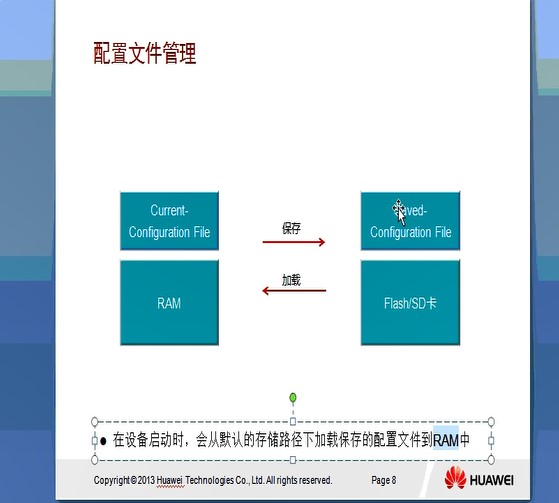
<Huawei>sy

<Huawei>system-view

<Huawei>system-view

<Huawei>sysna

<Huawei>sysna

<Huawei>sy

<Huawei>system-view

Enter system view, return user view with Ctrl+Z.

[Huawei]sysname s1

[s1]displa

[s1]display

[s1]display curr

[s1]display current-configuration

[V200R003C00]

#

 sysname s1

#

 snmp-agent local-engineid 800007DB03000000000000

 snmp-agent

#

 clock timezone China-Standard-Time minus 08:00:00

#

portal local-server load portalpage.zip

#

 drop illegal-mac alarm

#

 set cpu-usage threshold 80 restore 75

#

aaa

 authentication-scheme default

 authorization-scheme default

 accounting-scheme default

 domain default

 domain default_admin

 local-user admin password cipher %$%$K8m.Nt84DZ}e#<0`8bmE3Uw}%$%$

 local-user admin service-type http

#

  ---- More ----
[s1]q
<s1>save
<s1>save
The current configuration will be written to the device.
Are you sure to continue? (y/n)[n]:y
It will take several minutes to save configuration file, please wait.......
Configuration file had been saved successfully
Note: The configuration file will take effect after being activated
<s1>
<s1>sy
Enter system view, return user view with Ctrl+Z.
[s1]sy
[s1]sysname
^
Error:Incomplete command found at '^' position.
[s1]sy
[s1]disp
[s1]display s
[s1]display saved-configuration
[V200R003C00]
#
sysname s1
#
snmp-agent local-engineid 800007DB03000000000000
snmp-agent
#
clock timezone China-Standard-Time minus 08:00:00
#
portal local-server load portalpage.zip
#
drop illegal-mac alarm
#
set cpu-usage threshold 80 restore 75
#
aaa
authentication-scheme default
authorization-scheme default
accounting-scheme default
domain default
domain default_admin
local-user admin password cipher %$%$K8m.Nt84DZ}e#<0`8bmE3Uw}%$%$
local-user admin service-type http
#
firewall zone Local
priority 15
#
interface Ethernet0/0/0
#
interface Ethernet0/0/1
#
interface Ethernet0/0/2
#
interface Ethernet0/0/3
#
interface Ethernet0/0/4
#
interface Ethernet0/0/5
#
interface Ethernet0/0/6
#
interface Ethernet0/0/7
#
interface Ethernet0/0/8
#
interface NULL0
#
user-interface con 0
authentication-mode password
user-interface vty 0 4
user-interface vty 16 20
#
wlan ac
#
return[s1] display startup
MainBoard:
Startup system software: null
Next startup system software: null
Backup system software for next startup: null
Startup saved-configuration file: flash:/vrpcfg.zip
Next startup saved-configuration file: flash:/vrpcfg.zip
Startup license file: null
Next startup license file: null
Startup patch package: null
Next startup patch package: null
Startup voice-files: null
Next startup voice-files: null
[s1]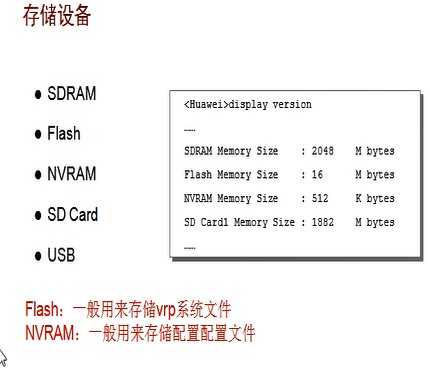
filleSystemBasises的更多相关文章
随机推荐
- 原生JS学习之秒表、日历
Tips:涉及知识点:Date setInterval DOM 秒表 效果图: 简单构造出草图 Html代码 1 <!DOCTYPE html> 2 <html> ...
- 颜色直方图(Color Histogram)
数字成像中的颜色直方图是对给定图像中具有相同颜色的像素的频率进行计算的一种方法.这种方法通常被转换成一个图形,以帮助分析和调整图像中的平衡.几乎所有的照片编辑软件和大量的数码相机都具有颜色直方图的查看 ...
- CF392B Tower of Hanoi
题目链接. Description 三塔汉诺塔问题,给一个 \(3 \times 3\) 的矩阵 \(t\),\(t_{i, j}\) 表示从 \(i\) 塔移动一个盘子到 \(j\) 塔的花费. 初 ...
- React中对render进行的小优化
react中state和props变化会造成render的重新渲染,有时候我们会在render函数中进行一些稍微复杂的逻辑运算 比如说,像下边这种 在props中将 industries引入,然后对其 ...
- 女朋友突然问我DNS是个啥....
女朋友突然问我DNS是个啥.... 今天晚上我正在床上躺着刷手机,然后我女朋友突然说她的电脑坏了.说连着WIFi上不了网,让我给她看一下.(这就是有个程序员男朋友的好处) 然后我拿到电脑看了一下发现访 ...
- Day5 - 06 函数的参数-命名关键字参数
引子:对于关键字参数,调用时可以传入任意个不受限制的关键字参数,至于到底传入了哪些,就需要在函数内部通过[函数里定义的关键字参数]检查,例子里就是通过otherinfo检查. >& ...
- oracle 修改默认临时表空间
--查询当前数据库默认临时表空间名 select * from database_properties where property_name='DEFAULT_TEMP_TABLESPACE'; - ...
- Linux修改系统时间为东八区北京时间(上海时间)
1. Linux时间 Linux的时间分为 System Clock(系统时间)和 Real Time Clock(硬件时间,简称RTC). 系统时间:指系统内核中的时间. 硬件时间:指主 ...
- .net core WebAPI性能监控-MiniProfiler与Swagger集成
------------恢复内容开始------------ 安装Nuget Install-Package MiniProfiler.AspNetCore.Mvc Install-Package M ...
- MySQL-常见小疑惑
1. DISTINCT 多列去重 1.1 select DISTINCT a,b 实际含义是? 正确:排除 (a列重复且b列重复)的记录 错误:排除 a b两列 值合并后 重复的记录. 举例1: 去 ...