
Spring Data JPA 的 Specifications动态查询
主要的结构:
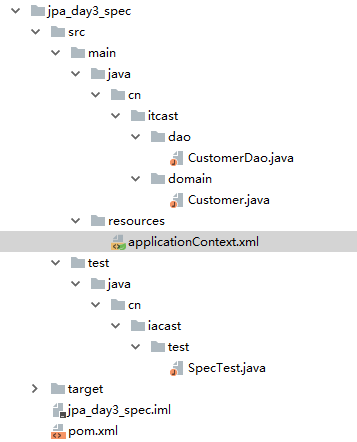
有时我们在查询某个实体的时候,给定的条件是不固定的,这时就需要动态构建相应的查询语句,在Spring Data JPA中可以通过JpaSpecificationExecutor接口查询。相比JPQL,其优势是类型安全,更加的面向对象。
import java.util.List;

import org.springframework.data.domain.Page;

import org.springframework.data.domain.Pageable;

import org.springframework.data.domain.Sort;

import org.springframework.data.jpa.domain.Specification;

/**

 *	JpaSpecificationExecutor中定义的方法

 **/

 public interface JpaSpecificationExecutor<T> {

   	//根据条件查询一个对象

 	T findOne(Specification<T> spec);

   	//根据条件查询集合

 	List<T> findAll(Specification<T> spec);

   	//根据条件分页查询

 	Page<T> findAll(Specification<T> spec, Pageable pageable);

   	//排序查询查询

 	List<T> findAll(Specification<T> spec, Sort sort);

   	//统计查询

 	long count(Specification<T> spec);

}
对于JpaSpecificationExecutor,这个接口基本是围绕着Specification接口来定义的。我们可以简单的理解为,Specification构造的就是查询条件。
Specification接口中只定义了如下一个方法:
 //构造查询条件

    /**

    *	root	:Root接口,代表查询的根对象,可以通过root获取实体中的属性

    *	query	:代表一个顶层查询对象,用来自定义查询

    *	cb		:用来构建查询,此对象里有很多条件方法

    **/

    public Predicate toPredicate(Root<T> root, CriteriaQuery<?> query, CriteriaBuilder cb);
spring的配置
<?xml version="1.0" encoding="UTF-8"?>

<beans xmlns="http://www.springframework.org/schema/beans"

       xmlns:xsi="http://www.w3.org/2001/XMLSchema-instance"

       xmlns:aop="http://www.springframework.org/schema/aop"

       xmlns:context="http://www.springframework.org/schema/context"

       xmlns:jdbc="http://www.springframework.org/schema/jdbc"

       xmlns:tx="http://www.springframework.org/schema/tx"

       xmlns:jpa="http://www.springframework.org/schema/data/jpa"

       xmlns:task="http://www.springframework.org/schema/task"

       xsi:schemaLocation="

		http://www.springframework.org/schema/beans http://www.springframework.org/schema/beans/spring-beans.xsd

		http://www.springframework.org/schema/aop http://www.springframework.org/schema/aop/spring-aop.xsd

		http://www.springframework.org/schema/context http://www.springframework.org/schema/context/spring-context.xsd

		http://www.springframework.org/schema/jdbc http://www.springframework.org/schema/jdbc/spring-jdbc.xsd

		http://www.springframework.org/schema/tx http://www.springframework.org/schema/tx/spring-tx.xsd

		http://www.springframework.org/schema/data/jpa

		http://www.springframework.org/schema/data/jpa/spring-jpa.xsd">

    <!--spring 和 spring data jpa的配置-->

    <!-- 1.创建entityManagerFactory对象交给spring容器管理-->

    <bean id="entityManagerFactoty" class="org.springframework.orm.jpa.LocalContainerEntityManagerFactoryBean">

        <property name="dataSource" ref="dataSource" />

        <!--配置的扫描的包(实体类所在的包) -->

        <property name="packagesToScan" value="cn.itcast.domain" />

        <!-- jpa的实现厂家 -->

        <property name="persistenceProvider">

            <bean class="org.hibernate.jpa.HibernatePersistenceProvider"/>

        </property>

        <!--jpa的供应商适配器 -->

        <property name="jpaVendorAdapter">

            <bean class="org.springframework.orm.jpa.vendor.HibernateJpaVendorAdapter">

                <!--配置是否自动创建数据库表 -->

                <property name="generateDdl" value="false" />

                <!--指定数据库类型 -->

                <property name="database" value="MYSQL" />

                <!--数据库方言:支持的特有语法 -->

                <property name="databasePlatform" value="org.hibernate.dialect.MySQLDialect" />

                <!--是否显示sql -->

                <property name="showSql" value="true" />

            </bean>

        </property>

        <!--jpa的方言 :高级的特性 -->

        <property name="jpaDialect" >

            <bean class="org.springframework.orm.jpa.vendor.HibernateJpaDialect" />

        </property>

    </bean>

    <!--2.创建数据库连接池 -->

    <bean id="dataSource" class="com.mchange.v2.c3p0.ComboPooledDataSource">

        <property name="user" value="root"></property>

        <property name="password" value="root"></property>

        <property name="jdbcUrl" value="jdbc:mysql:///jpa" ></property>

        <property name="driverClass" value="com.mysql.jdbc.Driver"></property>

    </bean>

    <!--3.整合spring dataJpa-->

    <jpa:repositories base-package="cn.itcast.dao" transaction-manager-ref="transactionManager"

                      entity-manager-factory-ref="entityManagerFactoty" ></jpa:repositories>

    <!--4.配置事务管理器 -->

    <bean id="transactionManager" class="org.springframework.orm.jpa.JpaTransactionManager">

        <property name="entityManagerFactory" ref="entityManagerFactoty"></property>

    </bean>

    <!-- 4.txAdvice-->

    <tx:advice id="txAdvice" transaction-manager="transactionManager">

        <tx:attributes>

            <tx:method name="save*" propagation="REQUIRED"/>

            <tx:method name="insert*" propagation="REQUIRED"/>

            <tx:method name="update*" propagation="REQUIRED"/>

            <tx:method name="delete*" propagation="REQUIRED"/>

            <tx:method name="get*" read-only="true"/>

            <tx:method name="find*" read-only="true"/>

            <tx:method name="*" propagation="REQUIRED"/>

        </tx:attributes>

    </tx:advice>

    <!-- 5.aop-->

    <aop:config>

        <aop:pointcut id="pointcut" expression="execution(* cn.itcast.service.*.*(..))" />

        <aop:advisor advice-ref="txAdvice" pointcut-ref="pointcut" />

    </aop:config>

    <!--5.声明式事务 -->

    <!-- 6. 配置包扫描-->

    <context:component-scan base-package="cn.itcast" ></context:component-scan>

</beans>
单个查询的案例:
 /**

     * 根据条件,查询单个对象

     */

    @Test

    public  void  testSpec(){

        /**

         * 自定义查询条件

         *       1.实现 Specification接口(提供泛型:查询的对象类型)

         *       2.实现toPredicate方法(构造查询条件)

         *       3.需要借的方法参数中的两个参数

         *            root:获取需要查询的对象属性

         *            CriteriaQuery:构造查询条件的,内部封装了很多的查询条件(模糊匹配,精准匹配)

         *

         *     案例:根据客户名称查询,查询客户名为杰哥的客户

         *          查询条件

         *              1.查询方式

         *                  cb对象

         *              2.比较的属性名称

         *                  root对象

         */

        Specification<Customer> specification =new Specification<Customer>() {

            public Predicate toPredicate(Root<Customer> root, CriteriaQuery<?> query, CriteriaBuilder cb) {

                //1.获取比较属性

                Path<Object> path = root.get("custName");

                //2.构造查询条件 select * from cust_customerwhere cust_name='杰哥'

                /**

                 * 第一个参数:需要比较的属性(path对象)

                 * 第二个参数:当前需要比较的取值

                 */

                Predicate predicate = cb.equal(path, "杰哥");//进行精准的匹配 (比较的属性:比较的属性的取值)

                return predicate;

            }

        };

        Customer customer = customerDao.findOne(specification);

        System.out.println(customer);

    }
分页查询案例:
/**

     * 分页查询

     *   Specification:查询条件

     *   Pageable:分页参数

     *        分页参数:查询的页码,每页查询的条数

     *        findAll(Specification,Pageable);带有条件的分页查询

     *        findAll(Pageable)没有条件的分页

     * 返回Page(springDataJpa为我们封装好的pageBean对象,数据列表,共条数)

     */

    @Test

    public  void  testSpec4(){

        Specification specification=null;

        //PageRequest:对象是Pageable接口的实现类

        /**

         * 创建PageRequest的过程中,需要调用他的构造方法传入两个参数

         *      第一个参数:当前查询的页数(从0开始)

         *      第二个参数:每页查询的数量

         */

        Pageable pageable=new PageRequest(0,2);

        //分页查询

        Page<Customer> all = customerDao.findAll(null, pageable);

        System.out.println(all.getContent());//得到数据集合列表

        System.out.println(all.getTotalElements());//得到的总条数

        System.out.println(all.getTotalPages());//得到的总数

    }
注意:可以参考结构,有些省略的在前面的里面可以找到。
Spring Data JPA 的 Specifications动态查询的更多相关文章
- Spring Data JPA中的动态查询 时间日期
功能:Spring Data JPA中的动态查询 实现日期查询 页面对应的dto类private String modifiedDate; //实体类 @LastModifiedDate protec ...
- Spring data jpa 实现简单动态查询的通用Specification方法
本篇前提: SpringBoot中使用Spring Data Jpa 实现简单的动态查询的两种方法 这篇文章中的第二种方法 实现Specification 这块的方法 只适用于一个对象针对某一个固定字 ...
- Spring Data JPA进阶——Specifications和Querydsl
Spring Data JPA进阶--Specifications和Querydsl 本篇介绍一下spring Data JPA中能为数据访问程序的开发带来更多便利的特性,我们知道,Spring Da ...
- spring data jpa使用原生sql查询
spring data jpa使用原生sql查询 @Repository public interface AjDao extends JpaRepository<Aj,String> { ...
- spring data jpa 利用@Query进行查询
参照https://blog.csdn.net/yingxiake/article/details/51016234#reply https://blog.csdn.net/choushi300/ar ...
- Spring Data Jpa的四种查询方式
一.调用接口的方式 1.基本介绍 通过调用接口里的方法查询,需要我们自定义的接口继承Spring Data Jpa规定的接口 public interface UserDao extends JpaR ...
- Spring MVC和Spring Data JPA之按条件查询和分页(kkpaper分页组件)
推荐视频:尚硅谷Spring Data JPA视频教程,一学就会,百度一下就有, 后台代码:在DAO层继承Spring Data JPA的PagingAndSortingRepository接口实现的 ...
- spring data jpa实现多条件查询(分页和不分页)
目前的spring data jpa已经帮我们干了CRUD的大部分活了,但如果有些活它干不了(CrudRepository接口中没定义),那么只能由我们自己干了.这里要说的就是在它的框架里,如何实现自 ...
- Spring Data Jpa (四)注解式查询方法
详细讲解声明式的查询方法 1 @Query详解 使用命名查询为实体声明查询是一种有效的方法,对于少量查询很有效.一般只需要关心@Query里面的value和nativeQuery的值.使用声明式JPQ ...
随机推荐
- 【电子取证:FTK Imager篇】FTK Imager制作镜像详细介绍
FTK Imager制作镜像详细介绍 以DD镜像制造为例,详细介绍了FTK Imager创建镜像的过程,记得大学的时候学习这些没什么教程,找到的资料也是语焉不详,故在此啰嗦一番---[suy] 一.磁 ...
- C语言讲义——指针函数和函数指针
指针函数 返回值是指针的函数,如void* malloc(...) #include<stdio.h> #include<stdlib.h> #include<strin ...
- 程序媛数据报告:近三年增长至70%,平均月薪1.54W,女性程序媛并不是特殊物种
- volatile使用
mq的故障延迟机制:
- LaTeX中的数学公式之矩阵
矩阵的代码及注释: 显示效果:
- Alpha冲刺-第七次冲刺笔记
Alpha冲刺-冲刺笔记 这个作业属于哪个课程 https://edu.cnblogs.com/campus/fzzcxy/2018SE2 这个作业要求在哪里 https://edu.cnblogs. ...
- 第一次个人作业 - 软件工程与UML
这个作业属于哪个课程 https://edu.cnblogs.com/campus/fzzcxy/2018SE1/ 这个作业要求在哪里 https://edu.cnblogs.com/campus/f ...
- JavaScript使用中的一些小技巧
任何一门技术在实际中都会有一些属于自己的小技巧.同样的,在使用JavaScript时也有一些自己的小技巧,只不过很多时候有可能容易被大家忽略.而在互联网上,时不时的有很多同行朋友会总结(或收集)一些这 ...
- python核心高级学习总结4-------python实现进程通信
Queue的使用 Queue在数据结构中也接触过,在操作系统里面叫消息队列. 使用示例 # coding=utf-8 from multiprocessing import Queue q = Que ...
- moviepy音视频剪辑VideoClip类to_mask方法、to_RGB、afx方法
☞ ░ 前往老猿Python博文目录 ░ moviepy音视频剪辑VideoClip类to_mask方法和to_RGB方法用于进行剪辑内容变换. 1.to_mask方法 to_mask方法返回一个由调 ...