
微信小程序3D轮播图
<!-- 轮播图 -->

<swiper previous-margin='50px' next-margin='50px' bindchange="swiperChange" style='height:{{swiperH}};'>

  <swiper-item wx:for='{{imgList}}' wx:key=''>

    <image class='le-img {{nowIdx==index?"le-active":""}}' bindload='getHeight' src='{{item}}' style='height:{{swiperH}};'></image>

  </swiper-item>

</swiper>

<!-- 轮播图end -->
swiper {

    padding-top: 30px;

}

.le-img {

    width: 100%;

    display: block;

    transform: scale(0.8);

    transition: all 0.3s ease;

    border-radius: 6px;

}

.le-img.le-active {

    transform: scale(1);

}
// pages/swiper/swiper.js

Page({

/**

* 页面的初始数据

*/

data: {

  swiperH: '',//swiper高度

  nowIdx: 0,//当前swiper索引

  imgList: [//图片列表

    '../../imgs/swiper1.jpg',

    '../../imgs/swiper2.jpg',

    '../../imgs/swiper3.jpg',

  ]

},

//获取swiper高度

getHeight: function (e) {

  var winWid = wx.getSystemInfoSync().windowWidth - 2 * 50;//获取当前屏幕的宽度

  var imgh = e.detail.height;//图片高度

  var imgw = e.detail.width;

  var sH = winWid * imgh / imgw + "px"

  this.setData({

    swiperH: sH//设置高度

  })

},

//swiper滑动事件

swiperChange: function (e) {

  this.setData({

    nowIdx: e.detail.current

  })

},

/**

* 生命周期函数--监听页面加载

*/

onLoad: function (options) {

},

/**

* 生命周期函数--监听页面初次渲染完成

*/

onReady: function () {

},

/**

* 生命周期函数--监听页面显示

*/

onShow: function () {

},

/**

* 生命周期函数--监听页面隐藏

*/

onHide: function () {

},

/**

* 生命周期函数--监听页面卸载

*/

onUnload: function () {

},

/**

* 页面相关事件处理函数--监听用户下拉动作

*/

onPullDownRefresh: function () {

},

/**

* 页面上拉触底事件的处理函数

*/

onReachBottom: function () {

},

/**

* 用户点击右上角分享

*/

onShareAppMessage: function () {

}

})

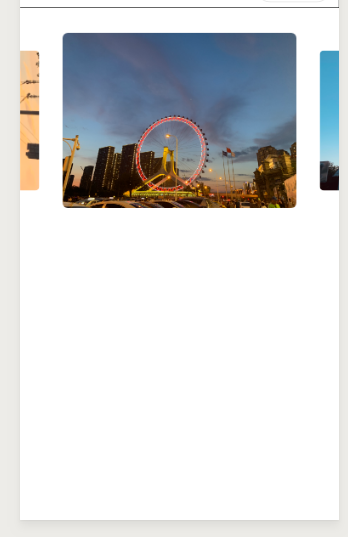
微信小程序3D轮播图的更多相关文章
- 微信小程序 - 3d轮播图组件(基础)
<!-- 目前仅支持data数据源来自banner,请看测试案例 ################ 以上三种形式轮播: 1. basic 2. 3d 3. book basic即普通轮播 3d即 ...
- 微信小程序的轮播图swiper问题
微信小程序的轮播图swiper,调用后,怎样覆盖系统的 点,达到自己想要的效果 不多说,先上一图望大家多给意见: 这个是效果图: 微信小程序效果图就成这样子: <view class=" ...
- 如何自定义微信小程序swiper轮播图面板指示点的样式
https://www.cnblogs.com/myboogle/p/6278163.html 微信小程序的swiper组件是滑块视图容器,也就是说平常我们看到的轮播图就可以用它来做,不过这个组件有很 ...
- 自定义微信小程序swiper轮播图面板指示点的样式
微信小程序的swiper组件是滑块视图容器,也就是说平常我们看到的轮播图就可以用它来做,不过这个组件有很多样式是固定的,但是,有时候我们的设计稿的面板指示点是需要个性化的,那么如何去修改swiper组 ...
- 【自定义轮播图】微信小程序自定义轮播图无缝滚动
先试试效果,可以通过设置参数调整样式 微信小程序中的轮播图可以直接使用swiper组件,如下: <swiper indicator-dots="{{indicatorDots}}&qu ...
- 小程序 swiper 轮播图滚动图片 + 视频
直奔代码主题wxml: <view class="test_box"> <swiper indicator-dots="{{indicatorDots} ...
- 微信小程序 swiper轮播 自定义indicator-dots样式
index.wxml <view class="swiperContainer"> <swiper bindchange="swiperChange&q ...
- 小程序图片轮播特效swiper(纯手打)
前言 一个月前还是用vue做微信H5,后面公司业务发展,入坑小程序,做了几款小程,跑了不少坑, 也会陆续在后面几节跟大家分享. 在这节给大家分享这个 小程序图片轮播实现方案 初步的实现思路 我要实现的 ...
- CSS3之3D轮播图
<!DOCTYPE html> <html lang="en"> <head> <meta charset="UTF-8&quo ...
随机推荐
- js实现一棵树的生长
参考链接:https://blog.csdn.net/u010298576/article/details/76609244 HTML网页源码: 1 <!DOCTYPE html> 2 & ...
- 活动精彩实录 | 阿里云刘军民(米诺):Cassandra中文社区年度回顾
点击这里观看完整视频 大家好,我是刘军民,我是阿里云数据库的产品经理,目前负责云数据库的产品规划以及相关工作.曾在2019年和多位小伙伴一起发起了中文社区,我希望有更多的小伙伴能加入到社区建设中,这样 ...
- git忽略规则以及.gitignore文件不生效解决办法
正文 Git忽略规则: #此为注释 – 内容被 Git 忽略 .sample # 忽略所有 .sample 结尾的文件 !lib.sample # 但 lib.sample 除外 /TODO # 仅仅 ...
- 《软件建模与分析》——UML基本概念
UML-基本概念 UML本质上是一种语言,语言的学习离不开基本的单词(元素)和语法(视图.模型)的学习,今天我们就从它们开始. 元素 类图中的关系 控制权限 继承 实现 依赖:一个类A使用到了另一个类 ...
- java-GUI编程学习总结
狂神说java-GUI编程学习总结 1.简介 2.AWT 2.1.实现如图1-2 (1)面向过程写法 (2)内部类写法 (3)完全改造成面向对象 3.Swing 3.1.鼠标花点 3.2.弹窗 3.3 ...
- cccc超级酱油心得
第一次线下比赛献给了cccc. 大致写写自己心得,比赛前一天晚上日常和室友在宿舍玩到11点多,洗漱上床.睡前突然想起第二天还有比赛,顿时激动加紧张.在床上刷了刷知乎和百度,看几道去年的真题,熬到了12 ...
- CSS :nth-of-type() bug
CSS :nth-of-type() bug .tools-hover-box-list-item { pointer-events: auto; box-sizing: border-box; di ...
- CURL (CommandLine Uniform Resource Locator) 简易教程!
1 http://curl.haxx.se/ http://curl.haxx.se/docs/httpscripting.html curl is an open source command li ...
- VSCode & outline & source code
VSCode & outline & source code Dart 源码学习 outline 速览 dart-core List class instance-methods ht ...
- node.js & create file
node.js & create file node js create file if not exists https://nodejs.org/api/fs.html#fs_fs_ope ...