
通过RTMP play分析FLV格式详解
最近做了一个rtmp中转服务程序,通过实践,熟悉rtmp play和push中各类格式,这里总结一下。
程序github地址: https://github.com/runner365/rtmp_relay
rtmp play接收报文分析
第一帧收到的报文:
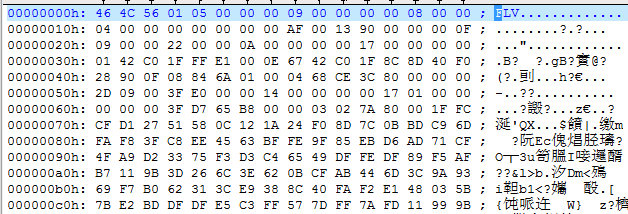
1) 0x46 4c 56:可参考文后:参考一
字符FLV头
2) 0x01 05
Version TypeFlagsReserved TypeFlagsAudio TypeFlagsReserved TypeFlagsVideo
这个解析的时候,一般不用管
3)0x00 00 00 09
FLV header offset: 也就是从开头9字节后,才是FLV真正的报文头。
4)0x00 00 00 00
这个是第1帧的PreviousTagSize0(前帧长度),因为是第一帧,所以肯定是0;
5)0x08 可参考文后:参考二,参考三
帧开头第一字节:0x08表示音频,0x09表示视频
6)0x00 00 04
帧payload长度:因为音频第一帧是ASC,所以只有4字节。
7) 0x 00 00 00 00
timestamp,时间戳
8) 0x 00 00 00
streamid,流ID
9) 0x AF 00 13 90
音频payload: 0xaf00开头的后面是asc flag, 0xaf01开头的后面是真正的音频数据
0x13 90,也就是0b0001 0011 1001 0000,
ASC flag格式:xxxx xyyy yzzz z000
x字符: aac type,类型2表示AAC-LC,5是SBR, 29是ps,5和29比较特殊ascflag的长度会变成4;
y字符: sample rate, 采样率, 7表示22050采样率
z字符: 通道数,2是双通道
10) 0x 00 00 00 0F
这个还是PreviousTagSize1,上一帧长度15bytes
11) 0x09 视频类型,新的一帧
12)0x00 00 22
视频帧payload长度
13) 0x00 00 0a 00
时间戳:这个地方有个大坑,顺序是:a[3] a[0] a[1] a[2],最后一位是最高位。
14) 0x00 00 00
streamid, 流id。
15) 0x 17 00
视频帧开头2字节:
0x17 00: 表示内容是SPS和PPS
0x17 01: 表示内容是I-FRAME
0x27: 表示内容是P-FRAME
16)
0000002bh: 17 00 00 00 00 01 42 C0 1F FF E1 00 0E 67 42 C0 ; ......B??.gB?
0000003bh: 1F 8C 8D 40 F0 28 90 0F 08 84 6A 01 00 04 68 CE ; .實@??.刯...h?
0000004bh: 3C 80 ; <€
第12, 13字节: 0x00 0E是spslen,也就是14字节长度
跳过14字节后,0x01是pps开始的标识,跳过它。
0x00 04是ppslen,也就是4个字节,最后0x68 ce 3c 80就是pps。
参考:
1, The FLV header
| Type | Comment | |
| Signature | UI8 | Signature byte always 'F' (0x46) |
| Signature | UI8 | Signature byte always 'L' (0x4C) |
| Signature | UI8 | Signature byte always 'V' (0x56) |
| Version | UI8 | File version (for example, 0x01 for FLV version 1) |
| TypeFlagsReserved | UB [5] | Shall be 0 |
| TypeFlagsAudio | UB [1] | 1 = Audio tags are present |
| TypeFlagsReserved | UB [1] | Shall be 0 |
| TypeFlagsVideo | UB [1] | 1 = Video tags are present |
| DataOffset | UI32 | The length of this header in bytes |
Signature: FLV 文件的前3个字节为固定的‘F’‘L’‘V’,用来标识这个文件是flv格式的.在做格式探测的时候,
如果发现前3个字节为“FLV”,就认为它是flv文件.
Version: 第4个字节表示flv版本号.
Flags: 第5个字节中的第0位和第2位,分别表示 video 与 audio 存在的情况.(1表示存在,0表示不存在)
DataOffset : 最后4个字节表示FLV header 长度.
2,FLV body整体
| Field | Type | Comment |
| PreviousTagSize0 | UI32 | Always 0 |
| Tag1 | FLVTAG | First tag |
| PreviousTagSize1 | UI32 |
Size of previous tag, including its header, in bytes. For FLV version1, this value is 11 plus the DataSize of the previous tag. |
| Tag2 | FLVTAG | Second tag |
| ... | ... | ... |
| PreviousTagSizeN-1 | UI32 | Size of second-to-last tag, including its header, in bytes. |
| TagN | FLVTAG | Last tag |
| PreviousTagSizeN | UI32 | Size of last tag, including its header, in bytes |
FLV header之后,就是 FLV File Body.
FLV File Body是由一连串的back-pointers + tags构成.back-pointers就是4个字节数据,表示前一个tag的size.
3,FLV body细节
| Field | Type | Comment |
| Reserved | UB [2] | Reserved for FMS, should be 0 |
| Filter | UB [1] | Indicates if packets are filtered. 0 = No pre-processing required. 1 = Pre-processing (such as decryption) of the packet is required before it can be rendered. Shall be 0 in unencrypted files, and 1 for encrypted tags. See Annex F. FLV Encryption for the use of filters. |
| TagType | UB [5] |
Type of contents in this tag. The following types are |
| DataSize | UI24 | Length of the message. Number of bytes after StreamID to end of tag (Equal to length of the tag – 11) |
| Timestamp | UI24 | Time in milliseconds at which the data in this tag applies. This value is relative to the first tag in the FLV file, which always has a timestamp of 0. |
| TimestampExtended | UI8 | Extension of the Timestamp field to form a SI32 value. This field represents the upper 8 bits, while the previous Timestamp field represents the lower 24 bits of the time in milliseconds. |
| StreamID | UI24 | Always 0. |
| AudioTagHeader | IF TagType == 8 AudioTagHeader |
|
| VideoTagHeader | IF TagType == 9 VideoTagHeader |
|
| EncryptionHeader | IF Filter == 1 EncryptionTagHeader |
|
| FilterParams | IF Filter == 1 FilterParams |
|
| Data | IF TagType == 8 AUDIODATA IF TagType == 9 VIDEODATA IF TagType == 18 SCRIPTDATA |
Data specific for each media t |
通过RTMP play分析FLV格式详解的更多相关文章
- flv格式详解+实例剖析
简介 FLV(Flash Video)是现在非常流行的流媒体格式,由于其视频文件体积轻巧.封装播放简单等特点,使其很适合在网络上进行应用,目前主流的视频网站无一例外地使用了FLV格式.另外由于当前浏览 ...
- FLV格式详解
Overview Flash Video(简称FLV),是一种流行的网络格式.目前国内外大部分视频分享网站都是采用的这种格式. File Structure 从整个文件上开看,FLV是由The FLV ...
- FLV视频封装格式详解
FLV视频封装格式详解 分类: FFMpeg编解码 2012-04-04 21:13 1378人阅读 评论(2) 收藏 举报 flvheaderaudiovideocodecfile 目录(?)[-] ...
- PNG,JPEG,BMP,JIF图片格式详解及其对比
原文地址:http://blog.csdn.net/u012611878/article/details/52215985 图片格式详解 不知道大家有没有注意过网页里,手机里,平板里的图片,事实上,图 ...
- binlog之四:mysql中binlog_format模式与配置详解,binlog的日志格式详解
mysql复制主要有三种方式:基于SQL语句的复制(statement-based replication, SBR),基于行的复制(row-based replication, RBR),混合模式复 ...
- 以太网帧格式、IP数据报格式、TCP段格式+UDP段格式 详解
转载:http://www.cnblogs.com/lifan3a/articles/6649970.html 以太网帧格式.IP数据报格式.TCP段格式+UDP段格式 详解 1.ISO开放系统有 ...
- BMP格式详解
BMP格式详解 BMP文件格式详解(BMP file format) BMP文件格式,又称为Bitmap(位图)或是DIB(Device-Independent Device,设备无关位图),是Win ...
- java分享第十五天(log4j 格式详解)
log4j 格式详解 log4j.rootLogger=日志级别,appender1, appender2, -. 日志级别:ALL<DEBUG<INFO<WARN<ERRO ...
- php 序列化(serialize)格式详解
1.前言 PHP (从 PHP 3.05 开始)为保存对象提供了一组序列化和反序列化的函数:serialize.unserialize.不过在 PHP 手册中对这两个函数的说明仅限于如何使用,而对序列 ...
随机推荐
- 从零开始学习jQuery (三) 管理jQuery包装集
本系列文章导航 从零开始学习jQuery (三) 管理jQuery包装集 一.摘要 在使用jQuery选择器获取到jQuery包装集后, 我们需要对其进行操作. 本章首先讲解如何动态的创建元素, 接着 ...
- HTTP请求方法详解
HTTP请求方法详解 请求方法:指定了客户端想对指定的资源/服务器作何种操作 下面我们介绍HTTP/1.1中可用的请求方法: [GET:获取资源] GET方法用来请求已被URI识别的资源.指定 ...
- 一个简单的inno setup模板
一.模板代码 基本功能包括多路径安装.多语言.自定义图标. [Setup] ShowLanguageDialog=yes AppCopyright=Copyright Reserved(C) , 36 ...
- WCF学习系列三--【WCF Interview Questions – Part 3 翻译系列】
http://www.topwcftutorials.net/2012/10/wcf-faqs-part3.html WCF Interview Questions – Part 3 This WCF ...
- C#基础-out与ref字段
using System; using System.Collections.Generic; using System.Linq; using System.Text; namespace Cons ...
- Angularjs真是个好东西
事件篇: 实例:(点击按钮内容加1) <!DOCTYPE html><html><head><meta charset="utf-8"&g ...
- 一款css3很美的iphone注册表单样式
代码如下,保存到html文件打开: <!DOCTYPE html> <html lang=""> <head> <title>Ani ...
- 基于.net mvc 的供应链管理系统(YB-SCM)开发随笔1-开篇
作为开篇之作,先把这个项目的介绍和一些技术点给各位. 1.项目所用到的技术 (1)前台展示:ASP.NET MVC 3.0+Jquery+Sea+Bootstrap等 (2)开发环境:VS2012/V ...
- 使用NPOI读取Excel到DataTable
一.NPOI介绍: 使用 NPOI 你就可以在没有安装 Office 或者相应环境的机器上对 WORD/EXCEL 文档进行读写.NPOI是构建在POI 3.x版本之上的,它可以在没有安装Office ...
- 获取SqlServer存储过程定义的3种方法
第一种: declare @p_text varchar(max) SELECT @p_text= text FROM syscomments WHERE id = ( SELECT id FROM ...