
【Cocos2d-x for WP8 学习整理】(4)CCTableView 实现《天天爱消除》中的得分榜
接上回 CCScrollView 继续,在GUI 里还有个 CCScrollView 的子类---CCTableView 。 这个名字应该是从 IOS 里的 UITableView来的,其实是跟WP8的 Listbox 效果一样,实现
大数据的虚拟化展示, 不管在应用还是游戏里都是很常见的控件。 比如下面的 《天天爱消除》 的分数展示
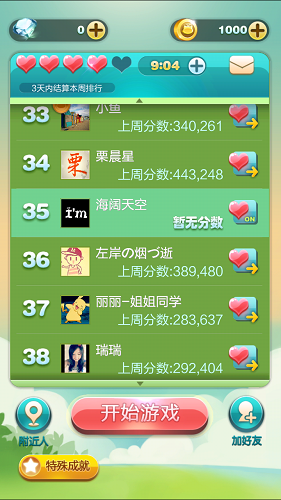
下面我们用 CCTableView 一步步实现上面的效果,
一、创建承载它的容器
我们选用一个Layer,
class ListViewLayer : public cocos2d::CCLayer, public cocos2d::extension::CCTableViewDataSource, public cocos2d::extension::CCTableViewDelegate

{

public:

    virtual bool init();


    virtual void scrollViewDidScroll(cocos2d::extension::CCScrollView* view);

    virtual void scrollViewDidZoom(cocos2d::extension::CCScrollView* view);

    //处理触摸事件

    virtual void tableCellTouched(cocos2d::extension::CCTableView* table, cocos2d::extension::CCTableViewCell* cell);

    //每一项的宽度和高度

    virtual cocos2d::CCSize cellSizeForTable(cocos2d::extension::CCTableView *table);

    //生成列表每一项的内容

    virtual cocos2d::extension::CCTableViewCell* tableCellAtIndex(cocos2d::extension::CCTableView *table, unsigned int idx);

    //一共多少项

    virtual unsigned int numberOfCellsInTableView(cocos2d::extension::CCTableView *table);

    CREATE_FUNC(ListViewLayer);

};
该 Layer 实现了 CCTableViewDataSource 和 CCTableViewDelegate 这两个接口,
分别为 CCTableView 提供数据源 和 响应事件,后面会作为 CCTableView 的 Delegate 存在
二、 创建并添加 CCTableView 对象
bool ListViewLayer::init()

{

    bool bRet = false;

    do

    {

        CC_BREAK_IF( !CCLayer::init() );

        bg = CCTextureCache::sharedTextureCache()->addImage("bg.png");

        bg2 = CCTextureCache::sharedTextureCache()->addImage("bg2.png");

        CCSize visibleSize = CCDirector::sharedDirector()->getVisibleSize();

        CCTableView* pTableView = CCTableView::create(this, CCSizeMake(visibleSize.width, visibleSize.height));

        pTableView->setDirection(kCCScrollViewDirectionVertical);

        pTableView->setPosition(CCPointZero);

        pTableView->setDelegate(this);  //将Delegate对象设置为刚才创建的容器.

        pTableView->setVerticalFillOrder(kCCTableViewFillTopDown);

        this->addChild(pTableView);

        pTableView->reloadData();

        bRet = true;

    }

    while();

    return bRet;

}
三、 为CCTableView提供数据
首先要 通过 numberOfCellsInTableView 指定 TableView 的单元个数,然后在 cellSizeForTable 里指定具体的单元格的尺寸大小,最后在 tableCellAtIndex 里控制每个单元格的具体数据。
代码如下:
unsigned int ListViewLayer::numberOfCellsInTableView(CCTableView *table)

{

    return ;

}

CCSize ListViewLayer::cellSizeForTable(CCTableView *table)

{

    return CCSizeMake(CCDirector::sharedDirector()->getVisibleSize().width, );

}

CCTableViewCell* ListViewLayer::tableCellAtIndex(CCTableView *table, unsigned int idx)

{

    CCSize visibleSize = CCDirector::sharedDirector()->getVisibleSize();

    CCString *pString = CCString::createWithFormat("%d", idx + );

    //这里要注意,因为是单元格是会重用的,所以不一定每次都要新建。

    CCTableViewCell *pCell = table->dequeueCell();

    if (!pCell)

    {

        pCell = new CCTableViewCell();

        pCell->autorelease();

        //Add background.

        CCSprite *pSprite;

        if(UserIndex == idx)

        {

            pSprite = CCSprite::createWithTexture(bg2);

        }

        else

        {

            pSprite = CCSprite::createWithTexture(bg);

        }

        pSprite->setAnchorPoint(CCPointZero);

        pSprite->setPosition(CCPointZero);

        pSprite->setTag();

        pCell->addChild(pSprite);

        //Add Icon.

        pSprite = CCSprite::create("Icon.png");

        pSprite->setPosition(ccp(, ));

        pCell->addChild(pSprite);

        //Add Rate.

        CCLabelTTF *pLabel = CCLabelTTF::create(pString->getCString(), "Arial", 70.0);

        pLabel->setPosition(ccp(, ));

        pLabel->setTag();

        pCell->addChild(pLabel);

        //Add Name.

        pLabel = CCLabelTTF::create("Ghost Person", "Arial", 40.0);

        pLabel->setPosition(ccp(, ));

        pLabel->setAnchorPoint(CCPointZero);

        pLabel->setTag();

        pCell->addChild(pLabel);

    }

    else

    {

        CCLabelTTF *pLabel = (CCLabelTTF*)pCell->getChildByTag();

        pLabel->setString(pString->getCString());

        if(UserIndex == idx)//根据ID创建不同的效果.

        {

            CCSprite* bg3 = (CCSprite*)pCell->getChildByTag();

            bg3->setTexture(bg2);

        }

        else

        {

            CCSprite* bg3 = (CCSprite*)pCell->getChildByTag();

            bg3->setTexture(bg);

        }

    }

    return pCell; }
就这三步,大功告成了,附上效果图:
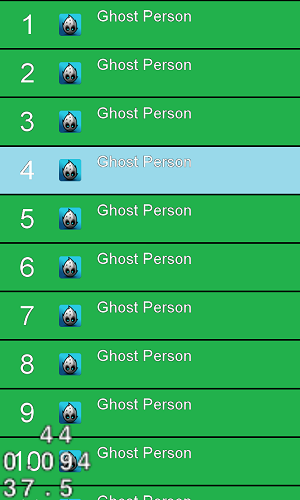
丑是丑了一点啊,不过已经基本成型了。
而且发现在920上滑动的时候只有30帧左右,不知道其他手机如何,后面具体再测。
欢迎有兴趣的童鞋加入Cocos2d-x 开发群 qq: 264152376
【Cocos2d-x for WP8 学习整理】(4)CCTableView 实现《天天爱消除》中的得分榜的更多相关文章
- 【Cocos2d-x for WP8 学习整理】(5)文字显示全整理
学习 Cocos2d-x 有一阵了,现在要做个小东西,第一步就遇到了文字展示的问题,于是想把可能遇到的问题统统整理一下.这一部分也不局限于wp8,全平台应该都是一个解决方案. 先在脑袋里大致想了一下, ...
- 【Cocos2d-x for WP8 学习整理】(2)Cocos2d-Html5 游戏 《Fruit Attack》 WP8移植版 开源
这一阵花了些时间,把 cocos2d-html5 里的sample 游戏<Fruit Attack>给移植到了WP8上来,目前已经实现了基本的功能,但是还有几个已知的bug,比如WP8只支 ...
- 【Cocos2d-x for WP8 学习整理】(1)创建一个新项目
喜大普奔 10.1假期之前看到了一个很振奋的消息,就是随着Cocos2d-x 2.2的发布,WP8/WIN8有史以来第一次的合并到主版本了. 之前 V2 ...
- 【Cocos2d-x for WP8 学习整理】(3)CCScrollView 实现捕鱼达人一样的场景选择界面
UI 界面一般是游戏里比较独立的地方,因为游戏引擎一般都比较注意基础的功能封装,很少会关注UI,但是 UI 确是玩家第一眼看到的效果,因此能否实现一个美观的UI对于提升游戏的整体美观有着很大的帮助. ...
- [Cocos2d-x for WP8学习笔记] HelloWorld结构分析
先来看一下目录结构: Assets:游戏资源文件,图片音频等,Resource文件夹也有类似功能 include:用于放置游戏头文件 Shaders:渲染器着色器文件(大雾) cocos2dorig. ...
- js数组学习整理
原文地址:js数组学习整理 常用的js数组操作方法及原理 1.声明数组的方式 var colors = new Array();//空的数组 var colors = new Array(3); // ...
- TweenMax学习整理--特有属性
TweenMax学习整理--特有属性 构造函数:TweenMax(target:Object, duration:Number, vars:Object) target:Object -- 需要缓 ...
- HttpClient学习整理
HttpClient简介HttpClient 功能介绍 1. 读取网页(HTTP/HTTPS)内容 2.使用POST方式提交数据(httpClient3) 3. 处理页面重定向 ...
- [Cocos2d-x for WP8学习笔记] HelloWorld
Cocos2d-x 是一个支持多平台的 2D 手机游戏引擎,使用 C++ 开发,基于OpenGL ES,基于Cocos2d-iphone,支持 WOPhone, iOS 4.1, Android 2. ...
随机推荐
- [CG编程] 基本光照模型的实现与拓展以及常见光照模型解析
0.前言 这篇文章写于去年的暑假.大二的假期时间多,小组便开发一个手机游戏的项目,开发过程中忙里偷闲地了解了Unity的shader编写,而CG又与shaderLab相似,所以又阅读了<CG教程 ...
- LNMP搭建(yum)
CentOS官方镜像不提供nginx,http://nginx.orghttp://nginx.org/en/linux_packages.html#stable yum install nginx ...
- asp.net form身份认证不定时认证失败的问题 排查
1.网站出现form认证不定时认证失败.登陆过后 每隔一会儿就需要重新登陆.首先检查的是form身份认证票据设置的时间(正常) 然后检查加密后的身份认证信息写入的cookie的失效时间(正常) 2.这 ...
- BigDecimal 加减乘除
BigDecimal bignum1 = new BigDecimal("10"); BigDecimal bignum2 = new BigDecimal("5&quo ...
- js 日期时间排序 数组
不多说直接show代码 var timeArr=[ {'id':'A01','date':'2016-04-20 23:22:11'}, {'id':'A02','date':'2016-04-21 ...
- python 之 PIP 安装
1.安装的必备包 pip 和 setuptool 都要有, 这个可以从python.org网站下载 // setuptool 安装 下载地址 https://pan.baidu.com/s/1gf ...
- openerp7 时区问题
由于目前openerp 的时区,读取的是UTC 时间,而我国本地时间比UTC 快8小时,这个问题就导致:写入数据库的时候时间相差8小时,以及Openerp日志输出时间格式也相差8小时和 前端显示时间的 ...
- Unity unsafe
http://answers.unity3d.com/questions/23307/is-it-impossible-to-use-the-code-with-keyword-unsa.html 可 ...
- 添加删除表格append或 createElement
方法一: js代码:增加一行五列的表格 function AddList(){ $len= document.getElementsByName('goods_name[]').length; obj ...
- IIS错误处理集合
1.编译器错误消息: CS0016: 未能写入输出文件“c:\Windows\Microsoft.NET\Framework\v2.0.50727\Temporary ASP.NET Files\ya ...