
Vulkan SDK之 Swapchain
Swapchain是一系列最终会展示给用户的图像的集合。
/*
* Set up swapchain:
* - Get supported uses for all queues
* - Try to find a queue that supports both graphics and present
* - If no queue supports both, find a present queue and make sure we have a
* graphics queue
* - Get a list of supported formats and use the first one
* - Get surface properties and present modes and use them to create a swap
* chain
* - Create swap chain buffers
* - For each buffer, create a color attachment view and set its layout to
* color attachment
*/
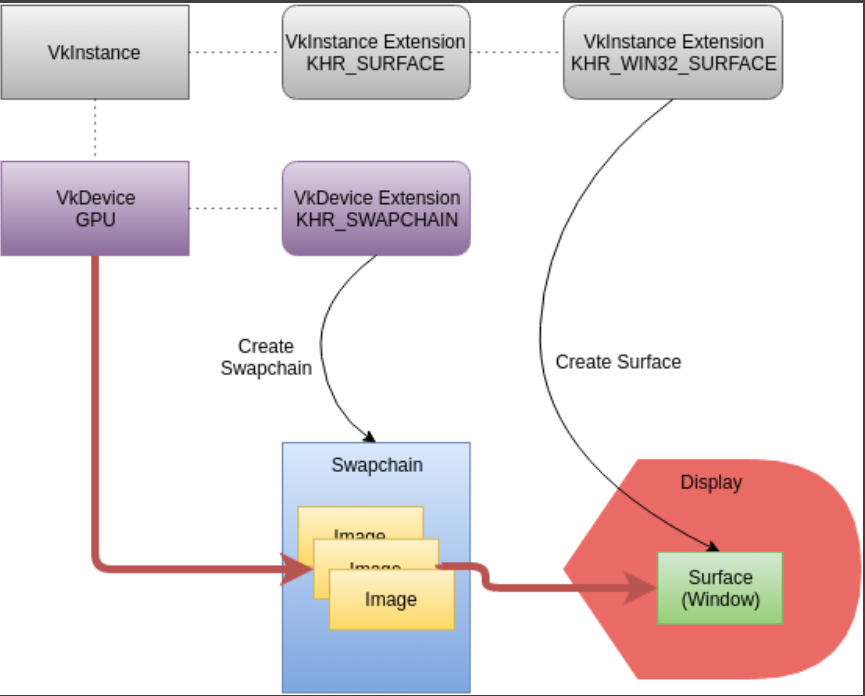
Vulkan and the Windowing System
1、跟其他图形API不同,vulkan 将window相关的操作和图形核心的API隔离;窗口使用对应的扩展,KHR 代表了这是一种Khronos Extension.
VK_USE_PLATFORM_ANDROID_KHR - Android

VK_USE_PLATFORM_WAYLAND_KHR - Wayland

VK_USE_PLATFORM_WIN32_KHR - Microsoft Windows

VK_USE_PLATFORM_XCB_KHR - X Window System, using the XCB library

VK_USE_PLATFORM_XLIB_KHR - X Window System, using the Xlib library
2、VkSurfaceKHR 是对原生平台设备表面或者窗口的一种抽象;
Revisiting Instance and Device Extensions
Instance Extensions
Device Extensions
1、swapchain只是一系列需要展示的图片,具体要将这些图片显示到显示器上,需要硬件进行操作,这个时候需要用到 VK_KHR_SWAPCHAIN_EXTENSION_NAME;
Queue Family and Present
1、vkQueuePresentKHR() 需要找到一个同时指出graphics和present的famaliy;
Device Surface Formats
1、 VkSurfaceFormatKHR 能获取当前显示设备指出的VkFormat;
Surface Capabilities
1、Swapchain的创建需要提供一些额外的信息,可以通过vkGetPhysicalDeviceSurfaceCapabilitiesKHR() 和 vkGetPhysicalDeviceSurfacePresentModesKHR()获取;
2、 minImageCount用来决定当前使用的是双缓冲还是三缓冲区。 双缓冲区一个render,一个present; 三缓冲区一个用来present,其他两个用来render;
Different Queue Families for Graphics and Present
1、如果graphics queue和 present queue family是不同的,需要做一些额外的工作可以让imagine在各个queue之间进行共享;
swapchain_ci.imageSharingMode = VK_SHARING_MODE_EXCLUSIVE;

swapchain_ci.queueFamilyIndexCount = ;

swapchain_ci.pQueueFamilyIndices = NULL;

uint32_t queueFamilyIndices[] = {

    (uint32_t)info.graphics_queue_family_index,

    (uint32_t)info.present_queue_family_index};

if (info.graphics_queue_family_index != info.present_queue_family_index) {

    // If the graphics and present queues are from different queue families,

    // we either have to explicitly transfer ownership of images between the

    // queues, or we have to create the swapchain with imageSharingMode

    // as VK_SHARING_MODE_CONCURRENT

    swapchain_ci.imageSharingMode = VK_SHARING_MODE_CONCURRENT;

    swapchain_ci.queueFamilyIndexCount = ;

    swapchain_ci.pQueueFamilyIndices = queueFamilyIndices;

}
Create Swapchain
1、vkCreateSwapchainKHR 创建了一系列的图像来组成swapchain,但在实际使用的过程中,我们需要告诉GPU当前使用的是哪个image,这个时候就用到如下的接口vkGetSwapchainImagesKHR;通过这个接口你可以获得
一系列images的handle;
Create Image Views
1、swapchain是一系列的images,但是当我们需要使用这些image的时候,我们就需要为image创建imagin view。 “view”用来告诉vulkan如何使用这些imagin。
2、VkImageViewCreateInfo 用来创建所需的imageview;
Vulkan SDK之 Swapchain的更多相关文章
- Vulkan SDK Demo 之一 熟悉
DiligentEngine的API是D3d11和D3D12风格的,vulkan也被封装成了这种风格的API. 在了解Diligent Engine是如何对vulkan进行封装之前,我准备先学习下Vu ...
- Vulkan SDK 之 Instance
上一篇 Vulkan SDK Demo 熟悉 粗略的了解了下,一个app是如何调用vulkan的api来展示一个立方体的,但是对其中的每一个api了解并不深刻,后面的系列会根据sample的tutor ...
- Vulkan SDK 之 Depth Buffer
深度缓冲是可选的,比如渲染一个3D的立方体的时候,就需要用到深度缓冲.Swapchain就算有多个images,此时深度缓冲区也只需要一个.vkCreateSwapchainKHR 会创建所有需要的i ...
- Vulkan SDK 之 DrawCube
Waiting for a Swapchain Buffer Beginning the Render Pass Bind the Pipeline Bind the Descriptor Sets ...
- Vulkan SDK之 FrameBuffer
The Vulkan Framebuffer Framebuffers represent a collection of memory attachments that are used by a ...
- Vulkan SDK 之 Shaders
Compiling GLSL Shaders into SPIR-V 1.SPIR-V 是vulkan的底层shader语言.GLSL可以通过相关接口转换为SPIR-V. Creating Vulka ...
- Vulkan SDK 之Render Pass
Create a Render Pass A render pass describes the scope of a rendering operation by specifying the co ...
- Vulkan SDK 之 Descriptor Set Layouts and Pipeline Layouts
当我们有了一个uniform buff之后,vulkan 还不知道这个信息,需要通过descriptor进行描述. Descriptors and Descriptor Sets A descript ...
- Vulkan SDK 之 Device
Enumerate Physical Devices Vulkan instance创建完成之后,vulkan loader是知道你有几个物理设备(显卡),但是程序不知道,需要通过 相关接口获取设备 ...
随机推荐
- PyCharm 2018.1破解激活步骤
1.下载破解补丁 下载地址:https://pan.baidu.com/s/1qjI9uHaw0x374rwu6H8djA 将下载下来的破解补丁放到C:\software\JetBrains\PyCh ...
- JForum项目搭建
JForum 是采用Java开发的功能强大且稳定的论坛系统.它提供了抽象的接口.高效的论坛引擎以及易于使用的管理界面,同时具有完全的权限控制.多语言支持(包括中文).高性能.可自定义的用户接口.安全. ...
- MQTT 协议学习: QoS等级 与 会话
背景 QoS 等级 与 通信的流程有关,直接影响了整个通信.而且篇幅比较长,所以我觉得应该单独拎出来讲一下. 概念 QoS 代表了 服务质量等级. 设置上,由2 位 的二进制控制,且值不允许为 3(0 ...
- office2019激活办法
@echo off (cd /d "%~dp0")&&(NET FILE||(powershell start-process -FilePath '%0' -ve ...
- Linux的几种关机命令
在linux下一些常用的关机/重启命令有shutdown.halt.reboot.及init,它们都可以达到重启系统的目的,但每个命令的内部工作过程是不同的,通过本文的介绍,希望你可以更加灵活的运用各 ...
- epoll源码分析(基于linux-5.1.4)
API epoll提供给用户进程的接口有如下四个,本文基于linux-5.1.4源码详细分析每个API具体做了啥工作,通过UML时序图理清内核内部的函数调用关系. int epoll_create1( ...
- Java的equals方法的使用技巧
Java的equals方法的使用技巧 1.业务场景: 在某个社交软件中,要求每个用户的用户名(name)必须独一无二,那么在每次增加新用户的时候,都要对该用户的注册名进行判断,如果当前用户名已经被占用 ...
- LabVIEW面向对象的ActorFramework(2)
二.为什么要学习面向编程? 面向对象编程,如果将上文推荐的两本书读完后,基本上也就有了答案.从自我产品开发的经验中,理解为可以迅速解决中大型程序需求变化时,在不影响其他程序功能的情况下,能够实现新增功 ...
- 杭电oj1860:统计字符(字符串hash / 水题)
统计字符 题目链接 Time Limit: 1000/1000 MS (Java/Others) Memory Limit: 32768/32768 K (Java/Others) Problem D ...
- BottomTabBar 套用 recycleview出错问题
原来不是用这个框架的 是一个不知名的github开源类 开始感觉很不错 后来套用recycleview就出错应该是碎片关系没处理好 ,后来用bottomtabbar 他的傻逼思想深深撼动了我, ...