
007.Delphi插件之QPlugins,插件的卸载和重新加载
效果图如下,可以反复卸载和重新加载。QPlugins这个插件,还没弄明白,摸索着跟着DEMO写
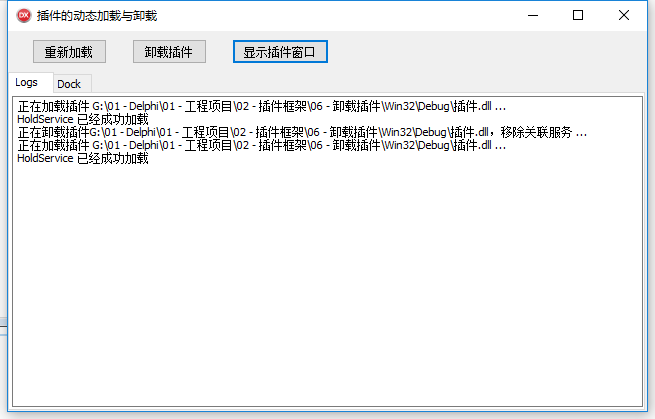
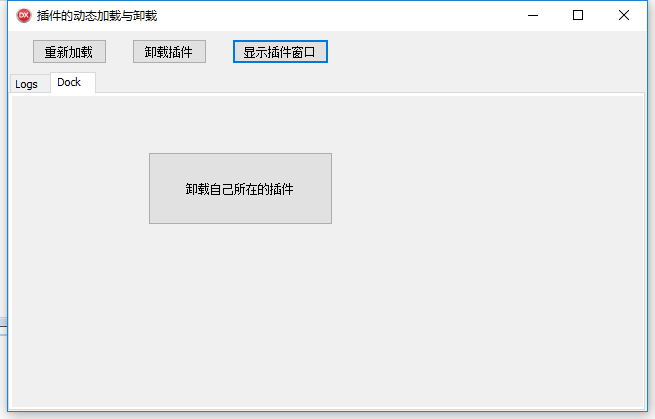
主窗口代码如下
unit Frm_Main;

interface

uses

  Winapi.Windows,

  Winapi.Messages,

  System.SysUtils,

  System.Variants,

  System.Classes,

  Vcl.Graphics,

  Vcl.Controls,

  Vcl.Forms,

  Vcl.Dialogs,

  Vcl.StdCtrls,

  Vcl.ExtCtrls,

  QPlugins,

  qplugins_base,

  qplugins_params,

  qplugins_loader_lib,

  Vcl.ComCtrls,

  qplugins_formsvc,

  qplugins_vcl_formsvc;

{ 要安全的移除一项服务,则使用该服务的模块必需实现IQNotify接口,并对NID_PLUGIN_UNLOADING

  通知的响应,并在通知里移除掉到服务的引用,以便插件能够被安全的释放。

  如果需要在某个插件注册后,引用某项服务,可以响应NID_PLUGIN_LOADED通知,在其中查询新的

  服务实例并记录它

}

type

  TForm_Main = class(TForm, IQNotify)

    Panel1: TPanel;

    Button1: TButton;

    Button2: TButton;

    PageControl1: TPageControl;

    TabSheet1: TTabSheet;

    TabSheet2: TTabSheet;

    mmLogs: TMemo;

    Button3: TButton;

    procedure FormCreate(Sender: TObject);

    procedure FormDestroy(Sender: TObject);

    procedure Button1Click(Sender: TObject);

    procedure Button2Click(Sender: TObject);

    procedure Button3Click(Sender: TObject);

  private

    { Private declarations }

    // 服务接口

    FHoldService: IQService;

    // 在通知发生时,通知响应函数接口。IQNotify接口中定义的函数,子类来实现这个函数

    procedure Notify(const AId: Cardinal; AParams: IQParams; var AFireNext: Boolean); stdcall;

  public

    { Public declarations }

  end;

var

  Form_Main: TForm_Main;

implementation

{$R *.dfm}

// 按钮_重新加载

procedure TForm_Main.Button1Click(Sender: TObject);

var

  AFileName: string;

  ALoader: IQLoader;

begin

  // DLL插件的全名

  AFileName := ExtractFilePath(Application.ExeName) + '插件.dll';

  // 如果DLL文件存在

  if FileExists(AFileName) then

  begin

    // ByPath通过路径获取指定的服务接口实例

    ALoader := PluginsManager.ByPath('/Loaders/Loader_DLL') as IQLoader;

    if Assigned(ALoader) then

    begin

      // 加载服务

      ALoader.LoadServices(PWideChar(AFileName));

    end;

  end;

end;

// 按钮_卸载插件

procedure TForm_Main.Button2Click(Sender: TObject);

var

  AModule: HMODULE;

  ALoader: IQLoader;

  // 取服务模块

  function ServiceModule: HMODULE;

  begin

    if Assigned(FHoldService) then

      Result := FHoldService.GetOwnerInstance

    else

    begin

      Result := ;

    end;

  end;

begin

  // 取服务模块

  AModule := ServiceModule;

  // 如果模块存在

  if AModule <>  then

  begin

    // 通过路径获取指定的服务接口实例

    ALoader := PluginsManager.ByPath('/Loaders/Loader_DLL') as IQLoader;

    if Assigned(ALoader) then

    begin

      // 卸载这个服务

      ALoader.UnloadServices(AModule);

    end;

  end;

end;

// 按钮_显示窗体

procedure TForm_Main.Button3Click(Sender: TObject);

var

  // 窗体服务的接口

  AFormService: IQFormService;

begin

  // 获取指定路径的服务实例(如果是多实例,则返回一个用于提供服务的新实例)

  if GetService('Services/Forms/DynamicLoadForm', IQFormService, AFormService) then

  begin

    // 嵌入窗体到父窗口的特定的位置

    AFormService.DockTo(TabSheet2.Handle, faContent);

  end;

end;

// 创建

procedure TForm_Main.FormCreate(Sender: TObject);

begin

  //

  with PluginsManager as IQNotifyManager do

  begin

    // Subscribe订阅通知

    Subscribe(NID_PLUGIN_LOADING, Self);

    Subscribe(NID_PLUGIN_UNLOADING, Self);

    Subscribe(NID_PLUGIN_LOADED, Self);

  end;

  // 加载同目录DLL

  PluginsManager.Loaders.Add(TQDLLLoader.Create(ExtractFilePath(Application.ExeName), '.dll'));

  // 启动所有的加载器加载支持的插件

  PluginsManager.Start;

end;

// 销毁

procedure TForm_Main.FormDestroy(Sender: TObject);

begin

  with PluginsManager as IQNotifyManager do

  begin

    // 取消订阅通知

    Unsubscribe(NID_PLUGIN_LOADING, Self);

    Unsubscribe(NID_PLUGIN_UNLOADING, Self);

    Unsubscribe(NID_PLUGIN_LOADED, Self);

  end;

end;

// 在通知发生时,通知响应函数接口。IQNotify接口中定义的函数,子类来实现这个函数

procedure TForm_Main.Notify(const AId: Cardinal; AParams: IQParams; var AFireNext: Boolean);

var

  AParam: IQParam;

begin

  if Assigned(AParams) then

  begin

    // 根据传入的参数,进行不同的输出

    case AId of

      // 加载

      NID_PLUGIN_LOADING:

        begin

          // 取DLL插件全路径

          AParam := AParams.ByName('File');

          mmLogs.Lines.Add('正在加载插件 ' + ParamAsString(AParam) + ' ...');

        end;

      // 加载完成

      NID_PLUGIN_LOADED:

        begin

          // 服务接口赋值

          FHoldService := PluginsManager.ByPath('Services/HoldService');

          if Assigned(FHoldService) then

          begin

            mmLogs.Lines.Add('HoldService 已经成功加载');

          end;

        end;

      // 卸载

      NID_PLUGIN_UNLOADING:

        begin

          // 取DLL插件全路径

          AParam := AParams.ByName('Instance');

          if Assigned(AParam) and (FHoldService.GetOwnerInstance = AParam.AsInt64) then

          begin

            FHoldService := nil;

            AParam := AParams.ByName('File');

            mmLogs.Lines.Add('正在卸载插件' + ParamAsString(AParam) + ',移除关联服务 ...');

          end;

        end;

    end;

  end;

end;

end.
DLL的界面代码如下
unit Frm_Dll;

interface

uses

  Winapi.Windows,

  Winapi.Messages,

  System.SysUtils,

  System.Variants,

  System.Classes,

  Vcl.Graphics,

  Vcl.Controls,

  Vcl.Forms,

  Vcl.Dialogs,

  QPlugins,

  qplugins_vcl_formsvc,

  Vcl.StdCtrls;

type

  TForm_Dll = class(TForm)

    Button1: TButton;

    procedure Button1Click(Sender: TObject);

  private

    { Private declarations }

  public

    { Public declarations }

  end;

var

  Form_Dll: TForm_Dll;

implementation

{$R *.dfm}

// 按钮_卸载服务

procedure TForm_Dll.Button1Click(Sender: TObject);

begin

  // 卸载服务

  UnloadServices(HInstance, False);

end;

initialization

// 初始化时,加载插件

RegisterFormService('Services/Forms', 'DynamicLoadForm', TForm_Dll, False);

finalization

// 卸载插件

UnregisterServices('Services/Forms', ['DynamicLoadForm']);

end.
自带了一个pas文件,不知道是干嘛用的
unit holdservice;

interface

uses

  qstring,

  qplugins,

  qplugins_params;

type

  // 这个只是用来测试,实际上什么也不干

  THoldService = class(TQService)

  end;

implementation

initialization

// 注册

RegisterServices('/Services', [THoldService.Create(NewId, 'HoldService')]);

finalization

// 注销

UnregisterServices('/Services', ['HoldService']);

end.
007.Delphi插件之QPlugins,插件的卸载和重新加载的更多相关文章
- IDEA下利用Jrebel插件实现JFinal项目main方法【热加载】
IDEA下利用Jrebel插件实现JFinal项目main方法[热加载] Jrebel破解办法 https://github.com/ilanyu/ReverseProxy/releases/tag/ ...
- 利用MEF实现插件机制(可根据输入类型来加载特定dll)
最近在做PACS的项目中想利用插件来加载各个不同的SCP的操作实现.比如Worklist的查询数据库,可以有多个实现. 比如MPPS的更新,也可以有多个实现. 为了统一弹性处理插件模块,增加了类型输入 ...
- H5页面基于iScroll.js插件实现下拉刷新,上拉加载更多
前言 在我之前的项目中,页面总是干巴巴的,用户的体验不是特别完美,我也是一直觉得把设计师给到的psd做出来就好,很少考虑用户的感受.我喜欢看不同的App,操作每个步骤,观赏每个能和我互动的交互设计效果 ...
- 基于.NET MVC的高性能IOC插件化架构(二)之插件加载原理
上一篇博文简单介绍了下插件化的代码组成部分:http://www.cnblogs.com/gengzhe/p/4390932.html,源码地址:https://github.com/luohuazh ...
- Qt插件热加载-QPluginLoader实现
上一篇C++消息框架-基于sigslot文章中我们讲述了使用sigslot信号槽实现自己的消息框架,这是一个比较粗糙,而且小的框架.当我们的程序逐渐变大时,我们可能就会考虑功能插件化,或者支持某些模块 ...
- 使用 .NET Core 3.0 的 AssemblyLoadContext 实现插件热加载
一般情况下,一个 .NET 程序集加载到程序中以后,它的类型信息以及原生代码等数据会一直保留在内存中,.NET 运行时无法回收它们,如果我们要实现插件热加载 (例如 Razor 或 Aspx 模版的热 ...
- 使用jOrgChart插件, 异步加载生成组织架构图
jOrgChart插件是一个用来实现组织结构图的Jquery的插件- 一.特点 1.支持拖拽修改子节点: 2.支持节点缩放展示: 3.方便修改css定义样式: 4.超轻量型: 5.兼容性好,基本支持所 ...
- 集成iscroll 下拉加载更多 jquery插件
一个插件总是经过了数月的沉淀,不断的改进而成的.最初只是为了做个向下滚动,自动加载的插件.随着需求和功能的改进,才有了今天的这个稍算完整的插件. 一.插件主功能: 1.下拉加载 2.页面滚动到底部自动 ...
- 在NPAPI开发火狐浏览器插件在NPAPI插件
1.插件是什么 插件是一种遵循一定规范的应用程序接口编写出来的程序.插件必须依附于一个宿主程序,为宿主程序提供增强功能.插件的种类有很多,这里主要讨论浏览器插件. IE下利用OLE和COM技术开发的浏 ...
随机推荐
- 新手如何配置 Chromedriver 环境变量
有一个不错的链接:https://blog.csdn.net/qq_41429288/article/details/80472064
- openstack搭建之旅(原创)
1.什么是openstack是一个集中管理虚拟机的平台,整合了各种虚拟化的技术.虚拟机的具体创建交给具体的虚拟化技术实现,而Openstack是整合这些虚拟化技术,提供一个统一管理的视图,对虚拟机进行 ...
- Java基础 -2.5
布尔数据boolean类型 布尔类型的取值范围只有两个数据:true false. public class ddd { public static void main(String[] args) ...
- Codeforces 1260 ABC
DEF 题对于 wyh 来说过于毒瘤,十分不可做. A. Heating Description: 给定\(a,b\),将\(b\)分成至少\(a\)个正整数,使这些正整数的平方和最小. Soluti ...
- redis 之redis发布订阅
Redis 通过 PUBLISH . SUBSCRIBE 等命令实现了订阅与发布模式. 一个Publisher,多个Subscriber模型 如下图所示,可以作为消息队列或者消息通道 主要应用: 一个 ...
- Python连载60-Tkinter布局、按钮以及属性详解
一.Tkinter 1.组件的大致使用步骤 (1)创建总面板 (2)创建面板上的各种组件: i.指定组件的父组件,即依附关系:ii.利用相应的属性对组件进行设置:iii.给组件安排布局. (3)同步 ...
- js面试代码中的“坑”
1.typeof 对类型的判断 (function() { return typeof arguments; } )(); 答案:"Object" 解释:arguments是一个伪 ...
- 02-01 Android学习进度报告一
前两天,刚刚安装好有关Android开发有关的软件并配好了环境,有一些体会想要发表. 首先我了解到有一款专门用于Android开发的软件,叫做Android Studio ,是一个IDE集成软件 于是 ...
- 9月Win10杀软大PK
导读 严格来说,Windows 10 并不存在“裸奔”一说,因为自带的 Defender 安全中心已经是越来越强大. 来自独立机构 AV-Comparatives 的 9 月份评测报告显示,Windo ...
- 转:Nginx 性能优化有这篇就够了!
目录: https://mp.weixin.qq.com/s/YoZDzY4Tmj8HpQkSgnZLvA 1.Nginx运行工作进程数量 Nginx运行工作进程个数一般设置CPU的核心或者核心数x2 ...