
flask之Flask特殊装饰器
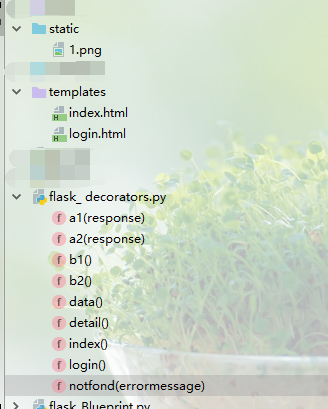
flask_decorators.py
 '''

 Flask中的特殊装饰器:

     (1)@app.before_request

         请求到达视图函数之前,进行自定义操作,类似django中间件中的process_request,在app中使用则为全局,在蓝图中使用则针对当前蓝图

         注意正常状态下return值必须为None

     (2)@app.after_request

         响应返回到达客户端之前,进行自定义操作,类似jango中间件中的process_response,在app中使用则为全局,在蓝图中使用则针对当前蓝图

         注意正常状态下视图函数必须定义一个形参接收response对象,并通过return response返回

     (3)@app.errorhandler()

         错误状态码捕获执行函数,装饰器参数务必是4xx或者5xx的int型错误状态码

     (4)@app.template_global() :定义装饰全局模板可用的函数,直接可在模板中进行渲染使用

        @app.template_filter(): 定义装饰全局模板可用的过滤器函数,类似django中的自定义过滤器,直接可在模板中使用

         两个特殊装饰器主要用在模板渲染,详情使用见falsk学习中的jinjia2学习

 '''

 import os

 from flask import Flask, render_template, session, redirect, request, send_file

 app = Flask(__name__)

 app.debug = True

 app.secret_key = 'sdfghjhg1234'

 # (1)@app.before_request请求达到视图函数之前装饰器函数,正常状态务必return None

 @app.before_request

 def b1():

     print('b1')

     urls = ['/login']

     if request.path in urls:

         return None

     if session.get('username'):

         return None

     else:

         return redirect('/login')

 @app.before_request

 def b2():

     print('b2')

     return None

 # (2)@app.after_request响应到达客户端之前装饰器函数,正常状态被装饰函数必须定义一个形参来接收response,务必return response

 @app.after_request

 def a1(response):

     print('a1')

     return response

 @app.after_request

 def a2(response):

     print('a2')

     return response

 # (3)@app.errorhandler(错误状态码)错误捕获装饰器,装饰其中必须传入4xx或5xx的错误状态码,同时在被装饰函数中定义一个形参来接收错误信息error

 @app.errorhandler(404)

 def notfond(errormessage):

     print(errormessage)

     return send_file(os.path.join(os.path.dirname(__file__), 'static', '1.png'))

 # (4)@app.template_global()和@app.template_filter()装饰器函数直接在模板中可以全局使用

 @app.template_global()

 def sum1(a, b):

     return a + b

 @app.template_filter()

 def sum2(a, b, c, d):

     return a + b + c + d

 # (5)@app.route()路由视图装饰器,第一个参数为请求路径,其它关键字参数使用相见flask之route路由学习

 # 可以使用app.add_url_rule(rule, endpoint=None, view_func=None,)进行路由

 @app.route('/login', methods=['GET', 'POST'])

 def login():

     if request.method == 'GET':

         print('login_get')

         return render_template('login.html')

     elif request.method == 'POST':

         print('login_post')

         username = request.form.get('username')

         pwd = request.form.get('pwd')

         if username == 'yang' and pwd == '':

             session['username'] = username

             return redirect('/index')

         else:

             return '登录失败!!!'

 @app.route('/index')

 def index():

     print('index')

     return render_template('index.html')

 @app.route('/data')

 def data():

     print('data')

     return 'data'

 @app.route('/detail')

 def detail():

     print('detail')

     return 'detail'

 if __name__ == '__main__':

     app.run()
index.html
 <!DOCTYPE html>

 <html lang="en">

 <head>

     <meta charset="UTF-8">

     <title>index</title>

 </head>

 <body>

 index页面

 </body>

 </html>
flask之Flask特殊装饰器的更多相关文章
- flask笔记(三)Flask 添加登陆验证装饰器报错,及解析
Flask 添加登陆验证装饰器报错,及解析 写这个之前,是想到一个需求,这个是关于之前写Flask笔记(二)中的一个知识点,路由相关 需求为 : 有一些页面必须是登陆之后才能访问的,比如Shoppin ...
- Flask之基于route装饰器的路由系统(源码阅读解析)
一 路由系统 1. 在flask中配置URL和视图函数的路由时,首先需要在main.py中实例化一个app对象: from flask import Flask, render_template ap ...
- Flask中的before_request装饰器和after_request装饰器以及WTForms组件
一.before_request装饰器和after_request装饰器 我们现在有一个Flask程序其中有3个路由和视图函数 from flask import Flask app = Flask( ...
- flask模板语言,装饰器,路由及配置
1.模板语言jinja2 Flask中默认的模板语言是Jinja2 1.0 模板传参 from flask import Flask,render_template app = Flask(__nam ...
- Flask(2)- 装饰器的坑及解决办法、flask中的路由/实例化配置/对象配置/蓝图/特殊装饰器(中间件、重定义错误页面)
一.装饰器的坑以及解决方法 1.使用装饰器装饰两个视图函数,代码如下 from flask import Flask, redirect, render_template, request, sess ...
- Flask 模板语言,装饰器
Jinja2模板语言 # -*- coding: utf-8 -*- from flask import Flask, render_template, request, redirect, ...
- Flask框架视图多层装饰器问题
Flask中的app.route装饰器 我们知道,在flask框架中,我们的路由匹配就是通过有参装饰器来实现的,我们看一个简单的例子: from flask import Flask, render_ ...
- Flask内的特殊装饰器
@app.template_global() # 全局变量 @app.template_filter() # 偏函数 @app.before_request # 请求进入视图函数之前,比 ...
- Flask入门 之 没有装饰器的路由
有些时候,需要一个类似路由的功能,但又不能或者不想写装饰器,这该怎么办? so easy! eg: @app.route('login') def login(): return 'hello wor ...
- Flask 中的 特殊装饰器before_request/after_request
before_request :在请求收到之前绑定一个函数做一些事情. after_request: 每一个请求之后绑定一个函数,如果请求没有异常. teardown_request: 每一个请求之后 ...
随机推荐
- 使用cat命令清空文件
比如要清空 /www/aaa.txt cat /dev/null > /www/aaa.txt; 即可.
- python教程(目录)
很早就想出一套python的零基础入门教程,各种原因一直没动手.今天立个flag,2020年一定完成这个目标. 入门篇 完全零基础的小白应该从这里看起. 一.计算机原理 这里不是要让大家去深入的学习计 ...
- 表达式求值--数据结构C语言算法实现
这篇博客介绍的表达式求值是用C语言实现的,只使用了c++里面的引用. 数据结构课本上的一个例题,但是看起来很简单,实现却遇到了很多问题. 这个题需要构建两个栈,一个用来存储运算符OPTR, 一个用来存 ...
- 素数&欧拉函数
素数表 const int maxN找[1,maxN)内的素数 int prime[int I]第I个素数 const int maxN=1e5+5; int prime[maxN]; bool ma ...
- 惠普 HP Pavilion 15 Notebook PC清灰教程总结 惠普g4系列清灰加内存条教程
最近天气热的电脑都受不了,风扇总是异响,声音很大,感觉是散热不行了,就把电脑清一下灰,虽然之前也清过,但是基本都忘记了,机子比较老,找不到具体教程,清灰过程中因为不熟悉有点费劲,手动记录一下,方便下次 ...
- JWT的浅谈
在实际工作过程中,运行jmeter脚本的时候,开发给了一个jwt的授权信息,到底是做什么用的呢,翻阅了一些资料,整理如下: 一.JWT(Json Web Token)是什么 JWT是一串格式为xxxx ...
- javaweb系统调优方案
1. java代码优化 java代码优化6大原则 : https://blog.csdn.net/bunny1024/article/details/72803708 java代码优化: https: ...
- tomcat日志清理
删除指定IP的日志后,删除自身 import os import time import sys ip="127.0.0.1" logpath="/var/lib/tom ...
- 2-JVM内存模型
内存模型 方法区 JDK1.7 之前包含1.7 将方法区称为 Perm Space 永久代 JDK1.8之后包含1.8 将方法区称为 MetaSpace 元空间. 堆(分配内存会大一些) 分配对象.n ...
- (技能篇)Mysql在linux下的全量热备份
相关命令: #创建备份目录 mkdir -p /mysqlbackup #进入创建的备份目录中 cd /mysqlbackup #如果mysql运行在mysql用户和用户组下面,root表示用户,my ...