
ASP.NET Core技术研究-探秘Host主机启动过程
当我们将原有ASP.NET 应用程序升级迁移到ASP.NET Core之后,我们发现代码工程中多了两个类Program类和Startup类。
接下来我们详细探秘一下通用主机Host的启动过程。
一、Program类的Main函数入口
Program类最重要的功能就是启动主机,这里有一个主机的概念,是ASP.NET Core全新引入的。
主机负责应用程序启动和生存期管理。 同时,主机也是封装应用程序资源的对象:
- 依赖注入 (DI)
- Logging
- Configuration
- IHostedService 实现
启动主机时,它在 DI 容器中找到 IHostedService 的每个实现,然后调用 IHostedService.StartAsync。 在 web 应用中,其中一个 IHostedService 的实现是启动 HTTP 服务器实现的 web 服务。这里的HTTP服务器默认是Kestrel。
即:ASP.NET Core主机启动时,会启动一个HTTP服务器,默认是Kestrel。启动后监听并响应某个端口的HTTP请求。
我们继续看Program类的代码:
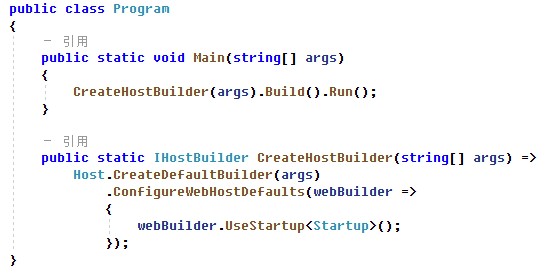
从上述代码可以看到,Main函数中首先调用CreateHostBuilder方法,返回一个IHostBuilder。然后调用IHostBuilder.Build()方法完成
二、Host.CreateDefaultBuilder(args): 构造IHostBuilder的默认实现HostBuilder
在CreateHostBuilder方法内部,首先调用了Host.CreateDefaultBuilder构造了一个HostBuilder,这个我们先看下源码,看看到底Host类内部做了什么操作:
https://github.com/dotnet/extensions/blob/release/3.1/src/Hosting/Hosting/src/Host.cs
public static IHostBuilder CreateDefaultBuilder(string[] args)

        {

            var builder = new HostBuilder();

            builder.UseContentRoot(Directory.GetCurrentDirectory());

            builder.ConfigureHostConfiguration(config =>

            {

                config.AddEnvironmentVariables(prefix: "DOTNET_");

                if (args != null)

                {

                    config.AddCommandLine(args);

                }

            });

            builder.ConfigureAppConfiguration((hostingContext, config) =>

            {

                var env = hostingContext.HostingEnvironment;

                config.AddJsonFile("appsettings.json", optional: true, reloadOnChange: true)

                      .AddJsonFile($"appsettings.{env.EnvironmentName}.json", optional: true, reloadOnChange: true);

                if (env.IsDevelopment() && !string.IsNullOrEmpty(env.ApplicationName))

                {

                    var appAssembly = Assembly.Load(new AssemblyName(env.ApplicationName));

                    if (appAssembly != null)

                    {

                        config.AddUserSecrets(appAssembly, optional: true);

                    }

                }

                config.AddEnvironmentVariables();

                if (args != null)

                {

                    config.AddCommandLine(args);

                }

            })

            .ConfigureLogging((hostingContext, logging) =>

            {

                var isWindows = RuntimeInformation.IsOSPlatform(OSPlatform.Windows);

                // IMPORTANT: This needs to be added *before* configuration is loaded, this lets

                // the defaults be overridden by the configuration.

                if (isWindows)

                {

                    // Default the EventLogLoggerProvider to warning or above

                    logging.AddFilter<EventLogLoggerProvider>(level => level >= LogLevel.Warning);

                }

                logging.AddConfiguration(hostingContext.Configuration.GetSection("Logging"));

                logging.AddConsole();

                logging.AddDebug();

                logging.AddEventSourceLogger();

                if (isWindows)

                {

                    // Add the EventLogLoggerProvider on windows machines

                    logging.AddEventLog();

                }

            })

            .UseDefaultServiceProvider((context, options) =>

            {

                var isDevelopment = context.HostingEnvironment.IsDevelopment();

                options.ValidateScopes = isDevelopment;

                options.ValidateOnBuild = isDevelopment;

            });

            return builder;

        }
从上述代码中,可以看到CreateDefaultBuilder内部构造了一个HostBuilder,同时设置了:
- 将内容根目录(contentRootPath)设置为由 GetCurrentDirectory 返回的路径。
- 通过以下源加载主机配置
- 环境变量(DOTNET_前缀)配置
- 命令行参数配置
- 通过以下对象加载应用配置
- appsettings.json
- appsettings.{Environment}.json
- 密钥管理器 当应用在 Development 环境中运行时
- 环境变量
- 命令行参数
- 添加日志记录提供程序
- 控制台
- 调试
- EventSource
- EventLog( Windows环境下)
- 当环境为“开发”时,启用范围验证和依赖关系验证。
以上构造完成了HostBuilder,针对ASP.NET Core应用,代码继续调用了HostBuilder.ConfigureWebHostDefaults方法。
三、IHostBuilder.ConfigureWebHostDefaults:通过GenericWebHostBuilder对HostBuilder增加ASP.NET Core的运行时设置
构造完成HostBuilder之后,针对ASP.NET Core应用,继续调用了HostBuilder.ConfigureWebHostDefaults方法。这是一个ASP.NET Core的一个扩展方法:

我们继续看ConfigureWebHostDefaults扩展方法内部做了哪些事情:
using System;

using Microsoft.AspNetCore.Hosting;

using Microsoft.AspNetCore;

namespace Microsoft.Extensions.Hosting

{

    /// <summary>

    /// Extension methods for configuring the IWebHostBuilder.

    /// </summary>

    public static class GenericHostBuilderExtensions

    {

        /// <summary>

        /// Initializes a new instance of the <see cref="IWebHostBuilder"/> class with pre-configured defaults.

        /// </summary>

        /// <remarks>

        ///   The following defaults are applied to the <see cref="IWebHostBuilder"/>:

        ///     use Kestrel as the web server and configure it using the application's configuration providers,

        ///     adds the HostFiltering middleware,

        ///     adds the ForwardedHeaders middleware if ASPNETCORE_FORWARDEDHEADERS_ENABLED=true,

        ///     and enable IIS integration.

        /// </remarks>

        /// <param name="builder">The <see cref="IHostBuilder" /> instance to configure</param>

        /// <param name="configure">The configure callback</param>

        /// <returns>The <see cref="IHostBuilder"/> for chaining.</returns>

        public static IHostBuilder ConfigureWebHostDefaults(this IHostBuilder builder, Action<IWebHostBuilder> configure)

        {

            return builder.ConfigureWebHost(webHostBuilder =>

            {

                WebHost.ConfigureWebDefaults(webHostBuilder);

                configure(webHostBuilder);

            });

        }

    }

}

© 2020 GitHub, Inc.
首先,通过类GenericHostWebHostBuilderExtensions,对IHostBuilder扩展一个方法:ConfigureWebHost:builder.ConfigureWebHost
在这个扩展方法中实现了对IWebHostBuilder的依赖注入:即将GenericWebHostBuilder实例传入方法ConfigureWebHostDefaults内部
using System;

using Microsoft.AspNetCore.Hosting;

using Microsoft.Extensions.DependencyInjection;

namespace Microsoft.Extensions.Hosting

{

    public static class GenericHostWebHostBuilderExtensions

    {

        public static IHostBuilder ConfigureWebHost(this IHostBuilder builder, Action<IWebHostBuilder> configure)

        {

            var webhostBuilder = new GenericWebHostBuilder(builder);

            configure(webhostBuilder);

            builder.ConfigureServices((context, services) => services.AddHostedService<GenericWebHostService>());

            return builder;

        }

    }

}
通过GenericWebHostBuilder的构造函数GenericWebHostBuilder(buillder),将已有的HostBuilder增加了ASP.NET Core运行时设置。
。。。
先看到这,让我们回到ConfigureWebHostDefaults:
将上面两段代码合并一下进行理解:ConfigureWebHostDefaults做了两件事情:
1. 扩展IHostBuilder增加ConfigureWebHost,引入IWebHostBuilder的实现GenericWebHostBuilder,将已有的HostBuilder增加ASP.NET Core运行时的设置。
2. ConfigureWebHost代码中的configure(webhostBuilder):对注入的IWebHostBuilder,调用 WebHost.ConfigureWebDefaults(webHostBuilder),启用各类设置,如下代码解读:
 internal static void ConfigureWebDefaults(IWebHostBuilder builder)

        {

            builder.ConfigureAppConfiguration((ctx, cb) =>

            {

                if (ctx.HostingEnvironment.IsDevelopment())

                {

                    StaticWebAssetsLoader.UseStaticWebAssets(ctx.HostingEnvironment, ctx.Configuration);

                }

            });

            builder.UseKestrel((builderContext, options) =>

            {

                options.Configure(builderContext.Configuration.GetSection("Kestrel"));

            })

            .ConfigureServices((hostingContext, services) =>

            {

                // Fallback

                services.PostConfigure<HostFilteringOptions>(options =>

                {

                    if (options.AllowedHosts == null || options.AllowedHosts.Count == 0)

                    {

                        // "AllowedHosts": "localhost;127.0.0.1;[::1]"

                        var hosts = hostingContext.Configuration["AllowedHosts"]?.Split(new[] { ';' }, StringSplitOptions.RemoveEmptyEntries);

                        // Fall back to "*" to disable.

                        options.AllowedHosts = (hosts?.Length > 0 ? hosts : new[] { "*" });

                    }

                });

                // Change notification

                services.AddSingleton<IOptionsChangeTokenSource<HostFilteringOptions>>(

                            new ConfigurationChangeTokenSource<HostFilteringOptions>(hostingContext.Configuration));

                services.AddTransient<IStartupFilter, HostFilteringStartupFilter>();

                if (string.Equals("true", hostingContext.Configuration["ForwardedHeaders_Enabled"], StringComparison.OrdinalIgnoreCase))

                {

                    services.Configure<ForwardedHeadersOptions>(options =>

                    {

                        options.ForwardedHeaders = ForwardedHeaders.XForwardedFor | ForwardedHeaders.XForwardedProto;

                        // Only loopback proxies are allowed by default. Clear that restriction because forwarders are

                        // being enabled by explicit configuration.

                        options.KnownNetworks.Clear();

                        options.KnownProxies.Clear();

                    });

                    services.AddTransient<IStartupFilter, ForwardedHeadersStartupFilter>();

                }

                services.AddRouting();

            })

            .UseIIS()

            .UseIISIntegration();

        }
内部实现了:
- 前缀为 ASPNETCORE_ 的环境变量加载主机配置。
- 将Kestrel作为默认的Web服务器
- 添加HostFiltering中间件(主机筛选中间件)
- 如果ASPNETCORE_FORWARDEDHEADERS_ENABLED=true,添加转接头中间件ForwardedHeaders
- 启用IIS集成
3. 返回ConfigureWebHostDefaults代码中的configure(webHostBuilder):执行Program类中的webBuilder.UseStartup<Startup>();
第三章节中,以上过程完成了IHostBuilder.ConfigureWebHostDefaults,通过GenericWebHostBuilder对HostBuilder增加ASP.NET Core的运行时设置。
接下来继续Build和Run的过程。
四、CreateHostBuilder(args).Build().Run();
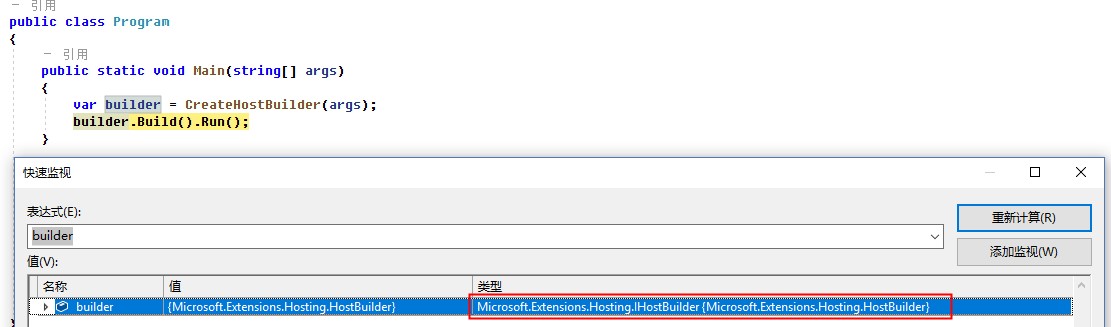
CreateHostBuilder返回的IHostBuilder,我们通过代码Debug,看一下具体的类型:Microsoft.Extensions.Hosting.HostBuilder,这样进一步验证了前三个章节的代码。
1. Build的过程
先看下Build的源码:https://github.com/dotnet/extensions/blob/release/3.1/src/Hosting/Hosting/src/HostBuilder.cs
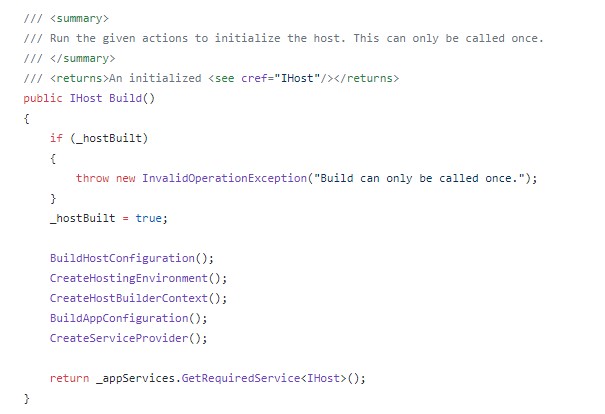
Build的过程主要完成了:
- BuildHostConfiguration: 构造配置系统,初始化 IConfiguration _hostConfiguration;
- CreateHostingEnvironment:构建主机HostingEnvironment环境信息,包含ApplicationName、EnvironmentName、ContentRootPath等
- CreateHostBuilderContext:创建主机Build上下文HostBuilderContext,上下文中包含:HostingEnvironment和Configuration
- BuildAppConfiguration:构建应用程序配置
- CreateServiceProvider:创建依赖注入服务提供程序, 即依赖注入容器
2. Run的过程
我们先通过Debug,看一下Host的信息:Microsoft.Extensions.Hosting.Internal.Host
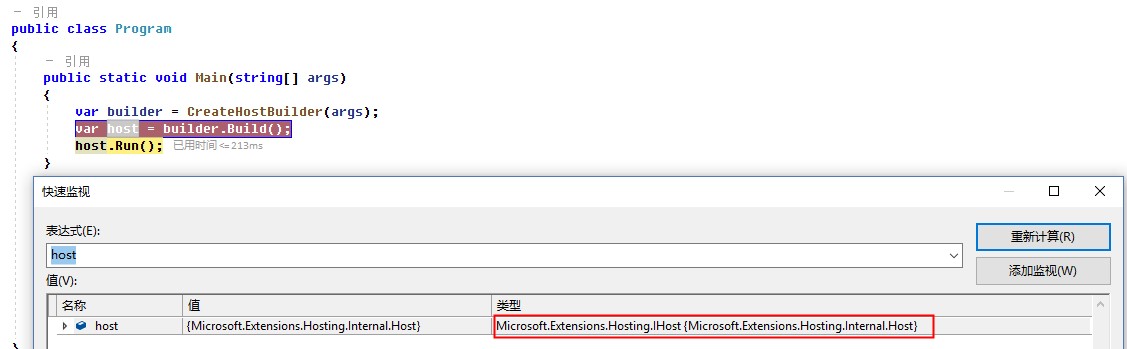
这个Run方法也是一个扩展方法:HostingAbstractionsHostExtensions.Run

其实内部转调的还是Host.StartAsync方法,在内部启动了DI依赖注入容器中所有注册的服务。
代码链接:https://github.com/dotnet/extensions/blob/release/3.1/src/Hosting/Hosting/src/Internal/Host.cs
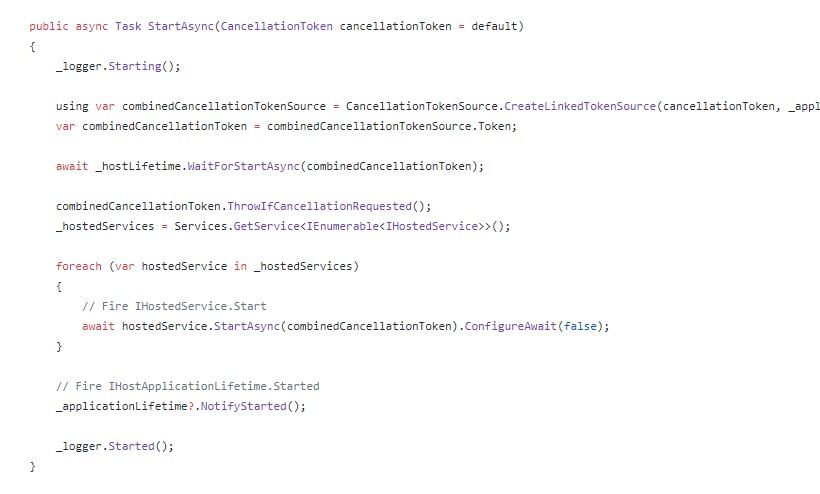
整个Host主机的启动过程还是非常复杂的,我们只是简单的在代码层面研究了一遍,感觉只是有了个大致的轮廓,具体怎么执行的,是不是如上面代码的解释,还需要深入继续研究。
接下来下一篇文章准备把源码单步调试看看。加深对ASP.NET Core底层技术原理的理解,只有理解了底层技术实现,我们在应用层才能更好、正确的使用。
周国庆
2020/4/6
ASP.NET Core技术研究-探秘Host主机启动过程的更多相关文章
- ASP.NET Core技术研究-探秘依赖注入框架
ASP.NET Core在底层内置了一个依赖注入框架,通过依赖注入的方式注册服务.提供服务.依赖注入不仅服务于ASP.NET Core自身,同时也是应用程序的服务提供者. 毫不夸张的说,ASP.NET ...
- ASP.NET Core技术研究-全面认识Web服务器Kestrel
因为IIS不支持跨平台的原因,我们在升级到ASP.NET Core后,会接触到一个新的Web服务器Kestrel.相信大家刚接触这个Kestrel时,会有各种各样的疑问. 今天我们全面认识一下ASP. ...
- .NET Core技术研究-主机
前一段时间,和大家分享了 ASP.NET Core技术研究-探秘Host主机启动过程 但是没有深入说明主机的设计.今天整理了一下主机的一些知识,结合先前的博文,完整地介绍一下.NET Core的主机的 ...
- .NET Core技术研究系列-索引篇
随着.NET Core相关技术研究的深入,现在将这一系列的文章,整理到一个索引页中,方便大家翻阅查找,同时,后续也会不断补充进来. .NET Core技术研究-WebApi迁移ASP.NET Core ...
- 简读《ASP.NET Core技术内幕与项目实战》之3:配置
特别说明:1.本系列内容主要基于杨中科老师的书籍<ASP.NET Core技术内幕与项目实战>及配套的B站视频视频教程,同时会增加极少部分的小知识点2.本系列教程主要目的是提炼知识点,追求 ...
- 快读《ASP.NET Core技术内幕与项目实战》EFCore2.5:集合查询原理揭秘(IQueryable和IEnumerable)
本节内容,涉及4.6(P116-P130).主要NuGet包:如前述章节 一.LINQ和EFCore的集合查询扩展方法的区别 1.LINQ和EFCore中的集合查询扩展方法,虽然命名和使用完全一样,都 ...
- 快读《ASP.NET Core技术内幕与项目实战》WebApi3.1:WebApi最佳实践
本节内容,涉及到6.1-6.6(P155-182),以WebApi说明为主.主要NuGet包:无 一.创建WebApi的最佳实践,综合了RPC和Restful两种风格的特点 1 //定义Person类 ...
- 《ASP.NET Core技术内幕与项目实战》精简集-目录
本系列是杨中科2022年最新作品<ASP.NET Core技术内幕与项目实战>及B站配套视频(强插点赞)的精简集,是一个读书笔记.总结和提炼了主要知识点,遵守代码优先原则,以利于快速复习和 ...
- ASP.NET Core Identity 实战(4)授权过程
这篇文章我们将一起来学习 Asp.Net Core 中的(注:这样描述不准确,稍后你会明白)授权过程 前情提要 在之前的文章里,我们有提到认证和授权是两个分开的过程,而且认证过程不属于Identity ...
随机推荐
- 那是我夕阳下的奔跑,电商网站PC端详情页图片放大效果实现
在详情页浏览时商品大图还是不能完全看清楚商品的细节,该特效实现鼠标悬停在商品大图上时,在商品大图右侧出现放大镜效果并根据鼠标的位置来改变右侧大图的显示内容,放大镜中的内容和鼠标悬停位置的内容相同.该特 ...
- JavaScript常见的六种继承方式
前言 面向对象编程很重要的一个方面,就是对象的继承.A 对象通过继承 B 对象,就能直接拥有 B 对象的所有属性和方法.这对于代码的复用是非常有用的. 大部分面向对象的编程语言,都是通过"类 ...
- FCC 成都社区·前端周刊 第 7 期
01. ES2016, 2017, 2018 中的新特性 文章介绍了 18 个 ECMAScript 2016,2017 和 2018 中新增加的特性,这些特性已被加入到 TC39 提案中.包括Arr ...
- Ubuntu 系统下如何安装pip3工具
一.[导读]Ubuntu 系统内置了 Python2 和 Python3 两个版本的开发环境,却没有内置相应的 pip3 管理工具,本文将介绍如何在Ubuntu下如何快速安装 pip3 工具,并升级到 ...
- ubuntu16.04卸载docker
1.sudo apt-get remove docker-ce 2.apt-get remove -y docker-* rm -rf /var/lib/docker
- TensorFlow CPU环境 SSE/AVX/FMA 指令集编译
TensorFlow CPU环境 SSE/AVX/FMA 指令集编译 sess.run()出现如下Warning W tensorflow/core/platform/cpu_feature_guar ...
- 负载均衡框架 ribbon 一
Ribbon开源地址:https://github.com/Netflix/ribbon/wiki/Getting-Started 1.Ribbon简介 负载均衡框架,支持可插拔式的负载均衡规则 支持 ...
- 第十章、Vue项目的联调上线
抓包 Fiddler 一.解决跨域 proxyTable(查看博客总结) 二.解决用本机ip地址不能访问 在dev中加上 --host 0.0.0.0就可以用本机ip访问,这样的话可以用手机在内网(局 ...
- sonarqube配置全指南,集成阿里巴巴p3c规范
环境准备 内置数据库 Sonar安装成功后,默认内置H2数据库,用于记录单次的扫描结果,对同一个project重复扫码,会覆盖之前的扫描记录,所以H2 数据库只应用于测试,不可以用于生产环境,那如果你 ...
- MapReduce 简单数据统计
1. 准备数据源 摘录了一片散文,保存格式为utf-8 2. 准备环境 2.1 搭建伪分布式环境 https://www.cnblogs.com/cjq10029/p/12336446.html 上传 ...