
Asp.Net生命周期系列六
上篇说到当一个Http请求流到HttpHandler这里时才开始对它的处理,那么一个请求经过HttpHandler之后, 到底怎么对它处理呢,也就是说HttpHandler会触发哪些事件,触发的顺序如何,我们可以在此中间做些什么?
话说我们今天的重中之重:页面生命周期,说的就是Page类在处理页面的过程中都发生了哪些事件,而这些事件又是按照什么顺序发生的。ASP.NET的页面生命周期跟我们之前的理论讲解完全不同,它具有非常强大的实用性,所以我想通过一个小例子来进行解释和说明,以便让大家看起来更清晰和容易理解。因为Page类的ProcessRequest方法实现非常的复杂,我把代码反编译过来给大家看我觉得也没什么意义,所以我就着重给大家看一下整个页面的事件是以何种顺序被引发的,以及在这些事件中,我们能做什么。在这个过程中,我们主要关注如下问题:
1, 事件的执行顺序
2, 控件何时被初始化(我们什么时候能用它)
3, ViewState何时可用
4, 更改MasterPage和Theme
5, 在各个事件中还能干什么工作
按照如下步骤建立示例:
一,我们创建一个website
二,加入两个MasterPage分别为site.master和map.master,分别在上面加一个label进行说明:this is site/map master page.
三,分别加入两个theme为BlueSkin和RedSkin,分别对button的背景色进行设置,一个是Blue,另外一个是Red
四,在default页面中加入两个label和一个button
五,Default页面代码如下:
private int step = ;

       private string GetEventName(string eventName)

       {

           step += ;

           return eventName;

       }

       protected override void OnPreInit(EventArgs e)

       {

          base.OnPreInit(e);

          Response.Write(GetEventName("pre init event, this is the " + step + "th step!"));

          //lblMessage.Text = "on pre init";

          this.MasterPageFile = "map.master";

          this.Theme = "BlueSkin";

          if (lblMessage2 == null)

          {

              Response.Write("<span style='color:red;'>Server control has not been initialed on pre init</span>");

          }

          else

          {

              Response.Write("<span style='color:red;'>Server control has been initialed here</span>");

          }

          if(this.ViewState.Count>)

          {

              Response.Write("ViewState can be used here, the ID is "+ViewState["ID"].ToString());

          }

          Response.Write("<br/>");

      }

      protected override void OnInit(EventArgs e)

      {

          if (lblMessage2 == null)

          {

              Response.Write("<span style='color:red;'>Server control has not been initialed on pre init</span>");

          }

          else

          {

              Response.Write("<span style='color:red;'>Server control has been initialed here</span>");

          }

          base.OnInit(e);

          Response.Write(GetEventName("init event, this is the " + step + "the step!   "));

          if (lblMessage2 == null)

          {

              Response.Write("<span style='color:red;'>Server control has not been initialed on pre init</span>");

          }

          else

          {

              Response.Write("<span style='color:red;'>Server control has been initialed here</span>");

          }

          if (this.ViewState.Count > )

          {

              Response.Write("<span style='color:red;'>ViewState can be used here, the ID is " + ViewState["ID"].ToString() + "</span>");

          }

          Response.Write("<br/>");

          //this.MasterPageFile = "map.master";

          //this.Theme = "BlueSkin";

      }

      protected override void OnInitComplete(EventArgs e)

      {

          base.OnInitComplete(e);

          Response.Write(GetEventName("init complete event, this is the " + step + "th step!"));

          if (this.ViewState.Count > )

          {

              Response.Write("<span style='color:red;'>ViewState can be used here, the ID is " + ViewState["ID"].ToString() + "</span>");

          }

          else

          {

              Response.Write("<span style='color:red;'>ViewState can not be used here</span>");

          }

          Response.Write("<br/>");

      }

      protected override void OnPreLoad(EventArgs e)

      {

          if (this.ViewState.Count > )

          {

              Response.Write("<span style='color:red;'>ViewState can be used here, the ID is " + ViewState["ID"].ToString() + "</span>");

          }

          else

          {

              Response.Write("<span style='color:red;'>ViewState can not be used here</span>");

          }

          base.OnPreLoad(e);

          Response.Write(GetEventName("pre load event, this is the " + step + "th step!"));

          if (this.ViewState.Count > )

          {

              Response.Write("<span style='color:red;'>ViewState can be used here, the ID is " + ViewState["ID"].ToString() + "</span>");

          }

          else

          {

              Response.Write("<span style='color:red;'>ViewState can not be used here</span>");

          }

          Response.Write("<br/>");

      }

      protected void Page_Load(object sender, EventArgs e)

      {

          Response.Write(GetEventName("page load system provided, this is " + step + "th step!"));

         if (this.ViewState.Count > )

         {

             Response.Write("<span style='color:red;'>ViewState can be used here, the ID is " + ViewState["ID"].ToString() + "</span>");

         }

         Response.Write("<br/>");

     }

     protected override void OnLoadComplete(EventArgs e)

     {

         base.OnLoadComplete(e);

         Response.Write(GetEventName("on load complete event, this is the " + step + "th step!<br/>"));

     }

     protected override void OnPreRender(EventArgs e)

     {

         base.OnPreRender(e);

         Response.Write(GetEventName("pre render event, this is the " + step + "th step!<br/>"));

     }

     protected override void OnPreRenderComplete(EventArgs e)

     {

         base.OnPreRenderComplete(e);

         Response.Write(GetEventName("pre render complete event, this is the " + step + "th step!<br/>"));

     }

     protected override void OnSaveStateComplete(EventArgs e)

     {

         base.OnSaveStateComplete(e);

         Response.Write(GetEventName("sae state complete event, this is the " + step + "th step!<br/>"));

     }

     protected override void Render(HtmlTextWriter writer)

     {

         base.Render(writer);

         Response.Write(GetEventName("render function, this is the " + step + "th step!<br/>"));

     }

     protected override void OnUnload(EventArgs e)

     {

         if (this == null)

         {

             string aaa = string.Empty;

         }

         if (lblMessage2 == null)

         {

             string ga = string.Empty;

         }

         base.OnUnload(e);

         if (this == null)

         {

         }

     }

     protected override void OnLoad(EventArgs e)

     {

         base.OnLoad(e);

         Response.Write(GetEventName("page load we created, this is the " + step + "th step!<br/>"));

     }

     protected void btnSubmit_Click1(object sender, EventArgs e)

     {

         ViewState["ID"] = "";

         Response.Write(GetEventName("button control click event, this is the " + step + "th step!<br/>"));

     }
执行结果:
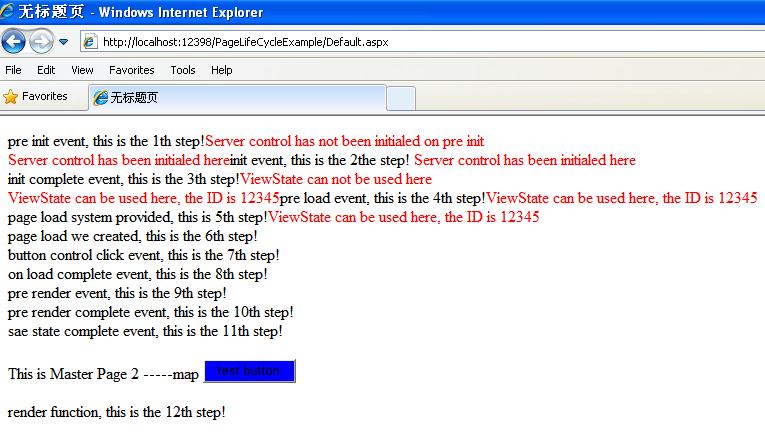
七,代码分析
a) 从执行结果我们可以看到,事件的执行顺序为:
i. PreInit
ii. Init
iii. InitComplete
iv. PreLoad
v. Load
vi. Control Event(if they have)
vii. LoadComplete
viii. PreRender
ix. PreRenderComplete
x. SaveStateComplete
xi. Render
xii. Unload
b) 从结果中我们也可以看到,在PreInit事件发生后控件还没有被初始化,也就是我们还不能使用。而在Init刚刚发生的时候已经可以使用了。也就是说,控件初始化发生在PreInit之后Init之前。总而言之,我们关心的是我们最早可以在Init事件里对页面server端控件进行操控。
c) 关于ViewState,本示例也清晰的显示出它在Init Complete之后还是不能使用,而在PreLoad刚刚发生的时候,就已经可以使用了。
d) 通过对比Default.aspx页面的配置我们知道,在PreInit里面的Theme和MasterPage的设置是生效了的,我们可以在PreInit里设置Theme和MasterPage,而在其它任何位置设置这两个东西都将抛出异常(看我注视掉的代码)
e) 其它的事件:
Load: 这个事件可能是大家最熟悉的了。需要注意的是,Page对象会递归的调用子控件的onload事件直到页面和所有的子控件被加载完成。这个事件主要用来设置控件属性的值,建立数据库连接(通常不这么做)。
Control events: 这个就不多说了,主要是处理控件的事件,例如click。这也就让我们明白了每次我们click一个Button的时候,实际上是要先去执行load事件然后才执行click事件的,一般我们用!IsPostBack来判断一下从而避免执行不必要的加载逻辑。
LoadComplete: 页面所有的控件都被加载以后执行,暂时没有想到用来干什么。。。
PreRender: 在HTML被生成之前这是最后一个事件。每一个页面中的控件都有PreRender的过程。在这里对将要输出的HTML结果进行最后一次修改。
SaveStateComplete: 在这个时间发生之前,已经保存了所有控件和页面的,任何对page或者控件的改动都不会产生左右。暂时没想到用来干啥。
Render: 它不是一个事件而是一个方法。工作就是把HTML写回客户端浏览器。
UnLoad: 页面中的每一个控件都会发生这件事。在控件中,使用这个事件来做清理工作,例如关闭数据库连接等。对与页面本身也是做清理工作,例如关闭打开的文件和数据库连接,或者结束日志或者其它指定的工作。
f) 关于Unload事件,它实际上做的是销毁前的工作。在Unload事件发生以后,Page类被卸载和销毁,所以page类的字段值也就消失了,而我们通常也是使用在SaveStateComplete之前保存的ViewState来存储哪些我们想要存储的page里的数据。HttpRuntime做了销毁Page的动作,同样也是它创建的Page这个handler,现在我们知道原来不是HttpApplication雇佣了P_Handler, HttpApplication只是使用了它而已,真正雇佣(创建)并解雇(销毁)P_Handler的是老板HttpRuntime。
整个ASP.NET生命周期基本结束,如果大家想更深入的了解其中内情,请反编译System.Web.HttpRuntime类。如果您不喜欢研究那么深入,我想我这几篇文章应该可以对您有些帮助。
Asp.Net生命周期系列六的更多相关文章
- Asp.Net生命周期系列三
上文讲到了HttpRunTime主要做了三个事情,我们先回忆一下. 第一:雇佣了项目经理(HttpApplication). 第二:建立了HttpModule列表,项目经理(HttpRunTime)就 ...
- Asp.Net生命周期系列四
上回我们说的当一个Http请求来到HttpModule这里的时候,Asp.Net内部并未对这个Http请求做出任何的处理,我们可以对这个Http请求添加一些我们需要的信息,以方便我们控制这个Http请 ...
- Asp.Net生命周期系列五
如果您看了我的前四篇文章,应该知道目前Http请求已经流到了HttpModule这个程序员手中了,而且我们可以注册自己的HttpModule并且可以在里面注册一些事件来控制这个Http请求,但是到目前 ...
- (转)Asp.Net生命周期系列五
原文地址:http://www.cnblogs.com/skm-blog/p/3188697.html 如果您看了我的前四篇文章,应该知道目前Http请求已经流到了HttpModule这个程序员手中了 ...
- (转)Asp.Net生命周期系列三
原文地址:http://www.cnblogs.com/skm-blog/p/3178862.html 上文讲到了HttpRunTime主要做了三个事情,我们先回忆一下. 第一:雇佣了项目经理(Htt ...
- Asp.Net生命周期系列二
在上回书开始的时候我们提到博客园的IIS看了一眼我的请求后就直接交给ASP.NET去处理了,并且要求ASP.NET处理完之后返回HTML以供展示. 那么我们不仅要问: 1, IIS肯定是没有眼睛 ...
- (转)Asp.Net生命周期系列一
原文地址:http://www.cnblogs.com/skm-blog/archive/2013/07/07/3176713.html Asp.Net生命周期对于初级甚至中级程序员来说,一直都是一个 ...
- Asp.Net生命周期系列一
Asp.Net生命周期对于初级甚至中级程序员来说,一直都是一个难题,很多程序员不了解生命周期,导致使用Asp.Net做开发感觉很不灵活,感觉太多东西被微软封装好了,我们不能改变,其实只要你稍微了解一下 ...
- Git使用总结 Asp.net生命周期与Http协议 托管代码与非托管代码的区别 通过IEnumerable接口遍历数据 依赖注入与控制反转 C#多线程——优先级 AutoFac容器初步 C#特性详解 C#特性详解 WPF 可触摸移动的ScrollViewer控件 .NET(C#)能开发出什么样的APP?盘点那些通过Smobiler开发的移动应用
一,原理 首先,我们要明白Git是什么,它是一个管理工具或软件,用来管理什么的呢?当然是在软件开发过程中管理软件或者文件的不同版本的工具,一些作家也可以用这个管理自己创作的文本文件,由Linus开发的 ...
随机推荐
- C# 微信支付证书使用
http://wenku.baidu.com/link?url=wt24Gc-2-TbZRoQQ2vRNl5P0pMgp7dIoJMzb_zc1FyiMnBECBDMJ9RTuFCeHl9Lu0ahg ...
- 【BUG】---ionic tab-demo项目在modal页跳转URL改变页面不刷新,手动刷新后显示空白
问题描述: 项目是基于ionic tab的demo,在modal上访问其他页面,地址栏变化了,但是页面不动没刷新,自己手动刷新呢,还是空白,可是访问的页面时有内容的啊 错误: 我的路由配置 .stat ...
- 快速调试的VS设置
这是2013年“惹”的“祸”. 自己一直使用着VS2012,以前的调试是相当方便的,或许是之前的同事设置好的VS,我一直不会去注意我停掉调试(停掉调试的意思是:将状态1正在调试的状态,变更为状态2待启 ...
- char*,const char*和string 三者转换
1. const char* 和string 转换 (1) const char*转换为 string,直接赋值即可. EX: const char* tmp = "tsinghua&quo ...
- 六、Android学习笔记_JNI_c调用java代码
1.编写native方法(java2c)和非native方法(c2java): package com.example.provider; public class CallbackJava { // ...
- 移动web开发的一些坑
类似的题目一搜一大堆,我就不再写那些meta标签类似的内容了,记录一下自己实现中遇到的问题,如果能帮到你,那再好不过了. 1px border的问题,大家能搜到很多方案,但如何选择还是要根据实际情况, ...
- BCB6中SCALERICHVIEW加入GIF动画
记载下,花了不少时间. 1. 项目导入文件GIFImage.pas 来源:http://melander.dk/delphi/gifimage/ 2. 项目导入文件RVGifAnimate.pas ...
- mysql max_allowed_packet自动重置为1024 终结解决
背景: 测试环境1台centOS机器,最近一段频繁报“ Caused by: com.mysql.jdbc.PacketTooBigException: Packet for query is too ...
- [大牛翻译系列]Hadoop(20)附录A.10 压缩格式LZOP编译安装配置
附录A.10 LZOP LZOP是一种压缩解码器,在MapReduce中可以支持可分块的压缩.第5章中有一节介绍了如何应用LZOP.在这一节中,将介绍如何编译LZOP,在集群做相应配置. A.10.1 ...
- c#配置log4net步骤
1.引入添加log4net.dll引用 2.建立配置文件Log4Net.config(名字自定义).文件内容参考,输出的文件名称可更改 .运行是要放入到相应bin/debug(release) 目录 ...