
iOS开发-在表单元中添加子视图
#import <UIKit/UIKit.h>

@interface NameAndColorCellTableViewCell : UITableViewCell

@property(copy,nonatomic) NSString *name;

@property(copy,nonatomic) NSString *color;

@end
NameAndColorCellTableViewCell.h
//

//  NameAndColorCellTableViewCell.m

//  Tabel Cells

//

//  Created by  Jierism on 16/7/21.

//  Copyright © 2016年  Jierism. All rights reserved.

//

#import "NameAndColorCellTableViewCell.h"

@interface NameAndColorCellTableViewCell ()

// 定义两个属性变量

@property(strong,nonatomic) UILabel *nameLabel;

@property(strong,nonatomic) UILabel *colorLabel;

@end

@implementation NameAndColorCellTableViewCell

- (void)awakeFromNib {

    [super awakeFromNib];

    // Initialization code

}

- (void)setSelected:(BOOL)selected animated:(BOOL)animated {

    [super setSelected:selected animated:animated];

    // Configure the view for the selected state

}

- (instancetype)initWithStyle:(UITableViewCellStyle)style reuseIdentifier:(NSString *)reuseIdentifier

{

    self = [super initWithStyle:style reuseIdentifier:reuseIdentifier];

    if (self) {

        // 初始化代码

        // 往表单元里面添加子视图

        // 这里在每个表单元里添加了四个Label

        CGRect nameLabelRect = CGRectMake(, , , );

        UILabel *nameMaker = [[UILabel alloc] initWithFrame:nameLabelRect];

        nameMaker.textAlignment = NSTextAlignmentRight;  // 右对齐

        nameMaker.text = @"Name:";

        nameMaker.font = [UIFont boldSystemFontOfSize:];

        [self.contentView addSubview:nameMaker];

        CGRect colorLabelRect = CGRectMake(, , , );

        UILabel *colorMaker = [[UILabel alloc] initWithFrame:colorLabelRect];

        colorMaker.textAlignment = NSTextAlignmentRight;

        colorMaker.text = @"Color:";

        colorMaker.font = [UIFont boldSystemFontOfSize:];

        [self.contentView addSubview:colorMaker];

        CGRect nameValueRect = CGRectMake(, , , );

        self.nameLabel = [[UILabel alloc] initWithFrame:nameValueRect];

        [self.contentView addSubview:_nameLabel];

        CGRect colorValueRect = CGRectMake(, , , );

        self.colorLabel = [[UILabel alloc] initWithFrame:colorValueRect];

        [self.contentView addSubview:_colorLabel];

    }

    return self;

}

// 重写了Name和Color的set方法,当传递一个新的值时,更新标签的额内容

- (void) setName:(NSString *)n {

    if (![n isEqualToString:_name]) {

        _name = [n copy];

        self.nameLabel.text = _name;

    }

}

- (void)setColor:(NSString *)c {

    if (![c isEqualToString:_color]) {

        _color = [c copy];

        self.colorLabel.text = _color;

    }

}

@end
NameAndColorCellTableViewCell.m
#import <UIKit/UIKit.h>

@interface ViewController : UIViewController<UITableViewDataSource>

@end
ViewController.h
//

//  ViewController.m

//  Tabel Cells

//

//  Created by  Jierism on 16/7/20.

//  Copyright © 2016年  Jierism. All rights reserved.

//

#import "ViewController.h"

#import "NameAndColorCellTableViewCell.h"

static NSString *CellTableIdentifier = @"CellTableIdentifier";

@interface ViewController ()

// 定义一个数组和输出接口

@property (copy,nonatomic) NSArray *computers;

@property (weak,nonatomic) IBOutlet UITableView *tableView;

@end

@implementation ViewController

- (void)viewDidLoad {

    [super viewDidLoad];

    // Do any additional setup after loading the view, typically from a nib.

    // 往数组里定义字典

    self.computers = @[@{@"Name" : @"MacBook Air",@"Color" : @"Sliver"},

                       @{@"Name" : @"MacBook Pro",@"Color" : @"Sliver"},

                       @{@"Name" : @"iMac",@"Color" : @"Sliver"},

                       @{@"Name" : @"Mac Mini",@"Color" : @"Sliver"},

                       @{@"Name" : @"Mac Pro",@"Color" : @"Black"},];

    [self.tableView registerClass:[NameAndColorCellTableViewCell class] forCellReuseIdentifier:CellTableIdentifier];

}

- (void)didReceiveMemoryWarning {

    [super didReceiveMemoryWarning];

    // Dispose of any resources that can be recreated.

}

// DataSource方法

// 返回数组元素个数的行数,这里return的数不能大于元素的个数,否则崩溃

- (NSInteger)tableView:(UITableView *)tableView numberOfRowsInSection:(NSInteger)section

{

    return [self.computers count];

}

- (UITableViewCell *)tableView:(UITableView *)tableView cellForRowAtIndexPath:(NSIndexPath *)indexPath

{

    NameAndColorCellTableViewCell *cell = [tableView dequeueReusableCellWithIdentifier:CellTableIdentifier forIndexPath:indexPath];

    NSDictionary *rowData = self.computers[indexPath.row];

    cell.name = rowData[@"Name"];

    cell.color = rowData[@"Color"];

    return cell;

}

@end
ViewController.m
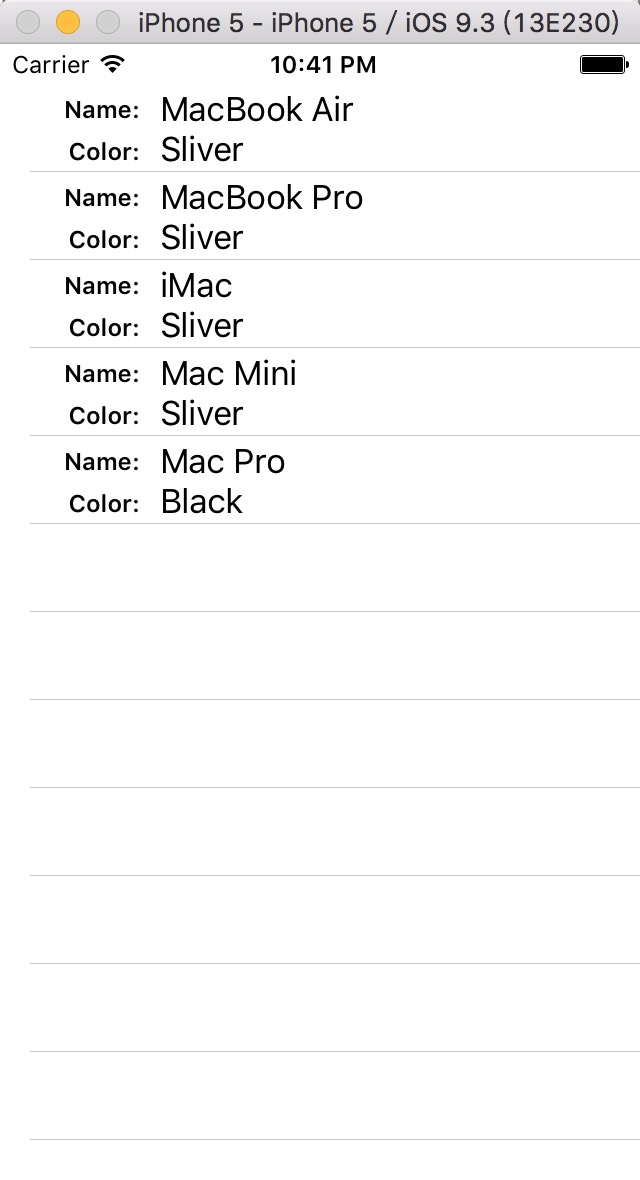
以上代码手动实现了在表单元中添加了4个Label,并显示相关内容,运行效果如图
这个效果还有另外一种实现方法,就是使用storyboard,用nib实现。不过之前与一位师兄交流中得知,以后工作中用代码实现视图布局比较多,因为会解决很多问题。在这之前自己做的都是使用storyboard,虽然现在觉得使用起来会省事,但是到了开发大型的APP的时候who know,right?所以,自己还需要提升用代码实现布局的能力。
iOS开发-在表单元中添加子视图的更多相关文章
- 关于cell中添加子视图 复用重叠问题的解决方法
问题本质: 因为你要添加的子视图并不是在自定义的cell中实现的,而是根据系统给的UITableViewCell这个类创建的实例,每次进图 cellForRow方法都会创建一个cell,每次都要创 ...
- iOS开发(OC)中的命名规范
开小差:最近发现自己有一个经验主义的毛病,不太容易接受新的知识,这对从事技术研发的人来说不太合理,需要改之. 正文:通过读写大量代码我有自己的一套编程思路和习惯,自认为自己的编码习惯还是不错的,代码结 ...
- IOS开发之表视图(UITableView)
IOS开发之表视图(UITableView)的基本介绍(一) (一):UITableView的基本概念 1.在IOS开发中,表视图的应用十分广泛和普及.因此掌握表视图的用法显得非常重要.一般情况下对于 ...
- iOS开发拓展篇—xib中关于拖拽手势的潜在错误
iOS开发拓展篇—xib中关于拖拽手势的潜在错误 一.错误说明 自定义一个用来封装工具条的类 搭建xib,并添加一个拖拽的手势. 主控制器的代码:加载工具条 封装工具条以及手势拖拽的监听事件 此时运行 ...
- IOS开发效率之为Xcode添加常用的代码片段
IOS开发效率之为Xcode添加常用的代码片段 原文地址:http://blog.csdn.net/pingchangtan367/article/details/30041285 tableview ...
- iOS开发实用技巧—Objective-C中的各种遍历(迭代)方式
iOS开发实用技巧—Objective-C中的各种遍历(迭代)方式 说明: 1)该文简短介绍在iOS开发中遍历字典.数组和集合的几种常见方式. 2)该文对应的代码可以在下面的地址获得:https:// ...
- 解决UIViewController中添加子控制器viewWillAppear不调用问题
问题描述: 我在UICollectionViewController中添加子控制器数组, 并在cellForItem中把子控制器数组中对应的控制器对应的view添加到了UICollectionView ...
- [iOS]在NavigationController中的ScrollView中的子视图都会下移64个像素
情况是这种: 我有一个UINavigationController,设置为self.window的root视图, 然后有一个UIVIewController是UINavigtionController ...
- UIScrollView中添加一个视图,实现让其始终固定在某个位置
ScrollView中添加一个视图,实现让其始终固定在某个位置,如最底部的位置.方法是自定义一个继承UIScrollView,重写它的layoutSubviews方法.代码如下: #import &q ...
随机推荐
- Django admin site(一)ModelAdmin Options
Admin管理界面是django的杀手级应用.它读取你模式中的元数据,然后提供给你一个强大而且可以使用的界面,网站管理者可以用它立即向网站中添加内容. 要使用admin,可以按照下面的步骤: 将'dj ...
- Linux内核OOM机制的详细分析
Linux 内核有个机制叫OOM killer(Out-Of-Memory killer),该机制会监控那些占用内存过大,尤其是瞬间很快消耗大量内存的进程,为了防止内存耗尽而内核会把该进程杀掉.典型的 ...
- Angularjs checkbox的ng属性
angularjs 默认给 input[checkbox] 元素定制了一些属性,如: <input type="checkbox" ng-mudel="name&q ...
- jsp请求由servlet响应的方式
一.登录页面主要代码:login.jsp<%@ page language="java" import="java.util.*" pageEncodin ...
- [Mac][$PATH]如何修改$PATH变量
从 stackoverflow 找到的方法 http://stackoverflow.com/questions/7703041/editing-path-variable-on-mac 首先打开终端 ...
- 学习面试题Day08
1.TCP/IP协议的理解. TCP/IP定义了电子设备(如计算机)连入因特网的标准,以及数据如何在它们之间传输的标准.它既是互联网中的基本通信语言或协议,也是局域网的通信协议. TC ...
- ubuntu桌面右上角键盘图标不见解决方法
今天出现了这个问题,桌面右上角的键盘图标不见,找到解决方法如下: 打开终端,分别输入以下命令即可: killall ibus-daemon 这个表示结束进程 ibus-daemon -d 这个表示重启 ...
- iOS开发中提交带有中文或特殊字符串的参数
iOS开发中,与后台进行数据交换是一个很常见的场景. 在web开发中,对于我们提交的地址,浏览器会负责进行decode,但是在ios中,必须要自己手动来实现.否则我们拼接出的网址在包括中文.特殊字符串 ...
- 提示35. 怎样实现OfTypeOnly<TEntity>()这样的写法
提示35. 怎样实现OfTypeOnly<TEntity>()这样的写法 如果你编写这样LINQ to Entities查询: 1 var results = from c in ctx. ...
- ASP.NET工作笔记之一:图片上传预览及无刷新上传
转自:http://www.cnblogs.com/sibiyellow/archive/2012/04/27/jqueryformjs.html 最近项目里面涉及到无刷新上传图片的功能,其实也就是上 ...