
mongo学习- mapReduce操作事例
源数据:
{

    "_id" : 1.0,

    "name" : "abc",

    "age" : 43.0,

    "type" : 1.0,

    "status" : "P",

    "favorites" : {

        "artist" : "Picasso",

        "food" : "pizza"

    },

    "finished" : [

        17.0,

        3.0

    ],

    "badges" : [

        "blue",

        "black"

    ],

    "points" : [

        {

            "points" : 85.0,

            "bonus" : 20.0

        },

        {

            "points" : 85.0,

            "bonus" : 10.0

        }

    ]

}

/* 2 */

{

    "_id" : 2.0,

    "name" : "abc",

    "age" : 42.0,

    "type" : 1.0,

    "status" : "A",

    "favorites" : {

        "artist" : "Miro",

        "food" : "meringue"

    },

    "finished" : [

        11.0,

        25.0

    ],

    "badges" : [

        "green"

    ],

    "points" : [

        {

            "points" : 85.0,

            "bonus" : 20.0

        },

        {

            "points" : 64.0,

            "bonus" : 12.0

        }

    ]

}

/* 3 */

{

    "_id" : 3.0,

    "name" : "ahn",

    "age" : 43.0,

    "type" : 2.0,

    "status" : "A",

    "favorites" : {

        "artist" : "Cassatt",

        "food" : "cake"

    },

    "finished" : [

        6.0

    ],

    "badges" : [

        "blue",

        "red"

    ],

    "points" : [

        {

            "points" : 81.0,

            "bonus" : 8.0

        },

        {

            "points" : 55.0,

            "bonus" : 20.0

        }

    ]

}

/* 4 */

{

    "_id" : 4.0,

    "name" : "xi",

    "age" : 34.0,

    "type" : 2.0,

    "status" : "D",

    "favorites" : {

        "artist" : "Chagall",

        "food" : "chocolate"

    },

    "finished" : [

        5.0,

        11.0

    ],

    "badges" : [

        "red",

        "black"

    ],

    "points" : [

        {

            "points" : 53.0,

            "bonus" : 15.0

        },

        {

            "points" : 51.0,

            "bonus" : 15.0

        }

    ]

}

/* 5 */

{

    "_id" : 5.0,

    "name" : "xyz",

    "age" : 23.0,

    "type" : 2.0,

    "status" : "D",

    "favorites" : {

        "artist" : "Noguchi",

        "food" : "nougat"

    },

    "finished" : [

        14.0,

        6.0

    ],

    "badges" : [

        "orange"

    ],

    "points" : [

        {

            "points" : 71.0,

            "bonus" : 20.0

        }

    ]

}

/* 6 */

{

    "_id" : 6.0,

    "name" : "abc",

    "age" : 43.0,

    "type" : 1.0,

    "status" : "A",

    "favorites" : {

        "food" : "pizza",

        "artist" : "Picasso"

    },

    "finished" : [

        18.0,

        12.0

    ],

    "badges" : [

        "black",

        "blue"

    ],

    "points" : [

        {

            "points" : 78.0,

            "bonus" : 8.0

        },

        {

            "points" : 57.0,

            "bonus" : 7.0

        }

    ]

}
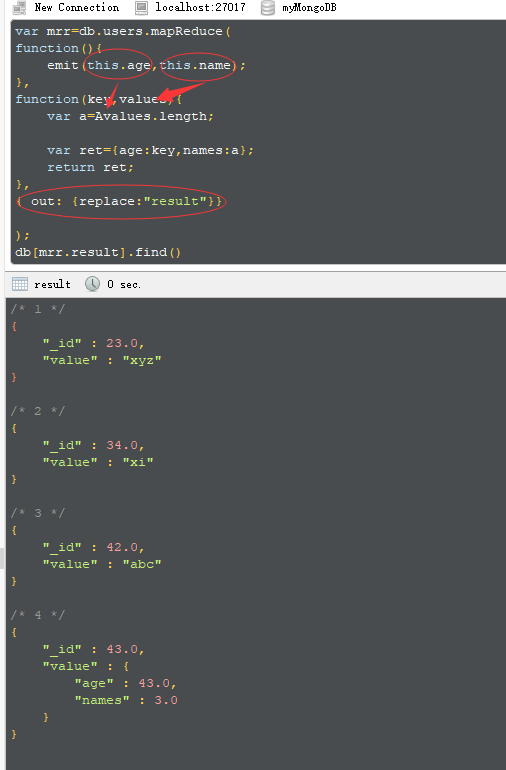
var mrr=db.users.mapReduce(
function(){
emit(this.age,this.name);
},
function(key,values){
var a=Avalues.length;
var ret={age:key,names:a};
return ret;
},
{ out: {replace:"result"}}
);
db[mrr.result].find()
mongo学习- mapReduce操作事例的更多相关文章
- mongo学习-group操作以及java代码
原数据: /* 1 */ { "_id" : ObjectId("552a330e05c27486b9b9b650"), "_class" ...
- mongo学习- group操作
group可以使用 $sum,$avg,$max,$min,$first,$last
- Java中的函数式编程(七)流Stream的Map-Reduce操作
写在前面 Stream 的 Map-Reduce 操作是Java 函数式编程的精华所在,同时也是最为复杂的部分.但一旦你啃下了这块硬骨头,那你就真正熟悉Java的函数式编程了. 如果你有大数据的编程经 ...
- 4-python学习——数据操作
4-python学习--数据操作 参考python类型转换.数值操作(收藏) Python基本运算符 数据类型转换: 有时候,可能需要执行的内置类型之间的转换.类型之间的转换,只需使用类名作为函数. ...
- Mapreduce操作HBase
这个操作和普通的Mapreduce还不太一样,比如普通的Mapreduce输入可以是txt文件等,Mapreduce可以直接读取Hive中的表的数据(能够看见是以类似txt文件形式),但Mapredu ...
- 安装Linux系统,学习Linux操作基础
20189230杨静怡 2018-2019-2 <移动平台开发实践>第1周学习总结 安装Linux系统内容总结 一.学习"基于VirtualBox虚拟机安装Ubuntu图文教程& ...
- HBase 相关API操练(三):MapReduce操作HBase
MapReduce 操作 HBase 在 HBase 系统上运行批处理运算,最方便和实用的模型依然是 MapReduce,如下图所示. HBase Table 和 Region 的关系类似 HDFS ...
- springboot学习-jdbc操作数据库--yml注意事项--controller接受参数以及参数校验--异常统一管理以及aop的使用---整合mybatis---swagger2构建api文档---jpa访问数据库及page进行分页---整合redis---定时任务
springboot学习-jdbc操作数据库--yml注意事项--controller接受参数以及参数校验-- 异常统一管理以及aop的使用---整合mybatis---swagger2构建api文档 ...
- 7.MapReduce操作Hbase
7 HBase的MapReduce HBase中Table和Region的关系,有些类似HDFS中File和Block的关系.由于HBase提供了配套的与MapReduce进行交互的API如 Ta ...
随机推荐
- python 获取excel文件内sheet名称列表
xl = pd.ExcelFile('foo.xls') xl.sheet_names # see all sheet names xl.parse(sheet_name) # read a spec ...
- ASP.NET MVC3默认提供了11种ActionResult的实现
在System.Web.Mvc命名空间 ActionResult ContentResult EmptyResult FileResult HttpStatusCodeResult HttpNot ...
- streamsets http client && json parse && local fs 使用
streamsets 包含了丰富的组件,origin processer destination 测试例子为集成了http client 以及json 处理 启动服务 使用docker 创建pipel ...
- QQ空间点赞代码
jQuery("a.qz_like_btn_v3[data-clicklog='like']").each(function(index,item){ console.log(it ...
- Git自动换行符
http://blog.csdn.net/jonathan321/article/details/51988242?locationNum=2 不同的操作系统有不同的换行符格式,跨平台协作时需要考虑版 ...
- 在pydev安装完成后在eclipse不显示的问题
Java配置: http://www.jb51.net/os/win10/370409.html http://blog.csdn.net/wwd0501/article/details/521308 ...
- Java-Runoob-高级教程-实例-字符串:04. Java 实例 - 字符串替换
ylbtech-Java-Runoob-高级教程-实例-字符串:04. Java 实例 - 字符串替换 1.返回顶部 1. Java 实例 - 字符串替换 Java 实例 如何使用java替换字符串 ...
- [MVC 4] ActionResult 使用示例
在控制器 HomeController.cs 中使用以下代码 public ActionResult Contact() { ViewBag.Message = "Your contact ...
- pythonNET day05
孤儿进程 父进程先于子进程退出,此时子进程就会成为孤儿进程. 孤儿进程会被系统指定的进程收养,即系统进程会成为该孤儿进程新的父进程.孤儿进程退出时该父进程会处理退出状态 僵尸进程 子进程先于父进程退出 ...
- 读取配置文件工具demo
//读取配置文件public class ResourcesUtils { /* * @description:根据属性获取文件名 * * @param:propertyName文件的属性名 * * ...