
centos7.3安装配置vsftp
首先使用命令查看,系统内是否安装了vsftp
[root@instance_290388 down]# rpm -qa |grep vsftp

如果没有安装,使用命令,进行安装
[root@instance_290388 down]# yum -y install vsftpd
安装完成后,命令进入文件夹
[root@instance_290388 down]# cd /etc/vsftpd/
修改vsftp配置文件
[root@instance_290388 vsftpd]# vi vsftpd.conf
将vsftp.conf内容,替换成如下的内容
# Example config file /etc/vsftpd/vsftpd.conf

#

# The default compiled in settings are fairly paranoid. This sample file

# loosens things up a bit, to make the ftp daemon more usable.

# Please see vsftpd.conf. for all compiled in defaults.

#

# READ THIS: This example file is NOT an exhaustive list of vsftpd options.

# Please read the vsftpd.conf. manual page to get a full idea of vsftpd's

# capabilities.

#

# Allow anonymous FTP? (Beware - allowed by default if you comment this out).

#anonymous_enable=YES

#

# Uncomment this to allow local users to log in.

# When SELinux is enforcing check for SE bool ftp_home_dir

local_enable=YES

#

# Uncomment this to enable any form of FTP write command.

write_enable=YES

#

# Default umask for local users is . You may wish to change this to ,

# if your users expect that ( is used by most other ftpd's)

local_umask=

#

# Uncomment this to allow the anonymous FTP user to upload files. This only

# has an effect if the above global write enable is activated. Also, you will

# obviously need to create a directory writable by the FTP user.

# When SELinux is enforcing check for SE bool allow_ftpd_anon_write, allow_ftpd_full_access

#anon_upload_enable=YES

#

# Uncomment this if you want the anonymous FTP user to be able to create

# new directories.

#anon_mkdir_write_enable=YES

#

# Activate directory messages - messages given to remote users when they

# go into a certain directory.

dirmessage_enable=YES

#

# Activate logging of uploads/downloads.

xferlog_enable=YES

#

# Make sure PORT transfer connections originate from port  (ftp-data).

connect_from_port_20=YES

#

# If you want, you can arrange for uploaded anonymous files to be owned by

# a different user. Note! Using "root" for uploaded files is not

# recommended!

#chown_uploads=YES

#chown_username=whoever

#

# You may override where the log file goes if you like. The default is shown

# below.

#xferlog_file=/var/log/xferlog

#

# If you want, you can have your log file in standard ftpd xferlog format.

# Note that the default log file location is /var/log/xferlog in this case.

xferlog_std_format=YES

#

# You may change the default value for timing out an idle session.

idle_session_timeout=

#

# You may change the default value for timing out a data connection.

data_connection_timeout=

#

# It is recommended that you define on your system a unique user which the

# ftp server can use as a totally isolated and unprivileged user.

#nopriv_user=ftpsecure

#

# Enable this and the server will recognise asynchronous ABOR requests. Not

# recommended for security (the code is non-trivial). Not enabling it,

# however, may confuse older FTP clients.

#async_abor_enable=YES

#

# By default the server will pretend to allow ASCII mode but in fact ignore

# the request. Turn on the below options to have the server actually do ASCII

# mangling on files when in ASCII mode.

# Beware that on some FTP servers, ASCII support allows a denial of service

# attack (DoS) via the command "SIZE /big/file" in ASCII mode. vsftpd

# predicted this attack and has always been safe, reporting the size of the

# raw file.

# ASCII mangling is a horrible feature of the protocol.

#ascii_upload_enable=YES

#ascii_download_enable=YES

#

# You may fully customise the login banner string:

ftpd_banner=Welcome to blah FTP service Hello KanYun.

#

# You may specify a file of disallowed anonymous e-mail addresses. Apparently

# useful for combatting certain DoS attacks.

#deny_email_enable=YES

# (default follows)

#banned_email_file=/etc/vsftpd/banned_emails

#

# You may specify an explicit list of local users to chroot() to their home

# directory. If chroot_local_user is YES, then this list becomes a list of

# users to NOT chroot().

# (Warning! chroot'ing can be very dangerous. If using chroot, make sure that

# the user does not have write access to the top level directory within the

# chroot)

chroot_local_user=YES

#chroot_list_enable=YES

# (default follows)

#chroot_list_file=/etc/vsftpd/chroot_list

#

# You may activate the "-R" option to the builtin ls. This is disabled by

# default to avoid remote users being able to cause excessive I/O on large

# sites. However, some broken FTP clients such as "ncftp" and "mirror" assume

# the presence of the "-R" option, so there is a strong case for enabling it.

ls_recurse_enable=YES

#

# When "listen" directive is enabled, vsftpd runs in standalone mode and

# listens on IPv4 sockets. This directive cannot be used in conjunction

# with the listen_ipv6 directive.

listen=YES

#

# This directive enables listening on IPv6 sockets. By default, listening

# on the IPv6 "any" address (::) will accept connections from both IPv6

# and IPv4 clients. It is not necessary to listen on *both* IPv4 and IPv6

# sockets. If you want that (perhaps because you want to listen on specific

# addresses) then you must run two copies of vsftpd with two configuration

# files.

# Make sure, that one of the listen options is commented !!

#listen_ipv6=YES

#pasv_enable=NO

allow_writeable_chroot=YES

pam_service_name=vsftpd

userlist_enable=NO

tcp_wrappers=YES

userlist_file=/etc/vsftpd/user_list

userlist_enable=YES

userlist_deny=YES

#此设置表示ftp用户登录之后进入哪个目录,跟用户主目录一致

local_root=/data/kanyun

tcp_wrappers=YES

use_localtime=YES
添加Ftp用户
#颜色标注为新增的用户名

[root@instance_290388 vsftpd]# useradd -d /data/kanyun kanyun  #增加用户kanyun,并制定test用户的主目录为/data/kanyun  与上面颜色标注的路径一致
设置用户密码
[root@instance_290388 vsftpd]# passwd kanyun
启动vsftp
#注意关闭防火墙

[root@instance_290388 vsftpd]# service vsftpd start
启动ftp之后,建议使用命令行登录ftp,不建议直接使用xftp登录ftp,因为使用xftp登录ftp,报错的话看不到报错信息,使用命令行登录ftp,方法如下:
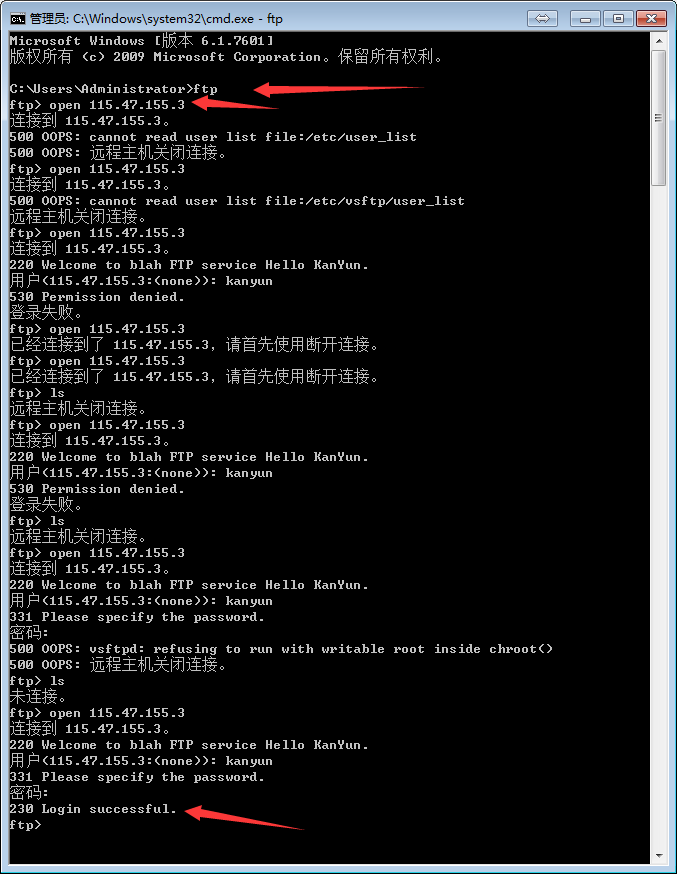
可以看到,使用命令行,可以很清楚自己配置的错误,然后就可以一一解决了!
删除用户使用命令
#在root用户下

[root@instance_290388 vsftpd]# userdel -r kanyun

#在普通用户下

[root@instance_290388 vsftpd]# sudo userdel -r kanyun
卸载vsftp命令
[root@instance_290388 vsftpd]# rpm -e vsftpd
这两天又在Ubuntu上安装vsftp,Ubuntu的vsftp的配置文件都在/etc目录下,当然重点不是这个:
重点是这样的,我新增了一个用户,并设置密码,登陆Ftp老是报错
530 Login incorrect.
但是我的配置没有问题啊,老用户也是可以登陆的,于是我把vsftp卸载了,再新增用户,再装vsftp,结果还不行,在网上各种找答案,网上说改vsftp.conf的都不行,删用户,再新增用户,弄了差不多一个星期,后来想了想,因为之前新增用户图方便把用户密码设置成跟用户名一样了,所以想改一下,把密码改成了别的,结果一实验就等成功了。但是之前给用户设置密码,它也没有提示不让设置成跟用户名一样啊,结果我又把密码改成了跟用户名一样,又登不上去了 还是530 Login incorrect. 晕!
所以记录一下,看来在linux里设置密码真的小心了:用户名不要跟密码设置成一样
centos7.3安装配置vsftp的更多相关文章
- CentOS 7.0安装配置Vsftp服务器
一.配置防火墙,开启FTP服务器需要的端口 CentOS 7.0默认使用的是firewall作为防火墙,这里改为iptables防火墙. 1.关闭firewall: systemctl stop fi ...
- Centos7下安装配置Redsocks
Redsocks是一个开源的网络程序,代码依赖开源的libevent网络库.Redsocks允许你将所有TCP连接重定向到SOCKS或HTTPS代理,比如Shadowsocks(Centos7下安装配 ...
- CentOS 7.0安装配置Vsftp服务器步骤详解
安装Vsftp讲过最多的就是在centos6.x版本中了,这里小编看到有朋友写了一篇非常不错的CentOS 7.0安装配置Vsftp服务器教程,下面整理分享给各位. 一.配置防火墙,开启FTP服务器需 ...
- centos7 yum安装配置redis 并设置密码
原文:https://www.cnblogs.com/fanlinglong/p/6635828.html centos7 yum安装配置redis 并设置密码 1.设置Redis的仓库地址 yum ...
- 【转发】【linux】【ftp】CentOS 7.0安装配置Vsftp服务器
adduser -d /var/www/android -g ftp -s /sbin/nologin ftp2 一.配置防火墙,开启FTP服务器需要的端口 CentOS 7.0默认使用的是firew ...
- CentOS 7.2安装配置Vsftp服务器
一.配置防火墙,开启FTP服务器需要的端口 CentOS 7.2默认使用的是firewall作为防火墙,这里改为iptables防火墙. 1.关闭firewall: systemctl stop fi ...
- centos7 rabbitmq安装/配置
原文:centos7 rabbitmq安装/配置 因为RabbitMQ是由erlang实现的,所以要先安装erlang再安装rabbitMQ 1.先配置yum软件源地址EPEL(EPEL是 ...
- 详解CentOS7安装配置vsftp搭建FTP
安装配置vsftpd做FTP服务,我们的Web应用使用git管理进行迭代,公共文件软件存储使用开源网盘Seafile来管理,基本够用.想不到FTP的使用的场景,感觉它好像老去了,虽然现在基本没有用到这 ...
- Linux CentOS 7 安装配置vsftp
学习Linux时间不长,首次安装了vsftp,按照网上的各种帖子尝试配置,不过都没打到预期,不是被拒绝连接,就是连接超时,总之就是各种问题啊.当然了,不是别人配置的不对,而是自己不是太懂Linux,选 ...
随机推荐
- Django之MTV
一.MTV模型 Django的MTV分别代表: Model(模型):负责业务对象与数据库的对象(ORM) Template(模版):负责如何把页面展示给用户 View(视图):负责业务逻辑,并在适当的 ...
- Java基础知识陷阱(十)
本文发表于本人博客. 上个星期由于时间比较紧所以未能继续写下去,今天再接再厉,专心 + 坚持这样离目标就越来越近了!废话少说说正题,今天我们还是来说说java中比较基础的知识,大家知道编写java程序 ...
- Java实现使用位图生成真值组合
摘要: 使用位图生成真值组合. 难度: 初级. /** * 问题描述: 给定 n 个布尔变量,打印所有真值组合. * 例如, n = 2 时 , 所有真值组合为 (true, false),(tr ...
- UI自动化测试框架之Selenium关键字驱动
一.原理及特点 1. 关键字驱动测试是数据驱动测试的一种改进类型 2. 主要关键字包括三类:被操作对象(Item).操作(Operation)和值(value),用面向对象形式可将其表现为Item.O ...
- Ubuntu软件包管理器
Ubuntu软件包管理 Ubuntu下对软件管理工具有:apt,dpkg,tasksel,aptitude等,我们常用的就是前三个工具.下面就介绍这三个工具的用法. dpkg 在Linux发展之初,安 ...
- Ubuntu16.04 远程访问RabbitMQ
我们在虚拟机里面安装好RabbitMQ以后,虽然可以在虚拟机中访问,但是在主机端并不能访问 现在要解决这个问题 第一:账户 RabbitMQ为了安全性考虑,默认的guest账户只能在本地127.0.0 ...
- mysql的隔离性和锁
INNODB的隔离性质 INNODB的事务支持4种隔离机制,分别是 READ UNCOMMITTED, READ COMMITTED, REPEATABLE READ, and SERIALIZABL ...
- jQuery实现鼠标点击Div区域外隐藏Div
冒泡定义:当一个元素上的事件被触发的时候,比如说鼠标点击了一个按钮,同样的事件将会在那个元素的所有祖先元素中被触发.这一过程被称为事件冒泡:这个事件从原始元素开始一直冒泡到DOM树的最上层.(摘自网络 ...
- python 去除不可见的控制字符
尤其是在json load的时候,字符串中的不可见控制字符可能会导致错误,应该先对字符串进行控制字符过滤. 对网页文本同样适用,最好在处理网页文本时先进性控制字符清洗. Replace null by ...
- hdu 5701 中位数计数 思路题
中位数计数 Time Limit: 12000/6000 MS (Java/Others) Memory Limit: 65536/65536 K (Java/Others)Total Subm ...