
jquery json实现面向对象 百度十二星座
效果:
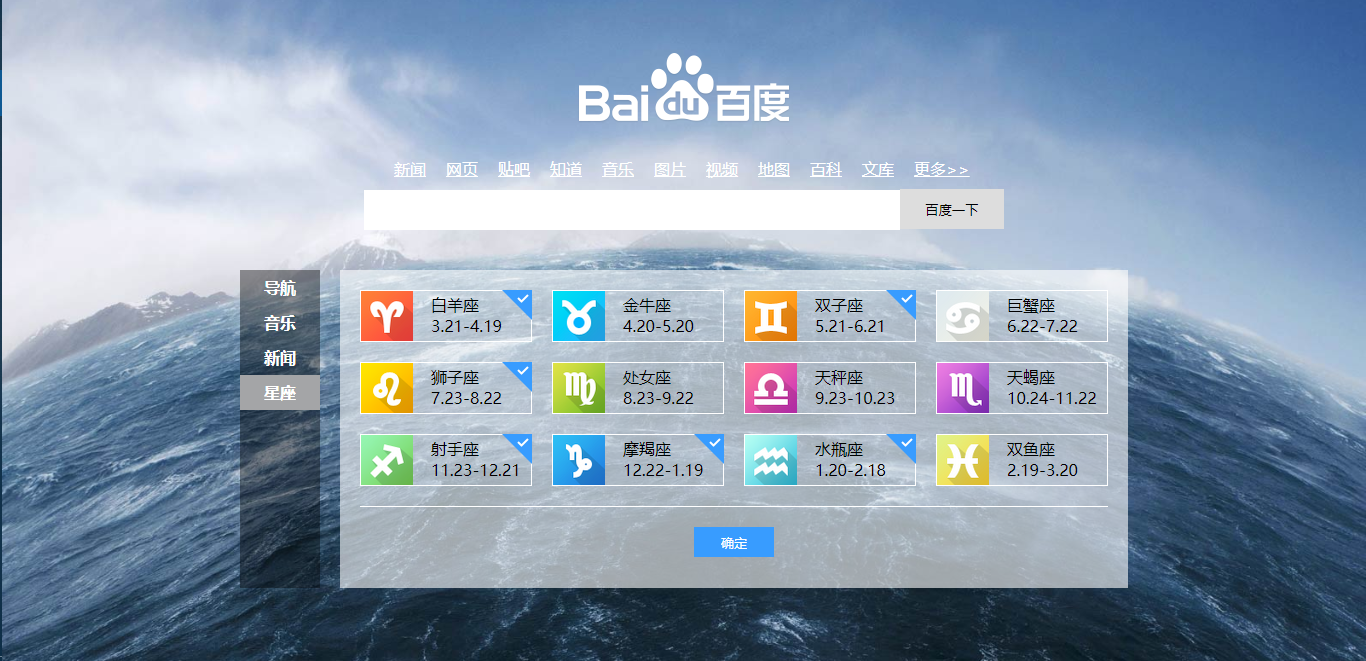
源码:
index.html
<!DOCTYPE html>
<html lang="en">
<head>
<meta charset="UTF-8">
<title>百度星座</title>
<style type="text/css">
*{
margin: 0;
padding: 0;
}
.clearfix:after{
content: "";
display: block;
clear: both;
height: 0;
line-height: 0;
visibility: hidden;
}
.clearfix{
zoom: 1;
}
ul{
list-style: none;
}
button{
border: none;
outline: none;
cursor: pointer;
}
body{
background: url("img/bg.jpg") no-repeat;
background-size: cover;
-webkit-background-size: cover;
}
.logo{
width: 270px;
margin: 30px auto 0;
}
.logo img{
width: 270px;
height: 129px;
}
.links{
width: 600px;
margin: 0px auto;
}
.links li{
float: left;
}
.links li a{
color: #fff;
padding: 0 10px;
}
.search{
width: 640px;
margin: 10px auto;
}
.search input{
width: 536px;
height: 40px;
border: none;
outline: none;
}
.search button{
width: 104px;
height: 40px;
background-color: #DDD;
}
.container{
width: 888px;
margin: 40px auto;
}
.container .menu{
float: left;
width: 80px;
height: 318px;
background-color: rgba(0,0,0,.4 );
}
.container .menu a{
display: block;
font-weight: bold;
color: #fff;
text-decoration: none;
width: 80px;
height: 35px;
line-height: 35px;
text-align: center;
}
.container .menu a.active{
background-color: #A4A5A7;
}
.container .card{
float: left;
margin-left: 20px;
width: 768px;
height: 278px;
background-color: rgba(255,255,255,.6);
padding: 20px 0 20px 20px;
}
.container .card li{
width: 170px;
height: 50px;
border: 1px solid #fff;
float: left;
margin: 0px 20px 20px 0;
/*background: url("img/xingzuo.png") no-repeat 0 0;*/
position: relative;
}
.container .card li a{
display: block;
width: 100px;
height: 30px;
padding: 3px 0 10px 70px;
text-decoration: none;
color: #000;
}
.container .card li div{
position: absolute;
top: -1px;
right: -1px;
height: 0;
width: 30px;
height: 30px;
background: url("img/xingzuo.png") no-repeat 0 -624px;
cursor: pointer;
display: none;
}
.container .card li div.mark{
display: block;
}
.container .card .bottom{
border-top: 1px solid #fff;
width: 748px;
}
.container .card .bottom button{
display: block;
width: 80px;
height: 30px;
color: #fff;
background-color: #389CFF;
margin: 20px auto;
}
</style>
<script type="text/javascript" src="jquery-3.3.1.js"></script>
<script type="text/javascript" src="index.js"></script>
</head>
<body>
<div class="logo">
<img src="img/logo_white.png" alt="">
</div>
<div class="links clearfix">
<ul>
<li><a href="http://news.baidu.com" target="_blank">新闻</a></li>
<li><a href="http://www.baidu.com" target="_blank">网页</a></li>
<li><a href="http://tieba.baidu.com" target="_blank">贴吧</a></li>
<li><a href="http://zhidao.baidu.com" target="_blank">知道</a></li>
<li><a href="http://music.baidu.com" target="_blank">音乐</a></li>
<li><a href="http://image.baidu.com" target="_blank">图片</a></li>
<li><a href="http://v.baidu.com" target="_blank">视频</a></li>
<li><a href="http://map.baidu.com" target="_blank">地图</a></li>
<li><a href="http://baike.baidu.com" target="_blank">百科</a></li>
<li><a href="http://wenku.baidu.com" target="_blank">文库</a></li>
<li><a href="http://www.baidu.com/more/" target="_blank">更多>></a></li>
</ul>
</div>
<div class="search">
<input type="text" name="question"><button type="submit">百度一下</button>
</div>
<div class="container">
<div class="menu">
<ul>
<li><a href="javascript:;">导航</a></li>
<li><a href="javascript:;">音乐</a></li>
<li><a href="javascript:;">新闻</a></li>
<li><a href="javascript:;" class="active">星座</a></li>
</ul>
</div>
<div class="card">
<div class="xingzuo clearfix" id="xz"></div>
<div class="bottom">
<button>确定</button>
</div>
</div>
</div>
</body>
</html>
index.js
$(function () {

    var datas = [{

        name : "白羊座",

        date : "3.21-4.19"

    },{

        name : "金牛座",

        date : "4.20-5.20"

    },{

        name : "双子座",

        date : "5.21-6.21"

    },{

        name : "巨蟹座",

        date : "6.22-7.22"

    },{

        name : "狮子座",

        date : "7.23-8.22"

    },{

        name : "处女座",

        date : "8.23-9.22"

    },{

        name : "天秤座",

        date : "9.23-10.23"

    },{

        name : "天蝎座",

        date : "10.24-11.22"

    },{

        name : "射手座",

        date : "11.23-12.21"

    },{

        name : "摩羯座",

        date : "12.22-1.19"

    },{

        name : "水瓶座",

        date : "1.20-2.18"

    },{

        name : "双鱼座",

        date : "2.19-3.20"

    }];

    var str = "<ul>";

    for(var i=0;i<datas.length;i++){

        str += "<li>";

        str += "<a href='#'>"+datas[i].name+"<br>"+datas[i].date+"</a>";

        str += "<div></div></li>";

    }

    str += "</ul>";

    $("#xz").html(str);

    $("#xz li").each(function (i) {

        $("#xz li:eq("+i+")").css("background","url('img/xingzuo.png') no-repeat 0 -"+(52*i)+"px");

    })

    $("#xz li").click(function () {

        $(this).children("div").toggleClass("mark");

    });

})
图片:



jquery json实现面向对象 百度十二星座的更多相关文章
- struts2 + jquery + json 简单的前后台信息交互
ajax 是一种客户端与服务器端异步请求的交互技术.相比同步请求,大大提高了信息交互的速度和效率.是当下非常实用和流行的技术. 这里简单的说明 struts2 + jquery + json 下的 信 ...
- Json 基于jQuery+JSON的省市联动效果
helloweba.com 作者:月光光 时间:2012-09-12 21:57 标签: jQuery JSON Ajax 省市联动 省市区联动下拉效果在WEB中应用非常广泛,尤其在一些 ...
- JQuery + JSON作为前后台数据交换格式实践
JQuery + JSON作为前后台数据交换 JQuery提供良好的异步加载接口AJAX,可以局部更新页面数据, http://api.jquery.com/category/ajax/ JSON作为 ...
- jQuery: jquery.json.js
http://api.jquery.com/jQuery.parseJSON/ http://www.json.org/json-zh.html http://fineui.codeplex.com/ ...
- struts2+jquery+json集成
以下采用struts2+jquery+json模拟一个案例.当点击提交按钮时会把输入的数据提交到后台,然后从后台获取数据在客户端显示. 效果如下: 接下来为struts2+jquery+json集成步 ...
- jQuery+JSON+jPlayer实现QQ空间音乐查询
演示地址: http://bejson.com/demos/qqmusic/ 代码下载:http://www.jqdemo.com/932.html 查询QQ音乐是很早前就出来的一个接口. 这里使用j ...
- echart+jquery+json统计TP数据
由于工作需要,需要统计交易数据的TP50,TP90,TP95,TP99.采用的前端技术是jquery+json+echart. 一.TP定义(谷歌) Calculating TP is very si ...
- Struts2+JQuery+Json登陆实例
Struts2+JQuery+Json登陆实例 博客分类: Struts2 在搭建之前.. 首先,需要准备struts2.0框架的5个核心包, 以及jsonplugin-0.32.jar 以及js ...
- 留存: struts2+jquery+json集成
原文地址:struts2+jquery+json集成 以下采用struts2+jquery+json模拟一个案例.当点击提交按钮时会把输入的数据提交到后台,然后从后台获取数据在客户端显示. 效果如下: ...
随机推荐
- 部署MVC项目ManagedPipelineHandler报错
"处理程序ExtensionlessUrlHandler-Integrated-4.0在其模块列表中有一个错误模块ManagedPipelineHandler": 解决方法:以管理 ...
- android textview 显示一行,且超出自动截断,显示"..."
android textview 显示一行,且超出自动截断,显示"..." <TextView android:layout_width="wrap_content ...
- CoreImage
[CoreImage] CIContext is an object through which Core Image draws the results produced by a filter. ...
- 移动直播app怎么做
今年移动直播行业的兴起,诞生了一大批网红,甚至明星也开始直播了,因此不得不跟上时代的步伐,教你从零开始搭建一个完整的iOS直播app,希望能帮助到更多的人更快的了解直播. 了解直播 1 热门直播产品: ...
- redhat6.7在线安装postgresql9
原文:http://wandejun1012.iteye.com/blog/2015777 1.安装postgresql9.0 yum 仓库 rpm -i http://yum.postgresql. ...
- UVa 818Cutting Chains (暴力dfs+位运算+二进制法)
题意:有 n 个圆环,其中有一些已经扣在一起了,现在要打开尽量少的环,使所有的环可以组成一条链. 析:刚开始看的时候,确实是不会啊....现在有点思路,但是还是差一点,方法也不够好,最后还是参考了网上 ...
- HRBUST1311 火影忍者之~忍者村 2017-03-06 16:06 106人阅读 评论(0) 收藏
火影忍者之-忍者村 忍者村是忍者聚居的村子,相等于国家的军事力量.绝大部分村民都是忍者,有一些忍者会在村内开设书店.餐厅等,不过大部分忍者都是为村子执行任务的忍者,以赚取酬劳,并于战时为国家出战. ...
- SpringBoot学习:整合shiro自动登录功能(rememberMe记住我功能)
首先在shiro配置类中注入rememberMe管理器 /** * cookie对象; * rememberMeCookie()方法是设置Cookie的生成模版,比如cookie的name,cooki ...
- 试题 G: 外卖店优先级 第十届蓝桥杯
试题 G: 外卖店优先级时间限制: 1.0s 内存限制: 512.0MB 本题总分: 20 分[问题描述]“饱了么”外卖系统中维护着 N 家外卖店,编号 1 ∼ N.每家外卖店都有一个优先级,初始时 ...
- Android-MediaPlayer-音频播放-异步准备
在上一篇博客,Android-MediaPlayer-音频播放-普通准备,介绍了普通准备的播放: 一般在开发中,要使用异步准备比较好,因为准备是要去准备硬件来播放,是耗性能的 异步准备和普通准备的区别 ...