
用C#写一个多进程监控自动关机工具
因为据说某server开着就很贵,所以我们跑完测试的job后就要赶紧关机才行,但是测试的job要跑很久,过程中又不需要干什么,所以就得有个守家的,有时候会走很晚。如果有一个自动化关机的工具就好了,当指定的进程结束了以后系统就会自动关机。这件事我在上一篇中已经做好了。这一次领导又有新需求,说要监控多个进程而不单单是一个了,需要有一个配置文件来配置所需要监控的进程名,而且想要可以自主选择检查的间隔,于是就有了下文。
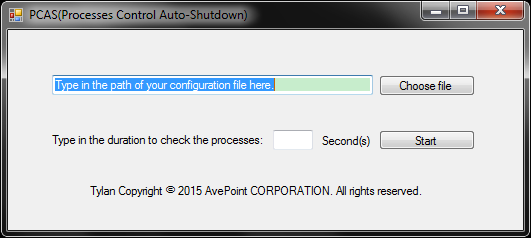
代码如下:
using System;

using System.Collections.Generic;

using System.ComponentModel;

using System.Data;

using System.Drawing;

using System.Linq;

using System.Text;

using System.Threading.Tasks;

using System.Windows.Forms;

using System.Diagnostics;

using System.Text.RegularExpressions;

using System.IO;

namespace AutoShutDown2

{

    public partial class MainForm : Form

    {

        public MainForm()

        {

            InitializeComponent();

        }

        private void chooseFileButton_Click(object sender, EventArgs e)

        {

            OpenFileDialog fileName = new OpenFileDialog();

            fileName.Filter = "文本文件|*.*|C#文件|*.cs|所有文件|*.*";

            if (fileName.ShowDialog() == DialogResult.OK)

            {

                filePath.Text = fileName.FileName;

            }

        }

        private void filePath_Click(object sender, EventArgs e)

        {

            filePath.Text = "";

        }

        private void startButton_Click(object sender, EventArgs e)

        {

            if (filePath.Text.ToString().Substring(filePath.Text.Length - , ) == "txt")

            {

                if (Regex.IsMatch(duration.Text, "^([0-9]{1,})$"))

                {

                    if (int.Parse(duration.Text) >= )

                    {

                        MessageBox.Show("PCAS will check with a duration of " + duration.Text + "s.");

                        this.Hide();

                        //Check the processes with the duration.

                        DurationStart();

                    }

                    else

                    {

                        MessageBox.Show("The integer number should be greater than 10 seconds.");

                    }

                }

                else

                {

                    MessageBox.Show("You can only type in an integer for duration.");

                    duration.Text = "";

                }

            }

            else

            {

                MessageBox.Show("You can only choose a txt to be a configuration file.");

                filePath.Text = "";

            }

        }

        private void DurationStart()

        {

            //Check the process's status with the duration.

            System.Timers.Timer tmr = new System.Timers.Timer(int.Parse(duration.Text)*);

            tmr.Elapsed += new System.Timers.ElapsedEventHandler(CheckProcess);

            tmr.AutoReset = true;

            tmr.Enabled = true;

        }

        private void CheckProcess(object source, System.Timers.ElapsedEventArgs e)

        {

            //Check the processes's status in the config file.

            FileStream fs = new FileStream(filePath.Text, FileMode.Open);

            StreamReader sr = new StreamReader(fs);

            string line;

            int numOfTheProcesses = ;

            while ((line = sr.ReadLine()) != null)

            {

                var processes = System.Diagnostics.Process.GetProcesses();

                foreach (var process in processes)

                {

                    if (process.ProcessName == line)

                    {

                        //Find the objective process.

                        //MessageBox.Show(line);

                        numOfTheProcesses++;

                    }

                }

            }

            if (numOfTheProcesses == )

            {

                //No such process, shut down the computer.

                //MessageBox.Show("The computer is ready to be shut down.");

                //Shut down the computer

                ShutDown();

            }

            sr.Close();

            fs.Close();

        }

        private void ShutDown()

        {

            //Shut down the computer.

            System.Diagnostics.Process myProcess = new System.Diagnostics.Process();

            myProcess.StartInfo.FileName = "cmd.exe";

            myProcess.StartInfo.UseShellExecute = false;

            myProcess.StartInfo.RedirectStandardInput = true;

            myProcess.StartInfo.RedirectStandardOutput = true;

            myProcess.StartInfo.RedirectStandardError = true;

            myProcess.StartInfo.CreateNoWindow = true;

            myProcess.Start();

            myProcess.StandardInput.WriteLine("shutdown -s -t 0");

        }

    }

}
你需要输入一个大于10的整数,并且填写的路径一定要是一个txt文本。否则会给予提示。
配置文件中的配置是这样的,每一行填写一个要监控的进程名:
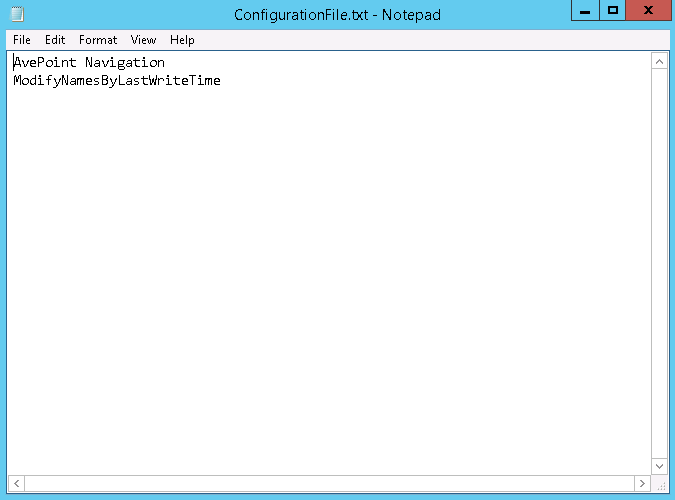
路径和时间间隔填写正确以后点击Start就会开始按你设定的时间间隔自动监控配置文件中的所有进程,等到所有进程都停止后系统就会自动关机。
用C#写一个多进程监控自动关机工具的更多相关文章
- 多进程监控自动关机工具升级远程关闭多台server——C# works with PowerShell
之前给单位做过一个多进程监控的自动关机工具,详见那篇blog. 这次领导又加了需求,说要等进程监控结束后,不止需要关闭主控端server,还需要关闭其他servers.于是就用到了我上篇文章所介绍的知 ...
- java 写一个JSON解析的工具类
上面是一个标准的json的响应内容截图,第一个红圈”per_page”是一个json对象,我们可以根据”per_page”来找到对应值是3,而第二个红圈“data”是一个JSON数组,而不是对象,不能 ...
- 利用 Python 写一个颜值测试小工具
我们知道现在有一些利用照片来测试颜值的网站或软件,其实使用 Python 就可以实现这一功能,本文我们使用 Python 来写一个颜值测试小工具. 很多人学习python,不知道从何学起.很多人学习p ...
- 通过npm写一个cli命令行工具
前言 如果你想写一个npm插件,如果你想通过命令行来简化自己的操作,如果你也是个懒惰的人,那么这篇文章值得一看. po主的上一篇文章介绍了定制自己的模版,但这样po主还是不满足啊,项目中我们频繁的需要 ...
- 基于 vite2 + Vue3 写一个在线帮助文档工具
提起帮助文档,想必大家都会想到 VuePress等,我也体验了一下,但是感觉和我的思路不太一样,我希望的是那种可以直接在线编辑文档,然后无需编译就可以直接发布的方式,另外可以在线写(修改)代码并且运行 ...
- 写一个nginx监控日志
下面的代码是实现一个nginx监控日志功能,是不是很好玩呢.
- 用 Python 写一个多进程兼容的 TimedRotatingFileHandler
我前面有篇文章已经详细介绍了一下 Python 的日志模块.Python 提供了非常多的可以运用在各种不同场景的 Log Handler. TimedRotatingFileHandler 是 Pyt ...
- 10min 手写一个内存监控系统
本文的目的在于,尽可能用简单的代码,让大家了解内存监控的原理,及思想.更容易去理解Nagios.Zabbix.Ganglia监控原理,文章最后还有视频教程链接哦,从零敲出来的全过程 思路分为下面几块: ...
- 教你写一个web远程控制小工具
惯例先上图 晚上躺床上了,发现忘关电脑了,又不想起来关,来用手机控制电脑多好,百度了下,果然一大把.哈,我自己为什么不自己也实现个呢,任意的自己diy.Just do it. 如果不想看如何实现,那么 ...
随机推荐
- java手动加载jar
@RequestMapping("/testJar") public @ResponseBody String exteriorJar(int ys, int csd,int jg ...
- Linux下FTP命令的使用方法
FTP> ? 显示 ftp 命令说明.? 与 help 相同. 格式:? [command] 说明:[command]指定需要帮助的命令名称.如果没有指定 command,ftp 将显示全部命令 ...
- asp.net三层架构详解(转)
摘自:http://www.cnblogs.com/cresuccess/archive/2008/12/10/1351675.html 一.数据库 ,) ) no ...
- HTTP1.1协议请求方面参数
请求信息 GET / HTTP/1.1 ->请求行 Accept: */* Accept-Languag ...
- <转>C++ explicit关键字详解
要文转自:http://www.cnblogs.com/ymy124/p/3632634.html 首先, C++中的explicit关键字只能用于修饰只有一个参数的类构造函数, 它的作用是表明该构造 ...
- Hadoop分布式文件系统:架构和设计
原文地址:http://hadoop.apache.org/docs/r1.0.4/cn/hdfs_design.html 引言 前提和设计目标 硬件错误 流式数据访问 大规模数据集 简单的一致性模型 ...
- jmeter ---常用字符串相关函数
主要的函数如下: 1.将字符串转为大写或小写: ${__lowercase(Hello,)} ${__uppercase(Hello,)}2.生成字符串: __RandomString函数 3.取 ...
- Linux内核jiffies简介
在LINUX的时钟中断中涉及至二个全局变量一个是xtime,它是timeval数据结构变量,另一个则是jiffies,首先看timeval结构struct timeval{time_t tv_sec; ...
- Ibatis基础知识:#与$的差别
背景 Ibatis是一个轻量级.非侵入式的持久层框架,适用于范围较广.较轻便--当然,不管J2EE中哪一个持久层框架,都会基于JDBC(不细究JNDI方式).我们在SqlMap中编写SQL,利用各种S ...
- 【服务器防护】linux 如何查看防火墙是否开启
service iptables status可以查看到iptables服务的当前状态.但是即使服务运行了,防火墙也不一定起作用,你还得看防火墙规则的设置 iptables -L在此说一下关于启动和关 ...