
xml布局中include的使用
参考:http://blog.csdn.net/harvic880925/article/details/17263275
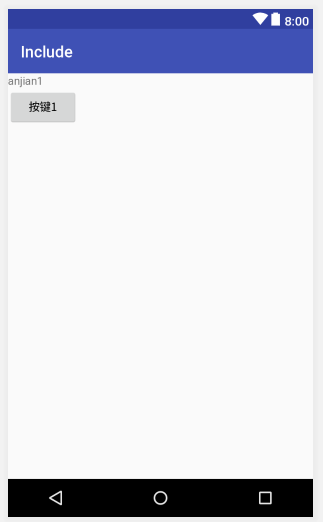
include_button1.xml
<?xml version="1.0" encoding="utf-8"?>

<LinearLayout

    xmlns:android="http://schemas.android.com/apk/res/android"

    android:orientation="vertical"

    android:layout_width="match_parent"

    android:layout_height="wrap_content">

    <TextView

        android:layout_width="wrap_content"

        android:layout_height="wrap_content"

        android:text="anjian1" />

    <Button

        android:layout_width="wrap_content"

        android:layout_height="wrap_content"

        android:text="按键1"/>

</LinearLayout>
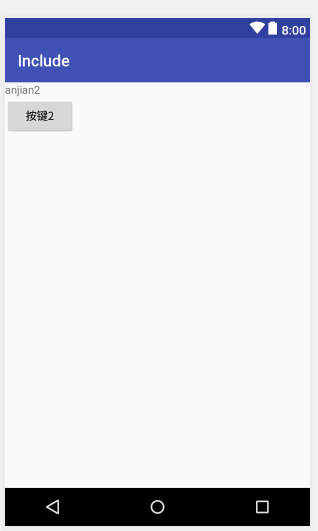
include_button2.xml
<?xml version="1.0" encoding="utf-8"?>

<LinearLayout

    xmlns:android="http://schemas.android.com/apk/res/android"

    android:orientation="vertical"

    android:layout_width="match_parent"

    android:layout_height="wrap_content">

    <TextView

        android:layout_width="wrap_content"

        android:layout_height="wrap_content"

        android:text="anjian2" />

    <Button

        android:layout_width="wrap_content"

        android:layout_height="wrap_content"

        android:text="按键2"/>

</LinearLayout>
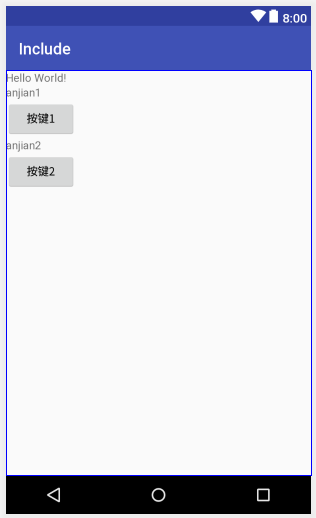
activity_main.xml
<?xml version="1.0" encoding="utf-8"?>

<LinearLayout

    xmlns:android="http://schemas.android.com/apk/res/android"

    xmlns:tools="http://schemas.android.com/tools"

    xmlns:app="http://schemas.android.com/apk/res-auto"

    android:orientation="vertical"

    android:layout_width="match_parent"

    android:layout_height="match_parent">

    <TextView

        android:layout_width="wrap_content"

        android:layout_height="wrap_content"

        android:text="Hello World!" />

    <include

        android:id="@+id/key1"

        layout="@layout/include_button1"></include>

    <include

        android:id="@+id/key2"

        layout="@layout/include_button2"></include>

</LinearLayout>
xml布局中include的使用的更多相关文章
- 安卓xml布局中 android:paddingBottom="@dimen/activity_vertical_margin"是什么意思?
@dimen/activity_vertical_margin 是什么意思? @dimen/activity_vertical_margin这个的意思就是在你的values文件夹下面的dimens文件 ...
- android布局中画线的方法
1.自定义View画线 http://fariytale.iteye.com/blog/1264225 下面介绍几种简单的方法 2.textView和View画直线 <TextView andr ...
- 第五篇:在SOUI中使用XML布局属性指引(pos, offset, pos2type)
窗口布局的概念 每一个UI都是由大量的界面元素构成的,在Windows编程,这些界面元素的最小单位通常称之为控件. 布局就是这些控件在主界面上的大小及相对位置. 传统的布局一般使用一个4个绝对坐标来定 ...
- 【转】在Android布局中使用include和merge标签
内容转自:http://fengweipeng1208.blog.163.com/blog/static/21277318020138229754135/ 在我们开发android布局时,经常会有很多 ...
- 我的Android进阶之旅------>Android中的布局优化 include、merge 、ViewStub
1.如何重用布局文件? 可以使用<include>标签引用其他的布局文件,并用android:id属性覆盖被引用布局文件中顶层节点的android:id属性值.代码如下: <!--引 ...
- android布局中使用include及需注意点
在android布局中,使用include,将另一个xml文件引入,可作为布局的一部分,但在使用include时,需注意以下问题: 一.使用include引入 如现有标题栏布局block_header ...
- Android Studio xml文件中的布局预览视图
操作系统:Windows 10 x64 IDE:Android Studio 3.3.1 更新了Android Studio之后,xml文件中的布局预览视图变得如此简洁! 原因是没有勾选Show La ...
- Android中measure过程、WRAP_CONTENT详解以及 xml布局文件解析流程浅析
转自:http://www.uml.org.cn/mobiledev/201211221.asp 今天,我着重讲解下如下三个内容: measure过程 WRAP_CONTENT.MATCH_PAREN ...
- Android Fragment之间的通信(用fragment替换掉XML布局文件中的一个线性布局)
1.XML布局 (1)主界面 <?xml version="1.0" encoding="utf-8"?> <LinearLayout xml ...
随机推荐
- ASP.NET RouteModule相关的一些东西
Asp.NET中的路由配置,首先要提到的几个相关类型,Route ,RouteBase,RouteData,RouteTable,RouteCollection 这几个.下面我一次回忆一下,有需要的朋 ...
- Android 屏幕,语言,API版本 适配和兼容性
Supporting Different Languages http://developer.android.com/training/basics/supporting-devices/langu ...
- Oracle数据库02
EXISTS子查询 特征:将主查询中的数据带到子查询中进行验证,如果验证成功则子查询返回true,当主查询接收到true的时候被验证的数据就显示,如果在子查询中验证失败则返回false,当主查询接收到 ...
- 201621123023《Java程序设计》第9周学习总结
一.本周学习总结 1.1 以你喜欢的方式(思维导图或其他)归纳总结集合与泛型相关内容. 二.书面作业 1. List中指定元素的删除(题集题目) 1.1 实验总结.并回答:列举至少2种在List中删除 ...
- CF79D Password
题目链接 题意:给定长度为n的0/1序列,初始值都为0.你每次可以在给定的l个长度中的\(a_i\)并将序列中长度为\(a_i\)的部分取反.使得最终状态为\(x_1\)~\(x_k\),求最少取反次 ...
- 【Oracle 12c】CUUG OCP认证071考试原题解析(35)
35.choose the best answer View the Exhibit and examine the description of the EMPLOYEES table. Evalu ...
- php 对比两个数组中的值是否相等
$a = ['1','2','4','3'];//提交答案 $b = ['2','1','3'];//正确答案 $state = $this->diffArray($b, $a); echo ' ...
- 为IEnumerable类型添加Add方法
IEnumerable类型原生是没有Add方法的,你可以用Contact方法去为它添加元素, 1 items = items.Concat(new[] { "foo" }); 也可 ...
- linux中python配置tab=4个空格,并显示行号。
vim ~/.vimrc 写入: set ts=4 set nu :wq 保存. source ~/.vimrc 使之生效.
- springBoot整合MyBatise及简单应用
springBoot整合MyBatise及简单应用 我采用的是 工具IDEA 框架是springBoot+maven+Mybatise 第一步: pom.xml 引入相关jar包 <?xml v ...