
关于chrome浏览器事件拖动的bug(首次点击的时候也触发move的事件)
在做R80web的时候出现一个奇怪的现象,chorme现在的版本还是存在,拖动事件有mousedown、mousemove、mouseup组成,但是首次click以及失去焦点再重新点击的时候同样会触发mousemove的事件
事件问题代码
$('#mydiv').on("mousedown",function(){

    console.log("this is mousedown event");

    $(document).on("mousemove",function(){

        console.log("this is mousemove event");

    });

    $(document).off("mouseup").on("mouseup",function(){

        console.log("this is mouseup event");

        $(document).off("mousemove")

    });

});
注:火狐版本的浏览器不会存在此问题
问题存在,但是也要解决,因为这样一来,如果页面元素上有其他的事件,就有可能会触发mousemove的事件
解决办法:
在mousedown下申明一个变量,记录鼠标的位置,然后再在mousemove里面同位置判断,如果相同说明是点击的事件,否则为move事件
代码:
$('#mydiv').on("mousedown",function(e){

    var m=e.clientX,n=e.clientY;

    console.log("this is mousedown event");

    $(document).on("mousemove",function(e){

        var mousemove = { x: e.clientX, y: e.clientY };

        //如果前后位置相同说明是点击事件,否则移动事件

      if (m !== mousemove.x || n !== mousemove.y) {

            console.log("this is mousemove event");

        }

    });

    $(document).off("mouseup").on("mouseup",function(){

        console.log("this is mouseup event");

        $(document).off("mousemove")

    });

});
测试代码:
<!DOCTYPE html>

<html>

<head>

<meta charset="UTF-8">

<title>测试chorme浏览器版本拖动问题</title>

<script type="text/javascript" src="js/jquery-1.11.3.js"></script>

</head>

<body>

    <div id="mydiv" style="width:200px;height:200px;background: red;">

    <script>

        $(function(){

            //有问题的

            $('#mydiv').on("mousedown",function(){

                console.log("this is mousedown event");

                $(document).on("mousemove",function(){

                    console.log("this is mousemove event");

                });

                $(document).off("mouseup").on("mouseup",function(){

                    console.log("this is mouseup event");

                    $(document).off("mousemove")

                });

            });

            //ok的

            $('#mydiv').on("mousedown",function(e){

                var m=e.clientX,n=e.clientY;

                console.log("this is mousedown event");

                $(document).on("mousemove",function(e){

                    var mousemove = { x: e.clientX, y: e.clientY };

                    //如果前后位置相同说明是点击事件,否则移动事件

                  if (m !== mousemove.x || n !== mousemove.y) {

                        console.log("this is mousemove event");

                    }

                });

                $(document).off("mouseup").on("mouseup",function(){

                    console.log("this is mouseup event");

                    $(document).off("mousemove")

                });

            });

        });

    </script>

</body>

</html>
问题延生:如何阻止冒泡,当我点击放大缩小图标的时候也触发拖动的事件
解决办法:
//窗口最大化的事件

$("#expander .ipn-status").on("mousedown",function(){return false}).on("click","ipn-max",function(){

    //最大化的业务代码

    ...

})
注意:一定是要注销对应的事件才会有效果
比如这样是没有效果的:
//窗口最大化的事件

$("#expander .ipn-status").on("click","ipn-max",function(){

    //最大化的业务代码

    ...

    return false;

})
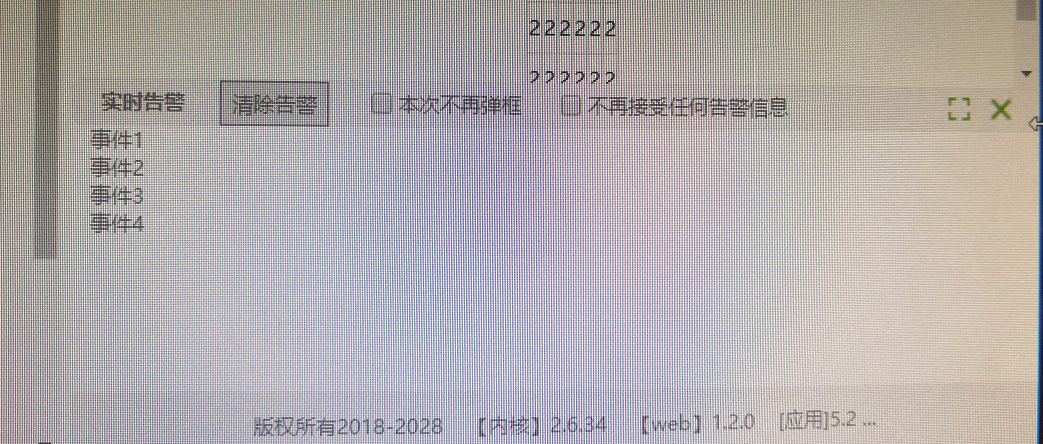
上图功能代码:
功能:
1、点击右边图标控制放大缩小,缩小后显示放大图标,放大后显示缩小图标
2、可以自由拖动事件主体,高度
$(function(){

    var src_posi_Y = 0, dest_posi_Y = 0, move_Y = 0, is_mouse_down = true;    //事件窗体拖拽

    $("#expander").mousedown(function(e){

        console.log("点击");

        $("#mask").css('display','block');//开启临时遮罩层

        src_posi_Y = e.pageY;

        var m=e.clientX;

        var n=e.clientY;

        is_mouse_down = true;

        $(document).on('mousemove',function(e){

            var mousemove = { x: e.clientX, y: e.clientY };

            if (m !== mousemove.x || n !== mousemove.y) {//如果mousemove鼠标的位置和mouseDown鼠标位置相同说明不是move事件

                console.log("移动");

                dest_posi_Y = e.pageY;//鼠标距离顶部的距离

                var maxPosiY=$("#top").height()+$("#top_nav").height()+$("#expander").height();//间距

                var mm=dest_posi_Y-maxPosiY;

                if(mm<0){mm=0}

                //根据距离页面顶端位置进行判断时候终止拖拽

                if(dest_posi_Y<=maxPosiY){

                    dest_posi_Y=maxPosiY;

                    $("#expander").find(".ipn-max").hide()//隐藏最大化图标

                    $("#expander").find(".ipn-default").css("display","inline-block")//显示默认图标

                }

                src_posi_Y = dest_posi_Y;

                $("#event").removeClass("half").removeClass("all");

                $("#event").css("top",mm+"px" );

            }

        });

        $(document).off("mouseup").on("mouseup",function(e){

            console.log("弹起");

            $("#mask").css('display','none');//关闭临时遮罩层

            $(document).off("mousemove");

        })

    });

    //窗口最大化的事件

    $("#expander .ipn-status").on("mousedown",function(){return false}).on("click",".ipn-max",function(){//阻止冒泡

        //var maxPosiY=parseFloat($("#main").height()-40)+"px";

        $(this).hide();

        $("#expander").find(".ipn-default").css("display","inline-block");

        $("#event").removeClass("half").addClass("all");

        return false;

    })

    //窗口还原的事件

    $("#expander .ipn-status").on("mousedown",function(){return false}).on("click",".ipn-default",function(){//阻止冒泡

        $(this).hide();

        $("#expander").find(".ipn-max").css("display","inline-block")

        $("#event").removeClass("all").addClass("half");

        return false;

    })

})
css
@charset "utf-8";

*{

    margin:0px;

    padding:0px;

}

html,body{

    background-color: #f9fbf8;

    height:100%

}

p{margin:;}

.lf   {float:left;}

.rt  {float:right;}

.clear  {clear:both;}

ul,li,p,h1,h2,h3,h4,h5,h6,dl,dt,dd {

    margin:0px;

    padding:0px;

    border:none;

    list-style:none;

}

button{outline: none}

a{text-decoration: none}

/*实时告警*/

.foot_nav{

    height: 40px;

    width: 100%;

    text-align: center;

    line-height: 40px;

    color: #7d7a7a;

    background-color:rgba(0, 0, 0, 0.05);

    position: absolute;

    bottom:;

    z-index:;

    font-size: 12px;

}

/*实时告警*/

.event{

    position: absolute;

    width: 100%;

    color: #7d7a7a;

    background-color: #ffffff;

    bottom: 40px;

    z-index:;

    font-size: 12px;

    display: none;

    /* transition: top 0.3s; */

}

.event.half{

    top:60% !important

}

.event.all{

    top:0 !important

}

.event.default{

    top:100%

}

.showEvent span{

    display: block;

    margin-left: 10px;

}

.showEvent{

    height: calc(100% - 22px);

    overflow: auto;

}

#expander{

    width: 100%;

    height: 25px;

    background-color: #f3f3f3;

    border-radius: 5px;

    border: 1px solid #eee;

    line-height: 25px;

}

#expander:hover{ cursor:n-resize;}

.ipn-tools>li{

    display:inline-block;

    vertical-align: top;

    margin-left:20px;

}

#iframe{

    height:100%;

}

#expander .ipn-tools{

    height:25px;

    line-height:25px;

}

#expander .ipn-tools a{

    display:inline-block;

    height:100%;

    text-align:center;

    color: #7d7a7a;

    width: 60px;

    height: 24px;

    border: 1px solid #8a8a8a;

    background-color: #ddd;

}

#expander .ipn-tools li input{

    vertical-align: middle;

    margin:0px 3px 3px 0px;

}

div.ipn-status{

    margin-right:20px;

    height: 25px;

    line-height: 29px;

}

div.ipn-status>i{

    display:inline-block;

    padding:7px;

    font-style: normal;

    margin-right: 10px;

    cursor: pointer;

}

div.ipn-status>i:hover{

    transform: scale(1.1);

}

div.ipn-status>i.ipn-close:hover{

    transform: scale(1.2);

}

div.ipn-status>i.ipn-max{

    background-image: url(../image/max.png)

}

div.ipn-status>i.ipn-default{

    display:none;

    background-image: url(../image/min.png)

}

div.ipn-status>i.ipn-close{

    transform: scale(1.1);

    padding:6px;

    background-image: url(../image/close.png);

    margin: 0 0 1px 0px;

}
html
<div id="event" class="event half">

<div id="expander">

    <h5 class="lf" style="margin-left:15px">实时告警</h5>

    <ul class="ipn-tools lf">

        <li>

            <a href="javascript:;">清除告警</a>

        </li>

        <li>

            <label>

                <input type="checkbox" name="" value="">本次不再弹框

            </label>

        </li>

        <li>

            <label>

                <input type="checkbox" name="" value="">不再接受任何告警信息

            </label>

        </li>

        <li></li>

    </ul>

    <div class="ipn-status rt">

        <i class="ipn-max" title="最大化"></i>

        <i class="ipn-default" title="还原"></i>

        <i class="ipn-close" title="关闭"></i>

        <div class="clear"></div>

    </div>

</div>

<div class="showEvent">

    <span>事件1</span>

    <span>事件2</span>

    <span>事件3</span>

    <span>事件4</span>

</div>

</div>
关于chrome浏览器事件拖动的bug(首次点击的时候也触发move的事件)的更多相关文章
- chrome浏览器模拟手机端:jquery click()点击无效解决方法
$(".sku-wrap .ok").click(); chrome浏览器模拟手机端,在油猴插件中写JS代码,然后发现click()点击失效. 解决方法:jquery的click( ...
- 关于谷歌Chrome浏览器的两个Bug?
1.网络资源下载莫名其妙的网络错误(也不支持续传?有时打开文件是损坏的?) 2.超级链接莫名的成了html下载?
- 赋予option元素点击事件后,点击select时却触发了option事件。如何解决?
将select的优先级提到option之前就可以了. 方法:为select元素添加position:relative: <select class="adt" name=&q ...
- 父节点使用css的transform: translate(0, 0)时position:fixed在chrome浏览器中无效
今天在做移动端的页面,无意间发现了一个Chrome浏览器下的一个bug,在使用CSS3的transform: translate(0, 0)属性对节点A进行位置转化,此时A节点下面有一个字节点B,节点 ...
- Chrome 浏览器垃圾回收机制与内存泄漏分析
Chorme 浏览器中的垃圾回收和内存泄漏 垃圾回收 通常情况下,垃圾数据回收分为手动回收和自动回收两种策略. 手动回收策略,何时分配内存.何时销毁内存都是由代码控制的. 自动回收策略,产生的垃圾数据 ...
- Selenium +Chrome浏览器如何模拟手机操作
Selenium +Chrome浏览器如何模拟手机操作 进入手机模式 打开谷歌浏览器,按F12,进入开发者模式,点击Toggle device toolbar,进入手机模式 设置Chrome的手机模式 ...
- 关闭chrome浏览器的input香蕉黄背景
chrome浏览器input的自动完成,点击之后自动输入,input的背景会变成香蕉黄,用如下方法修复: /* Change the white to any color ;) 就是给input设置内 ...
- 基于 Chrome 浏览器的扩展插件来进行的安装Postman
我会给你一个安装包,见附件.你应该下载下来,解压缩到你喜欢的位置. 打开 Chrome 浏览器的「扩展程序」 点击「加载已解压的扩展程序...」按钮,找到你刚刚下载的安装包的位置,点击确定. 你去看看 ...
- 关于 Chrome 浏览器中 onresize 事件的 Bug
我在写插件时用到了 onresize 事件,在反复地测试后发现该事件在 Chrome 及 Opera(内核基本与 Chrome 相同,以下统称 Chrome)浏览器打开时就会执行,这种情况也许不能算作 ...
随机推荐
- linux常见命令-查看磁盘空间
linux查看磁盘使用情况命令 1. 统一每个目录下磁盘的整体情况: df -h 2. 查看指定目录,在命令后直接放目录名,比如查看“usr”目录使用情况:df -h /usr/ 3. 查看当前目录 ...
- Objective-C 学习笔记(四) 数组
Objective-C 数组作为函数参数传递 如果想在一个函数作为参数,通过一维数组,就必须声明函数形式参数 方式一 指针作为形式参数 - (void) myFunction(int *) pa ...
- 配置sql server 允许远程连接
如果要想远程连接数据库那么则需要在一个局域网中或一个路由器中才可以做到 接下来就是具体的操作检查sqlserver数据库是否允许远程连接 具体操作为 (1)打开数据库,用本地帐户登录,右击第一个选项, ...
- c#设计模式之观察者模式(Observer Pattern)
场景出发 一个月高风黑的晚上,突然传来了尖锐的猫叫,宁静被彻底打破,狗开始吠了,大人醒了,婴儿哭了,小偷跑了 这个过程,如果用面向对象语言来描述,简单莫过于下: public class Cat { ...
- 1、ASP.NET Core2.0之Model、View、Controller
一.新建空项目 打开VS2017,新建→项目,选择如下: 点击,确定,弹出的界面选择如下: 选择空项目,因为选择其他的话会自动生成很多用不到的类,显得项目不够“清爽”,ASP.NET Core选择2. ...
- @JoinColumn 详解
1. 一对一 现假设有Person表和Address表,是一对一的关系,在Person中有一个指向Address表主键的字段addressID,所以主控方一定是Person,所谓主控方就是能改变关联关 ...
- 「BZOJ1426」收集邮票
题目链接 戳我 \(Solution\) 我们首先转换一下问题: 假设我们进行了k轮得到了所有种类的邮票 则所花费用为: \[(1+2+5+...+k)=\frac{(1+k)*k}{2}=\frac ...
- LOJ#6360. 复燃「恋之埋火」(最小圆覆盖+高斯消元)
题面 传送门 题解 不难发现最小圆覆盖的随机增量法复杂度还是正确的 所以现在唯一的问题就是给定若干个点如何求一个\(m\)维的圆 其实就是这一题 //minamoto #include<bits ...
- djngo 1.9版本以后 Foreignkey() 字段 第二个参数 on_delete 必不可少, mysql 外键可以为空
一.外键的删除 1.常见的使用方式(设置为null) class BookModel(models.Model): """ 书籍表 """ ...
- Python数据采集处理分析挖掘可视化应用实例
距离上一次发Python的技术贴已经过去两年了,这两年大法初成,并在知乎谢了相关技术专栏.现在搬运如下,均为原创,转载需注明出处哦! https://zhuanlan.zhihu.com/p/2957 ...