
Spring Boot 官方文档学习(一)入门及使用
个人说明:本文内容都是从为知笔记上复制过来的,样式难免走样,以后再修改吧。另外,本文可以看作官方文档的选择性的翻译(大部分),以及个人使用经验及问题。
- 内置Servlet Container
- 使用Spring Boot
- 安装Spring Boot CLI
- 开发一个简单的Spring Boot应用--使用最原始的方式
- Dependency Management
- Starters
- 自动配置
- Spring Beans 和 依赖注入(略)
- @SpringBootApplication
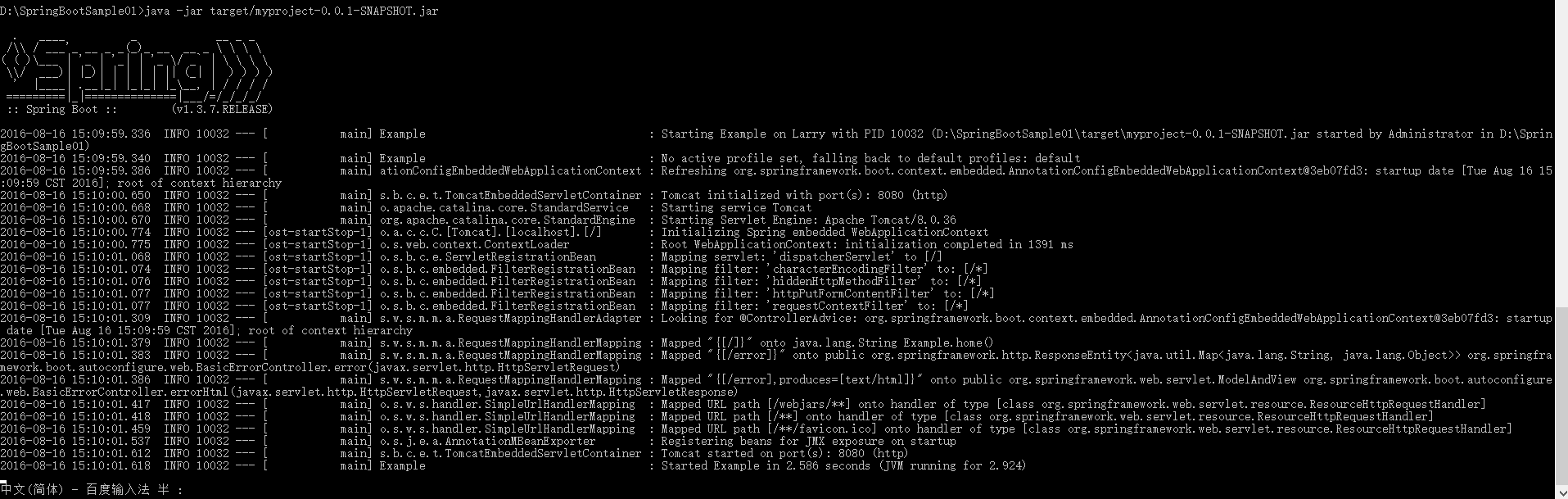
- 运行Spring Boot Application
- Developer tools
- 生产打包
Name Servlet Version Java Version Tomcat 8
3.1
Java 7+
Tomcat 7
3.0
Java 6+
Jetty 9.3
3.1
Java 8+
Jetty 9.2
3.1
Java 7+
Jetty 8
3.0
Java 6+
Undertow 1.3
3.1
Java 7+
此外,你仍然可以部署Spring Boot项目到任何兼容Servlet3.0+的容器。
org.springframework.boot groupId 。<?xml version="1.0" encoding="UTF-8"?>
<project xmlns="http://maven.apache.org/POM/4.0.0" xmlns:xsi="http://www.w3.org/2001/XMLSchema-instance"
xsi:schemaLocation="http://maven.apache.org/POM/4.0.0 http://maven.apache.org/xsd/maven-4.0.0.xsd">
<modelVersion>4.0.0</modelVersion> <groupId>com.example</groupId>
<artifactId>myproject</artifactId>
<version>0.0.1-SNAPSHOT</version> <!-- Inherit defaults from Spring Boot -->
<parent>
<groupId>org.springframework.boot</groupId>
<artifactId>spring-boot-starter-parent</artifactId>
<version>1.4.0.RELEASE</version>
</parent> <!-- Add typical dependencies for a web application -->
<dependencies>
<dependency>
<groupId>org.springframework.boot</groupId>
<artifactId>spring-boot-starter-web</artifactId>
</dependency>
</dependencies> <!-- Package as an executable jar -->
<build>
<plugins>
<plugin>
<groupId>org.springframework.boot</groupId>
<artifactId>spring-boot-maven-plugin</artifactId>
</plugin>
</plugins>
</build> </project>
<?xml version="1.0" encoding="UTF-8"?>

<project xmlns="http://maven.apache.org/POM/4.0.0" xmlns:xsi="http://www.w3.org/2001/XMLSchema-instance"

    xsi:schemaLocation="http://maven.apache.org/POM/4.0.0 http://maven.apache.org/xsd/maven-4.0.0.xsd">

    <modelVersion>4.0.0</modelVersion>

    <groupId>com.example</groupId>

    <artifactId>myproject</artifactId>

    <version>0.0.1-SNAPSHOT</version>

    <parent>

        <groupId>org.springframework.boot</groupId>

        <artifactId>spring-boot-starter-parent</artifactId>

        <version>1.4.0.RELEASE</version>

    </parent>

    <!-- Additional lines to be added here... -->

</project>
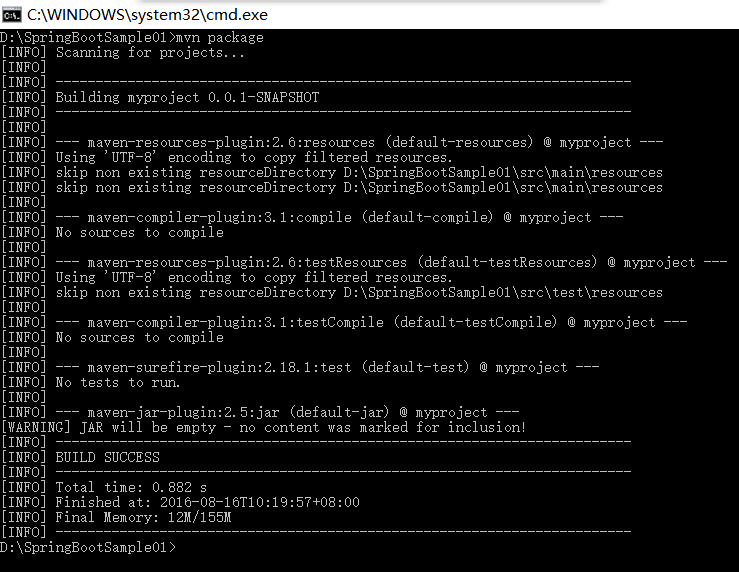
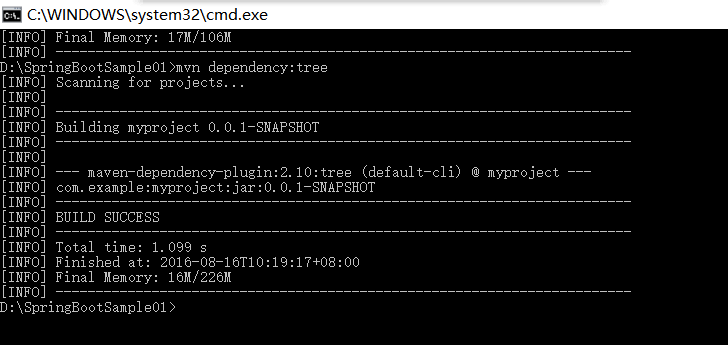
<dependencies>

    <dependency>

        <groupId>org.springframework.boot</groupId>

        <artifactId>spring-boot-starter-web</artifactId>

    </dependency>

</dependencies>
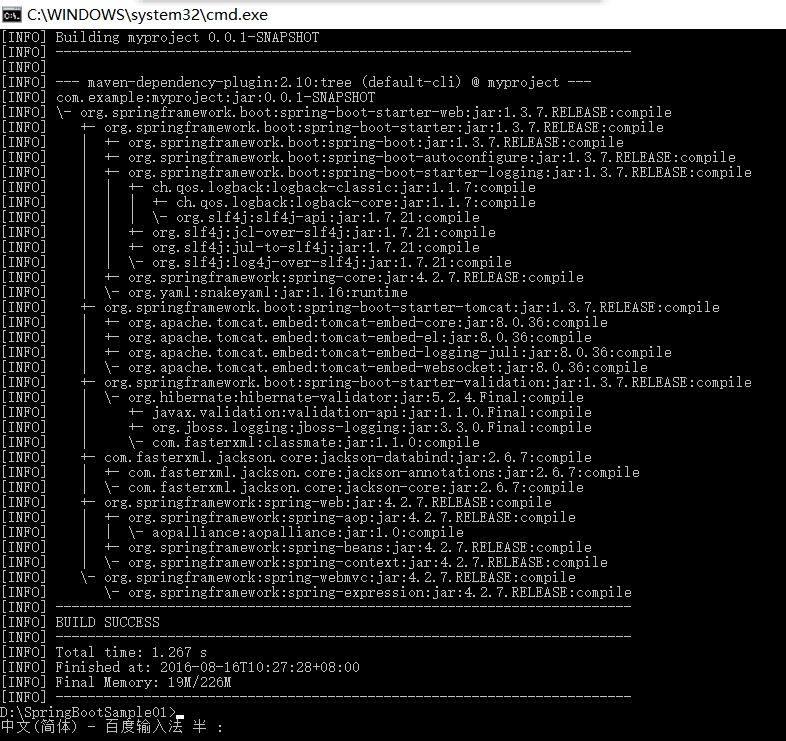
import org.springframework.boot.*;

import org.springframework.boot.autoconfigure.*;

import org.springframework.stereotype.*;

import org.springframework.web.bind.annotation.*;

@RestController

@EnableAutoConfiguration

public class Example {

    @RequestMapping("/")

    String home() {

        return "Hello World!";

    }

    public static void main(String[] args) throws Exception {

        SpringApplication.run(Example.class, args);

    }

}
<build>

    <plugins>

        <plugin>

            <groupId>org.springframework.boot</groupId>

            <artifactId>spring-boot-maven-plugin</artifactId>

        </plugin>

    </plugins>

</build>
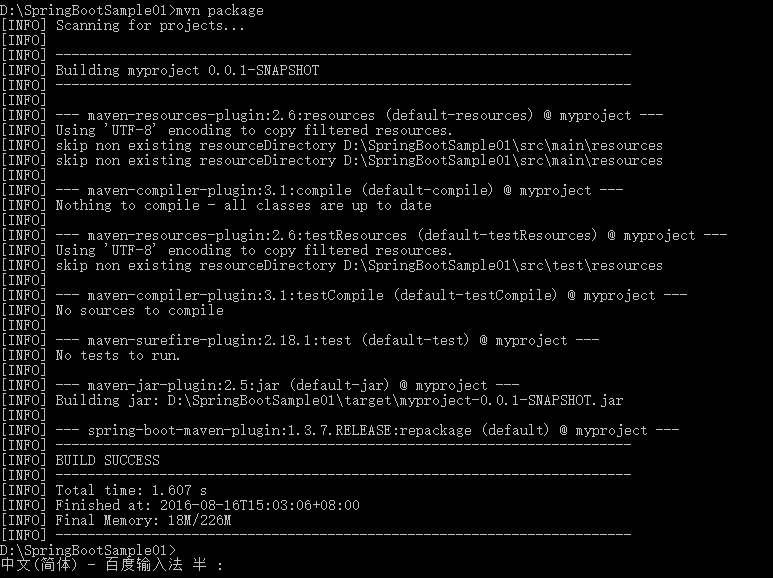
<properties>

    <spring-data-releasetrain.version>Fowler-SR2</spring-data-releasetrain.version>

</properties>
<!-- 使用 java 1.8 -->

<java.version>1.8</java.version>
<dependencyManagement>

     <dependencies>

        <dependency>

            <!-- Import dependency management from Spring Boot -->

            <groupId>org.springframework.boot</groupId>

            <artifactId>spring-boot-dependencies</artifactId>

            <version>1.4.0.RELEASE</version>

            <type>pom</type>

            <scope>import</scope>

        </dependency>

    </dependencies>

</dependencyManagement>
<dependencyManagement>

    <dependencies>

        <!-- Override Spring Data release train provided by Spring Boot -->

        <dependency>

            <groupId>org.springframework.data</groupId>

            <artifactId>spring-data-releasetrain</artifactId>

            <version>Fowler-SR2</version>

            <scope>import</scope>

            <type>pom</type>

        </dependency>

        <dependency>

            <groupId>org.springframework.boot</groupId>

            <artifactId>spring-boot-dependencies</artifactId>

            <version>1.4.0.RELEASE</version>

            <type>pom</type>

            <scope>import</scope>

        </dependency>

    </dependencies>

</dependencyManagement>
<build>

    <plugins>

        <plugin>

            <groupId>org.springframework.boot</groupId>

            <artifactId>spring-boot-maven-plugin</artifactId>

        </plugin>

    </plugins>

</build>
import org.springframework.boot.autoconfigure.*;

import org.springframework.boot.autoconfigure.jdbc.*;

import org.springframework.context.annotation.*;

@Configuration

@EnableAutoConfiguration(exclude={DataSourceAutoConfiguration.class})

public class MyConfiguration {

}
@Configuration, @EnableAutoConfiguration and @ComponentScan。 java -Xdebug -Xrunjdwp:server=y,transport=dt_socket,address=8000,suspend=n -jar target/myproject-0.0.1-SNAPSHOT.jar
mvn spring-boot:run
<dependencies>

    <dependency>

        <groupId>org.springframework.boot</groupId>

        <artifactId>spring-boot-devtools</artifactId>

        <optional>true</optional>

    </dependency>

</dependencies>
<build>

    <plugins>

        <plugin>

            <groupId>org.springframework.boot</groupId>

            <artifactId>spring-boot-maven-plugin</artifactId>

            <configuration>

                <fork>true</fork>

            </configuration>

        </plugin>

    </plugins>

</build>
spring.devtools.restart.exclude=static/**,public/**
public static void main(String[] args) {

    System.setProperty("spring.devtools.restart.enabled", "false");

    SpringApplication.run(MyApp.class, args);

}
restart.include.companycommonlibs=/mycorp-common-[\\w-]+\.jar

restart.include.projectcommon=/mycorp-myproj-[\\w-]+\.jar
spring.devtools.reload.trigger-file=.reloadtrigger
spring.devtools.remote.secret=mysecret
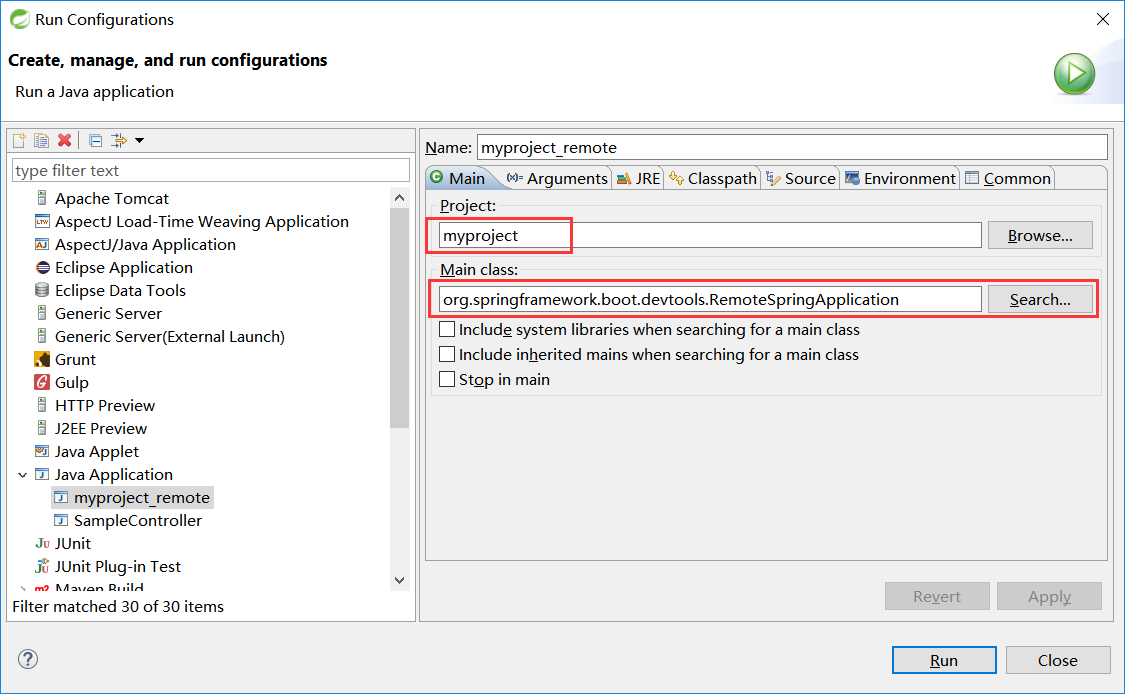
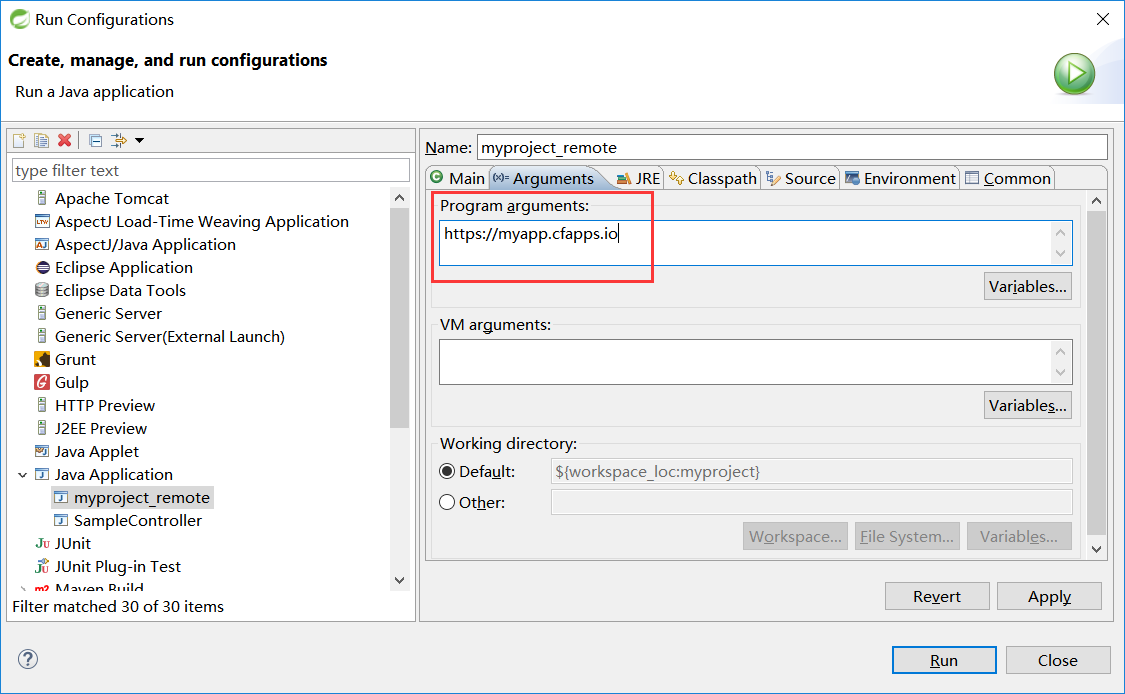
Select Run -> Run Configurations...Create a new Java Application "launch configuration"Browse for the my-app projectUse org.springframework.boot.devtools.RemoteSpringApplication as the main class.Add https://myapp.cfapps.io to the Program arguments (or whatever your remote URL is).
---

  env:

    JAVA_OPTS: "-Xdebug -Xrunjdwp:server=y,transport=dt_socket,suspend=n"
Spring Boot 官方文档学习(一)入门及使用的更多相关文章
- Spring boot官方文档学习(一)
个人说明:本文内容都是从为知笔记上复制过来的,样式难免走样,以后再修改吧.另外,本文可以看作官方文档的选择性的翻译(大部分),以及个人使用经验及问题. 其他说明:如果对Spring Boot没有概念, ...
- 20191106 Spring Boot官方文档学习(1-2)
学习内容相关信息 最新版本:2.2.0 CURRENT GA 官网地址 官方文档地址 单页版文档地址 代码生成网址 2.入门 Spring Boot的主要目标是: 为所有Spring开发提供更快且入门 ...
- 20191127 Spring Boot官方文档学习(9.1-9.3)
9."使用方法"指南 9.1.Spring Boot应用程序 9.1.1.创建自己的FailureAnalyzer FailureAnalyzer被包装在FailureAnalys ...
- 20191110 Spring Boot官方文档学习(3)
3.使用Spring Boot 3.1.构建系统 建议选择Maven或Gradle作为构建工具 每个Spring Boot版本都提供了它所支持的依赖关系的精选列表.实际上,您不需要为构建配置中的所有这 ...
- 20191128 Spring Boot官方文档学习【目录】
Spring Boot文档 入门 使用Spring Boot 3.1. 构建系统 3.2. 结构化代码 3.3. 配置类 3.4. 自动配置 3.5. Spring beans和依赖注入 3.6. 使 ...
- 20191128 Spring Boot官方文档学习(9.11-9.17)
9.11.消息传递 Spring Boot提供了许多包含消息传递的启动器.本部分回答了将消息与Spring Boot一起使用所引起的问题. 9.11.1.禁用事务JMS会话 如果您的JMS代理不支持事 ...
- 20191128 Spring Boot官方文档学习(9.4-9.8)
9.4.Spring MVC Spring Boot有许多启动器包含Spring MVC.请注意,一些启动器包括对Spring MVC的依赖,而不是直接包含它. 9.4.1.编写JSON REST服务 ...
- 20191127 Spring Boot官方文档学习(4.12)
4.12.缓存(Caching) Spring框架提供了对应用程序透明添加缓存的支持.从本质上讲,抽象将缓存应用于方法,从而根据缓存中可用的信息减少执行次数.缓存逻辑是透明应用的,不会对调用者造成任何 ...
- 20191127 Spring Boot官方文档学习(5)
5.Spring Boot Actuator:可投入生产的功能 Spring Boot包含许多其他功能,可帮助您在将应用程序投入生产时监控和管理您的应用程序.您可以选择使用HTTP端点或JMX管理和监 ...
随机推荐
- CSU1256 天朝的单行道(spfa)
1256: 天朝的单行道 Time Limit: 1 Sec Memory Limit: 128 MB Submit: 281 Solved: 92 [Submit][Status][pid=12 ...
- HTTP请求流程(二)----Telnet模拟HTTP请求
http://www.cnblogs.com/stg609/archive/2008/07/06/1237000.html 上一部分"流程简介", 我们大致了解了下HTTP请求的流 ...
- How to kill a process on a port on linux 怎么杀死 关掉一个端口
sudo kill `sudo lsof -t -i:9001`
- angular.js 中的作用域 数据模型 控制器
1.angular.js 作为后起之秀的前端mvc框架,他于传统的前端框架都不同,我们再也不需要在html中嵌入脚本来操作对象了.它抽象出了数据模型,控制器及视图. 成功解耦了应用逻辑,数据模型,视图 ...
- 不同版本Lua介绍
luainterface.nlua.ulua.unilua.cstolua.slua luainterface:LuaInterface是开源的C#的lua桥接库,配合开源库luanet,能轻松实现L ...
- 基于Cocos2d-x学习OpenGL ES 2.0之多纹理
没想到原文出了那么多错别字,实在对不起观众了.介绍opengl es 2.0的不多.相信介绍基于Cocos2d-x学习OpenGL ES 2.0之多纹理的,我是独此一家吧.~~ 子龙山人出了一个系列: ...
- Tomcat的URL中文乱码解决以及传输优化
默认的tomcat容器如果直接使用get方式在url中传中文时,传到后台接收会是乱码. 乱码问题 原因: tomcat默认的在url传输时是用iso8859-1编码. 解决方案一: 在使用get传输参 ...
- sqlalchemy多表联合查询(inner outer join 左右连接)详解
#按用户名摸糊查询trans_details.query.join(Uses).filter(Users.username.like('%xx%'))#select xxx from trans_de ...
- c++之——抽象基类
在一个虚函数的声明语句的分号前加上 =0:就可以将一个虚函数变成纯虚函数,其中,=0只能出现在类内部的虚函数声明语句处.纯虚函数只用声明,而不用定义,其存在就是为了提供接口,含有纯虚函数的类是抽象基类 ...
- js获取checkbox值的方法
js获取checkbox值的方法.分享给大家供大家参考.具体实现方法如下:<html> <head> <meta http-equiv="Content-Typ ...