
HBase第一章 安装 HMaster 主备
1、集群环境
Hadoop HA 集群规划
hadoop1 cluster1 nameNode HMaster
hadoop2 cluster1 nameNodeStandby ZooKeeper ResourceManager HMaster
hadoop3 cluster2 nameNode ZooKeeper
hadoop4 cluster2 nameNodeStandby ZooKeeper ResourceManagerStandBy
hadoop5 DataNode NodeManager HRegionServer
hadoop6 DataNode NodeManager HRegionServer
hadoop7 DataNode NodeManager HRegionServer
2、安装
版本:版本为hbase-0.99.2-bin.tar
解压配置环境变量
export HBASE_HOME=/home/hadoop/apps/hbase

export PATH=$PATH:$HBASE_HOME/bin
配置文件:在conf目录中加入core-site.xml,hdfs-site.xml文件,该文件保持和hadoop的配置文件一致
3、详细配置文件
core-site.xml 和当前hadoop集群的配置文件保持一致
 <?xml version="1.0" encoding="UTF-8"?>

 <?xml-stylesheet type="text/xsl" href="configuration.xsl"?>

 <!--

   Licensed under the Apache License, Version 2.0 (the "License");

   you may not use this file except in compliance with the License.

   You may obtain a copy of the License at

     http://www.apache.org/licenses/LICENSE-2.0

   Unless required by applicable law or agreed to in writing, software

   distributed under the License is distributed on an "AS IS" BASIS,

   WITHOUT WARRANTIES OR CONDITIONS OF ANY KIND, either express or implied.

   See the License for the specific language governing permissions and

   limitations under the License. See accompanying LICENSE file.

 -->

 <!-- Put site-specific property overrides in this file. -->

 <configuration>

 <property>

   <name>fs.defaultFS</name>

   <value>hdfs://cluster1</value>

 </property>

  <property>

  <name>hadoop.tmp.dir</name>

  <value>/home/hadoop/hadoop/tmp</value>

  </property>

  <property>

  <name>ha.zookeeper.quorum</name>

  <value>hadoop2:2181,hadoop3:2181,hadoop4:2181</value>

  </property>

 </configuration>
core-site.xml
hdfs-site.xml和当前hadoop集群的配置文件保持一致
 <?xml version="1.0" encoding="UTF-8"?>

 <?xml-stylesheet type="text/xsl" href="configuration.xsl"?>

 <!--

   Licensed under the Apache License, Version 2.0 (the "License");

   you may not use this file except in compliance with the License.

   You may obtain a copy of the License at

     http://www.apache.org/licenses/LICENSE-2.0

   Unless required by applicable law or agreed to in writing, software

   distributed under the License is distributed on an "AS IS" BASIS,

   WITHOUT WARRANTIES OR CONDITIONS OF ANY KIND, either express or implied.

   See the License for the specific language governing permissions and

   limitations under the License. See accompanying LICENSE file.

 -->

 <!-- Put site-specific property overrides in this file. -->

 <configuration>

  <property>

  <name>dfs.replication</name>

  <value>3</value>

  </property>

  <!--指定DataNode存储block的副本数量。默认值是3个,我们现在有4个DataNode,该值不大于4即可。-->

  <property>

  <name>dfs.nameservices</name>

  <value>cluster1,cluster2</value>

  </property>

  <!--使用federation时,使用了2个HDFS集群。这里抽象出两个NameService实际上就是给这2个HDFS集群起了个别名。名字可以随便起,相互不重复即可 -->

  <!-- 以下是集群cluster1的配置信息-->

  <property>

  <name>dfs.ha.namenodes.cluster1</name>

  <value>nn1,nn2</value>

  </property>

  <!-- 指定NameService是cluster1时的namenode有哪些,这里的值也是逻辑名称,名字随便起,相互不重复即可 -->

  <property>

  <name>dfs.namenode.rpc-address.cluster1.nn1</name>

  <value>hadoop1:9000</value>

  </property>

  <!-- 指定hadoop1的RPC地址 -->

  <property>

  <name>dfs.namenode.http-address.cluster1.nn1</name>

  <value>hadoop1:50070</value>

  </property>

  <!-- 指定hadoop1的http地址 -->

  <property>

  <name>dfs.namenode.rpc-address.cluster1.nn2</name>

  <value>hadoop2:9000</value>

  </property>

  <!-- 指定hadoop2的RPC地址 -->

  <property>

  <name>dfs.namenode.http-address.cluster1.nn2</name>

  <value>hadoop2:50070</value>

  </property>

  <!-- 指定hadoop2的http地址 -->

  <property>

  <name>dfs.namenode.shared.edits.dir</name>

  <value>qjournal://hadoop2:8485;hadoop3:8485;hadoop4:8485/cluster1</value>

  </property>

  <!-- 指定cluster1的两个NameNode共享edits文件目录时,使用的JournalNode集群信息,在cluster1中配置此信息 -->

  <property>

  <name>dfs.ha.automatic-failover.enabled.cluster1</name>

  <value>true</value>

  </property>

  <!-- 指定cluster1是否启动自动故障恢复,即当NameNode出故障时,是否自动切换到另一台NameNode -->

  <property>

  <name>dfs.client.failover.proxy.provider.cluster1</name>

  <value>org.apache.hadoop.hdfs.server.namenode.ha.ConfiguredFailoverProxyProvider</value>

  </property>

  <!-- 指定cluster1出故障时,哪个实现类负责执行故障切换 -->

  <!-- 以下是集群cluster2的配置信息-->

  <property>

  <name>dfs.ha.namenodes.cluster2</name>

  <value>nn3,nn4</value>

  </property>

  <!-- 指定NameService是cluster2时的namenode有哪些,这里的值也是逻辑名称,名字随便起,相互不重复即可 -->

  <property>

  <name>dfs.namenode.rpc-address.cluster2.nn3</name>

  <value>hadoop3:9000</value>

  </property>

  <!-- 指定hadoop3的RPC地址 -->

  <property>

  <name>dfs.namenode.http-address.cluster2.nn3</name>

  <value>hadoop3:50070</value>

  </property>

  <!-- 指定hadoop3的http地址 -->

  <property>

  <name>dfs.namenode.rpc-address.cluster2.nn4</name>

  <value>hadoop4:9000</value>

  </property>

  <!-- 指定hadoop4的RPC地址 -->

  <property>

  <name>dfs.namenode.http-address.cluster2.nn4</name>

  <value>hadoop4:50070</value>

  </property>

  <!-- 指定hadoop4的http地址 -->

  <!--

  <property>

  <name>dfs.namenode.shared.edits.dir</name>

  <value>qjournal://hadoop2:8485;hadoop3:8485;hadoop4:8485/cluster2</value>

  </property>

  -->

  <!-- 指定cluster2的两个NameNode共享edits文件目录时,使用的JournalNode集群信息,在cluster2中配置此信息 -->

  <property>

  <name>dfs.ha.automatic-failover.enabled.cluster2</name>

  <value>true</value>

  </property>

  <!-- 指定cluster2是否启动自动故障恢复,即当NameNode出故障时,是否自动切换到另一台NameNode -->

  <property>

  <name>dfs.client.failover.proxy.provider.cluster2</name>

  <value>org.apache.hadoop.hdfs.server.namenode.ha.ConfiguredFailoverProxyProvider</value>

  </property>

  <!-- 指定cluster2出故障时,哪个实现类负责执行故障切换 -->

  <property>

  <name>dfs.journalnode.edits.dir</name>

  <value>/home/hadoop/hadoop/jndir</value>

  </property>

  <!-- 指定JournalNode集群在对NameNode的目录进行共享时,自己存储数据的磁盘路径 -->

  <property>

  <name>dfs.datanode.data.dir</name>

  <value>/home/hadoop/hadoop/datadir</value>

  </property>

  <property>

  <name>dfs.namenode.name.dir</name>

  <value>/home/hadoop/hadoop/namedir</value>

  </property>

  <property>

  <name>dfs.ha.fencing.methods</name>

  <value>sshfence</value>

  </property>

  <!-- 一旦需要NameNode切换,使用ssh方式进行操作 -->

  <property>

  <name>dfs.ha.fencing.ssh.private-key-files</name>

  <value>/home/hadoop/.ssh/id_rsa</value>

  </property>

  <!-- 一旦需要NameNode切换,使用ssh方式进行操作 -->

 </configuration>
hdfs-site.xml
hbase-env.sh
#

#/**

# * Copyright 2007 The Apache Software Foundation

# *

# * Licensed to the Apache Software Foundation (ASF) under one

# * or more contributor license agreements.  See the NOTICE file

# * distributed with this work for additional information

# * regarding copyright ownership.  The ASF licenses this file

# * to you under the Apache License, Version 2.0 (the

# * "License"); you may not use this file except in compliance

# * with the License.  You may obtain a copy of the License at

# *

# *     http://www.apache.org/licenses/LICENSE-2.0

# *

# * Unless required by applicable law or agreed to in writing, software

# * distributed under the License is distributed on an "AS IS" BASIS,

# * WITHOUT WARRANTIES OR CONDITIONS OF ANY KIND, either express or implied.

# * See the License for the specific language governing permissions and

# * limitations under the License.

# */

# Set environment variables here.

# This script sets variables multiple times over the course of starting an hbase process,

# so try to keep things idempotent unless you want to take an even deeper look

# into the startup scripts (bin/hbase, etc.)

# The java implementation to use.  Java 1.6 required.

export JAVA_HOME=/usr/local/jdk1.8.0_151

# Extra Java CLASSPATH elements.  Optional.这行代码是错的,需要可以修改为下面的形式

#export HBASE_CLASSPATH=/home/hadoop/hbase/conf

export JAVA_CLASSPATH=.:$JAVA_HOME/lib/dt.jar:$JAVA_HOME/lib/tools.jar

# The maximum amount of heap to use, in MB. Default is 1000.

# export HBASE_HEAPSIZE=1000

# Extra Java runtime options.

# Below are what we set by default.  May only work with SUN JVM.

# For more on why as well as other possible settings,

# see http://wiki.apache.org/hadoop/PerformanceTuning

export HBASE_OPTS="-XX:+UseConcMarkSweepGC"

# Uncomment below to enable java garbage collection logging for the server-side processes

# this enables basic gc logging for the server processes to the .out file

# export SERVER_GC_OPTS="-verbose:gc -XX:+PrintGCDetails -XX:+PrintGCDateStamps $HBASE_GC_OPTS"

# this enables gc logging using automatic GC log rolling. Only applies to jdk 1.6.0_34+ and 1.7.0_2+. Either use this set of options or the one above

# export SERVER_GC_OPTS="-verbose:gc -XX:+PrintGCDetails -XX:+PrintGCDateStamps -XX:+UseGCLogFileRotation -XX:NumberOfGCLogFiles=1 -XX:GCLogFileSize=512M $HBASE_GC_OPTS"

# Uncomment below to enable java garbage collection logging for the client processes in the .out file.

# export CLIENT_GC_OPTS="-verbose:gc -XX:+PrintGCDetails -XX:+PrintGCDateStamps $HBASE_GC_OPTS"

# Uncomment below (along with above GC logging) to put GC information in its own logfile (will set HBASE_GC_OPTS).

# This applies to both the server and client GC options above

# export HBASE_USE_GC_LOGFILE=true

# Uncomment below if you intend to use the EXPERIMENTAL off heap cache.

# export HBASE_OPTS="$HBASE_OPTS -XX:MaxDirectMemorySize="

# Set hbase.offheapcache.percentage in hbase-site.xml to a nonzero value.

# Uncomment and adjust to enable JMX exporting

# See jmxremote.password and jmxremote.access in $JRE_HOME/lib/management to configure remote password access.

# More details at: http://java.sun.com/javase/6/docs/technotes/guides/management/agent.html

#

# export HBASE_JMX_BASE="-Dcom.sun.management.jmxremote.ssl=false -Dcom.sun.management.jmxremote.authenticate=false"

# export HBASE_MASTER_OPTS="$HBASE_MASTER_OPTS $HBASE_JMX_BASE -Dcom.sun.management.jmxremote.port=10101"

# export HBASE_REGIONSERVER_OPTS="$HBASE_REGIONSERVER_OPTS $HBASE_JMX_BASE -Dcom.sun.management.jmxremote.port=10102"

# export HBASE_THRIFT_OPTS="$HBASE_THRIFT_OPTS $HBASE_JMX_BASE -Dcom.sun.management.jmxremote.port=10103"

# export HBASE_ZOOKEEPER_OPTS="$HBASE_ZOOKEEPER_OPTS $HBASE_JMX_BASE -Dcom.sun.management.jmxremote.port=10104"

# File naming hosts on which HRegionServers will run.  $HBASE_HOME/conf/regionservers by default.

# export HBASE_REGIONSERVERS=${HBASE_HOME}/conf/regionservers

# File naming hosts on which backup HMaster will run.  $HBASE_HOME/conf/backup-masters by default.

# export HBASE_BACKUP_MASTERS=${HBASE_HOME}/conf/backup-masters

# Extra ssh options.  Empty by default.

# export HBASE_SSH_OPTS="-o ConnectTimeout=1 -o SendEnv=HBASE_CONF_DIR"

# Where log files are stored.  $HBASE_HOME/logs by default.

# export HBASE_LOG_DIR=${HBASE_HOME}/logs

# Enable remote JDWP debugging of major HBase processes. Meant for Core Developers

# export HBASE_MASTER_OPTS="$HBASE_MASTER_OPTS -Xdebug -Xrunjdwp:transport=dt_socket,server=y,suspend=n,address=8070"

# export HBASE_REGIONSERVER_OPTS="$HBASE_REGIONSERVER_OPTS -Xdebug -Xrunjdwp:transport=dt_socket,server=y,suspend=n,address=8071"

# export HBASE_THRIFT_OPTS="$HBASE_THRIFT_OPTS -Xdebug -Xrunjdwp:transport=dt_socket,server=y,suspend=n,address=8072"

# export HBASE_ZOOKEEPER_OPTS="$HBASE_ZOOKEEPER_OPTS -Xdebug -Xrunjdwp:transport=dt_socket,server=y,suspend=n,address=8073"

# A string representing this instance of hbase. $USER by default.

# export HBASE_IDENT_STRING=$USER

# The scheduling priority for daemon processes.  See 'man nice'.

# export HBASE_NICENESS=10

# The directory where pid files are stored. /tmp by default.

# export HBASE_PID_DIR=/var/hadoop/pids

# Seconds to sleep between slave commands.  Unset by default.  This

# can be useful in large clusters, where, e.g., slave rsyncs can

# otherwise arrive faster than the master can service them.

# export HBASE_SLAVE_SLEEP=0.1

# Tell HBase whether it should manage it's own instance of Zookeeper or not.

export HBASE_MANAGES_ZK=false
hbase-site.xml
<?xml version="1.0"?>

<?xml-stylesheet type="text/xsl" href="configuration.xsl"?>

<!--

/**

 * Copyright 2010 The Apache Software Foundation

 *

 * Licensed to the Apache Software Foundation (ASF) under one

 * or more contributor license agreements.  See the NOTICE file

 * distributed with this work for additional information

 * regarding copyright ownership.  The ASF licenses this file

 * to you under the Apache License, Version 2.0 (the

 * "License"); you may not use this file except in compliance

 * with the License.  You may obtain a copy of the License at

 *

 *     http://www.apache.org/licenses/LICENSE-2.0

 *

 * Unless required by applicable law or agreed to in writing, software

 * distributed under the License is distributed on an "AS IS" BASIS,

 * WITHOUT WARRANTIES OR CONDITIONS OF ANY KIND, either express or implied.

 * See the License for the specific language governing permissions and

 * limitations under the License.

 */

-->

<configuration>

<!--指定master-->

<property>

<name>hbase.master</name>

<value>hadoop1:60000</value>

</property>

<property>

<name>hbase.master.maxclockskew</name>

<value>180000</value>

</property>

<!--指定hbase的路径,地址根据hdfs-site.xml的配置而定,当前是hadoop集群1(cluster1)的路径-->

<property>

<name>hbase.rootdir</name>

<value>hdfs://cluster1/hbase</value>

</property>

<property>

<name>hbase.cluster.distributed</name>

<value>true</value>

</property>

<!--zoojeeper集群-->

<property>

<name>hbase.zookeeper.quorum</name>

<value>hadoop2,hadoop3,hadoop4</value>

</property>

<!--zookeeper的data目录-->

<property>

<name>hbase.zookeeper.property.dataDir</name>

<value>/home/hadoop/zookeeper/data</value>

</property>

</configuration>
regionservers文件指定 HRegionServer所在的机器
hadoop5

hadoop6

hadoop7
在一台机器上配置好hbase之后,然后使用scp命令复制到其他机器上(hadoop1,hadoop2,hadoop5,hadoop6,hadoop7)
4 启动hbase集群(前提是hadoop集群已经启动)
4.1 在hadoop1 上执行
start-hbase.sh
此时在hadoop1上会启动 Hmaster 在hadoop5,hadoop6,hadoop7 上会启动HRegionServer。
通过http://hadoop1:16030可以访问web页面如下:

4.2 启动备用master
在hadoop2 上执行:
local-master-backup.sh start
通过http://hadoop2:16031访问备用master
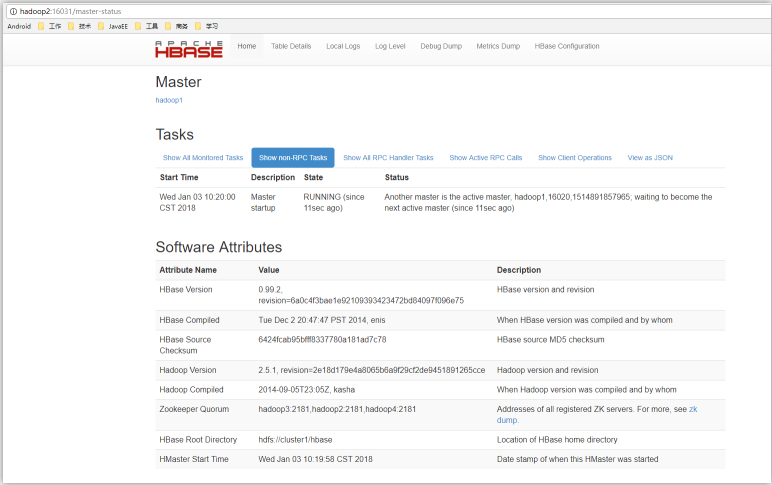
local-master-backup.sh start n :
该命令说明:n代表启动第几个备用master,对应的web访问地址的端口号也会变成1603n。
HBase第一章 安装 HMaster 主备的更多相关文章
- 第一章 安装ubuntu
最近正在研究hadoop,hbase,准备自己写一套研究的感研,下面先讲下安装ubuntu,我这个是在虚拟机下安装,先用 文件转换的方式安装. 1:选择语言:最好选择英文,以免出错的时候乱码 2:选择 ...
- 第一章 安装MongoDB
需要下载 高效开源数据库(mongodb) V3.0.6 官方正式版 安装配置: MongoDB默认的数据目录为:C:\data\db.如果不用默认目录,则需要在在mongod.exe命令后加--db ...
- Oracle Dataguard HA (主备,灾备)方案部署调试
包括: centos6.5 oracle11gR2 DataGuard安装 dataGuard 主备switchover角色切换 数据同步测试 <一,>DG数据库数据同步测试1,正常启动主 ...
- 1.Hbase集群安装配置(一主三从)
1.HBase安装配置,使用独立zookeeper,shell测试 安装步骤:首先在Master(shizhan2)上安装:前提必须保证hadoop集群和zookeeper集群是可用的 1.上传:用 ...
- Mariadb第一章:介绍及安装--小白博客
mariadb(第一章) 数据库介绍 1.什么是数据库? 简单的说,数据库就是一个存放数据的仓库,这个仓库是按照一定的数据结构(数据结构是指数据的组织形式或数据之间的联系)来组织,存储的,我们可以 ...
- nginx-编译安装 第一章
nginx 第一章:编译安装 nginx 官网网站:http://nginx.org/en/ 1.基础说明 基本HTTP服务器功能其他HTTP服务器功能邮件代理服务器功能TCP/UDP代理服务器功能体 ...
- 1.HBase In Action 第一章-HBase简介(后续翻译中)
This chapter covers ■ The origins of Hadoop, HBase, and NoSQL ■ Common use cases for HBase ■ A basic ...
- CentOS6安装各种大数据软件 第一章:各个软件版本介绍
相关文章链接 CentOS6安装各种大数据软件 第一章:各个软件版本介绍 CentOS6安装各种大数据软件 第二章:Linux各个软件启动命令 CentOS6安装各种大数据软件 第三章:Linux基础 ...
- 第一章 impala的安装
目录 第一章 impala的安装 1.impala的介绍 imala基本介绍 impala与hive的关系 impala的优点 impala的缺点: impala的架构以及查询计划 2.impala的 ...
随机推荐
- LayIM.AspNetCore Middleware 开发日记(七)Asp.Net.Core.SignalR闪亮登场
前言 前几篇介绍了整个中间件的构成,路由,基本配置等等.基本上没有涉及到通讯部分.不过已经实现了融云的通讯功能,由于是第三方的就不在单独去写.正好.NET Core SignalR已经出来好久了, ...
- selenium + python自动化测试unittest框架学习(四)python导入模块及包知识点
在写脚本的时候,发现导入某些模块,经常报错提示导入模块失败,这里来恶补下python导入模块的知识点. 1.模块导入时文件查找顺序 在脚本中,import xxx模块时的具体步骤: (1)新建一个mo ...
- PHP扩展功能----发送邮件
1.下载PHPMailer源码 github下载 (测试使用的是5.2.2 版本) 2.注册并登录网易邮箱(其他邮箱均可)[用于配置用户名和三方登录授权码,以及发送人邮箱地址] (1)开启POP3协 ...
- use tool wget for windows download
1.什么是wget Wget是一个在网络上进行下载的简单而强大的自由软件,其本身也是GNU计划的一部分.它的名字是"World Wide Web"和"Get"的 ...
- nginx开启gzip
gzip on; gzip_min_length 5k; gzip_buffers 4 16k; #gzip_http_version 1.0; gzip_comp_level 3; gzip_typ ...
- 小程序采坑之setData
根据双向绑定当我setData的时候input的值应该改变,但是并没有.而且this.data中的值也没有改变 <input class="weui-input" bindi ...
- 测试Protobuffer的定义格式对其时间和空间的影响
测试Protobuffer格式的A命令转换为std::string的的字节个数,分别测试了工程中用到的几种命令: a)AddLayer:108 b)AddSource:209 c)MoveLayer: ...
- SwaggerUI用户手册
SwaggerUI是一个非常好用的API文档工具,最关键的是他还能在工具内调试API,简直爽的不要不要的~网上针对开发者的文档非常多,但是给用户的手册却非常少.所以我来简单写个用户手册,供没有使用过s ...
- iOS 隐私政策
我们深知个人信息对您的重要性,您的信任对我们非常重要.本应用尊重并保护所有使用服务用户的个人隐私权.您在使用我们的产品与/或服务时,我们可能会收集和使用您的相关信息.我们将按法律法规要求,采取相应安全 ...
- iOS原生分享功能
iOS_系统原生分享 - CSDN博客 通过UIActivityViewController实现更多分享服务 - 简书 UIActivity - UIKit _ Apple Developer Doc ...