
cesium编程入门(九)实体 Entity
cesium编程入门(九)实体 Entity
在cesium编程入门(五)绘制形状提到过添加实体的方法,这一节聊一聊实体相关的一些内容:
先来看 Entity 的各个属性
- id
唯一标志,如果没设置,值就为一个默认给定的GUID - name
名称,可以不唯一 - availability
可用性 - show
可见性 - description
描述 - position
位置 - orientation
方向 - viewFrom
查看此对象的初始偏移量 - parent
父节点 - properties
与此实体关联的任意属性。 - Graphics
相关的形状- box
- corridor
- cylinder
- ellipse
- ellipsoid
- path
- point
- polygon
- polyline
- polylineVolume
- rectangle
- wall
- billboard
- label
- model
第五篇中描述了部分形状,这里补充 标签,模型,广告牌
标签 label
文字标注,可以设置样式,文字内容,字体,偏移等等
label : {

    text : 'Citizens Bank Park',

    font : '14pt monospace',

    style: Cesium.LabelStyle.FILL_AND_OUTLINE,

    outlineWidth : 2,

    verticalOrigin : Cesium.VerticalOrigin.BOTTOM,

    pixelOffset : new Cesium.Cartesian2(0, -9)

}
模型 model
常见的模型有glTF 和glb
model : {

    uri : '../../SampleData/models/CesiumGround/Cesium_Ground.gltf'

}
广告牌 billboard
一个最简单的广告牌一般就是图片,和显示大小
billboard : {

  image : 'http://localhost:81/images/2015/02-02/Philadelphia_Phillies.png',

  width : 64,

  height : 64

}
增
创建一个实体参考:
//方法一

var entity = new Entity({

    id : 'uniqueId'

});

viewer.entities.add(entity);

//方法一 简写

viewer.entities.add({

    id : 'uniqueId'

});

//方法二

var entity = viewer.entities.getOrCreateEntity('uniqueId');
查
查找实体的方法:
var entity = viewer.entities.getById('uniqueId');
删
移除实体的方法:
//方法一,先查后删

var entity = viewer.entities.getById('uniqueId');

viewer.entities.remove(entity)

//方法二,直接删除

viewer.entities.removeById('uniqueId')

//方法三,删除所有

viewer.entities.removeAll()
实体集变化
function onChanged(collection, added, removed, changed){

  var msg = 'Added ids';

  for(var i = 0; i < added.length; i++) {

    msg += '\n' + added[i].id;

  }

  console.log(msg);

}

viewer.entities.collectionChanged.addEventListener(onChanged);
描述信息 官网示例
只需要修改entity 的description 属性就可以达到目的
var viewer = new Cesium.Viewer('cesiumContainer');

var wyoming = viewer.entities.add({

  name : 'Wyoming',

  polygon : {

    hierarchy : Cesium.Cartesian3.fromDegreesArray([

                              -109.080842,45.002073,

                              -105.91517,45.002073,

                              -104.058488,44.996596,

                              -104.053011,43.002989,

                              -104.053011,41.003906,

                              -105.728954,40.998429,

                              -107.919731,41.003906,

                              -109.04798,40.998429,

                              -111.047063,40.998429,

                              -111.047063,42.000709,

                              -111.047063,44.476286,

                              -111.05254,45.002073]),

    height : 0,

    material : Cesium.Color.RED.withAlpha(0.5),

    outline : true,

    outlineColor : Cesium.Color.BLACK

  },

  description:'divID'//方法一

});

viewer.zoomTo(wyoming);

//方法二

wyoming.description = '\

<img\

  width="50%"\

  style="float:left; margin: 0 1em 1em 0;"\

  src="//cesiumjs.org/images/2015/02-02/Flag_of_Wyoming.svg"/>\

<p>\

  Wyoming is a state in the mountain region of the Western \

  United States.\

</p>\

<p>\

  Wyoming is the 10th most extensive, but the least populous \

  and the second least densely populated of the 50 United \

  States. The western two thirds of the state is covered mostly \

  with the mountain ranges and rangelands in the foothills of \

  the eastern Rocky Mountains, while the eastern third of the \

  state is high elevation prairie known as the High Plains. \

  Cheyenne is the capital and the most populous city in Wyoming, \

  with a population estimate of 62,448 in 2013.\

</p>\

<p>\

  Source: \

  <a style="color: WHITE"\

    target="_blank"\

    href="http://en.wikipedia.org/wiki/Wyoming">Wikpedia</a>\

</p>';
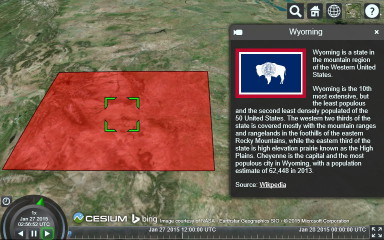
选中
scene 提供了两个方法来获取选中对象,参数都是两个(viewer, windowPosition)
- pickEntity 获取最顶层的实体
- drillPickEntities 获取当前位置的所有实体的集合(List)
cesium编程入门(九)实体 Entity的更多相关文章
- cesium编程入门(八)设置材质
cesium编程入门(八)设置材质 Cesium中为几何形状设置材质有多种方法 第一种方法 Material 直接构建Cesium.Material对象,通过设置Material的属性来进行控制,官方 ...
- cesium编程入门(七)3D Tiles,模型旋转
cesium编程入门(七)3D Tiles,模型旋转 上一节介绍了3D Tiles模型的位置移动,和贴地的操作,这一节来聊一聊模型的旋转, 参考<WebGl编程指南>的第四章 假设在X轴和 ...
- cesium编程入门(一)cesium简介
cesium编程入门 cesium是什么 Cesium 是一个跨平台.跨浏览器的展示三维地球和地图的 javascript 库. Cesium 使用WebGL 来进行硬件加速图形,使用时不需要任何插件 ...
- cesium编程入门(七)3D Tiles,模型旋转
cesium编程入门(七)3D Tiles,模型旋转 上一节介绍了3D Tiles模型的位置移动,和贴地的操作,这一节来聊一聊模型的旋转, 参考<WebGl编程指南>的第四章 假设在X轴和 ...
- cesium编程入门(六)添加 3D Tiles,并调整位置,贴地
添加 3D Tiles,并调整位置 3D Tiles 是什么 3DTiles数据集是cesium小组AnalyticlGraphics与2016年3月定义的一种数据集,3DTiles数据集以分块.分级 ...
- cesium编程入门(五)绘制形状
通过Entity添加形状 先来看一个添加立方体的例子 var viewer = new Cesium.Viewer('cesiumContainer'); var redBox = **viewer. ...
- cesium编程入门(六)添加 3D Tiles,并调整位置,贴地
添加 3D Tiles,并调整位置 3D Tiles 是什么 3DTiles数据集是cesium小组AnalyticlGraphics与2016年3月定义的一种数据集,3DTiles数据集以分块.分级 ...
- cesium编程入门(五)绘制形状
通过Entity添加形状 先来看一个添加立方体的例子 var viewer = new Cesium.Viewer('cesiumContainer'); var redBox = **viewer. ...
- cesium编程入门(四)界面介绍及小控件隐藏
感性认识 界面介绍,viewer Geocoder : 查找位置工具,查找到之后会将镜头对准找到的地址,默认使用bing地图 Home Button :视角返回初始位置. Scene Mode Pic ...
随机推荐
- RabbitMQ 信道(channel)挂掉,但连接仍然存在,同时出现错误:Received remote Channel.Close (406): PRECONDITION_FAILED - unknown delivery tag x 的问题
该问题经过一番试验,发现是消费者(consumer)程序逻辑错误导致:在消息处理的回调函数中多次ack或nack. 开启Python日志,并在回调函数中两次ack得到如下信息: F:\software ...
- ThreadPoolExecutor – Java Thread Pool Example
https://www.journaldev.com/1069/threadpoolexecutor-java-thread-pool-example-executorservice Java t ...
- urllib2 Handler处理器和自定义opener(六)
Handler处理器 和 自定义Opener opener是 urllib2.OpenerDirector 的实例,我们之前一直都在使用的urlopen,它是一个特殊的opener(也就是模块帮我们构 ...
- angularjs中的$http详解
语法: 要将区别先弄清$http服务,它是对原生XMLHttpRequest对象的简单封装,是只能接受一个参数的方法, 这个方法会返回一个promise对象,具有sccess和error两个方法.当然 ...
- js解决弹窗问题实现班级跳转DIV示例
js解决弹窗问题实现班级跳转DIV 1.js代码如下: <%--实现班级跳转DIV--%> <div id="displayClassDiv" style=&q ...
- leetcode232
public class MyQueue { Stack<int> S = new Stack<int>(); /** Initialize your data structu ...
- CommonDialog控件
'要先单击“工程-部件”,显示“部件”对话框,将“Microsoft Common Dialog control 6.0(SP6)”选中,在工具栏就多出了一个CommonDialog控件图标,将其添加 ...
- PO BO VO DTO POJO DAO概念及其作用
J2EE开发中大量的专业缩略语很是让人迷惑,尤其是跟一些高手讨论问题的时候,三分钟就被人家满口的专业术语喷晕了,PO VO BO DTO POJO DAO,一大堆的就来了(听过老罗对这种现象的批判的朋 ...
- Oracle安装过程出现问题---------安装Oracle11gR2先决条件检查失败
一.错误信息当安装到“先决条件检查” 时,提示如下图所示的错误: 二.错误原因一般情况下,由于操作系统未开启默认共享,导致Oracle无法检查环境的可用性. 三.解决方法1.在运行中(或键盘按 Win ...
- Linux学习---新建文件,查看文件,修改权限,删除
过程:在一个文件夹下面新建一个文件,然后查看文件,再修改权限,运行,最后删除 1.新建文件: touch Test.sh 补充:新建文件有好多种方式,一般用mkdir(创建目录,即文件夹).touc ...