
pandas dataframe 读取 xlsx 文件
refer to:
https://medium.com/@kasiarachuta/reading-and-writingexcel-files-in-python-pandas-8f0da449cc48
dframe = pd.read_excel(“file_name.xlsx”)
dframe = pd.read_excel(“file_name.xlsx”, sheetname=”Sheet_name”)
dframe = pd.read_excel(“file_name.xlsx”, sheetname=number)
原文如下:
//////////////////////////////////////////////////////////////////////////////
Reading and writingExcel files in Python pandas
In data science, you are very likely to mostly work with CSV files. However, knowing how to import and export Excel files is also very useful.
In this post, a Kaggle dataset on 2016 US Elections was used (https://www.kaggle.com/benhamner/d/benhamner/2016-us-election/primary-results-sample-data/output). This dataset has been converted from a CSV file to an Excel file and two sheets have been added with votes for Hilary Clinton (HilaryClinton) and Donald Trump (DonaldTrump). The first sheet (All) contains the original dataset.
Reading Excel files
dframe = pd.read_excel(“file_name.xlsx”)
Reading Excel files is very similar to reading CSV files. By default, the first sheet of the Excel file is read.
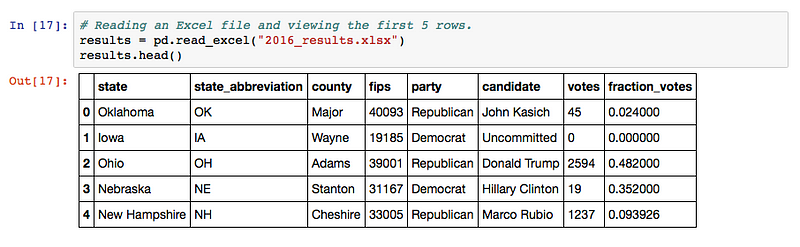
I’ve read an Excel file and viewed the first 5 rows
dframe = pd.read_excel(“file_name.xlsx”, sheetname=”Sheet_name”)
Passing the sheetname method allows you to read the sheet of the Excel file that you want. It is very handy if you know its name.

I picked the sheet named “DonaldTrump”
dframe = pd.read_excel(“file_name.xlsx”, sheetname=number)
If you aren’t sure what are the names of your sheets, you can pick them by their order. Please note that the sheets start from 0 (similar to indices in pandas), not from 1.

I read the second sheet of the Excel file
dframe = pd.read_excel(“file_name.xlsx”, header=None)
Sometimes, the top row does not contain the column names. In this case, you pass the argument of header=None.

The first row is not the header — instead, we get the column names as numbers
dframe = pd.read_excel(“file_name.xlsx”, header=n)
Passing the argument of header being equal to a number allows us to pick a specific row as the column names.

I pick the second row (i.e. row index 1 of the original dataset) as my column names.
dframe = pd.read_excel(“file_name.xlsx”, index_col=number)
You can use different columns for the row labels by passing the index_col argument as number.

I now use the county as the index column.
dframe = pd.read_excel(“file_name.xlsx”, skiprows=n)
Sometimes, you don’t want to include all of the rows. If you want to skip the first n rows, just pass the argument of skiprows=n.

Skipping the first two rows (including the header)
Writing an Excel file
dframe.to_excel(‘file_name.xlsx’)

I wrote an Excel file called results.xlsx from my results DataFrame
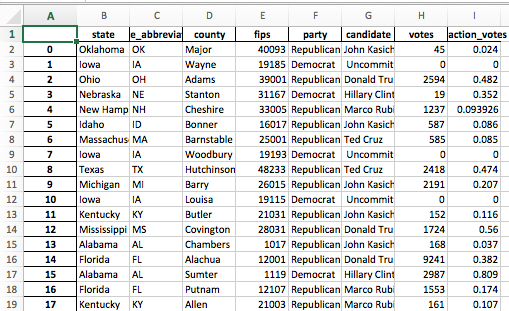
My exported Excel file
dframe.to_excel(‘file_name.xlsx’, index=False)
If you don’t want to include the index name (for example, here it is a number so it may be meaningless for future use/analysis), you can just pass another argument, setting index as False.

I don’t want index names in my Excel file
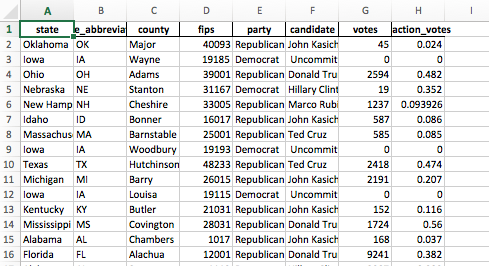
Excel file output with no index names
All of the code can be found on my GitHub: https://github.com/kasiarachuta/Blog/blob/master/Reading%20and%20writing%20Excel%20files.ipynb
pandas dataframe 读取 xlsx 文件的更多相关文章
- pandas-19 DataFrame读取写入文件的方法
pandas-19 DataFrame读取写入文件的方法 DataFrame有非常丰富的IO方法,比如DataFrame读写csv文件excel文件等等,操作很简单.下面在代码中标记出来一些常用的读写 ...
- 人工智能-机器学习之seaborn(读取xlsx文件,小提琴图)
我们不止可以读取数据库的内容,还可以读取xlsx文件的内容,这个库有在有些情况还是挺实用的 首先我们想读取这个文件的时候必须得现有个seaborn库 下载命令就是: pip install seab ...
- Python读取xlsx文件
Python读取xlsx文件 脚本如下: from openpyxl import load_workbook workbook = load_workbook(u'/tmp/test.xlsx') ...
- 读取xlsx文件的内容输入到xls文件中
package com.cn.peitest.excel; import java.io.File; import java.io.FileInputStream; import java.io.Fi ...
- C#读取xlsx文件Excel2007
读取Excel 2007的xlsx文件和读取老的.xls文件是一样的,都是用Oledb读取,仅仅连接字符串不同而已. 具体代码实例: public static DataTable GetExcelT ...
- C#基础知识之读取xlsx文件Excel2007
读取Excel 2007的xlsx文件和读取老的.xls文件是一样的,都是用Oledb读取,仅仅连接字符串不同而已. 具体代码实例: public static DataTable GetExcelT ...
- 使用POI读取xlsx文件,包含对excel中自定义时间格式的处理
package poi; import java.io.File; import java.io.FileInputStream; import java.io.FileNotFoundExcepti ...
- pandas read_csv读取大文件的Memory error问题
今天在读取一个超大csv文件的时候,遇到困难:首先使用office打不开然后在python中使用基本的pandas.read_csv打开文件时:MemoryError 最后查阅read_csv文档发现 ...
- Pandas dataframe数据写入文件和数据库
转自:http://www.dcharm.com/?p=584 Pandas是Python下一个开源数据分析的库,它提供的数据结构DataFrame极大的简化了数据分析过程中一些繁琐操作,DataFr ...
随机推荐
- A题:Common Substrings(KMP应用)
原题链接 注意:2号和3号get_next()函数中next[i]赋值时的区别,一个是0,一个是1,且不能互换 #include<cstdio> #include<cstring&g ...
- Learn2Rank
Learning to rank 排序学习是推荐.搜索.广告的核心方法.排序结果的好坏很大程度影响用户体验.广告收入等.排序学习可以理解为机器学习中用户排序的方法,这里首先推荐一本微软亚洲研究院刘铁岩 ...
- vgg_face人脸识别
最近参考http://blog.csdn.net/hlx371240/article/details/51388022一文,用LFW数据集对vgg_face.caffemodel进行fine-tune ...
- js 变量、函数提升 与js的预编译有关
参考网址:http://www.codesec.net/view/178491.html 先简单理解下作用域的概念,方便对变量与函数提升的概念的理解 function foo() { var x = ...
- linux第六周
一.知识概要 进程的描述 进程描述符task_struct数据结构(一)进程描述符task_struct数据结构(二)进程的创建 进程的创建概览及fork一个进程的用户态代码理解进程创建过程复杂代码的 ...
- DDMS
DDMS 的全称是Dalvik Debug Monitor Service,是 Android 开发环境中的Dalvik虚拟机调试监控服务
- Iterator(迭代器)
意图: 提供一种方法顺序访问一个聚合对象中各个元素, 而又不需暴露该对象的内部表示. 适用性: 访问一个聚合对象的内容而无需暴露它的内部表示. 支持对聚合对象的多种遍历. 为遍历不同的聚合结构提供一个 ...
- Qt532_WebKit_SSL问题
1.打开网页"http://www.baidu.com",它会跳转至"https://www.baidu.com/",使用 SSL了,于是 WebView 出现 ...
- Android静态变量的生命周期
Android是用Java开发,其静态变量的生命周期遵守Java的设计.我们知道静态变量是在类被load的时候分配内存的,并且存在于方法区.当类 被卸载的时候,静态变量被销毁.在PC机的客户端程序中, ...
- EF大数据批量添加性能问题(续)
昨天在园子里发了一篇如题的文章EF大数据批量添加性能问题,就引来一大堆的吐槽,我认为知识就应该这样分享出来,不然总以为自己很了不起:再说说昨天那篇文章,很多自认为很牛逼的人都评论说把SaveChang ...