
[翻译] FLAnimatedImage
FLAnimatedImage

FLAnimatedImage is a performant animated GIF engine for iOS:
FLAnimatedImage是一个播放gif图片的引擎:
- Plays multiple GIFs simultaneously with a playback speed comparable to desktop browsers 可以异步播放多个gif图片,不会降低速度,与电脑上面播放的效果一致.
- Honors variable frame delays 支持帧率的不同
- Behaves gracefully under memory pressure 内存占用率小
- Eliminates delays or blocking during the first playback loop 重复播放时,不会有延时阻塞感
- Interprets the frame delays of fast GIFs the same way modern browsers do
It's a well-tested component that powers all GIFs in Flipboard. To understand its behavior it comes with an interactive demo:
这个已经经过了很多的测试,保证很稳定。你可以看看下面demo显示:
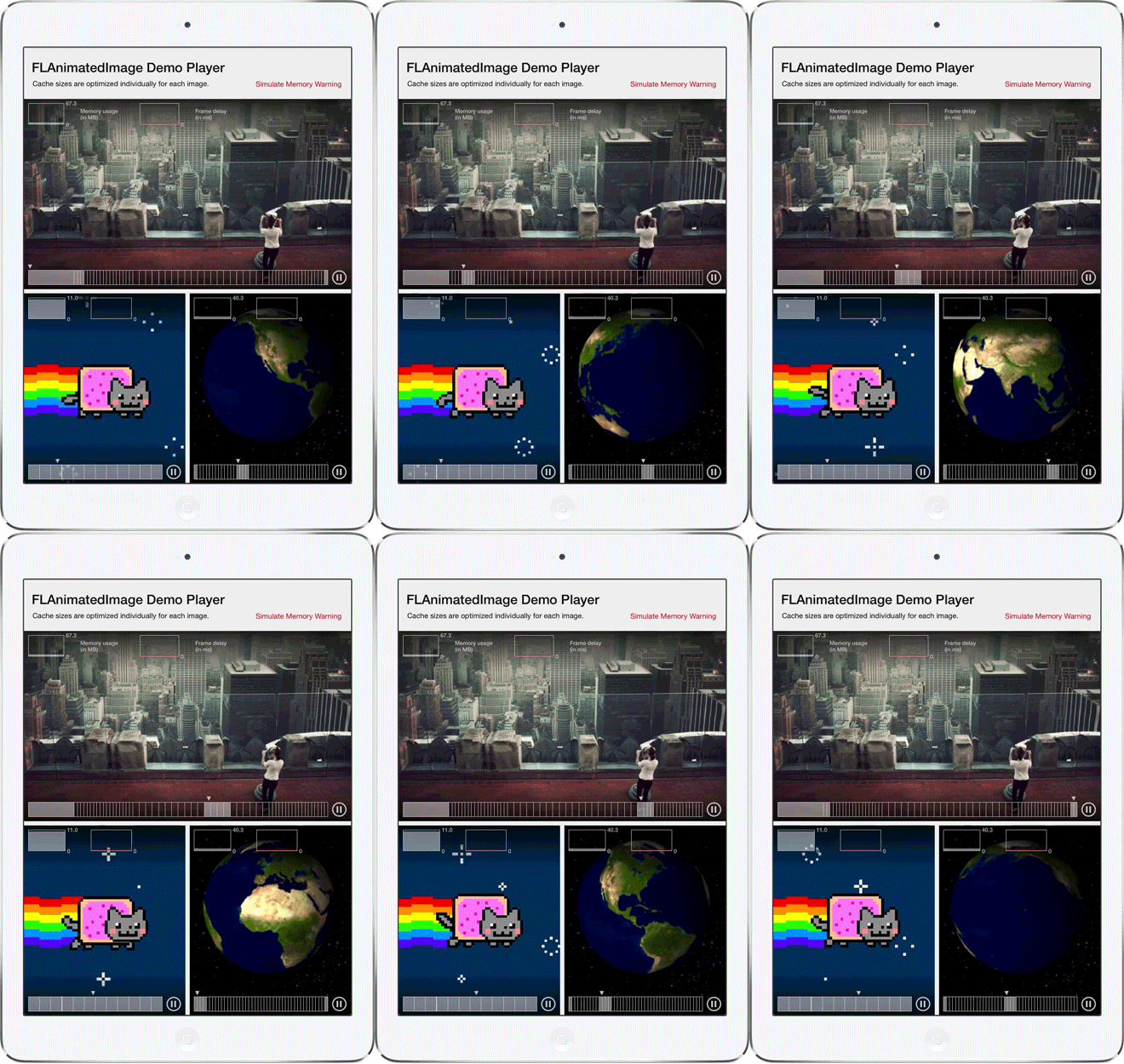
Who is this for? 用在什么地方?
- Apps that don't support animated GIFs yet App还不支持GIF显示的
- Apps that already support animated GIFs but want a higher performance solution App已经使用了GIF图片,但是效果不好的
- People who want to tinker with the code (the corresponding blog post is a great place to start; also see the To Do section below) 那些想要改进这份代码的人
Installation & Usage
FLAnimatedImage is a well encapsulated drop-in component. Simply replace your UIImageView instances with instances of FLAnimatedImageView to get animated GIF support. There is no central cache or state to manage.
FLAnimatedImage是一个继承与UIImageView的子类,你只需要简单的用FLAnimatedImage替换UIImageView即可支持GIF图片的显示。没有中心缓存或者是状态管理操作。
If using CocoaPods, the quickest way to try it out is to type this on the command line:
如果你使用CocoaPods,你可以用以下一句话来集成:
$ pod try FLAnimatedImage
To add it to your app, copy the two classes FLAnimatedImage.h/.m and FLAnimatedImageView.h/.minto your Xcode project or add via CocoaPods by adding this to your Podfile:
你也可以将FLAnimatedImage.h/.m 与 FLAnimatedImageView.h/.m拷贝到你的项目中即可。
pod 'FLAnimatedImage', '~> 1.0'
In your code, #import "FLAnimatedImage.h", create an image from an animated GIF, and setup the image view to display it:
在你的代码中,导入 #import "FLAnimatedImage.h",然后创建出GIF图片,加载出来显示即可:
FLAnimatedImage *image = [FLAnimatedImage animatedImageWithGIFData:[NSData dataWithContentsOfURL:[NSURL URLWithString:@"http://raphaelschaad.com/static/nyan.gif"]]];

FLAnimatedImageView *imageView = [[FLAnimatedImageView alloc] init];

imageView.animatedImage = image;

imageView.frame = CGRectMake(0.0, 0.0, 100.0, 100.0);

[self.view addSubview:imageView];
It's flexible to integrate in your custom image loading stack and backwards compatible to iOS 6.
兼容性很好,即时是iOS6也能跑的很顺畅。
It uses ARC and the Apple frameworks QuartzCore, ImageIO, MobileCoreServices, andCoreGraphics.
使用ARC,以及QuartzCore,ImageIO,MobileCoreServices,andCoreGraphics框架
It has fine-grained logging. By default, it uses NSLog. However, if your project usesCocoaLumberjack, it automatically can detect that and use CocoaLumberjack to send logs to the configured output.
Since FLAnimatedImage is licensed under MIT, it's compatible with the terms of using it for any app on the App Store.
To Do
- Support other animated image formats such as APNG or WebP
- Integration into network libraries and image caches
- Investigate whether
FLAnimatedImageshould become aUIImagesubclass - Smarter buffering
- Bring demo app to iOS 6 and iPhone
This has successfully shipped to many people as is, but please do come with your questions, issues and pull requests!
Feel free to reach out to @RaphaelSchaad for further help.
Select apps using FLAnimatedImage
- Dropbox
- Medium
- LiveBooth
- Design Shots
- lWlVl Festival
- Close-up
- Zip Code Finder
- getGIF
Using FLAnimatedImage in your app? Let me know!
[翻译] FLAnimatedImage的更多相关文章
- 《Django By Example》第五章 中文 翻译 (个人学习,渣翻)
书籍出处:https://www.packtpub.com/web-development/django-example 原作者:Antonio Melé (译者@ucag注:大家好,我是新来的翻译, ...
- 《Django By Example》第四章 中文 翻译 (个人学习,渣翻)
书籍出处:https://www.packtpub.com/web-development/django-example 原作者:Antonio Melé (译者注:祝大家新年快乐,这次带来<D ...
- [翻译]开发文档:android Bitmap的高效使用
内容概述 本文内容来自开发文档"Traning > Displaying Bitmaps Efficiently",包括大尺寸Bitmap的高效加载,图片的异步加载和数据缓存 ...
- 【探索】机器指令翻译成 JavaScript
前言 前些时候研究脚本混淆时,打算先学一些「程序流程」相关的概念.为了不因太枯燥而放弃,决定想一个有趣的案例,可以边探索边学. 于是想了一个话题:尝试将机器指令 1:1 翻译 成 JavaScript ...
- 《Django By Example》第三章 中文 翻译 (个人学习,渣翻)
书籍出处:https://www.packtpub.com/web-development/django-example 原作者:Antonio Melé (译者注:第三章滚烫出炉,大家请不要吐槽文中 ...
- 《Django By Example》第二章 中文 翻译 (个人学习,渣翻)
书籍出处:https://www.packtpub.com/web-development/django-example 原作者:Antonio Melé (译者注:翻译完第一章后,发现翻译第二章的速 ...
- 《Django By Example》第一章 中文 翻译 (个人学习,渣翻)
书籍出处:https://www.packtpub.com/web-development/django-example 原作者:Antonio Melé (译者注:本人目前在杭州某家互联网公司工作, ...
- 【翻译】Awesome R资源大全中文版来了,全球最火的R工具包一网打尽,超过300+工具,还在等什么?
0.前言 虽然很早就知道R被微软收购,也很早知道R在统计分析处理方面很强大,开始一直没有行动过...直到 直到12月初在微软技术大会,看到我软的工程师演示R的使用,我就震惊了,然后最近在网上到处了解和 ...
- ASP.NET MVC with Entity Framework and CSS一书翻译系列文章之第一章:创建基本的MVC Web站点
在这一章中,我们将学习如何使用基架快速搭建和运行一个简单的Microsoft ASP.NET MVC Web站点.在我们马上投入学习和编码之前,我们首先了解一些有关ASP.NET MVC和Entity ...
随机推荐
- redis 数据类型 Hash
Redis 数据类型Hash:hash数据类型存储的数据和mysql数据库中存储的一条记录很类似. hash的一些操作: 比如数据库是user表,有id,name,age ,sex,可以建立与之对应的 ...
- python-thread多线程
#!/usr/bin/python import threading,time def Music(): print "music is playing" time.sleep(3 ...
- bash切割文件
split -l 100 ./x01.txt -d -a 3 --additional-suffix=.txt 将 x01.txt文件,-l 100 按照每个100行, -d 以数字累加, -a 3 ...
- linux mint 19安装最新社区版docker
sudo apt-get update sudo apt-get install \ apt-transport-https \ ca-certificates \ curl \ software-p ...
- 使用VMware安装CentOS7详请
话不多说直接开车,乘客坐稳了 准备资料: CentOS-7-x86_64-Everything-1611 点击下载CentOS 对,资料就这些 第一步. 点击文件 再点击新建虚拟机 第二步 .点击 ...
- ListView和Adapter
<RelativeLayout xmlns:android="http://schemas.android.com/apk/res/android" xmlns:tools= ...
- C# 扩展方法一
1. 何为扩展方法 扩展方法是C#3.0引入的语法特性,是一种特殊的静态方法.它使得我们能向现有的数据类型“动态”添加方法,而不需要创建行的派生类型.重新编译或直接修改原始类型的源代码. 注意扩展方法 ...
- 第7章 Scrapy突破反爬虫的限制
7-1 爬虫和反爬的对抗过程以及策略 Ⅰ.爬虫和反爬虫基本概念 爬虫:自动获取网站数据的程序,关键是批量的获取. 反爬虫:使用技术手段防止爬虫程序的方法. 误伤:反爬虫技术将普通用户识别为爬虫,如果误 ...
- 搭建Eclipse和MyEclipse的开发环境
主要步骤: 下载并配置Eclipse 建立并运行一个简单的javaSE项目 下载并破解MyEclipse 整合Eclipse和MyEclipse 开发环境和Tomcat结合 关于这个配置也可以参考:h ...
- 使用Docker镜像部署ELK日志系统
使用Docker部署elasticsearch.logstash.kibana 指定版本:6.7.1 (建议使用同一的版本.屏蔽三个软件间的不兼容性) 下载镜像: docker pull elasti ...