
沉淀再出发:使用python进行机器学习
沉淀再出发:使用python进行机器学习
一、前言
使用python进行学习运算和机器学习是非常方便的,因为其中有很多的库函数可以使用,同样的python自身语言的特点也非常利于程序的编写和使用。
二、几个简单的例子
2.1、使用python实现KNN算法
 #########################################

 # kNN: k Nearest Neighbors

 # Input:      newInput: vector to compare to existing dataset (1xN)

 #             dataSet:  size m data set of known vectors (NxM)

 #             labels:     data set labels (1xM vector)

 #             k:         number of neighbors to use for comparison

 # Output:     the most popular class label

 #########################################

 from numpy import *

 import operator

 # create a dataset which contains 4 samples with 2 classes

 def createDataSet():

     # create a matrix: each row as a sample

     group = array([[1.0, 0.9], [1.0, 1.0], [0.1, 0.2], [0.0, 0.1]])

     labels = ['A', 'A', 'B', 'B'] # four samples and two classes

     return group, labels

 # classify using kNN

 def kNNClassify(newInput, dataSet, labels, k):

     numSamples = dataSet.shape[0] # shape[0] stands for the num of row

     ## step 1: calculate Euclidean distance

     # tile(A, reps): Construct an array by repeating A reps times

     # the following copy numSamples rows for dataSet

     diff = tile(newInput, (numSamples, 1)) - dataSet # Subtract element-wise

     squaredDiff = diff ** 2 # squared for the subtract

     squaredDist = sum(squaredDiff, axis = 1) # sum is performed by row

     distance = squaredDist ** 0.5

     ## step 2: sort the distance

     # argsort() returns the indices that would sort an array in a ascending order

     sortedDistIndices = argsort(distance)

     classCount = {} # define a dictionary (can be append element)

     for i in range(k):

         ## step 3: choose the min k distance

         voteLabel = labels[sortedDistIndices[i]]

         ## step 4: count the times labels occur

         # when the key voteLabel is not in dictionary classCount, get()

         # will return 0

         classCount[voteLabel] = classCount.get(voteLabel, 0) + 1

     ## step 5: the max voted class will return

     maxCount = 0

     for key, value in classCount.items():

         if value > maxCount:

             maxCount = value

             maxIndex = key

     return maxIndex
测试文件:
 import knn

 from numpy import *

 dataSet, labels = knn.createDataSet()

 testX = array([1.2, 1.0])

 k = 3

 k = 3

 outputLabel = knn.kNNClassify(testX, dataSet, labels, 3)

 print ("Your input is:", testX, "and classified to class: ", outputLabel)

 testX = array([0.1, 0.3])

 outputLabel = knn.kNNClassify(testX, dataSet, labels, 3)

 print ("Your input is:", testX, "and classified to class: ", outputLabel)
其中knn的思路非常简单,就是在某一个范围内观察距离该需要归类的样本的所有样本之中,那一个种类的样本数目最多,通过对附近的K个样本的寻找来进行分类。

2.2、使用scikit-learn库进行机器学习
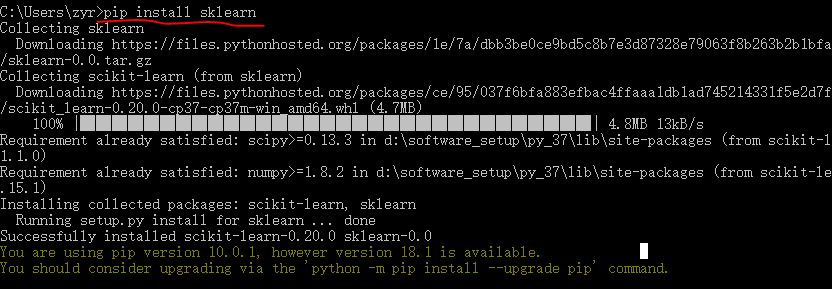
 #!usr/bin/env python

 # coding:utf-8

 import sys

 import os

 import time

 from sklearn import metrics

 import numpy as np

 import pickle

 # import imp

 # imp.reload(sys)

 # Multinomial Naive Bayes Classifier

 def naive_bayes_classifier(train_x, train_y):

     from sklearn.naive_bayes import MultinomialNB

     model = MultinomialNB(alpha=0.01)

     model.fit(train_x, train_y)

     return model

 # KNN Classifier

 def knn_classifier(train_x, train_y):

     from sklearn.neighbors import KNeighborsClassifier

     model = KNeighborsClassifier()

     model.fit(train_x, train_y)

     return model

 # Logistic Regression Classifier

 def logistic_regression_classifier(train_x, train_y):

     from sklearn.linear_model import LogisticRegression

     model = LogisticRegression(penalty='l2')

     model.fit(train_x, train_y)

     return model

 # Random Forest Classifier

 def random_forest_classifier(train_x, train_y):

     from sklearn.ensemble import RandomForestClassifier

     model = RandomForestClassifier(n_estimators=8)

     model.fit(train_x, train_y)

     return model

 # Decision Tree Classifier

 def decision_tree_classifier(train_x, train_y):

     from sklearn import tree

     model = tree.DecisionTreeClassifier()

     model.fit(train_x, train_y)

     return model

 # GBDT(Gradient Boosting Decision Tree) Classifier

 def gradient_boosting_classifier(train_x, train_y):

     from sklearn.ensemble import GradientBoostingClassifier

     model = GradientBoostingClassifier(n_estimators=200)

     model.fit(train_x, train_y)

     return model

 # SVM Classifier

 def svm_classifier(train_x, train_y):

     from sklearn.svm import SVC

     model = SVC(kernel='rbf', probability=True)

     model.fit(train_x, train_y)

     return model

 # SVM Classifier using cross validation

 def svm_cross_validation(train_x, train_y):

     from sklearn.grid_search import GridSearchCV

     from sklearn.svm import SVC

     model = SVC(kernel='rbf', probability=True)

     param_grid = {'C': [1e-3, 1e-2, 1e-1, 1, 10, 100, 1000], 'gamma': [0.001, 0.0001]}

     grid_search = GridSearchCV(model, param_grid, n_jobs = 1, verbose=1)

     grid_search.fit(train_x, train_y)

     best_parameters = grid_search.best_estimator_.get_params()

     for para, val in best_parameters.items():

         print (para, val)

     model = SVC(kernel='rbf', C=best_parameters['C'], gamma=best_parameters['gamma'], probability=True)

     model.fit(train_x, train_y)

     return model

 def read_data(data_file):

     import gzip

     f = gzip.open(data_file, "rb")

     train, val, test = pickle.load(f,encoding='bytes')

     f.close()

     train_x = train[0]

     train_y = train[1]

     test_x = test[0]

     test_y = test[1]

     return train_x, train_y, test_x, test_y

 if __name__ == '__main__':

     data_file = "mnist.pkl.gz"

     thresh = 0.5

     model_save_file = None

     model_save = {}

     test_classifiers = ['NB', 'KNN', 'LR', 'RF', 'DT', 'SVM', 'GBDT']

     classifiers = {'NB':naive_bayes_classifier,

                   'KNN':knn_classifier,

                    'LR':logistic_regression_classifier,

                    'RF':random_forest_classifier,

                    'DT':decision_tree_classifier,

                   'SVM':svm_classifier,

                 'SVMCV':svm_cross_validation,

                  'GBDT':gradient_boosting_classifier

     }

     print ('reading training and testing data...')

     train_x, train_y, test_x, test_y = read_data(data_file)

     num_train, num_feat = train_x.shape

     num_test, num_feat = test_x.shape

     is_binary_class = (len(np.unique(train_y)) == 2)

     print ('******************** Data Info *********************')

     print ('#training data: %d, #testing_data: %d, dimension: %d' % (num_train, num_test, num_feat))

     for classifier in test_classifiers:

         print ('******************* %s ********************' % classifier)

         start_time = time.time()

         model = classifiers[classifier](train_x, train_y)

         print ('training took %fs!' % (time.time() - start_time))

         predict = model.predict(test_x)

         if model_save_file != None:

             model_save[classifier] = model

         if is_binary_class:

             precision = metrics.precision_score(test_y, predict)

             recall = metrics.recall_score(test_y, predict)

             print ('precision: %.2f%%, recall: %.2f%%' % (100 * precision, 100 * recall))

         accuracy = metrics.accuracy_score(test_y, predict)

         print ('accuracy: %.2f%%' % (100 * accuracy) )

     if model_save_file != None:

         pickle.dump(model_save, open(model_save_file, 'wb'))
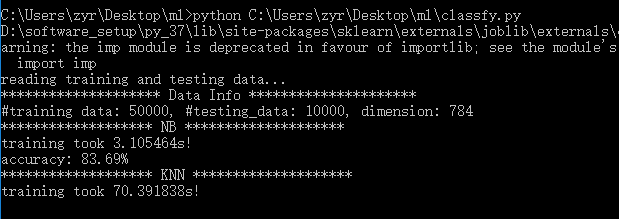
其中数据集使用的minst数据集。
2.3、sklearn的使用
     Supervised Learning

         Classification

         Regression

         Measuring performance

     Unsupervised Learning

         Clustering

         Dimensionality Reduction

         Density Estimation

     Evaluation of Learning Models

     Choosing the right algorithm for your dataset
2.3.1、分类任务(随机梯度下降(SGD)算法)
 >>> import matplotlib.pyplot as plt

 >>> plt.style.use('seaborn')

 >>> from fig_code import plot_sgd_separator

 >>> plot_sgd_separator()

 >>> plt.show()
其中sgd_separator.py:
 import numpy as np

 import matplotlib.pyplot as plt

 from sklearn.linear_model import SGDClassifier

 from sklearn.datasets.samples_generator import make_blobs

 def plot_sgd_separator():

     # we create 50 separable points

     X, Y = make_blobs(n_samples=50, centers=2,

                       random_state=0, cluster_std=0.60)

     # fit the model

     clf = SGDClassifier(loss="hinge", alpha=0.01,

                         max_iter=200, fit_intercept=True)

     clf.fit(X, Y)

     # plot the line, the points, and the nearest vectors to the plane

     xx = np.linspace(-1, 5, 10)

     yy = np.linspace(-1, 5, 10)

     X1, X2 = np.meshgrid(xx, yy)

     Z = np.empty(X1.shape)

     for (i, j), val in np.ndenumerate(X1):

         x1 = val

         x2 = X2[i, j]

         p = clf.decision_function(np.array([x1, x2]).reshape(1, -1))

         Z[i, j] = p[0]

     levels = [-1.0, 0.0, 1.0]

     linestyles = ['dashed', 'solid', 'dashed']

     colors = 'k'

     ax = plt.axes()

     ax.contour(X1, X2, Z, levels, colors=colors, linestyles=linestyles)

     ax.scatter(X[:, 0], X[:, 1], c=Y, cmap=plt.cm.Paired)

     ax.axis('tight')

 if __name__ == '__main__':

     plot_sgd_separator()

     plt.show()

2.3.2、线性回归任务
@1、linear_regression.py:
 import numpy as np

 import matplotlib.pyplot as plt

 from sklearn.linear_model import LinearRegression

 def plot_linear_regression():

     a = 0.5

     b = 1.0

     # x from 0 to 10

     x = 30 * np.random.random(20)

     # y = a*x + b with noise

     y = a * x + b + np.random.normal(size=x.shape)

     # create a linear regression classifier

     clf = LinearRegression()

     clf.fit(x[:, None], y)

     # predict y from the data

     x_new = np.linspace(0, 30, 100)

     y_new = clf.predict(x_new[:, None])

     # plot the results

     ax = plt.axes()

     ax.scatter(x, y)

     ax.plot(x_new, y_new)

     ax.set_xlabel('x')

     ax.set_ylabel('y')

     ax.axis('tight')

 if __name__ == '__main__':

     plot_linear_regression()

     plt.show()
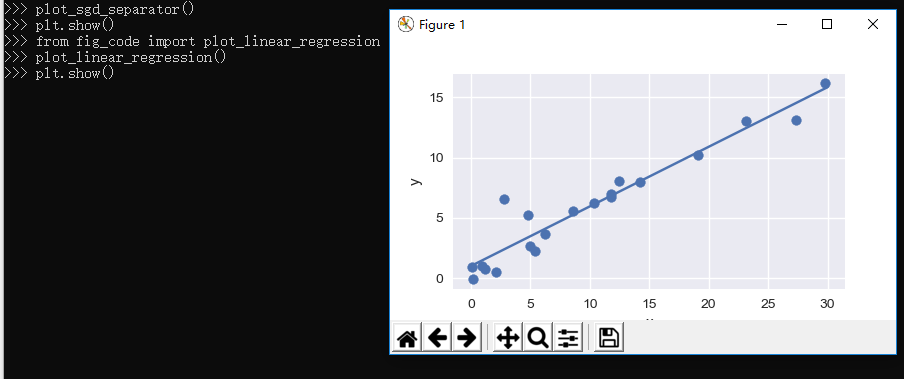
导入上面的程序并使用:
 >>> from fig_code import plot_linear_regression

 >>> plot_linear_regression()

 >>> plt.show()
@2、接下来我们自己生成数据并进行拟合:
生成模型:
 >>> from sklearn.linear_model import LinearRegression

 >>> model = LinearRegression(normalize=True)

 >>> print(model.normalize)

 True

 >>> print(model)

 LinearRegression(copy_X=True, fit_intercept=True, n_jobs=None, normalize=True)
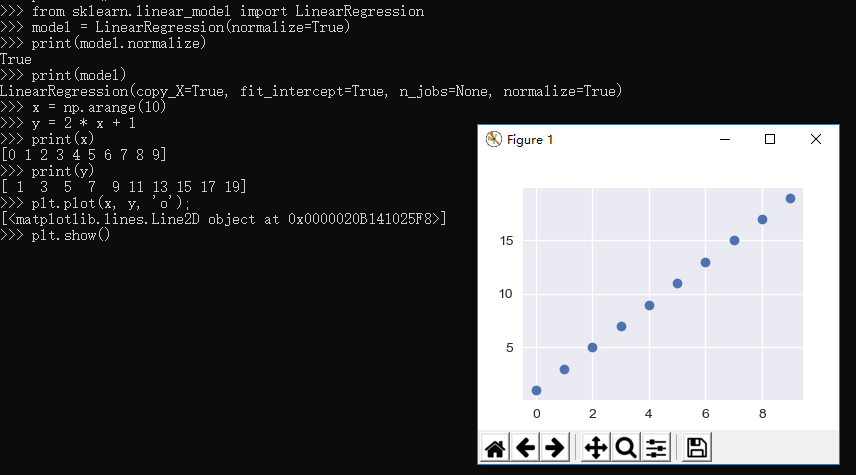
生成数据:
 >>> x = np.arange(10)

 >>> y = 2 * x + 1

 >>> print(x)

 [0 1 2 3 4 5 6 7 8 9]

 >>> print(y)

 [ 1  3  5  7  9 11 13 15 17 19]

 >>> plt.plot(x, y, 'o');

 [<matplotlib.lines.Line2D object at 0x0000020B141025F8>]

 >>> plt.show()

 >>>
进行拟合:
 >>> X = x[:, np.newaxis]

 >>> print(X)

 [[0]

  [1]

  [2]

  [3]

  [4]

  [5]

  [6]

  [7]

  [8]

  [9]]

 >>> print(y)

 [ 1  3  5  7  9 11 13 15 17 19]

 >>> model.fit(X, y)

 LinearRegression(copy_X=True, fit_intercept=True, n_jobs=None, normalize=True)

 >>> print(model.coef_)

 [2.]

 >>> print(model.intercept_)

 0.9999999999999982

 >>>
可以看到斜率和截距确实是我们期望的。
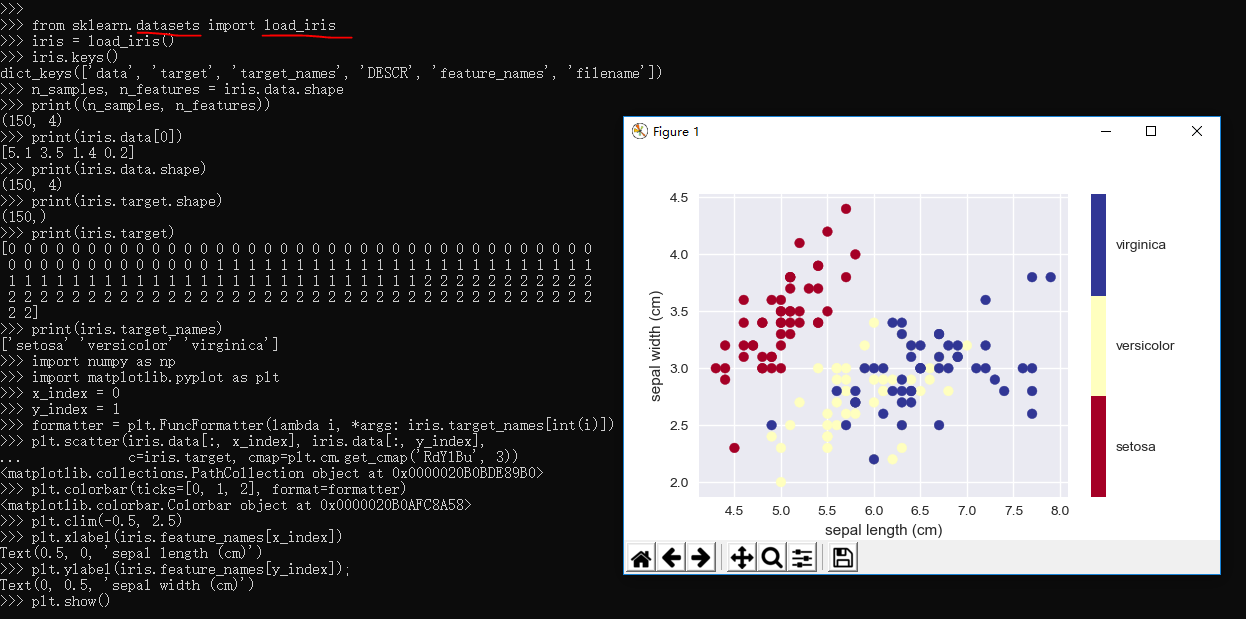
2.3.3、Iris Dataset的简单样例
 >>> from sklearn.datasets import load_iris

 >>> iris = load_iris()

 >>> iris.keys()

 dict_keys(['data', 'target', 'target_names', 'DESCR', 'feature_names', 'filename'])

 >>> n_samples, n_features = iris.data.shape

 >>> print((n_samples, n_features))

 (150, 4)

 >>> print(iris.data[0])

 [5.1 3.5 1.4 0.2]

 >>> print(iris.data.shape)

 (150, 4)

 >>> print(iris.target.shape)

 (150,)

 >>> print(iris.target)

 [0 0 0 0 0 0 0 0 0 0 0 0 0 0 0 0 0 0 0 0 0 0 0 0 0 0 0 0 0 0 0 0 0 0 0 0 0

  0 0 0 0 0 0 0 0 0 0 0 0 0 1 1 1 1 1 1 1 1 1 1 1 1 1 1 1 1 1 1 1 1 1 1 1 1

  1 1 1 1 1 1 1 1 1 1 1 1 1 1 1 1 1 1 1 1 1 1 1 1 1 1 2 2 2 2 2 2 2 2 2 2 2

  2 2 2 2 2 2 2 2 2 2 2 2 2 2 2 2 2 2 2 2 2 2 2 2 2 2 2 2 2 2 2 2 2 2 2 2 2

  2 2]

 >>> print(iris.target_names)

 ['setosa' 'versicolor' 'virginica']

 >>> import numpy as np

 >>> import matplotlib.pyplot as plt

 >>> x_index = 0

 >>> y_index = 1

 >>> formatter = plt.FuncFormatter(lambda i, *args: iris.target_names[int(i)])

 >>> plt.scatter(iris.data[:, x_index], iris.data[:, y_index],

 ...             c=iris.target, cmap=plt.cm.get_cmap('RdYlBu', 3))

 <matplotlib.collections.PathCollection object at 0x0000020B0BDE89B0>

 >>> plt.colorbar(ticks=[0, 1, 2], format=formatter)

 <matplotlib.colorbar.Colorbar object at 0x0000020B0AFC8A58>

 >>> plt.clim(-0.5, 2.5)

 >>> plt.xlabel(iris.feature_names[x_index])

 Text(0.5, 0, 'sepal length (cm)')

 >>> plt.ylabel(iris.feature_names[y_index]);

 Text(0, 0.5, 'sepal width (cm)')

 >>> plt.show()

 >>>
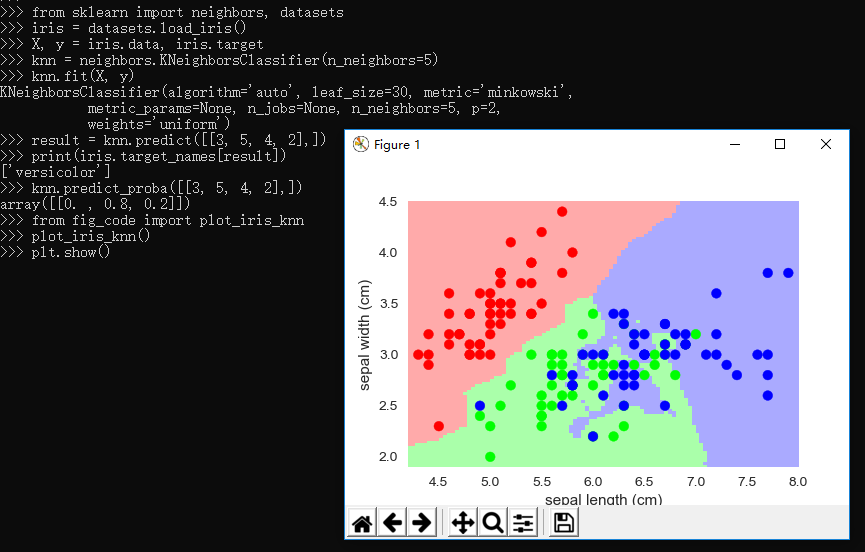
2.3.4、knn分类器
 """

 Small helpers for code that is not shown in the notebooks

 """

 from sklearn import neighbors, datasets, linear_model

 import pylab as pl

 import numpy as np

 from matplotlib.colors import ListedColormap

 # Create color maps for 3-class classification problem, as with iris

 cmap_light = ListedColormap(['#FFAAAA', '#AAFFAA', '#AAAAFF'])

 cmap_bold = ListedColormap(['#FF0000', '#00FF00', '#0000FF'])

 def plot_iris_knn():

     iris = datasets.load_iris()

     X = iris.data[:, :2]  # we only take the first two features. We could

                         # avoid this ugly slicing by using a two-dim dataset

     y = iris.target

     knn = neighbors.KNeighborsClassifier(n_neighbors=3)

     knn.fit(X, y)

     x_min, x_max = X[:, 0].min() - .1, X[:, 0].max() + .1

     y_min, y_max = X[:, 1].min() - .1, X[:, 1].max() + .1

     xx, yy = np.meshgrid(np.linspace(x_min, x_max, 100),

                          np.linspace(y_min, y_max, 100))

     Z = knn.predict(np.c_[xx.ravel(), yy.ravel()])

     # Put the result into a color plot

     Z = Z.reshape(xx.shape)

     pl.figure()

     pl.pcolormesh(xx, yy, Z, cmap=cmap_light)

     # Plot also the training points

     pl.scatter(X[:, 0], X[:, 1], c=y, cmap=cmap_bold)

     pl.xlabel('sepal length (cm)')

     pl.ylabel('sepal width (cm)')

     pl.axis('tight')

 def plot_polynomial_regression():

     rng = np.random.RandomState(0)

     x = 2*rng.rand(100) - 1

     f = lambda t: 1.2 * t**2 + .1 * t**3 - .4 * t **5 - .5 * t ** 9

     y = f(x) + .4 * rng.normal(size=100)

     x_test = np.linspace(-1, 1, 100)

     pl.figure()

     pl.scatter(x, y, s=4)

     X = np.array([x**i for i in range(5)]).T

     X_test = np.array([x_test**i for i in range(5)]).T

     regr = linear_model.LinearRegression()

     regr.fit(X, y)

     pl.plot(x_test, regr.predict(X_test), label='4th order')

     X = np.array([x**i for i in range(10)]).T

     X_test = np.array([x_test**i for i in range(10)]).T

     regr = linear_model.LinearRegression()

     regr.fit(X, y)

     pl.plot(x_test, regr.predict(X_test), label='9th order')

     pl.legend(loc='best')

     pl.axis('tight')

     pl.title('Fitting a 4th and a 9th order polynomial')

     pl.figure()

     pl.scatter(x, y, s=4)

     pl.plot(x_test, f(x_test), label="truth")

     pl.axis('tight')

     pl.title('Ground truth (9th order polynomial)')
引用上面的包:
 >>> from sklearn import neighbors, datasets

 >>> iris = datasets.load_iris()

 >>> X, y = iris.data, iris.target

 >>> knn = neighbors.KNeighborsClassifier(n_neighbors=5)

 >>> knn.fit(X, y)

 KNeighborsClassifier(algorithm='auto', leaf_size=30, metric='minkowski',

            metric_params=None, n_jobs=None, n_neighbors=5, p=2,

            weights='uniform')

 >>> result = knn.predict([[3, 5, 4, 2],])

 >>> print(iris.target_names[result])

 ['versicolor']

 >>> knn.predict_proba([[3, 5, 4, 2],])

 array([[0. , 0.8, 0.2]])

 >>> from fig_code import plot_iris_knn

 >>> plot_iris_knn()

 >>> plt.show()

 >>>
2.3.5、Regression Example
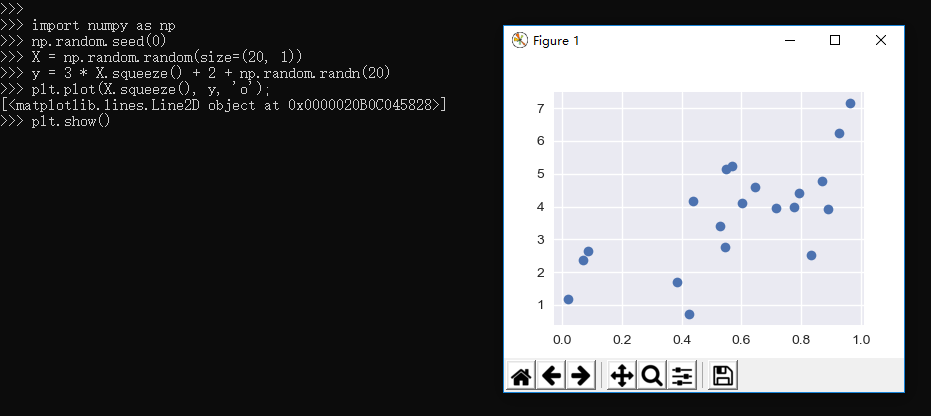
 >>> import numpy as np

 >>> np.random.seed(0)

 >>> X = np.random.random(size=(20, 1))

 >>> y = 3 * X.squeeze() + 2 + np.random.randn(20)

 >>> plt.plot(X.squeeze(), y, 'o');

 [<matplotlib.lines.Line2D object at 0x0000020B0C045828>]

 >>> plt.show()
 >>>

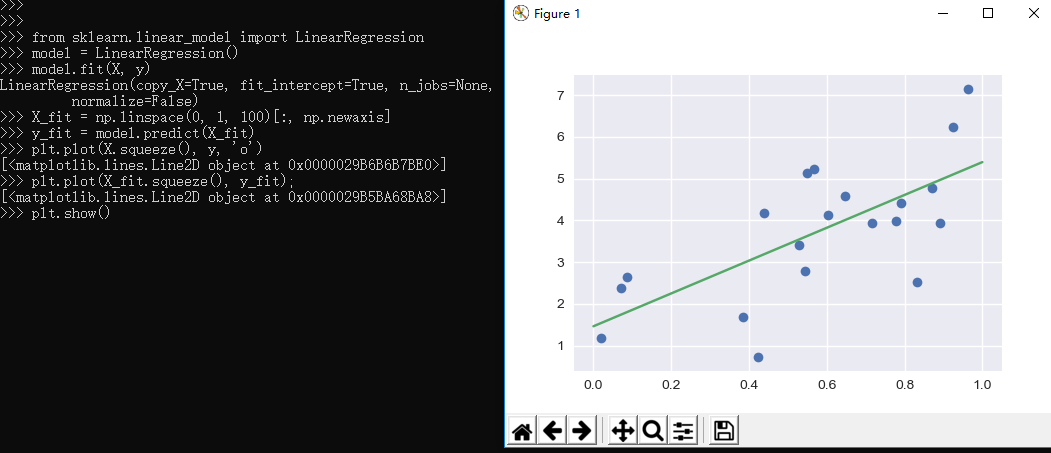
 >>> from sklearn.linear_model import LinearRegression

 >>> model = LinearRegression()

 >>> model.fit(X, y)

 LinearRegression(copy_X=True, fit_intercept=True, n_jobs=None,

          normalize=False)

 >>> X_fit = np.linspace(0, 1, 100)[:, np.newaxis]

 >>> y_fit = model.predict(X_fit)

 >>> plt.plot(X.squeeze(), y, 'o')

 [<matplotlib.lines.Line2D object at 0x0000029B6B6B7BE0>]

 >>> plt.plot(X_fit.squeeze(), y_fit);

 [<matplotlib.lines.Line2D object at 0x0000029B5BA68BA8>]

 >>> plt.show()
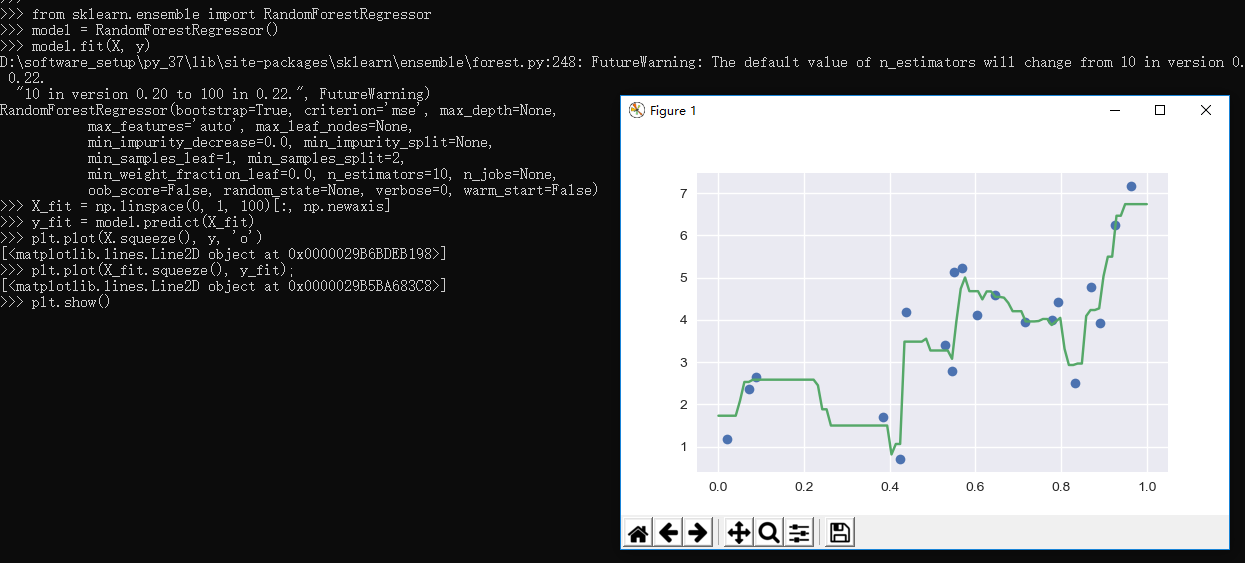
Scikit-learn also has some more sophisticated models, which can respond to finer features in the data::
 >>> from sklearn.ensemble import RandomForestRegressor

 >>> model = RandomForestRegressor()

 >>> model.fit(X, y)

 FutureWarning: The default value of n_estimators will change from 10 in version 0.20 to 100 in 0.22.

   "10 in version 0.20 to 100 in 0.22.", FutureWarning)

 RandomForestRegressor(bootstrap=True, criterion='mse', max_depth=None,

            max_features='auto', max_leaf_nodes=None,

            min_impurity_decrease=0.0, min_impurity_split=None,

            min_samples_leaf=1, min_samples_split=2,

            min_weight_fraction_leaf=0.0, n_estimators=10, n_jobs=None,

            oob_score=False, random_state=None, verbose=0, warm_start=False)

 >>> X_fit = np.linspace(0, 1, 100)[:, np.newaxis]

 >>> y_fit = model.predict(X_fit)

 >>> plt.plot(X.squeeze(), y, 'o')

 [<matplotlib.lines.Line2D object at 0x0000029B6BDEB198>]

 >>> plt.plot(X_fit.squeeze(), y_fit);

 [<matplotlib.lines.Line2D object at 0x0000029B5BA683C8>]

 >>> plt.show()

 >>>
2.3.6、Dimensionality Reduction: PCA
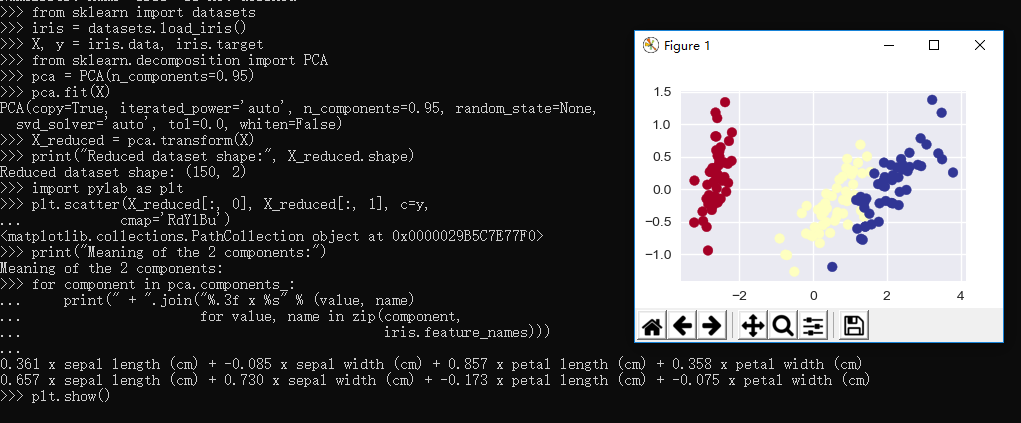
 >>> from sklearn import datasets

 >>> iris = datasets.load_iris()

 >>> X, y = iris.data, iris.target

 >>> from sklearn.decomposition import PCA

 >>> pca = PCA(n_components=0.95)

 >>> pca.fit(X)

 PCA(copy=True, iterated_power='auto', n_components=0.95, random_state=None,

   svd_solver='auto', tol=0.0, whiten=False)

 >>> X_reduced = pca.transform(X)

 >>> print("Reduced dataset shape:", X_reduced.shape)

 Reduced dataset shape: (150, 2)

 >>> import pylab as plt

 >>> plt.scatter(X_reduced[:, 0], X_reduced[:, 1], c=y,

 ...            cmap='RdYlBu')

 <matplotlib.collections.PathCollection object at 0x0000029B5C7E77F0>

 >>> print("Meaning of the 2 components:")

 Meaning of the 2 components:

 >>> for component in pca.components_:

 ...     print(" + ".join("%.3f x %s" % (value, name)

 ...                      for value, name in zip(component,

 ...                                             iris.feature_names)))

 ...

 0.361 x sepal length (cm) + -0.085 x sepal width (cm) + 0.857 x petal length (cm) + 0.358 x petal width (cm)

 0.657 x sepal length (cm) + 0.730 x sepal width (cm) + -0.173 x petal length (cm) + -0.075 x petal width (cm)

 >>> plt.show()

 >>>
2.3.7、Clustering: K-means
 >>> from sklearn.cluster import KMeans

 >>> k_means = KMeans(n_clusters=3, random_state=0) # Fixing the RNG in kmeans

 >>> k_means.fit(X)

 KMeans(algorithm='auto', copy_x=True, init='k-means++', max_iter=300,

     n_clusters=3, n_init=10, n_jobs=None, precompute_distances='auto',

     random_state=0, tol=0.0001, verbose=0)

 >>> y_pred = k_means.predict(X)

 >>> plt.scatter(X_reduced[:, 0], X_reduced[:, 1], c=y_pred,

 ...            cmap='RdYlBu');

 <matplotlib.collections.PathCollection object at 0x0000029B5C7456A0>

 >>> plt.show()

 >>>

2.4、sklearn的模型验证
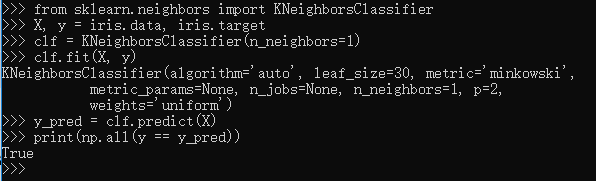
    An important piece of machine learning is model validation: that is, determining how well your model will generalize from the training data
to future unlabeled data. Let's look at an example using the nearest neighbor classifier. This is a very simple classifier:
    it simply stores all training data, and for any unknown quantity, simply returns the label of the closest training point.With the iris data,
    it very easily returns the correct prediction for each of the input points:
样例如下:
 >>> from sklearn.neighbors import KNeighborsClassifier

 >>> X, y = iris.data, iris.target

 >>> clf = KNeighborsClassifier(n_neighbors=1)

 >>> clf.fit(X, y)

 KNeighborsClassifier(algorithm='auto', leaf_size=30, metric='minkowski',

            metric_params=None, n_jobs=None, n_neighbors=1, p=2,

            weights='uniform')

 >>> y_pred = clf.predict(X)

 >>> print(np.all(y == y_pred))

 True

 >>>
A more useful way to look at the results is to view the confusion matrix, or the matrix showing the frequency of inputs and outputs:
>>> from sklearn.metrics import confusion_matrix

>>> print(confusion_matrix(y, y_pred))

[[50  0  0]

 [ 0 50  0]

 [ 0  0 50]]
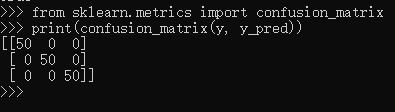
For each class, all 50 training samples are correctly identified. But this does not mean that our model is perfect! In particular, such a model generalizes extremely poorly to new data. We can simulate this by splitting our data into a training set and a testing set. Scikit-learn contains some convenient routines to do this:
>>> from sklearn.model_selection import train_test_split

>>> Xtrain, Xtest, ytrain, ytest = train_test_split(X, y)

>>> clf.fit(Xtrain, ytrain)

KNeighborsClassifier(algorithm='auto', leaf_size=30, metric='minkowski',

           metric_params=None, n_jobs=None, n_neighbors=1, p=2,

           weights='uniform')

>>> ypred = clf.predict(Xtest)

>>> print(confusion_matrix(ytest, ypred))

[[12  0  0]

 [ 0  6  0]

 [ 0  2 18]]
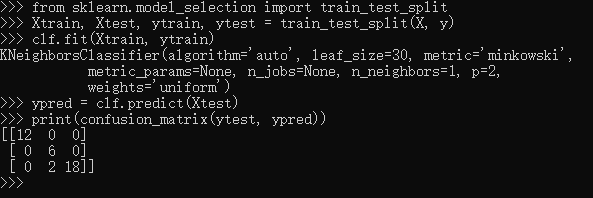
This paints a better picture of the true performance of our classifier: apparently there is some confusion between the second and third species, which we might anticipate given what we've seen of the data above.This is why it's extremely important to use a train/test split when evaluating your models.

沉淀再出发:使用python进行机器学习的更多相关文章
- 沉淀再出发:用python画各种图表
沉淀再出发:用python画各种图表 一.前言 最近需要用python来做一些统计和画图,因此做一些笔记. 二.python画各种图表 2.1.使用turtle来画图 import turtle as ...
- 沉淀,再出发:python中的pandas包
沉淀,再出发:python中的pandas包 一.前言 python中有很多的包,正是因为这些包工具才使得python能够如此强大,无论是在数据处理还是在web开发,python都发挥着重要的作用,下 ...
- 沉淀,再出发:python爬虫的再次思考
沉淀,再出发:python爬虫的再次思考 一.前言 之前笔者就写过python爬虫的相关文档,不过当时因为知识所限,理解和掌握的东西都非常的少,并且使用更多的是python2.x的版本的功能,现 ...
- 沉淀再出发:在python3中导入自定义的包
沉淀再出发:在python3中导入自定义的包 一.前言 在python中如果要使用自己的定义的包,还是有一些需要注意的事项的,这里简单记录一下. 二.在python3中导入自定义的包 2.1.什么是模 ...
- 沉淀再出发:mongodb的使用
沉淀再出发:mongodb的使用 一.前言 这是一篇很早就想写却一直到了现在才写的文章.作为NoSQL(not only sql)中出色的一种数据库,MongoDB的作用是非常大的,这种文档型数据库, ...
- 沉淀再出发:java中的equals()辨析
沉淀再出发:java中的equals()辨析 一.前言 关于java中的equals,我们可能非常奇怪,在Object中定义了这个函数,其他的很多类中都重载了它,导致了我们对于辨析其中的内涵有了混淆, ...
- 沉淀再出发:web服务器和应用服务器之间的区别和联系
沉淀再出发:web服务器和应用服务器之间的区别和联系 一.前言 关于后端,我们一般有三种服务器(当然还有文件服务器等),Web服务器,应用程序服务器和数据库服务器,其中前面两个的概念已经非常模糊了,但 ...
- 沉淀再出发:jetty的架构和本质
沉淀再出发:jetty的架构和本质 一.前言 我们在使用Tomcat的时候,总是会想到jetty,这两者的合理选用是和我们项目的类型和大小息息相关的,Tomcat属于比较重量级的容器,通过很多的容器层 ...
- 沉淀再出发:dubbo的基本原理和应用实例
沉淀再出发:dubbo的基本原理和应用实例 一.前言 阿里开发的dubbo作为服务治理的工具,在分布式开发中有着重要的意义,这里我们主要专注于dubbo的架构,基本原理以及在Windows下面开发出来 ...
随机推荐
- H5+百度地图定位
<!DOCTYPE html> <html lang="en"> <head> <meta charset="UTF-8&quo ...
- 在Linux上创建webrev(cont)[基于svn]
在前文中,基于git介绍了webrev工具.实际上,webrev工具还支持hg和svn.最近的工作中不可避免地要使用svn,故在此总结一下如何基于svn在Linux上创建webrev.顺便吐个槽,没有 ...
- varchar(n) 和 int(n)
mysql(测试版本为5.6) 的varchar必须加范围,否则报错: mysql> CREATE TABLE test ( -> id INT, -> name VARCHAR - ...
- this说明
这个This就表示当前实例的对象,用this可访问属性,this.Fist:
- MFC—— AfxMessageBox
AfxMessageBox 错误C2665: “AfxMessageBox”: 2 个重载中没有一个可以转换所有参数类型 1,楼主发表于:2007-01-01 03:56:34同样的语句, ...
- android studio 中由于网络问题,编译错误
由于网络原因,需要连外网实现下载相关依赖包,导致编译失败 在 build.gradle文件中 将原来是jcenter()的地址改成 maven{ url 'http://maven.aliyun.co ...
- 16、IO (Properties、序列化流、打印流、CommonsIO)
Properties集合的特点 * A: Properties集合的特点 * a: Properties类介绍 * Properties 类表示了一个持久的属性集.Properties 可保存在流中或 ...
- msql查询指定日期
今天 select * from 表名 where to_days(时间字段名) = to_days(now()); 昨天 SELECT * FROM 表名 WHERE TO_DAYS( NOW( ) ...
- groovy集合
groovy集合可以直接在语言中使用,因为它默认已经导入包了. 不需要初始化对象,也不需要专门的类. 集合是groovy语言本地成员.Groovy语法提供了本地列表和相应的映射. 每个Groovy集合 ...
- 解决:IDEA springmvc maven 项目搭建完后没有生成 webcontent 目录
前言:发现项目创建好,配置好,写好测试代码,一看没有 webcontent 目录. 问题: 解决方案: ctrl + alt + Shift + S