
161221、bootstrap table 实例
bootstrap table 封装了一套完善的数据表格组件,把下面的代码复制一下估计你需要的基本功能都有了,没有的再看看手册对比着我给的实例也能很快的熟悉了
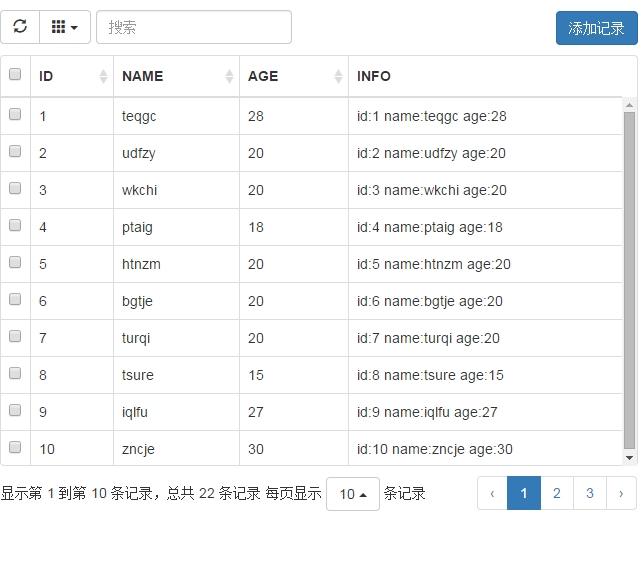

客户端
<!DOCTYPE html>
<html>
<head>
<meta charset="UTF-8">
<title>Bootstrap-Table</title>
<link rel="stylesheet" href="http://apps.bdimg.com/libs/bootstrap/3.3.4/css/bootstrap.min.css"/>
<link rel="stylesheet" href="assets/bootstrap-table.css"/>
<meta name="viewport" content="width=device-width, initial-scale=1.0, maximum-scale=1.0, user-scalable=0">
</head>
<body>
<div>
<div>
<div class="col-*-12">
<div id="toolbar">
<div class="btn btn-primary" data-toggle="modal" data-target="#addModal">添加记录</div>
</div>
<table id="mytab" class="table table-hover"></table>
<div class="modal fade" id="addModal" tabindex="-1" role="dialog" aria-hidden="true">
<div class="modal-dialog">
<div class="modal-content">
<div class="modal-header">
<button type="button" class="close" data-dismiss="modal" aria-hidden="true">
×
</button>
<h4 class="modal-title" id="myModalLabel">添加记录</h4>
</div>
<div class="modal-body">
<form role="form" action="javascript:void(0)">
<div class="form-group">
<input type="text" class="form-control" id="name" placeholder="请输入名称">
</div>
<div class="form-group">
<input type="text" class="form-control" id="age" placeholder="请输入年龄">
</div>
</form>
</div>
<div class="modal-footer">
<button type="button" class="btn btn-default" data-dismiss="modal">取消</button>
<button type="button" class="btn btn-primary" id="addRecord">提交</button>
</div>
</div>
</div>
</div>
</div>
</div>
</div>
<script src="http://apps.bdimg.com/libs/jquery/2.1.4/jquery.min.js"></script>
<script src="http://apps.bdimg.com/libs/bootstrap/3.3.4/js/bootstrap.min.js"></script>
<script src="assets/bootstrap-table.js"></script>
<script src="assets/bootstrap-table-zh-CN.js"></script>
<script type="text/javascript">
$(function() {
//根据窗口调整表格高度
$(window).resize(function() {
$('#mytab').bootstrapTable('resetView', {
height: tableHeight()
})
})
$('#mytab').bootstrapTable({
url: "index.php",//数据源
dataField: "rows",//服务端返回数据键值 就是说记录放的键值是rows,分页时使用总记录数的键值为total
height: tableHeight(),//高度调整
search: true,//是否搜索
pagination: true,//是否分页
pageSize: 20,//单页记录数
pageList: [5, 10, 20, 50],//分页步进值
sidePagination: "server",//服务端分页
contentType: "application/x-www-form-urlencoded",//请求数据内容格式 默认是 application/json 自己根据格式自行服务端处理
dataType: "json",//期待返回数据类型
method: "post",//请求方式
searchAlign: "left",//查询框对齐方式
queryParamsType: "limit",//查询参数组织方式
queryParams: function getParams(params) {
//params obj
params.other = "otherInfo";
return params;
},
searchOnEnterKey: false,//回车搜索
showRefresh: true,//刷新按钮
showColumns: true,//列选择按钮
buttonsAlign: "left",//按钮对齐方式
toolbar: "#toolbar",//指定工具栏
toolbarAlign: "right",//工具栏对齐方式
columns: [
{
title: "全选",
field: "select",
checkbox: true,
width: 20,//宽度
align: "center",//水平
valign: "middle"//垂直
},
{
title: "ID",//标题
field: "id",//键名
sortable: true,//是否可排序
order: "desc"//默认排序方式
},
{
field: "name",
title: "NAME",
sortable: true,
titleTooltip: "this is name"
},
{
field: "age",
title: "AGE",
sortable: true,
},
{
field: "info",
title: "INFO[using-formatter]",
formatter: 'infoFormatter',//对本列数据做格式化
}
],
onClickRow: function(row, $element) {
//$element是当前tr的jquery对象
$element.css("background-color", "green");
},//单击row事件
locale: "zh-CN"//中文支持,
detailView: false, //是否显示详情折叠
detailFormatter: function(index, row, element) {
var html = '';
$.each(row, function(key, val){
html += "<p>" + key + ":" + val + "</p>"
});
return html;
}
});
$("#addRecord").click(function(){
alert("name:" + $("#name").val() + " age:" +$("#age").val());
});
})
function tableHeight() {
return $(window).height() - 50;
}
/**
* 列的格式化函数 在数据从服务端返回装载前进行处理
* @param {[type]} value [description]
* @param {[type]} row [description]
* @param {[type]} index [description]
* @return {[type]} [description]
*/
function infoFormatter(value, row, index)
{
return "id:" + row.id + " name:" + row.name + " age:" + row.age;
}
</script>
</body>
</html>服务端:
<?php

/**

 * 服务端模拟数据

 */

//前端期望数据为json

header("Content-Type:application/json;charset=utf-8");

//post 请求 请求内容类型为 application/x-www-form-urlencoded 如果是 application/json 则需要另行处理 $_POST 数组不会被填充

//为了保持模拟的数据

session_start();

if ($_SESSION['emulate_data']) {

    //已生成

} else {

    $list = [];

    //第一次会模拟个数据

    for($i = 1; $i < 50; $i ++) {

        $list[] = [

                "id" => $i,

                "name" => substr(str_shuffle(implode('', range('a', 'z'))), 0, 5),

                "age" => mt_rand(10, 30)

            ];

    }

    $_SESSION['emulate_data'] = $list;

}

$list_temp = [];

//检索

if (isset($_POST['search']) && !empty($_POST['search'])) {

    foreach ($_SESSION['emulate_data'] as $key => $row) {

        if (strpos($row['name'], $_POST['search']) !== false

        || strpos($row['age'], $_POST['search']) !== false) {

            $list_temp[] = $_SESSION['emulate_data'][$key];

        }

    }

} else {

    $list_temp = $_SESSION['emulate_data'];

}

//排序

if (isset($_POST['sort'])) {

    $temp = [];

    foreach ($list_temp as $row) {

        $temp[] = $row[$_POST['sort']];

    }

    //php的多维排序

    array_multisort($temp,

        $_POST['sort'] == 'name' ? SORT_STRING : SORT_NUMERIC,

        $_POST['order'] == 'asc' ? SORT_ASC : SORT_DESC,

        $list_temp

    );

}

//分页时需要获取记录总数,键值为 total

$result["total"] = count($list_temp);

//根据传递过来的分页偏移量和分页量截取模拟分页 rows 可以根据前端的 dataField 来设置

$result["rows"] = array_slice($list_temp, $_POST['offset'], $_POST['limit']);

echo json_encode($result);
需要注意的是
1、bootstrap table 可以前端分页也可以后端分页,这里我们使用的是后端分页,后端分页时需返回含有
total:总记录数 这个键值好像是固定的,我看文档没找到可以修改成别的
rows: 记录集合 键值可以修改 dataField 自己定义成自己想要的就好
{

    "total":200,

    "rows":[

            {"id":1, "name":"sallency", "age": 26},

            {"id":1, "name":"sallency", "age": 26},

            {"id":1, "name":"sallency", "age": 26},

            {"id":1, "name":"sallency", "age": 26},

            {"id":1, "name":"sallency", "age": 26}]

}
如上的json数据(当然我前台设置的
161221、bootstrap table 实例的更多相关文章
- ABP+AdminLTE+Bootstrap Table权限管理系统第十一节--bootstrap table之用户管理列表
这张开始bootstrap table,引入项目有两种方法,一种是直接去官网下载 地址:http://bootstrap-table.wenzhixin.net.cn/ 另一种是Nuget引入. 然后 ...
- ABP+AdminLTE+Bootstrap Table权限管理系统第七节--登录逻辑及abp封装的Javascript函数库
经过前几节,我们已经解决数据库,模型,DTO,控制器和注入等问题.那么再来看一下登录逻辑.这里算是前面几节的一个初次试水. 首先我们数据库已经有的相应的数据. 模型和DTO已经建好,所以我们直接在服务 ...
- ABP module-zero +AdminLTE+Bootstrap Table+jQuery权限管理系统第十七节--Quartz与ABP框架Abp.Quartz及扩展
ABP+AdminLTE+Bootstrap Table权限管理系统一期 Github:https://github.com/Jimmey-Jiang/ABP-ASP.NET-Boilerplate- ...
- ABP module-zero +AdminLTE+Bootstrap Table+jQuery权限管理系统第十五节--缓存小结与ABP框架项目中 Redis Cache的实现
返回总目录:ABP+AdminLTE+Bootstrap Table权限管理系统一期 缓存 为什么要用缓存 为什么要用缓存呢,说缓存之前先说使用缓存的优点. 减少寄宿服务器的往返调用(round-tr ...
- ABP module-zero +AdminLTE+Bootstrap Table+jQuery权限管理系统第十四节--后台工作者HangFire与ABP框架Abp.Hangfire及扩展
返回总目录:ABP+AdminLTE+Bootstrap Table权限管理系统一期 HangFire与Quartz.NET相比主要是HangFire的内置提供集成化的控制台,方便后台查看及监控,对于 ...
- ABP+AdminLTE+Bootstrap Table权限管理系统第十一节--Bootstrap Table用户管理列表以及Module Zero之用户管理
返回总目录:ABP+AdminLTE+Bootstrap Table权限管理系统一期 用户实体 用户实体代表应用的一个用户,它派生自AbpUser类,如下所示: public class User : ...
- ABP+AdminLTE+Bootstrap Table权限管理系统第七节--登录逻辑及几种abp封装的Javascript函数库
返回总目录:ABP+AdminLTE+Bootstrap Table权限管理系统一期 简介 经过前几节,我们已经解决数据库,模型,DTO,控制器和注入等问题.那么再来看一下登录逻辑.这 ...
- bootstrap table 前端搜索
1.bootstrap-table对于前端的搜索可以通过官网设置,但发现前端搜索出现bug,网上找到一个bootstrap-table的扩充js bootstrap-table-mytoolbar. ...
- bootstrap table 怎么实现前两列固定冻结?
$("#Table").bootstrapTable('destroy').bootstrapTable({ pagination: true,//分页 minimumCountC ...
随机推荐
- win10我能ping通他人,但他人ping不同我
这是防火墙的原因,关闭防火墙即可
- centos安装php
1.安装phpyum install php php-devel重启apache使php生效 2.此时可以在目录:/var/www/html/下建立一个PHP文件代码:<?php phpinfo ...
- Spring中的单例一二
Spring框架很好的帮助我们创建和管理dao.bean.service.action等对象, 但是它创建的对象是单例呢还是多例,又有哪些区别以及为什么 1.在Spring中默认创建的是单例模式,简单 ...
- javascript对象的一点理解
<script type="text/javascript"> /* js对象:对象的职责是调用属性和调用方法 */ //1.对象的创建的三种方式 var obj = ...
- [转]RamDisk导致远程桌面客户端无法启动问题
在一次重启系统后发现无法运行远程桌面客户端,运行后进行连接即报错. 查看日志有AppCrash错误: 错误应用程序名称: mstsc.exe,版本: 6.1.7600.16385,时间戳: 0x4a5 ...
- 用session实现简单的购物
package cn.itcast.shopping; import java.io.IOException; import java.io.PrintWriter; import java.util ...
- java.lang.UnsupportedClassVersionError: Bad version number in .class file异常
java.lang.UnsupportedClassVersionError: Bad version number in .class file异常 部署工程时也出现过因为版本不同引起的问题,那时我 ...
- centos yum 使用笔记
yum 参数说明yum -y # 表示自动选择 基本使用# yum -y install 包名(支持*) :自动选择y,全自动# yum install 包名(支持*) :手动选择y or n# yu ...
- ExtJS4笔记 Data
The data package is what loads and saves all of the data in your application and consists of 41 clas ...
- How to bind data to a user control
http://support.microsoft.com/kb/327413 Create a user control by inheriting from the System.Windows. ...