
Edit Individual GridView Cells in ASP.NET
Edit individual GridView cells without putting the entire row into edit mode.Examples using the SqlDataSource and ObjectDataSource controls are included.
Introduction
The ASP.NET GridView allows for a row of data to be edited by setting the EditIndex property of theGridView, placing the entire row in edit mode.
You may not want the entire row in edit mode if you are using DropDownList controls for several columns in the EditItemTemplate. If each DropDownList has many options, then loading them all at once may result in a sluggish page. Also, if your data structure is more like a 2 dimensional array rather than a set of rows, you may want to edit each cell individually.
Here I will demonstrate how to achieve this and also how to deal with Event Validation without disabling it.
Background
This article is based on questions I was asked in relation to one of my previous articles: Clickable and Double Clickable Rows with GridView and DataList Controls in ASP.NET.
To understand the concept of making a GridView row clickable, you may want to read it before proceeding.
Edit Individual GridView Cells
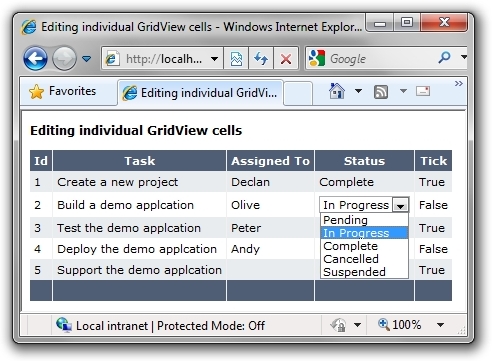
The GridView in the demo has an asp:ButtonField control called SingleClick in the first column with its visibility set to false.
This is used to add the click event to the GridView rows.
<Columns>

    <asp:ButtonField Text="SingleClick" CommandName="SingleClick"

                        Visible="False" />

</Columns>
For each of the other columns, there is an item template with a visible Label control and an invisible TextBox,DropdownList or CheckBox control.
For convenience, we will call the Label the "display control" and the TextBox, DropdownList or CheckBox the "edit control".
<asp:TemplateField HeaderText="Task">

    <ItemTemplate>

        <asp:Label ID="DescriptionLabel" runat="server"

            Text='<%# Eval("Description") %>'></asp:Label>

        <asp:TextBox ID="Description" runat="server"

            Text='<%# Eval("Description") %>' Width="175px"

            visible="false">
The idea here is that initially the data is displayed in the display control and when the cell containing the display control is clicked, it's visibility is set to false and the edit control's visibility is set to true. TheEditItemTemplate is not used.
Within the RowDataBound event, each cell of the row is looped through and has a click event added.
The cell index is passed in as the event argument parameter so that the cell can be identified when it raises an event.
protected void GridView1_RowDataBound(object sender, GridViewRowEventArgs e)

{

    if (e.Row.RowType == DataControlRowType.DataRow)

    {

        // Get the LinkButton control in the first cell

        LinkButton _singleClickButton = (LinkButton)e.Row.Cells[].Controls[];

        // Get the javascript which is assigned to this LinkButton

        string _jsSingle = ClientScript.GetPostBackClientHyperlink(

            _singleClickButton, "");

        // Add events to each editable cell

        for (int columnIndex = _firstEditCellIndex; columnIndex <

            e.Row.Cells.Count; columnIndex++)

        {

            // Add the column index as the event argument parameter

            string js = _jsSingle.Insert(_jsSingle.Length - ,

                columnIndex.ToString());

            // Add this javascript to the onclick Attribute of the cell

            e.Row.Cells[columnIndex].Attributes["onclick"] = js;

            // Add a cursor style to the cells

            e.Row.Cells[columnIndex].Attributes["style"] +=

                "cursor:pointer;cursor:hand;";

        }

    }

}
Within the RowCommand event, the command argument and the event argument are retrieved. This gives us the row and column index of the selected cell.
int _rowIndex = int.Parse(e.CommandArgument.ToString());

int _columnIndex = int.Parse(Request.Form["__EVENTARGUMENT"]);
Since the row and column indexes of the selected cell are known, the cell can be set to edit mode by setting the visibility of the display control to false and that of the edit control to true.
The attributes of the selected cell are also cleared to remove the click event.
// Get the display control for the selected cell and make it invisible

Control _displayControl =

    _gridView.Rows[_rowIndex].Cells[_columnIndex].Controls[];

_displayControl.Visible = false;

// Get the edit control for the selected cell and make it visible

Control _editControl =

    _gridView.Rows[_rowIndex].Cells[_columnIndex].Controls[];

_editControl.Visible = true;

// Clear the attributes from the selected cell to remove the click event

   _gridView.Rows[_rowIndex].Cells[_columnIndex].Attributes.Clear();
There is also some code to set the focus on the edit control after a postback. If the edit control is aDropDownList, then its SelectedValue is set to the value of the display control, if it is a TextBox then its text is selected so that it is ready for editing and if it is a Checkbox then its checked value is set to that of the display control.
// Set focus on the selected edit control

ClientScript.RegisterStartupScript(GetType(), "SetFocus",

    "<script>document.getElementById(

    '" + _editControl.ClientID + "').focus();</script>");

// If the edit control is a dropdownlist set the

// SelectedValue to the value of the display control

if (_editControl is DropDownList && _displayControl is Label)

{

    ((DropDownList)_editControl).SelectedValue = (

        (Label)_displayControl).Text;

}

// If the edit control is a textbox then select the text

if (_editControl is TextBox)

{

   ((TextBox)_editControl).Attributes.Add("onfocus", "this.select()");

}

// If the edit control is a checkbox set the

// Checked value to the value of the display control

if (_editControl is CheckBox && _displayControl is Label)

{

    (CheckBox)_editControl).Checked = bool.Parse(((Label)_displayControl).Text);

}
In the demo, a history of the events fired is also written to the page. Within RowUpdating each cell in the row is checked to see if it is in edit mode. If a cell in edit mode is found, then the data update code is called.
In the first demo page, some sample data is held in a DataTable which is stored in session.
// Loop though the columns to find a cell in edit mode

for (int i = ; i < _gridView.Columns.Count; i++)

{

    // Get the editing control for the cell

    Control _editControl = _gridView.Rows[e.RowIndex].Cells[i].Controls[];

    if (_editControl.Visible)

    {

       .... update the data

    }

}
To ensure that RowUpdating is fired after a cell is edited, it is called in Page_Load. By hitting "Enter" after editing a TextBox or clicking another cell, the page is posted back and the checks are made to ensure any data changes are saved.
if (this.GridView1.SelectedIndex > -)

{

    this.GridView1.UpdateRow(this.GridView1.SelectedIndex, false);

}
Register the Postback or Callback Data for Validation
The custom events created in RowDataBound must be registered with the page.
The ClientScriptManager.RegisterForEventValidation is called by overriding the Render method.
The UniqueID of the row is returned by GridViewRow.UniqueID and the UniqueID of the button can be generated by appending "$ctl00" to the row's UniqueID.
protected override void Render(HtmlTextWriter writer)

{

    foreach (GridViewRow r in GridView1.Rows)

    {

        if (r.RowType == DataControlRowType.DataRow)

        {

            for (int columnIndex = _firstEditCellIndex; columnIndex <

                r.Cells.Count; columnIndex++)

            {

                Page.ClientScript.RegisterForEventValidation(

                    r.UniqueID + "$ctl00", columnIndex.ToString());

            }

        }

    }

    base.Render(writer);

}
This will prevent any "Invalid postback or callback argument" errors from being raised.
Other Examples in the Demo Project
Editing Individual GridView Cells Using a SQL Data Source Control
Implementing this technique with a SqlDataSource control requires some modifications to the GridView'sRowUpdating event. A SqlDataSource control normally takes the values from the EditItemTemplate to populate the NewValues collection when updating a GridView row.
As the EditItemTemplate is not being used in this scenario, the NewValues collection must be populated programmatically.
e.NewValues.Add(key, value);
There is a simple SQL Server Express database in the App_Data folder for the data.
(Depending on your configuration, you may need to modify the connection string in the web.config).
Editing Individual GridView Cells Using an Object Data Source Control
This example uses the two classes in the App_Code folder:
- Task.cs - is the
Taskobject - TaskDataAccess.cs - manages the
Taskobject
The code behind of the ASPX page is identical to that in the SQL Data Source example.
The ObjectDataSource manages the data through the GetTasks and UpdateTask methods in theTaskDataAccess.cs class.
GridView with Spreadsheet Styling
This example has a GridView which is styled to look like a spreadsheet.
(Although it looks like a spreadsheet, it does not really behave like a spreadsheet, it's still a GridView after all!)
The principle is the same as above although there is some extra code which changes the cell styles when they are clicked, etc.
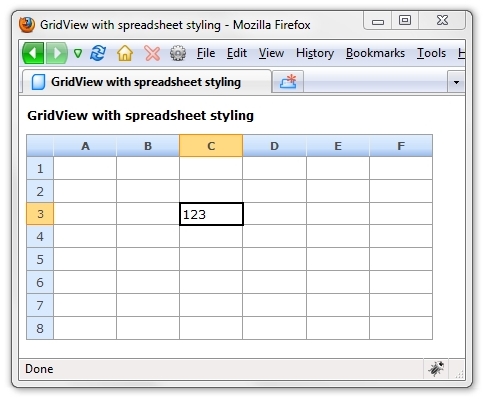
GridView with Spreadsheet Styling Using a SQL Data Source Control
This example is the same as above but with some modifications to the GridView's RowUpdating event to allow it to work with a SqlDataSource control.
References
- Clickable and Double Clickable Rows with GridView and DataList Controls in ASP.NET by Declan Bright
- Data Access Tutorials
Conclusion
If you want to edit data in an ASP.NET GridView one cell at a time, then this technique may be useful.
History
- v1.0 - 25th Mar 2007
- v2.0 - 7th Apr 2007
- Examples using
SqlDataSourceandObjectDataSourceadded to the demo project - v3.0 - 23rd Nov 2007
- Examples with paging and sorting added to the demo project
- ASP.NET 3.5 web.config added to demo project
- v4.0 - 5th Nov 2009
- Examples with
UpdatePanel, Validator Controls, andCheckBoxadded to the demo project - VB.NET examples added to demo project
License
This article, along with any associated source code and files, is licensed under The Code Project Open License (CPOL)
download:
http://pan.baidu.com/s/1pLL9bCJ
Edit Individual GridView Cells in ASP.NET的更多相关文章
- Asp.net中GridView详解《转》
ASP.NET服务器控件GridView 1 ASP.NET 服务器控件GridView使用 本教程不介绍服务器端控件的呈现,事件处理,状态等理论知识,只介绍服务器端控件的使用操作,如 ...
- 在ASP.NET MVC5中实现具有服务器端过滤、排序和分页的GridView
背景 在前一篇文章<[初学者指南]在ASP.NET MVC 5中创建GridView>中,我们学习了如何在 ASP.NET MVC 中实现 GridView,类似于 ASP.NET web ...
- [转]在ASP.NET MVC5中实现具有服务器端过滤、排序和分页的GridView
本文转自:http://www.cnblogs.com/powertoolsteam/p/MVC5_GridView_2.html 背景 在前一篇文章<[初学者指南]在ASP.NET MVC 5 ...
- 利用ASP.NET AJAX的Timer讓GridView每隔一段時間做到自動換頁的功能
最近在討論區看到這個問題,小弟利用asp.net ajax的timer來實作這個功能 利用timer每隔一段時間,讓gridview自動跳頁並且更新gridview的內容 asp.net(c#) Gr ...
- asp.net gridview实现正在加载效果方案一AJAX(转)
前台代码: <%@ Page Language="C#" AutoEventWireup="true" CodeFile="Default.as ...
- asp.net存储过程分页+GridView控件 几百万数据 超快
存储过程:---亲测275万数据,分页速度N快 ))+' '+@orderid+' from '+@tablename+' '+@tmpOrderid set @sql='select top'+st ...
- ASP.NET的gridview设置数据格式(DataFormatString="{}") 2011年04月08日 16:26:00 阅读数:5318 标签: asp.net datagrid integer asp date strin
select convert(numeric(8,2),round(UnTaxAmount,2))as UnTaxAmount from View_SaleVoiceselect cast(UnT ...
- Secure a Web API with Individual Accounts and Local Login in ASP.NET Web API 2.2
https://docs.microsoft.com/en-us/aspnet/web-api/overview/security/individual-accounts-in-web-api Ind ...
- GridView/DataGrid行单击和双击事件实现代码_.Net教程
功能: 单击选中行,双击打开详细页面 说明:单击事件(onclick)使用了 setTimeout 延迟,根据实际需要修改延迟时间 ;当双击时,通过全局变量 dbl_click 来取消单击事件的响应 ...
随机推荐
- 2015 asia xian regional F Color (容斥 + 组合数学)
2015 asia xian regional F Color (容斥 + 组合数学) 题目链接http://codeforces.com/gym/100548/attachments Descrip ...
- 用SqlBulkCopy批量插入数据到SqlServer数据库表中
首先创建一个数据库连接类:SQLHelper using System; using System.Collections.Generic; using System.Linq; using Syst ...
- 2.1 IDEA
1.背景:IntelliJ IDEA 比 Eclipse 更好http://www.oschina.net/news/26929/why-intellij-is-better-than-eclipse ...
- jquery如何获取url中问号后面的数值
假如路径是这样的:www.domain.com/list/?menu=1 var locationUrl = location.search.substring(6); switch(location ...
- redis11--java_jedis-test
使用Java开发项目的时候使用Redis的话,目前有一些开源API可以使用.最常用的就是jedis,它提供了许多基于Java的对象和方法来调用Redis的指令.jedis的jar包下载地址http:/ ...
- JavaScript eval() 为什么使用eval()是一个坏主意 什么时候可以使用eval()
---------------------------------------------------------------------------------------------------- ...
- cxf 报错:java.lang.NoSuchMethodError: org.apache.ws.commons.schema.XmlSchemaCollection.read(Lorg/w3c/dom/Document;Ljava/lang/String;)
由于没有仔细查看官方提供的文档,由jdk版本不一致导致的出错: http://cxf.apache.org/cxf-316-release-notes.html 自己使用的是jdk1.8. 报Exce ...
- gulp4个基础API
Gulp.src(globs[, options]) 此接口会匹配工作目录下指定规则的文件并返回提供给下一个插件管道使用.其中globs就是匹配格式,options是一些额外参数. gulp.src( ...
- ASP_Login
===第一种============================================================================================== ...
- https请求时出错:Could not establish trust relationship for the SSL/TLS secure channel
当我在用NET命名空间下获取URL的时候,提示如下错误: The underlying connection was closed: Could not establish trust relatio ...