
ASP.NET Zero--12.一个例子(5)商品分类管理-编辑分类
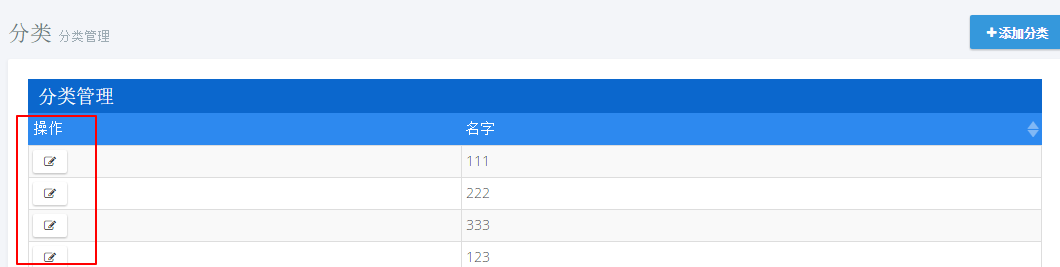
1.添加编辑按钮
actions: {

                    title: app.localize('Actions'),//操作列

                    width: '15%',

                    sorting: false,

                    display: function (data) {

                        var $span = $('<span></span>');

                        $('<button class="btn btn-default btn-xs" title="' + app.localize('Edit') + '"><i class="fa fa-edit"></i></button>')

                                .appendTo($span)

                                .click(function () {

                                    _editModal.open({ id: data.record.id });

                                });

                        return $span;

                    }

                },
2.模态框创建
@using MyCompanyName.AbpZeroTemplate.Web.Areas.Mpa.Models.Common.Modals

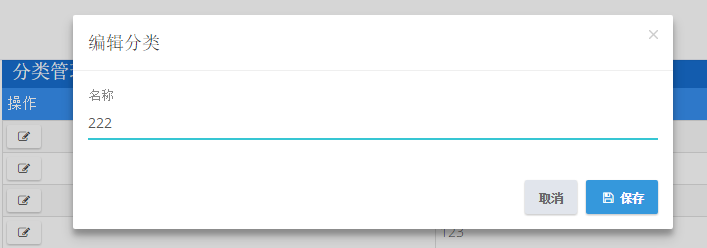
@Html.Partial("~/Areas/Mpa/Views/Common/Modals/_ModalHeader.cshtml", new ModalHeaderViewModel("编辑分类"))

<div class="modal-body">

    <form name="CategoryForm">

        <input type="hidden" name="Id" value="@Model.Id" />

        <div class="form-group form-md-line-input form-md-floating-label">

            <input type="text" name="Name" value="@Model.Name" class="form-control edited" required >

            <label>名称</label>

        </div>

    </form>

</div>

@Html.Partial("~/Areas/Mpa/Views/Common/Modals/_ModalFooterWithSaveAndCancel.cshtml")
var EditCategoryModal = (function ($) {

    app.modals.EditCategoryModal = function () {

        var _modalManager;

        var _categoryService = abp.services.app.category;

        var _$categoryForm = null;

        this.init = function (modalManager) {

            _modalManager = modalManager;

            _$categoryForm = _modalManager.getModal().find('form[name=CategoryForm]');

            _$categoryForm.validate();

        };

        this.save = function () {

            if (!_$categoryForm.valid()) {

                return;

            }

            var category = _$categoryForm.serializeFormToObject();

            _modalManager.setBusy(true);

            _categoryService.updateCategory(

                category

            ).done(function () {

                abp.notify.info(app.localize('SavedSuccessfully'));

                _modalManager.close();

                abp.event.trigger('app.editCategoryModalSaved');

            }).always(function () {

                _modalManager.setBusy(false);

            });

        };

    };

})(jQuery);
3.添加方法
void UpdateCategory(CreateCategoryInput input);

CategoryOutput GetCategoryForEdit(EntityRequestInput input);
public void UpdateCategory(CreateCategoryInput input)

        {

int count = _categoryRepository.Count(a => a.Name.Equals(input.Name) && a.Id!=input.Id);

            if (count > )

            {

                throw new UserFriendlyException("分类名称已存在!");

            }

            var category=_categoryRepository.Get(input.Id);

            category.Name = input.Name;

        }

public CategoryOutput GetCategoryForEdit(EntityRequestInput input)

        {

            var category = _categoryRepository.Get(input.Id);

            return new CategoryOutput()

            {

                Id = category.Id,

                Name = category.Name

            };

        }
4.修改Index.js
...

var _createModal = new app.ModalManager({

            viewUrl: abp.appPath + 'Mpa/Category/CreateModal',//加载视图

            scriptUrl: abp.appPath + 'Areas/Mpa/Views/Category/_CreateModal.js',//加载对应js

            modalClass: 'CreateCategoryModal'

        });

        var _editModal = new app.ModalManager({

            viewUrl: abp.appPath + 'Mpa/Category/EditModal',

            scriptUrl: abp.appPath + 'Areas/Mpa/Views/Category/_EditModal.js',

            modalClass: 'EditCategoryModal'

        });

...

//事件注册

        abp.event.on('app.createCategoryModalSaved', function () {

            getCategories(true);

        });

        abp.event.on('app.editCategoryModalSaved', function () {

            getCategories(true);

        });
5.控制器
private ICategoryAppService _categoryAppService;

        public CategoryController(ICategoryAppService categoryAppService)

        {

            _categoryAppService = categoryAppService;

        }

...

public ActionResult EditModal(int id)

        {

            CategoryOutput category=_categoryAppService.GetCategoryForEdit(new EntityRequestInput(id));

            CategoryViewModel categoryViewModel=new CategoryViewModel()

            {

                Id = category.Id,

                Name = category.Name

            };

            return PartialView("_EditModal", categoryViewModel);

        }
6.添加ViewModel
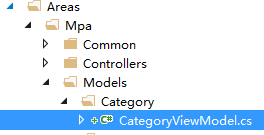
public class CategoryViewModel

    {

        public int Id { get; set; }

        public string Name { get; set; }

    }
7.测试
ASP.NET Zero--12.一个例子(5)商品分类管理-编辑分类的更多相关文章
- [asp.net core]SignalR一个例子
摘要 在一个后台管理的页面想实时监控一些操作的数据,想到用signalR. 一个例子 asp.net core+signalR 使用Nuget安装包:Microsoft.AspNetCore.Sign ...
- ASP.NET Zero--13.一个例子(6)商品分类管理-删除分类
1.添加按钮 首先添加一个删除按钮,打开文件Index.js[..\MyCompanyName.AbpZeroTemplate.Web\Areas\Mpa\Views\Category\Index.j ...
- ASP.NET Zero--15.一个例子(8)商品分类管理-权限控制
1.添加权限常量 打开文件AppPermissions.cs [..\MyCompanyName.AbpZeroTemplate.Core\Authorization\AppPermissions.c ...
- ASP.NET Zero--8.一个例子(1)菜单添加
以一个商品分类管理功能来编写,代码尽量简单易懂.从一个实体开始,一直到权限控制,由浅到深一步步对功能进行完善. 1.打开语言文件 [..\MyCompanyName.AbpZeroTemplate.C ...
- 这算是ASP.NET MVC的一个大BUG吗?
这是昨天一个同事遇到的问题,我觉得这是一个蛮大的问题,而且不像是ASP.NET MVC的设计者有意为之,换言之,这可能是ASP.NET MVC的一个Bug(不过也有可能是保持原始请求数据而作的妥协). ...
- 返璞归真 asp.net mvc (12) - asp.net mvc 4.0 新特性之移动特性
原文:返璞归真 asp.net mvc (12) - asp.net mvc 4.0 新特性之移动特性 [索引页][源码下载] 返璞归真 asp.net mvc (12) - asp.net mvc ...
- 通过一个例子了解Ajax
Ajax指的Asyncronous JavaScript and XML Ajax并不是什么新的编程语言, 它是现有一些东西的应用.从它的名称中就可以看出来 假如我们设想, 浏览器展示了一个页面,但需 ...
- [ASP.NET MVC2 系列] ASP.Net MVC教程之《在15分钟内用ASP.Net MVC创建一个电影数据库应用程序》
[ASP.NET MVC2 系列] [ASP.NET MVC2 系列] ASP.Net MVC教程之<在15分钟内用ASP.Net MVC创建一个电影数据库应用程序> ...
- 《The art of software testing》的一个例子
这几天一直在看一本书,<The art of software testing>,里面有一个例子挺有感触地,写出来和大家分享一下: [问题] 从输入对话框中读取三个整数值,这三个整数值代表 ...
随机推荐
- Python 之路:Python操作 RabbitMQ、Redis、Memcache、SQLAlchemy
一.Memcached Memcached是一个高性能的分布式内存对象缓存系统,用于动态Web应用以减轻数据库负债.它通过在内存中缓存数据和对象来减少读取数据库的次数,从而提高动态.数据库驱动网站的速 ...
- C++ string 类重写
(我们知道学习C++时,在学习完C的基础内容后最先上手的就是C++的string类来学习字符串处理的内容,这里我们通过重写string类来重新认识字符串处理的内容) 1.树立string类主要函数,确 ...
- .NET的对象映射工具AutoMapper使用笔记
AutoMapper是一个.NET的对象映射工具. 项目地址:https://github.com/AutoMapper/AutoMapper. 帮助文档:https://github.com/Aut ...
- 修改Linux系统语言
====[root@lichao520 yum.repos.d]# localeLANG=en_US.UTF-8LC_CTYPE="en_US.UTF-8"LC_NUMERIC=& ...
- iOS开发——pch文件创建
新换的公司,接手的项目里面连pch文件都没有,每次需要用到屏幕的宽高时,都是现写.今天既然碰到了,就把PCH这个玩意说一下. 1.Command+N,打开新建文件窗口:iOS->Other-&g ...
- 微信公众号支付开发全过程 --JAVA
按照惯例,开头总得写点感想 ------------------------------------------------------------------ 业务流程 这个微信官网说的还是很详细的 ...
- Windows Server 2012 安装sqlserver2008 小记
1.拷贝大文件被阻止 解决方案:把大文件压缩成小文件... 据说关闭防火墙会好点,没试验过. 2.安装第一步,提示没有安装.net framework 3.5 sp1 ,使用服务器管理器,添加角色 ...
- IOS第三方数据库--FMDB 分类: ios技术 2015-03-01 09:38 57人阅读 评论(0) 收藏
iOS中原生的SQLite API在使用上相当不友好,在使用时,非常不便.于是,就出现了一系列将SQLite API进行封装的库,例如FMDB.PlausibleDatabase.sqlitepers ...
- UVa 324 - Factorial Frequencies
题目大意:给一个数n,统计n的阶乘中各个数字出现的次数.用java的大数做. import java.io.*; import java.util.*; import java.math.*; cla ...
- 概率dp初探
论文链接: http://wenku.baidu.com/link?url=vEcfxpqAvGRf6JL9IL2R6v8plBgPnaP3tKp5niOBmoajk0y4CcpwFzL4SkfGS ...