
ASP.NET Zero--12.一个例子(5)商品分类管理-编辑分类
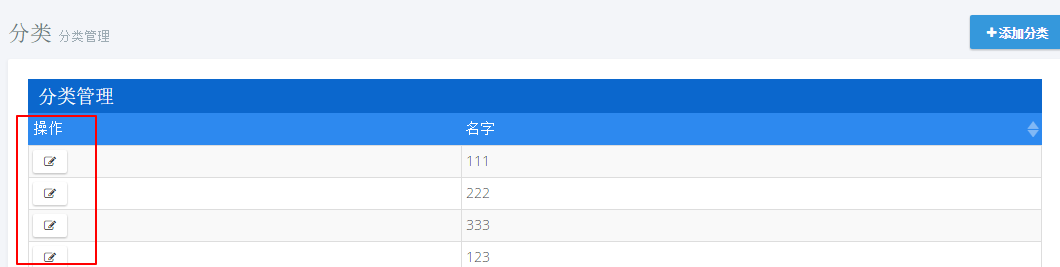
1.添加编辑按钮
actions: {

                    title: app.localize('Actions'),//操作列

                    width: '15%',

                    sorting: false,

                    display: function (data) {

                        var $span = $('<span></span>');

                        $('<button class="btn btn-default btn-xs" title="' + app.localize('Edit') + '"><i class="fa fa-edit"></i></button>')

                                .appendTo($span)

                                .click(function () {

                                    _editModal.open({ id: data.record.id });

                                });

                        return $span;

                    }

                },
2.模态框创建
@using MyCompanyName.AbpZeroTemplate.Web.Areas.Mpa.Models.Common.Modals

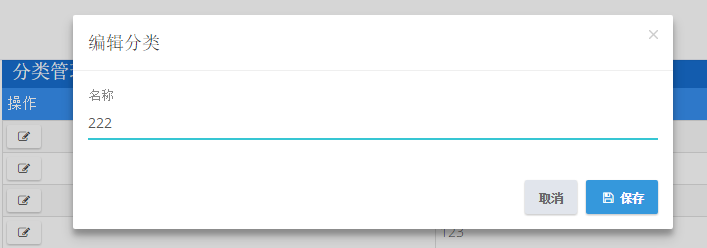
@Html.Partial("~/Areas/Mpa/Views/Common/Modals/_ModalHeader.cshtml", new ModalHeaderViewModel("编辑分类"))

<div class="modal-body">

    <form name="CategoryForm">

        <input type="hidden" name="Id" value="@Model.Id" />

        <div class="form-group form-md-line-input form-md-floating-label">

            <input type="text" name="Name" value="@Model.Name" class="form-control edited" required >

            <label>名称</label>

        </div>

    </form>

</div>

@Html.Partial("~/Areas/Mpa/Views/Common/Modals/_ModalFooterWithSaveAndCancel.cshtml")
var EditCategoryModal = (function ($) {

    app.modals.EditCategoryModal = function () {

        var _modalManager;

        var _categoryService = abp.services.app.category;

        var _$categoryForm = null;

        this.init = function (modalManager) {

            _modalManager = modalManager;

            _$categoryForm = _modalManager.getModal().find('form[name=CategoryForm]');

            _$categoryForm.validate();

        };

        this.save = function () {

            if (!_$categoryForm.valid()) {

                return;

            }

            var category = _$categoryForm.serializeFormToObject();

            _modalManager.setBusy(true);

            _categoryService.updateCategory(

                category

            ).done(function () {

                abp.notify.info(app.localize('SavedSuccessfully'));

                _modalManager.close();

                abp.event.trigger('app.editCategoryModalSaved');

            }).always(function () {

                _modalManager.setBusy(false);

            });

        };

    };

})(jQuery);
3.添加方法
void UpdateCategory(CreateCategoryInput input);

CategoryOutput GetCategoryForEdit(EntityRequestInput input);
public void UpdateCategory(CreateCategoryInput input)

        {

int count = _categoryRepository.Count(a => a.Name.Equals(input.Name) && a.Id!=input.Id);

            if (count > )

            {

                throw new UserFriendlyException("分类名称已存在!");

            }

            var category=_categoryRepository.Get(input.Id);

            category.Name = input.Name;

        }

public CategoryOutput GetCategoryForEdit(EntityRequestInput input)

        {

            var category = _categoryRepository.Get(input.Id);

            return new CategoryOutput()

            {

                Id = category.Id,

                Name = category.Name

            };

        }
4.修改Index.js
...

var _createModal = new app.ModalManager({

            viewUrl: abp.appPath + 'Mpa/Category/CreateModal',//加载视图

            scriptUrl: abp.appPath + 'Areas/Mpa/Views/Category/_CreateModal.js',//加载对应js

            modalClass: 'CreateCategoryModal'

        });

        var _editModal = new app.ModalManager({

            viewUrl: abp.appPath + 'Mpa/Category/EditModal',

            scriptUrl: abp.appPath + 'Areas/Mpa/Views/Category/_EditModal.js',

            modalClass: 'EditCategoryModal'

        });

...

//事件注册

        abp.event.on('app.createCategoryModalSaved', function () {

            getCategories(true);

        });

        abp.event.on('app.editCategoryModalSaved', function () {

            getCategories(true);

        });
5.控制器
private ICategoryAppService _categoryAppService;

        public CategoryController(ICategoryAppService categoryAppService)

        {

            _categoryAppService = categoryAppService;

        }

...

public ActionResult EditModal(int id)

        {

            CategoryOutput category=_categoryAppService.GetCategoryForEdit(new EntityRequestInput(id));

            CategoryViewModel categoryViewModel=new CategoryViewModel()

            {

                Id = category.Id,

                Name = category.Name

            };

            return PartialView("_EditModal", categoryViewModel);

        }
6.添加ViewModel
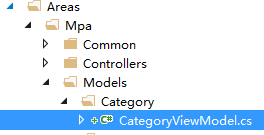
public class CategoryViewModel

    {

        public int Id { get; set; }

        public string Name { get; set; }

    }
7.测试
ASP.NET Zero--12.一个例子(5)商品分类管理-编辑分类的更多相关文章
- [asp.net core]SignalR一个例子
摘要 在一个后台管理的页面想实时监控一些操作的数据,想到用signalR. 一个例子 asp.net core+signalR 使用Nuget安装包:Microsoft.AspNetCore.Sign ...
- ASP.NET Zero--13.一个例子(6)商品分类管理-删除分类
1.添加按钮 首先添加一个删除按钮,打开文件Index.js[..\MyCompanyName.AbpZeroTemplate.Web\Areas\Mpa\Views\Category\Index.j ...
- ASP.NET Zero--15.一个例子(8)商品分类管理-权限控制
1.添加权限常量 打开文件AppPermissions.cs [..\MyCompanyName.AbpZeroTemplate.Core\Authorization\AppPermissions.c ...
- ASP.NET Zero--8.一个例子(1)菜单添加
以一个商品分类管理功能来编写,代码尽量简单易懂.从一个实体开始,一直到权限控制,由浅到深一步步对功能进行完善. 1.打开语言文件 [..\MyCompanyName.AbpZeroTemplate.C ...
- 这算是ASP.NET MVC的一个大BUG吗?
这是昨天一个同事遇到的问题,我觉得这是一个蛮大的问题,而且不像是ASP.NET MVC的设计者有意为之,换言之,这可能是ASP.NET MVC的一个Bug(不过也有可能是保持原始请求数据而作的妥协). ...
- 返璞归真 asp.net mvc (12) - asp.net mvc 4.0 新特性之移动特性
原文:返璞归真 asp.net mvc (12) - asp.net mvc 4.0 新特性之移动特性 [索引页][源码下载] 返璞归真 asp.net mvc (12) - asp.net mvc ...
- 通过一个例子了解Ajax
Ajax指的Asyncronous JavaScript and XML Ajax并不是什么新的编程语言, 它是现有一些东西的应用.从它的名称中就可以看出来 假如我们设想, 浏览器展示了一个页面,但需 ...
- [ASP.NET MVC2 系列] ASP.Net MVC教程之《在15分钟内用ASP.Net MVC创建一个电影数据库应用程序》
[ASP.NET MVC2 系列] [ASP.NET MVC2 系列] ASP.Net MVC教程之<在15分钟内用ASP.Net MVC创建一个电影数据库应用程序> ...
- 《The art of software testing》的一个例子
这几天一直在看一本书,<The art of software testing>,里面有一个例子挺有感触地,写出来和大家分享一下: [问题] 从输入对话框中读取三个整数值,这三个整数值代表 ...
随机推荐
- <c:foreach> 标签怎么获取循环次数?
<c:forEach var="i" begin="1" end="9" varStatus="status"&g ...
- window下查看端口命令
原文:http://blog.csdn.net/ldl22847/article/details/7181210 http://blog.csdn.net/xinxin19881112/article ...
- ural1553 Caves and Tunnels
Caves and Tunnels Time limit: 3.0 secondMemory limit: 64 MB After landing on Mars surface, scientist ...
- 推荐!国外程序员整理的Java资源大全
http://www.importnew.com/14429.html 本文由 ImportNew - 唐尤华 翻译自 github akullpp.欢迎加入翻译小组.转载请见文末要求. 构建 这里搜 ...
- HDU 1811 Rank of Tetris 拓补排序+并查集
Rank of Tetris Time Limit: 1000/1000 MS (Java/Others) Memory Limit: 32768/32768 K (Java/Others) [ ...
- CodeForces 660D Number of Parallelograms
枚举两点,确定一条线段,计算每条线段的中点坐标. 按线段中点坐标排个序.找出每一种坐标有几个. 假设第x种坐标有y个,那么这些线段可以组成y*(y-1)/2种平行四边形. 累加即可. #include ...
- Linux ALSA声卡驱动之二:声卡的创建
1. struct snd_card 1.1. snd_card是什么 snd_card可以说是整个ALSA音频驱动最顶层的一个结构,整个声卡的软件逻辑结构开始于该结构,几乎所有与声音相关的逻辑设备都 ...
- 【转】15款Java程序员必备的开发工具
如果你是一名Web开发人员,那么用膝盖想也知道你的职业生涯大部分将使用Java而度过.这是一款商业级的编程语言,我们没有办法不接触它. 对于Java,有两种截然不同的观点:一种认为Java是最简单功能 ...
- mongodb学习(一)
重点是踏出第一步: 1. 各种资料集合,mongodb的介绍,安装,破解...内容大同小异... http://www.cnblogs.com/kuochin/p/3599630.html;http: ...
- Object类可以接受引用类型
Object类是一切类的父类,所以Object类可以接受一切引用类型.连数组和接口对象也都可以接受. 1.接受数组 public class ObjectTest{ public static voi ...