
SpringMVC之 数据绑定-1
SpringMVC学习系列(4) 之 数据绑定-1
在系列(3)中我们介绍了请求是如何映射到一个action上的,下一步当然是如何获取到请求中的数据,这就引出了本篇所要讲的内容—数据绑定。
首先看一下都有哪些绑定数据的注解:
1.@RequestParam,绑定单个请求数据,可以是URL中的数据,表单提交的数据或上传的文件;
2.@PathVariable,绑定URL模板变量值;
3.@CookieValue,绑定Cookie数据;
4.@RequestHeader,绑定请求头数据;
5.@ModelValue,绑定数据到Model;
6.@SessionAttributes,绑定数据到Session;
7.@RequestBody,用来处理Content-Type不是application/x-www-form-urlencoded编码的内容,例如application/json, application/xml等;
8.@RequestPart,绑定“multipart/data”数据,与@RequestParam不同的是它可以指定绑定“multipart/data”数据的类型;
下面我们来看如何使用:
1.@RequestParam:
为了验证文件绑定我们需要先做以下工作:
a.把commons-fileupload-1.3.1.jar和commons-io-2.4.jar两个jar包添加到我们项目。
b.配置我们项目中的springservlet-config.xml文件使之支持文件上传,内容如下:

<!-- 支持上传文件 -->

<bean id="multipartResolver" class="org.springframework.web.multipart.commons.CommonsMultipartResolver">

    <!-- 设置上传文件的最大尺寸为1MB -->

    <property name="maxUploadSize">

        <value>1048576</value>

    </property>

    <property name="defaultEncoding">

        <value>UTF-8</value>

    </property>

</bean>
其中maxUploadSize用于限制上传文件的最大大小,也可以不做设置,这样就代表上传文件的大小木有限制。defaultEncoding用于设置上传文件的编码格式,用于解决上传的文件中文名乱码问题。
下面就看具体如何使用:
添加一个DataBindController,里面有2个paramBind的action分别对应get和post请求:
package com.demo.web.controllers;

import javax.servlet.http.HttpServletRequest;

import org.springframework.stereotype.Controller;

import org.springframework.web.bind.ServletRequestUtils;

import org.springframework.web.bind.annotation.RequestMapping;

import org.springframework.web.bind.annotation.RequestMethod;

import org.springframework.web.bind.annotation.RequestParam;

import org.springframework.web.multipart.MultipartFile;

import org.springframework.web.multipart.MultipartHttpServletRequest;

import org.springframework.web.servlet.ModelAndView;

@Controller

@RequestMapping(value = "/databind")

public class DataBindController {

    @RequestMapping(value="/parambind", method = {RequestMethod.GET})

    public ModelAndView paramBind(){

        ModelAndView modelAndView = new ModelAndView();

        modelAndView.setViewName("parambind");

        return modelAndView;

    }

    @RequestMapping(value="/parambind", method = {RequestMethod.POST})

    public ModelAndView paramBind(HttpServletRequest request, @RequestParam("urlParam") String urlParam, @RequestParam("formParam") String formParam, @RequestParam("formFile") MultipartFile formFile){

        //如果不用注解自动绑定,我们还可以像下面一样手动获取数据

         String urlParam1 = ServletRequestUtils.getStringParameter(request, "urlParam", null);

        String formParam1 = ServletRequestUtils.getStringParameter(request, "formParam", null);

        MultipartFile formFile1 = ((MultipartHttpServletRequest) request).getFile("formFile");

        ModelAndView modelAndView = new ModelAndView();

        modelAndView.addObject("urlParam", urlParam);

        modelAndView.addObject("formParam", formParam);

        modelAndView.addObject("formFileName", formFile.getOriginalFilename());

        modelAndView.addObject("urlParam1", urlParam1);

        modelAndView.addObject("formParam1", formParam1);

        modelAndView.addObject("formFileName1", formFile1.getOriginalFilename());

        modelAndView.setViewName("parambindresult");

        return modelAndView;

    }

}
在views文件夹中添加parambind.jsp和parambindresult.jsp两个视图,内容分别如下:
<%@ page language="java" contentType="text/html; charset=UTF-8"

    pageEncoding="UTF-8"%>

<!DOCTYPE html PUBLIC "-//W3C//DTD HTML 4.01 Transitional//EN" "http://www.w3.org/TR/html4/loose.dtd">

<html>

<head>

<meta http-equiv="Content-Type" content="text/html; charset=UTF-8">

<title>Insert title here</title>

</head>

<body>

    <form action="parambind?urlParam=AAA" method="post" enctype="multipart/form-data">

        <input type="text" name="formParam" /><br/>

        <input type="file" name="formFile" /><br/>

        <input type="submit" value="Submit" />

    </form>

</body>

</html>
<%@ page language="java" contentType="text/html; charset=UTF-8"

    pageEncoding="UTF-8"%>

<!DOCTYPE html PUBLIC "-//W3C//DTD HTML 4.01 Transitional//EN" "http://www.w3.org/TR/html4/loose.dtd">

<html>

<head>

<meta http-equiv="Content-Type" content="text/html; charset=UTF-8">

<title>Insert title here</title>

</head>

<body>

    自动绑定数据:<br/><br/>

    ${urlParam}<br/>

    ${formParam}<br/>

    ${formFileName}<br/><br/><br/><br/>

    手动获取数据:<br/><br/>

    ${urlParam1}<br/>

    ${formParam1}<br/>

    ${formFileName1}<br/>

</body>

</html>
运行项目,输入内容,选择上传文件:
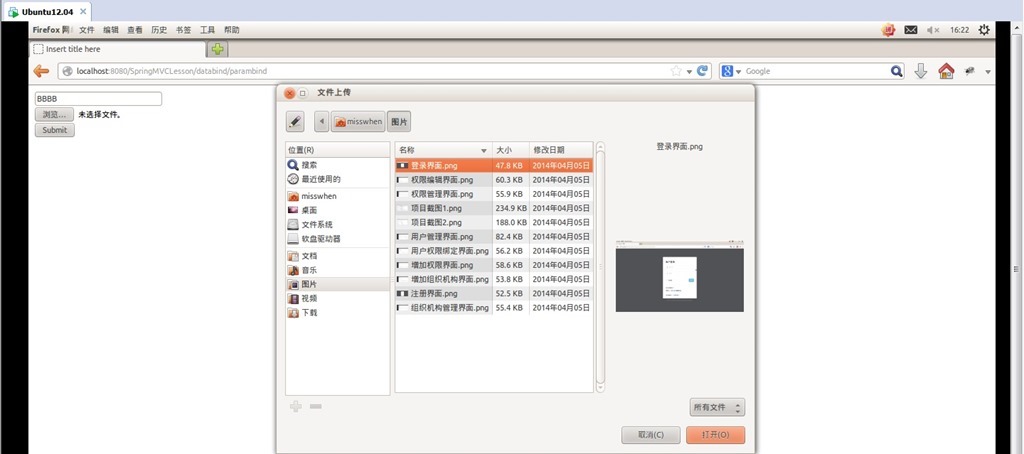
提交查看结果:
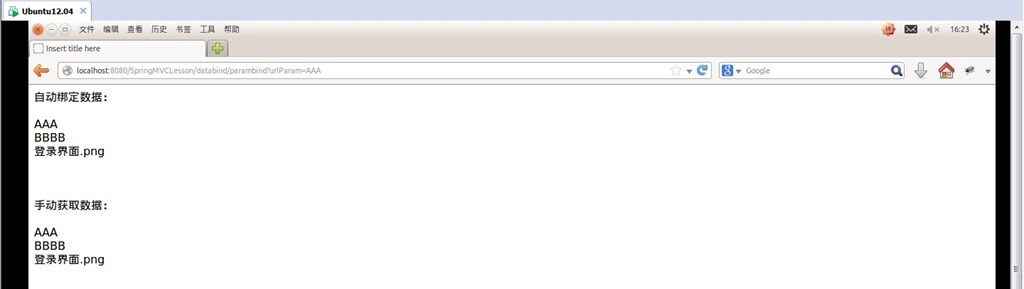
可以看到绑定的数据已经获取到了。
上面我们演示了如何把数据绑定到单个变量,但在实际应用中我们通常需要获取的是model对象,别担心,我们不需要把数据绑定到一个个变量然后在对model赋值,只需要把model加入相应的action参数(这里不需要指定绑定数据的注解)Spring MVC会自动进行数据转换并绑定到model对象上,一切就是这么简单。测试如下:
添加一个AccountModel类作为测试的model:
package com.demo.web.models;

public class AccountModel {

    private String username;

    private String password;

    public void setUsername(String username){

        this.username=username;

    }

    public void setPassword(String password){

        this.password=password;

    }

    public String getUsername(){

        return this.username;

    }

    public String getPassword(){

        return this.password;

    }

}
在DataBindController里面添加2个modelAutoBind的action分别对应get和post请求:
@RequestMapping(value="/modelautobind", method = {RequestMethod.GET})

public String modelAutoBind(HttpServletRequest request, Model model){

    model.addAttribute("accountmodel", new AccountModel());

    return "modelautobind";

}

@RequestMapping(value="/modelautobind", method = {RequestMethod.POST})

public String modelAutoBind(HttpServletRequest request, Model model, AccountModel accountModel){

    model.addAttribute("accountmodel", accountModel);

    return "modelautobindresult";

}
在views文件夹中添加modelautobind.jsp和modelautobindresult.jsp 2个视图用于提交数据和展示提交的数据:
modelautobind.jsp:
<%@ page language="java" contentType="text/html; charset=UTF-8"

    pageEncoding="UTF-8"%>

<!DOCTYPE html PUBLIC "-//W3C//DTD HTML 4.01 Transitional//EN" "http://www.w3.org/TR/html4/loose.dtd">

<%@ taglib prefix="form" uri="http://www.springframework.org/tags/form" %>

<html>

<head>

<meta http-equiv="Content-Type" content="text/html; charset=UTF-8">

<title>Insert title here</title>

</head>

<body>

    <form:form modelAttribute="accountmodel" method="post">

        用户名:<form:input path="username"/><br/>

        密 码:<form:password path="password"/><br/>

        <input type="submit" value="Submit" />

    </form:form>

</body>

</html>
modelautobindresult.jsp :
<%@ page language="java" contentType="text/html; charset=UTF-8"

    pageEncoding="UTF-8"%>

<!DOCTYPE html PUBLIC "-//W3C//DTD HTML 4.01 Transitional//EN" "http://www.w3.org/TR/html4/loose.dtd">

<html>

<head>

<meta http-equiv="Content-Type" content="text/html; charset=UTF-8">

<title>Insert title here</title>

</head>

<body>

    用户名:${accountmodel.username}<br/>

    密 码:${accountmodel.password}

</body>

</html>
运行测试:

用户名 输入AAA 密码 输入BBB,提交:

可以看到结果显示正确,说明自动绑定成功。
注:
1.关于@RequestParam的参数,这是一个@RequestParam的完整写法@RequestParam(value="username", required=true, defaultValue="AAA")。
value表示要绑定请求中参数的名字;
required表示请求中是否必须有这个参数,默认为true这是如果请求中没有要绑定的参数则返回404;
defaultValue表示如果请求中指定的参数值为空时的默认值;
要绑定的参数如果是值类型必须要有值否则抛异常,如果是引用类型则默认为null(Boolean除外,默认为false);
2.在刚才添加的2个action中可以看到返回类型和以前的不一样了由ModelAndView变成了String,这是由于Spring MVC 提供Model、ModelMap、Map让我们可以直接添加渲染视图需要的模型数据,在返回时直接指定对应视图名称就可以了。同时Map是继承于ModelMap的,而Model和ModelMap是继承于ExtendedModelMap的。
3.在刚才添加的视图modelautobind.jsp中可以看到<form:form、<form:input 等标签,这是Spring MVC提供的表单标签,借助于这些标签我们可以很方便的把模型数据绑定到表单上面(当然你也可以选择继续使用原生的HTML表单标签),要使用Spring MVC只要在视图中添加引用 <%@ taglib prefix="form" uri="http://www.springframework.org/tags/form" %>即可,关于Spring MVC表单标签的具体内容会在以后的文章中作介绍。
代码下载:http://pan.baidu.com/s/1pJyiS2Z
好了,写到这里其实已经写了数据绑定的多半部分内容了,数据绑定-1 内容就先写到这里,后面的几个数据绑定的注解会在 数据绑定-2 中介绍,明天还要上班,休息去~~~
SpringMVC之 数据绑定-1的更多相关文章
- SpringMVC之数据绑定
SpringMVC之数据绑定 #数据绑定:Spring MVC会根据客户端请求参数的不同,将请求信息以一定的方式转换并绑定 到控制器类中的方法参数上. #说明:这里的“以一定的方式”应该指的是什么?过 ...
- SpringMvc的数据绑定流程
在SpringMvc中会将来自web页面的请求和响应数据与controller中对应的处理方法的入参进行绑定,即数据绑定.流程如下: -1.SpringMvc主框架将ServletRequest对象及 ...
- SpringMVC 的数据绑定
1.数据自动绑定 SpringMVC 框架支持不需要任何数据绑定的注解直接将表单参数绑定到我们的执行方法的参数上. 表单参数:包括 POST 以及 GET 发送过来的参数 就是以内容类型为:encty ...
- SpringMVC框架——数据绑定
Spring MVC 数据绑定 使用POJO绑定参数 entity package com.sunjian.entity; /** * @author sunjian * @date 2020/3/1 ...
- SpringMVC之数据绑定(转)
到目前为止,请求已经能交给我们的处理器进行处理了,接下来的事情是要进行收集数据啦,接下来我们看看我们能从请求中收集到哪些数据, 1.@RequestParam绑定单个请求参数值: 2.@PathVar ...
- springMVC学习总结(三)数据绑定
springMVC学习总结(三)数据绑定 一.springMVC的数据绑定,常用绑定类型有: 1.servlet三大域对象: HttpServletRequest HttpServletRespons ...
- springMVC能做什么,做j2ee时候要考虑什么
转载: http://jinnianshilongnian.iteye.com/category/231099 [置顶] 跟我学SpringMVC目录汇总贴.PDF下载.源码下载 博客分类: 跟开涛学 ...
- 扩展SpringMVC以支持绑定JSON格式的请求参数
此方案是把请求参数(JSON字符串)绑定到java对象,,@RequestBody是绑定内容体到java对象的. 问题描述: <span style="font-size: x-sma ...
- 【SSH系列】深入浅出SpringMvc+入门Demo
Spring MVC框架是有一个MVC框架,通过实现Model-View-Controller模式来很好地将数据.业务与展现进行分离.从这样一个角度来说,Spring MVC和Struts.Strut ...
随机推荐
- IT互联网行业中相关职能的缩写
RD – Research & Develop 研发FE – Front End 前端QA – Quality Assurance 测试DBA – Database Administrator ...
- mysql子查询慢的问题
当你在用explain工具查看sql语句的运行计划时.若select_type 字段中出现"DEPENDENT SUBQUERY"时,你要注意了.你已经掉入了mysql子查询慢 ...
- 用python3.x与mysql数据库构建简单的爬虫系统(转)
这是在博客园的第一篇文章,由于本人还是一个编程菜鸟,也写不出那些高大上的牛逼文章,这篇文章就是对自己这段时间学习python的一个总结吧. 众所周知python是一门对初学编程的人相当友好的编程语言, ...
- hdu 1542 Atlantis 段树区,并寻求,,,尼玛真坑人数据,不要打开一小阵!
Atlantis Time Limit: 2000/1000 MS (Java/Others) Memory Limit: 65536/32768 K (Java/Others) Total S ...
- TCO14 2C L2: CliqueGraph,graph theory, clique
称号:http://community.topcoder.com/stat?c=problem_statement&pm=13251&rd=16017 參考:http://apps.t ...
- C#快递跟踪(基于快递100深度定制)
本文主要介绍快递跟踪的相关信息.如根据快递单号预测所属快递公司,判断快递是否已被签收,以及改良官方model后可在不用申请授权的情况下实现json,html,xml及text等多种格式以及单行多行,降 ...
- JavaEE Tutorials (2) - 使用教程示例
2.1 必要软件27 2.1.1 Java EE 7软件开发包28 2.1.2 Java平台标准版28 2.1.3 Java EE 7教程组件28 2.1.4 NetBeans IDE29 2.1.5 ...
- Android编码标准
只是练习是很难找工作那会儿在,简历基本上都是赶出去石沉大海,因为有项目开发没有实践经验.没有牛逼的背景.更重要的是,没有真才实学,虽然我在大学时读的是计算机专业,它可以被认为是一个技术教育.但--你知 ...
- 将图片转为ASCII字符画
原文:将图片转为ASCII字符画 Copyright 2012 Conmajia 源代码下载:点击这里 什么是字符画?就是用ASCII字符来近似组成图像,就像这样: ╭╮ ╭╮ ││ ││ ╭┴┴—— ...
- Struts2.0+Spring3+Hibernate3(SSH~Demo)
Struts2.0+Spring3+Hibernate3(SSH~Demo) 前言:整理一些集成框架,发现网上都是一些半成品,都是共享一部分出来(确实让人很纠结),这是整理了一份SSH的测试案例,完全 ...