
ASP.NET CORE 入门教程(附源码)
ASP.NET CORE 入门教程
第一课 基本概念
- 基本概念
- Asp.Net Core Mvc是.NET Core平台下的一种Web应用开发框架
- 符合Web应用特点
- .NET Core跨平台解决方案
- MVC设计模式的一种实现
- Asp.Net Core Mvc是.NET Core平台下的一种Web应用开发框架
- 环境准备
- 安装最新版Visual Studio 2017
- 安装最新版.NET Core Sdk
第二课 控制器的介绍
- 控制器定义方式:
- 命名以
Controller结尾 - 使用
ControllerAttribute标注
- 命名以
    public class TestController : Controller

    {

    }

    [Controller]

    public class Test : Controller

    {

    }
默认路由规则
- 域名/控制器类/方法
{Domain}/{Controller}/{Action}
数据形式
QueryString: ?name=zhangsan&age=22FormCookieSessionHeader
HttpRequest
- HttpRequest 是用户请求对象
- 提供获取请求数据的属性
- Cookies,Headers,Query,QueryString,Form
        public IActionResult Hello()

        {

            // Query

            var name = Request.Query["name"];

            // QueryString

            var query = Request.QueryString.Value;

            // Form

            var username = Request.Form["username"];

            // Cookies

            var cookie = Request.Cookies["item"];

            // Headers

            var headers = Request.Headers["salt"];

            return Content("Hello");

        }
- HttpContext
- HttpContext是用户请求上下文
- 提供Session属性获取Session对象
- Session.Set 设置
- Session.Remove 移除
- Session.TryGetValue 获取数据
        public IActionResult Hello()

        {

            // byte[]

            HttpContext.Session.Set("byte", new byte[] { 1, 2, 3, 4, 5 });

            var bytes = HttpContext.Session.Get("byte");

            // string

            HttpContext.Session.SetString("name", "tom");

            var name = HttpContext.Session.GetString("name");

            // int

            HttpContext.Session.SetInt32("id", 20);

            var id = HttpContext.Session.GetInt32("id");

            HttpContext.Session.Remove("name");

            HttpContext.Session.Clear();

            return Content("Hello");

        }
- 数据绑定
- 把用户请求的数据绑定到控制器方法的参数上
- 支持简单类型与自定义类型
- 绑定规则是请求数据名称与参数名称一致
- 如查询字符串key名称跟参数一致
- Form表单名称跟参数一致
        public IActionResult Hello(RequestModel request,int? age)

        {

            // 查询字符串

            var test = Request.Query["test"];

            // 简单类型

            var userAge = age;

            // 自定义类型

            var name = request.Name;

            return Content("Hello");

        }

        public class RequestModel

        {

            public string Name { get; set; }

        }
- 内容补充
- 如果以Controller结尾的都是控制器,那如果程序里面由一些业务命名的时候也是以Controller结尾,怎么办?
NonControllerAttribute
    /// <summary>

    /// 拍卖师控制类

    /// </summary>

    [NonController]

    public class AuctionController

    {

    }
- 常用特性
| 特性 | 数据源 |
|---|---|
| FromHeaderAttribute | 请求头数据 |
| FromRouteAttribute | 路由数据 |
| FromBodyAttribute | 请求体 |
| FromFormAttribute | 表单数据 |
| FromQueryAttribute | 查询字符串 |
| FromServicesAttribute | 服务注册 |
        public IActionResult Say(

            [FromForm]string name,

            [FromQuery]int age,

            [FromHeader] string salt,

            [FromBody] string content

            )

        {

            return View();

        }
特性参数
- 通过特性修饰参数来影响绑定逻辑
- 灵活扩展
IActionResult
- 动作结果接口
- 具体实现
- JsonResult:返回JSON结构数据
- RedirectResult:跳转到新地址
- FileResult:返回文件
- ViewResult:返回视图内容
- ContentResult:文本内容
第三课 视图与表单
- 数据传递
- ViewData
- ViewBag
- tempData
- Model
- Session
- Cache
| ViewData | ViewBag |
|---|---|
| 键值对 | 动态类型 |
| 索引器 | ViewData的封装 |
| 支持任意类型 | 动态属性 |
| TempData | Cache | Session |
|---|---|---|
| 视图级别 | 应用程序级别 | 会话级别 |
| 只允许消费一次 | 服务器端保存 | 服务器端保存 |
| 可多次赋值 | 可设置有效期 | 键值对形式 |
| 键值对形式 | 键值对形式 |
- Cache
- 与.NET Framework时代不同,一种全新实现
- IMemoryCache接口
- 依赖注入方式获取
- IMemoryCache.Get/Set操作数据
    [Controller]

    public class Test : Controller

    {

        private readonly IMemoryCache _cache;

        public Test(IMemoryCache memoryCache)

        {

            this._cache = memoryCache;

        }

        public IActionResult ReadCache()

        {

            _cache.Set("name","tom");

            _cache.Get("name");

            _cache.Set("age",30);

            _cache.Get("age");

            User tom = new User(){ Name = "admin",Pwd = "123456"};

            _cache.Set<User>("user",tom);

            _cache.Get<User>("user");

            return Content("ok");

        }

    }

    public class User

    {

        public string Name { get; set; }

        public string Pwd { get; set; }

    }
- ViewStart
- 以_ViewStart.cshtml命名,固定名称,不能更换
- 一般放在视图所在目录的根目录下
- 自动执行,无需手工调用
- 不要再ViewStart中做大量的业务操作
- ViewImport
- 以_ViewImport.cshtml命名,固定名称,不能更换
- 只作引入操作
- 一般放在视图所在目录的根目录下
- 自动执行,无需手工调用
- 视图中可以使用@using关键字引入所需命名空间
- 通过ViewImport做全局性的命名空间引入,减少在每个页面中引入的工作量
第四课 数据验证
- 数据验证特性
ValidationAttribute
  public abstract class ValidationAttribute : Attribute

  {

    /// <summary>Initializes a new instance of the <see cref="T:System.ComponentModel.DataAnnotations.ValidationAttribute"></see> class.</summary>

    protected ValidationAttribute();

    /// <summary>Initializes a new instance of the <see cref="T:System.ComponentModel.DataAnnotations.ValidationAttribute"></see> class by using the function that enables access to validation resources.</summary>

    /// <param name="errorMessageAccessor">The function that enables access to validation resources.</param>

    /// <exception cref="T:System.ArgumentNullException"><paramref name="errorMessageAccessor">errorMessageAccessor</paramref> is null.</exception>

    protected ValidationAttribute(Func<string> errorMessageAccessor);

    /// <summary>Initializes a new instance of the <see cref="T:System.ComponentModel.DataAnnotations.ValidationAttribute"></see> class by using the error message to associate with a validation control.</summary>

    /// <param name="errorMessage">The error message to associate with a validation control.</param>

    protected ValidationAttribute(string errorMessage);

    /// <summary>Gets or sets an error message to associate with a validation control if validation fails.</summary>

    /// <returns>The error message that is associated with the validation control.</returns>

    public string ErrorMessage { get; set; }

    /// <summary>Gets or sets the error message resource name to use in order to look up the <see cref="P:System.ComponentModel.DataAnnotations.ValidationAttribute.ErrorMessageResourceType"></see> property value if validation fails.</summary>

    /// <returns>The error message resource that is associated with a validation control.</returns>

    public string ErrorMessageResourceName { get; set; }

    /// <summary>Gets or sets the resource type to use for error-message lookup if validation fails.</summary>

    /// <returns>The type of error message that is associated with a validation control.</returns>

    public Type ErrorMessageResourceType { get; set; }

    /// <summary>Gets the localized validation error message.</summary>

    /// <returns>The localized validation error message.</returns>

    protected string ErrorMessageString { get; }

    /// <summary>Gets a value that indicates whether the attribute requires validation context.</summary>

    /// <returns>true if the attribute requires validation context; otherwise, false.</returns>

    public virtual bool RequiresValidationContext { get; }

    /// <summary>Applies formatting to an error message, based on the data field where the error occurred.</summary>

    /// <param name="name">The name to include in the formatted message.</param>

    /// <returns>An instance of the formatted error message.</returns>

    public virtual string FormatErrorMessage(string name);

    /// <summary>Checks whether the specified value is valid with respect to the current validation attribute.</summary>

    /// <param name="value">The value to validate.</param>

    /// <param name="validationContext">The context information about the validation operation.</param>

    /// <returns>An instance of the <see cref="System.ComponentModel.DataAnnotations.ValidationResult"></see> class.</returns>

    public ValidationResult GetValidationResult(

      object value,

      ValidationContext validationContext);

    /// <summary>Determines whether the specified value of the object is valid.</summary>

    /// <param name="value">The value of the object to validate.</param>

    /// <returns>true if the specified value is valid; otherwise, false.</returns>

    public virtual bool IsValid(object value);

    /// <summary>Validates the specified value with respect to the current validation attribute.</summary>

    /// <param name="value">The value to validate.</param>

    /// <param name="validationContext">The context information about the validation operation.</param>

    /// <returns>An instance of the <see cref="System.ComponentModel.DataAnnotations.ValidationResult"></see> class.</returns>

    protected virtual ValidationResult IsValid(

      object value,

      ValidationContext validationContext);

    /// <summary>Validates the specified object.</summary>

    /// <param name="value">The object to validate.</param>

    /// <param name="validationContext">The <see cref="T:System.ComponentModel.DataAnnotations.ValidationContext"></see> object that describes the context where the validation checks are performed. This parameter cannot be null.</param>

    /// <exception cref="T:System.ComponentModel.DataAnnotations.ValidationException">Validation failed.</exception>

    public void Validate(object value, ValidationContext validationContext);

    /// <summary>Validates the specified object.</summary>

    /// <param name="value">The value of the object to validate.</param>

    /// <param name="name">The name to include in the error message.</param>

    /// <exception cref="T:System.ComponentModel.DataAnnotations.ValidationException"><paramref name="value">value</paramref> is not valid.</exception>

    public void Validate(object value, string name);

  }
常用数据验证
- RequiredAttribute
- RegularExpressionAttribute
- CompareAttribute
- RangeAttribute
- MaxAttribute
- MinAttribute
- StringLengthAttribute
- DataTypeAttribute
服务器端使用
- 使用包含验证规则的类接收数据
- 使用ModelState.IsValid判断是否符合要求
前端使用
- 定义强类型视图并传递包含验证规则的业务数据模型
- 使用HtmlHelper.ValidationFor初始前端验证规则
- 使用HtmlHelper.ValidationMessageFor生成提示文字
    public class UserLogin

    {

        [Required(ErrorMessage = "用户名不能为空")]

        [StringLength(10,ErrorMessage = "用户名长度不能超过10位")]

        public string UserName { get; set; }

        //[Required(ErrorMessage = "密码不能为空")]

        [StringLength(6,ErrorMessage = "密码长度不能超过6位")]

        public string Password { get; set; }

    }
    public class FormController : Controller

    {

        public IActionResult Index()

        {

            return View(new UserLogin());

        }

        public IActionResult PostData(UserLogin login)

        {

            return Content(ModelState.IsValid?"数据有效":"数据无效");

        }

    }
@model Lesson2.Models.UserLogin

@{

    Layout = null;

}

<!DOCTYPE html>

<html>

<head>

    <meta name="viewport" content="width=device-width" />

    <title>Index</title>

    <script src="~/lib/jquery/dist/jquery.min.js"></script>

    <script src="~/lib/jquery-validation/dist/jquery.validate.min.js"></script>

    <script src="~/lib/jquery-validation-unobtrusive/jquery.validate.unobtrusive.min.js"></script>

</head>

<body>

    <form asp-action="PostData" method="post">

        <table>

            <tr>

                <td>用户名</td>

                <td>@Html.TextBoxFor(m => m.UserName)</td>

                <td>@Html.ValidationMessageFor(m => m.UserName)</td>

            </tr>

            <tr>

                <td>密码</td>

                <td>@Html.PasswordFor(m => m.Password)</td>

                <td>@Html.ValidationMessageFor(m => m.Password)</td>

            </tr>

            <tr>

                <td></td>

                <td><input type="submit" value="登录" /></td>

                <td></td>

            </tr>

        </table>

    </form>

</body>

</html>
第五课 路由规则
路由
- 定义用户请求与控制器方法之前的映射关系
路由配置
- IRouteBuilder
- 通过MapRoute方法配置路由模板
- IRouteBuilder
    app.UseMvc(routes =>

    {

        routes.MapRoute(

            name: "default",

            template: "{controller=Home}/{action=Index}/{id?}");

        routes.MapRoute(

            name: "admin_default",

            template: "admin/{controller=Home}/{action=Index}/{id?}");

    });
- RouteAttribute
- 应用在控制器及方法上
- 通过Template属性配置路由模板
    [Route("admin/form")]

    public class FormController : Controller

    {

        [Route("index")]

        public IActionResult Index()

        {

            return View(new UserLogin());

        }

        public IActionResult PostData(UserLogin login)

        {

            return Content(ModelState.IsValid?"数据有效":"数据无效");

        }

    }
- 路由约束
- 对路由数据进行约束
- 只有约束满足条件才能匹配成功
| 约束 | 示例 | 说明 |
|---|---|---|
| required | "Product/{ProductName:required}" | 参数必选 |
| alpha | "Product/{ProductName:alpha}" | 匹配字母,大小写不限 |
| int | "Product/{ProductId:int}" | 匹配int类型 |
| ··· | ··· | ··· |
| composite | "Product/{ProductId:composite}" | 匹配composite类型 |
| length | "Product/{ProductName:length(5)}" | 长度必须是5个字符 |
| length | "Product/{ProductName:length(5)}" | 长度在5-10之间 |
| maxlength | "Product/{ProductId:maxlength(10)}" | 最大长度为10 |
| minlength | "Product/{ProductId:minlength(3)}" | 最小长度为3 |
| min | "Product/{ProductId:min(3)}" | 大于等于3 |
| max | "Product/{ProductId:max(10)}" | 小于等于10 |
| range | "Product/{ProductId:range(5,10)}" | 对应的数组在5-10之间 |
| regex | "Product/{ProductId:regex(^\d{4}$)}" | 符合指定的正则表达式 |
- 路由数据
- 路由数据也是请求数据的一部分
- 路由数据与表单数据一样,也可以绑定到参数上
- 默认是通过名称进行匹配,也可以通过
FormRouteAttribute匹配参数与路由数据的映射关系
    public IActionResult Index([FromRoute] int? id)

    {

        return View();

    }
第六课 应用发布与部署
- 发布
- 发布方法
- 使用
Visual Studio发布应用:项目右键 -> 发布 -> 发布方式选择... - 使用
dotnet publish命令行工具发布:dotnet publish --configuration Release --runtime win7-x64 --output c:\svc
- 使用
- 发布方法
- 视图预编译
- 少了运行时编译过程,启动速度快
- 预编译后,整个程序包更小
- 可以通过MvcRazorCompileOnPublish配置是否开启,默认是开启状态
- 关闭视图预编译:
- 打开项目的
.csproj文件 - 配置
MvcRazorCompileOnPublish为false
- 打开项目的
- 关闭视图预编译:
<Project Sdk="Microsoft.NET.Sdk.Web">

  <PropertyGroup>

    <TargetFramework>netcoreapp2.1</TargetFramework>

    <!-- 关闭视图预编译 -->

    <MvcRazorCompileOnPublish>false</MvcRazorCompileOnPublish>

  </PropertyGroup>

  <ItemGroup>

    <PackageReference Include="Microsoft.AspNetCore.App" />

    <PackageReference Include="Microsoft.AspNetCore.Razor.Design" Version="2.1.2" PrivateAssets="All" />

    <PackageReference Include="Microsoft.VisualStudio.Web.CodeGeneration.Design" Version="2.1.1" />

  </ItemGroup>

</Project>
- 部署
- IIS 部署
- 目标机器安装对应版本的.NET Core Sdk
- 安装.NET Core Windows Server 托管程序
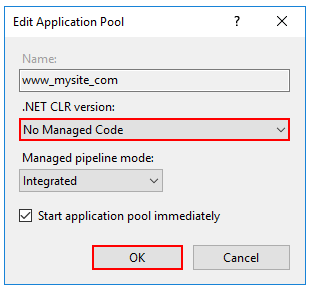
- 应用程序池的“.NET CLR版本”设置为“无托管代码”
- 自宿主发布
- 发布成一个exe直接运行
- 不用依赖IIS
- RuntimeIdentifier
- .NET Core RID Catalog
- IIS 部署
<!-- 依赖框架的部署 (FDD) -->

<PropertyGroup>

  <TargetFramework>netcoreapp2.2</TargetFramework>

  <RuntimeIdentifier>win7-x64</RuntimeIdentifier>

  <SelfContained>false</SelfContained>

  <IsTransformWebConfigDisabled>true</IsTransformWebConfigDisabled>

</PropertyGroup>

<!-- 独立部署 (SCD) -->

<PropertyGroup>

  <TargetFramework>netcoreapp2.2</TargetFramework>

  <RuntimeIdentifier>win7-x64</RuntimeIdentifier>

  <IsTransformWebConfigDisabled>true</IsTransformWebConfigDisabled>

</PropertyGroup>

    ...

    ...

    ...
源码地址
- DncLesson 喜欢的话,请Star一下哦。你的支持是我们源源不断更新的动力!
ASP.NET CORE 入门教程(附源码)的更多相关文章
- SpringBoot 和Vue前后端分离入门教程(附源码)
作者:梁小生0101 juejin.im/post/5c622fb5e51d457f9f2c2381 推荐阅读(点击即可跳转阅读) 1. SpringBoot内容聚合 2. 面试题内容聚合 3. 设计 ...
- CentOS开发ASP.NET Core入门教程
作者:依乐祝 原文地址:https://www.cnblogs.com/yilezhu/p/9891346.html 因为之前一直没怎么玩过CentOS,大多数时间都是使用Win10进行开发,然后程序 ...
- ASP.NET Core 入门教程 10、ASP.NET Core 日志记录(NLog)入门
一.前言 1.本教程主要内容 ASP.NET Core + 内置日志组件记录控制台日志 ASP.NET Core + NLog 按天记录本地日志 ASP.NET Core + NLog 将日志按自定义 ...
- PHP简单的长文章分页教程 附源码
PHP简单的长文章分页教程 附源码.本文将content.txt里的内容分割成3页,这样浏览起来用户体验很好. 根据分页参数ipage,获取对应文章内容 include('page.class.php ...
- 各类最新Asp .Net Core 项目和示例源码
1.网站地址:http://www.freeboygirl.com2.网站Asp .Net Core 资料http://www.freeboygirl.com/blog/tag/asp%20net%2 ...
- ASP.NET CORE 启动过程及源码解读
在这个特殊的春节,大家想必都在家出不了们,远看已经到了回城里上班的日子,但是因为一只蝙蝠的原因导致我们无法回到工作岗位,大家可能有的在家远程办公,有些在家躺着看书,有的是在家打游戏:在这个特殊无聊的日 ...
- ASP.Net Core Configuration 理解与源码分析
Configuration 在ASP.NET Core开发过程中起着很重要的作用,这篇博客主要是理解configuration的来源,以及各种不同类型的configuration source是如何被 ...
- easyUI整合富文本编辑器KindEditor详细教程(附源码)
原因 在今年4月份的时候写过一篇关于easyui整合UEditor的文章Spring+SpringMVC+MyBatis+easyUI整合优化篇(六)easyUI与富文本编辑器UEditor整合,从那 ...
- ASP.NET Core 入门教程 9、ASP.NET Core 中间件(Middleware)入门
一.前言 1.本教程主要内容 ASP.NET Core 中间件介绍 通过自定义 ASP.NET Core 中间件实现请求验签 2.本教程环境信息 软件/环境 说明 操作系统 Windows 10 SD ...
随机推荐
- WPF获取和设置应用程序范围的资源
设置资源: Application.Current.Resources["ApplicationScopeResource"] = Brushes.White; 使用代码获取资源: ...
- intel汇编笔记
另一篇汇编学习笔记AT&T Assembly on Linux (linux下) mov ax,bx bx到ax 读数据过程:cpu通过地址线发送地址a,控制线向存储器发送读命令,存 ...
- hMailServer搭建简单邮件系统
本文介绍的是搭建本地的邮件系统,至于互联网的还在研究之中. 1.需要一个邮件服务器软件,这里用的是hMailServer,其中会让你设置一个密码,记住这个密码,后面连接的时候回用到. 2.添加域名 因 ...
- 不同格式图片相互转换的开源库分享(使用CxImage,并有VC6的配置过程)
不同格式图片相互转换的开源库分享 一.背景 笔者在项目的开发中,需要调用windows下的COM接口SetIconLocation来实现桌面快捷方式.而我们项目中给定的图片格式为png格式,SetIc ...
- Delphi线程类 DIY(把类指针作为参数传进去,就可以执行类里面的方法啦)
Delphi 封装了一个很强大的线程类 TThread, 我们也自己动手制作一个简单的线程类 首先Type一个类 type TwwThread = class constructor Create; ...
- 判断当前进程是否以管理员权限运行(AllocateAndInitializeSid后,用CheckTokenMembership与AdministratorsGroup进行比较,和Delphi的那个例子还有点不一样)
在Win7下(Vista以上的...)有时某些操作就是会让人郁闷 开启了UAC的话,得以管理员权限运行才不会出现Access is denied... 但是,程序又不是非得什么时候都用那破管理员权限的 ...
- java基础(1)-几种获取类的扩展方式
摘要 在日常开发过程中经常需要获取类的扩展集.即获取类的子类集(抽象类),或者接口实现类.比如说状态模式中,状态构建类,策略模式中的,策略构造方式.本文介绍几种获取方式. 实现 以策略模式为例 定义了 ...
- 快速理解类的访问控制(public,protected,private)
接触过面向对象编程的朋友们都知道类中的访问控制符无非有三个,public, protected, private. 理解他就先从期望他达到的效果先说吧 Public: 使成员对于整个程序内(类内类外) ...
- Hyperledger Fabric1.4的多机部署
之前的文章深入解析Hyperledger Fabric启动的全过程主要讲解了Fabric的网络搭建,以及启动的整体流程,但是都是通过单机完成的.而区块链本身就是去中心化的,所以最终还是要完成Fabri ...
- PATB 1018. 锤子剪刀布
时间限制 100 ms 内存限制 65536 kB 代码长度限制 8000 B 判题程序 Standard 作者 CHEN, Yue 大家应该都会玩“锤子剪刀布”的游戏:两人同时给出手势,胜负规则如图 ...