
springboot + thymeleaf静态资源访问404
在使用springboot 和thtmeleaf开发时引用静态资源404,静态资源结如下:
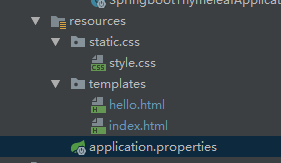
index.html文件:
<!DOCTYPE html>

<html xmlns:th="http://www.thymeleaf.org">

<head>

    <meta charset = "UFT-8" />

    <title>Spring Boot Application</title>

    <link href="css/style.css" rel="stylesheet">

    <!--<link th:href="@{css/style.css}" rel="stylesheet">-->

</head>

<body>

<h4>Welcome to Thymeleaf Spring Boot web application 乱码乱码</h4>

<p th:text="${hello}">hello</p>

<p th:text="${hi}">hi</p>

<input type="text" />

</body>

</html>
style.css文件
h4 {

    color: red;

}

p {

    color: blue;

}
测试访问url
@Controller

@RequestMapping(value = "thymeleaf")

public class IndexController {

    @RequestMapping(value = "index")

    public String index(Model model, ModelMap modelMap) {

        model.addAttribute("hello", "thymeleaf");

        modelMap.addAttribute("hi", "thymeleaf");

        return "index";

    }

    @RequestMapping(value = "hello")

    public String hello(ModelMap modelMap) {

        modelMap.put("hei", "thymeleaf");

        return "hello";

    }

}
配置文件application
#thymeleaf

spring.thymeleaf.cache=false

spring.thymeleaf.prefix=classpath:/templates/

spring.thymeleaf.check-template-location=true

spring.thymeleaf.suffix=.html

spring.thymeleaf.encoding=UTF-8

spring.thymeleaf.servlet.content-type=text/html

spring.thymeleaf.mode=HTML
启动项目后访问http://127.0.0.1:8080/thymeleaf/index,写入的样式并未引进项目中,打开控制台发现静态资源访问的url上加上了后台请求url的除去最后以为的字符串(如果是/thymeleaf/index/hello将会是http://127.0.0.1:8080/thymeleaf/index/css/style.css),显然这并不是静态资源访问位置,404也就正常了。

而直接访问http://127.0.0.1:8080/css/style.css是ok的。
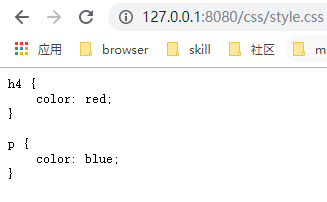
这个问题就是英文引入静态资源文件的路径写的不对,index.html中的引入应该写成
<link href="/css/style.css" rel="stylesheet">

<!--<link th:href="@{/css/style.css}" rel="stylesheet">-->
加上“/”表示绝对路径
springboot + thymeleaf静态资源访问404的更多相关文章
- IntelliJ IDEA+SpringBoot中静态资源访问路径陷阱:静态资源访问404
IntelliJ IDEA+SpringBoot中静态资源访问路径陷阱:静态资源访问404 .embody{ padding:10px 10px 10px; margin:0 -20px; borde ...
- springboot配置静态资源访问路径
其实在springboot中静态资源的映射文件是在resources目录下的static文件夹,springboot推荐我们将静态资源放在static文件夹下,因为默认配置就是classpath:/s ...
- 关于SpringBoot中静态资源访问的问题
第一种方式 : 放在src/main/webapp目录下 第二种方式:放在classpath下(网页存放于static目录下, 默认的"/"指向的是~/resouces/stati ...
- springboot - 登录+静态资源访问+国际化
1.项目目录结构 2.pom.xml <?xml version="1.0" encoding="UTF-8"?> <project xmln ...
- SpringBoot静态资源访问+拦截器+Thymeleaf模板引擎实现简单登陆
在此记录一下这十几天的学习情况,卡在模板引擎这里已经是四天了. 对Springboot的配置有一个比较深刻的认识,在此和大家分享一下初学者入门Spring Boot的注意事项,如果是初学SpringB ...
- 聊聊、SpringBoot 静态资源访问
SpringBoot 1.X 版本和 SpringBoot 2.X 版本在静态资源访问上有一些区别,如果直接从 1.X 升级到 2.X 肯定是有问题的.这篇文章就来讲讲这方面问题,也是项目中的坑. 先 ...
- SpringBoot 常用配置 静态资源访问配置/内置tomcat虚拟文件映射路径
Springboot 再模板引擎中引入Js等文件,出现服务器拒绝访问的错误,需要配置过滤器 静态资源访问配置 @Configuration @EnableWebMvc public class Sta ...
- springboot学习入门简易版四---springboot2.0静态资源访问及整合freemarker视图层
2.4.4 SpringBoot静态资源访问(9) Springboot默认提供静态资源目录位置需放在classpath下,目录名需要符合如下规则 /static /public /resourc ...
- springboot 静态资源访问,和文件上传 ,以及路径问题
springboot 静态资源访问: 这是springboot 默认的静态资源访问路径 访问顺序依次从前到后(http://localhost:8080/bb.jpg) spring.resourc ...
随机推荐
- HDU 6299
题意略. 思路: 我们先把所有字符串处理成 ")))((((" 这样的形式.然后我们把这些字符串排个序,按照min(l,r)来排,小的在前,在我的代码中,l为 ( 的个数,r 为 ...
- netty源码解解析(4.0)-20 ChannelHandler: 自己实现一个自定义协议的服务器和客户端
本章不会直接分析Netty源码,而是通过使用Netty的能力实现一个自定义协议的服务器和客户端.通过这样的实践,可以更深刻地理解Netty的相关代码,同时可以了解,在设计实现自定义协议的过程中需要解决 ...
- java Spring-Boot框架学习视频-百度云盘
版权声明:本文为博主原创文章,遵循 CC 4.0 BY-SA 版权协议,转载请附上原文出处链接和本声明.本文链接:https://blog.csdn.net/lk142500/article/deta ...
- Struts2:request & response
整理自网上: 1. 获取Request和Response的方法 1.1. ServletActionContext的静态方法 HttpServletRequest request = ...
- [python]打开文件操作open用法
1. 格式 handle = open(file_name, access_mode = 'r') file_name: 希望打开的文件名 access_mode: 'r'表示读取,'w'表示写入,' ...
- 混合图欧拉回路POJ1637Sightseeing tour
http://www.cnblogs.com/looker_acm/archive/2010/08/15/1799919.html /* ** 混合图欧拉回路 ** 只记录各定点的出度与入度之差,有向 ...
- HDU - 4366 Successor DFS区间+线段树
Successor:http://acm.hdu.edu.cn/showproblem.php?pid=4366 参考:https://blog.csdn.net/colin_27/article/d ...
- 字符编码与gcc 编译器的编码问题
最近在 vscode 中借助 gcc 编译器来配置 c 语言开发环境时,发现中文编码存在乱码问题.再加上最近学习到多字节字符与宽字符,搅在一起,搞得很乱,就把自己的理解写下来,供有需者参考吧. 1. ...
- 多级树的深度遍历与广度遍历(Java实现)
目录 多级树的深度遍历与广度遍历 节点模型 深度优先遍历 广度优先遍历 多级树的深度遍历与广度遍历 深度优先遍历与广度优先遍历其实是属于图算法的一种,多级树可以看做是一种特殊的图,所以多级数的深/广遍 ...
- 【Nginx】实现负载均衡的几种方式
要理解负载均衡,必须先搞清楚正向代理和反向代理. 注: 正向代理,代理的是用户. 反向代理,代理的是服务器 什么是负载均衡 当一台服务器的单位时间内的访问量越大时,服务器压力就越大,大到超过自身承受能 ...