
C# 设置、删除、读取Word文档背景——基于Spire.Cloud.Word
Spire.Cloud.Word.Sdk提供了接口SetBackgroudColor()、SetBackgroudImage()、DeleteBackground()、GetBackgroudColor()用于设置、删除及读取Word文档背景。本文将以C#程序为例演示如何来调用API接口实现以上内容操作。
必要步骤:
步骤一:dll文件获取及导入。通过官网下载SDK文件包。
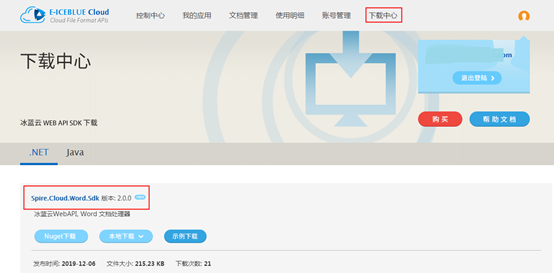
下载后,解压文件,将Spire.Cloud.Word.Sdk.dll文件及其他三个dll添加引用至VS程序(如下图);或者在程序中通过Nuget搜索安装,直接导入。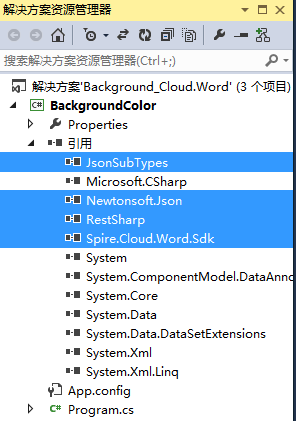
步骤二:App ID及Key获取。在云端创建账号,并在“我的应用”板块中创建应用以获得App ID及App Key。

步骤三:源文档上传。在“文档管理”板块,上传源文档。这里如果想方便文档管理,可以新建文件夹,将源文档及结果文档分别保存至相应的文件夹下。不建文件夹时,源文档及结果文档直接保存在根目录。本文示例中,建了两个文件夹,分别用于存放源文档及结果文档。

【示例1】设置背景颜色
using Spire.Cloud.Word;

using Spire.Cloud.Word.Sdk.Api;

using Spire.Cloud.Word.Sdk.Client;

using Spire.Cloud.Word.Sdk.Model;

using System;

namespace BackgroundColor

{

    class Program

    {

        static String appId = "App ID";

        static String appKey = "App Key";

        static void Main(string[] args)

        {

            //配置账号信息

            Configuration wordConfiguration = new Configuration(appId, appKey);

            //创建BackgroundApi实例

            BackgroundApi backgroundApi = new BackgroundApi(wordConfiguration);

            //源文档

            var fileName = "testfile.docx";

            string name = fileName;

            //源文档所在文件夹,若没有文件夹则设置为null

            string folder = "input";

            //设置背景颜色RGB值

            Color color = new Color(, , );

            //设置文档密码,如果没有密码,则设置为null

            string password = null;

            //使用冰蓝云配置的2G空间存贮文档,可设置为null

            string storage = null;

            //设置生成文档的路径及文档名称

            string destFilePath = "output/BackgroundColor.docx";

            //调用方法设置背景颜色

            backgroundApi.SetBackgroudColor(name,color, folder, storage, password, destFilePath);

        }

    }

}
背景颜色设置结果:

【示例2】设置背景图片
using Spire.Cloud.Word.Sdk;

using Spire.Cloud.Word.Sdk.Api;

using Spire.Cloud.Word.Sdk.Client;

using System;

namespace BackgroundImg

{

    class Program

    {

        static String appId = "App ID";

        static String appKey = "App Key";

        static void Main(string[] args)

        {

            //配置账号信息

            Configuration wordConfiguration = new Configuration(appId, appKey);

            //创建BackgroundApi实例

            BackgroundApi backgroundApi = new BackgroundApi(wordConfiguration);

            //源文档及图片

            var fileName = "testfile.docx";

            var imageName = "ss.png";

            string name = fileName;

            //源文档所在文件夹,若没有文件夹则设置为null

            string folder = "input";

            string imagePath = "input" + "/"+ imageName;

            //设置文档密码,如果没有密码,则设置为null

            string password = null;

            //使用冰蓝云配置的2G空间存贮文档,可设置为null

            string storage = null;

            //设置生成文档的路径及文档名称

            string destFilePath = "output/BackgroundImg.docx";

            //调用方法设置背景

            backgroundApi.SetBackgroudImage(name, imagePath, folder, storage, password, destFilePath);

        }

    }

}
背景图片设置效果:

【示例3】删除背景(包括背景颜色及背景图片)
using Spire.Cloud.Word.Sdk;

using Spire.Cloud.Word.Sdk.Api;

using Spire.Cloud.Word.Sdk.Client;

using System;

namespace DeleteBackground

{

    class Program

    {

        static String appId = "App ID";

        static String appKey = "App Key";

        static void Main(string[] args)

        {

            //配置账号信息

            Configuration wordConfiguration = new Configuration(appId, appKey);

            //创建BackgroundApi实例

            BackgroundApi backgroundApi = new BackgroundApi(wordConfiguration);

            //源文档

            var fileName = "BackgroundImg.docx";

            string name = fileName;

            //源文档所在文件夹,若没有文件夹则设置为null

            string folder = "output";

            //设置文档密码,如果没有密码,则设置为null

            string password = null;

            //使用冰蓝云配置的2G空间存贮文档,可设置为null

            string storage = null;

            //设置生成文档的路径及文档名称

            string destFilePath = "output/DeleteBackground.docx";

            //调用方法删除文档中背景

            backgroundApi.DeleteBackground(name, password, folder, storage, destFilePath);

        }

    }

}
文档背景删除效果:

【示例4】读取背景颜色
using Spire.Cloud.Word.Sdk.Api;

using Spire.Cloud.Word.Sdk.Client;

using Spire.Cloud.Word.Sdk.Model;

using System;

namespace GetBackground

{

    class Program

    {

        static String appId = "App ID";

        static String appKey = "App Key";

        static void Main(string[] args)

        {

            //配置账号信息

            Configuration wordConfiguration = new Configuration(appId, appKey);

            //创建BackgroundApi实例

            BackgroundApi backgroundApi = new BackgroundApi(wordConfiguration);

            //源文档

            var fileName = "BackgroundColor.docx";

            string name = fileName;

            //源文档密码,若无密码可设置为null

            string password = null;

            //源文档所在文件夹,若没有文件夹则设置为null

            string folder = "output";

            //使用冰蓝云配置的2G空间存贮文档,可设置为null

            string storage = null;

            //获取文档背景色

            System.Console.WriteLine(backgroundApi.GetBackgroudColor(name, password, folder, storage));

            System.Console.ReadLine();

        }

    }

}
背景色RGB值读取结果:

(本文完)
C# 设置、删除、读取Word文档背景——基于Spire.Cloud.Word的更多相关文章
- C# 添加文本、图片到PDF文档(基于Spire.Cloud.PDF.SDK)
Spire.Cloud.PDF.SDK提供了接口PdfTextApi及PdfImagesApi用于添加文本和图片到PDF文档,添加文本时,可格式化文本样式,包括文本字体类型.字号.字体样式.文本颜色. ...
- C# 加密、解密PDF文档(基于Spire.Cloud.SDK for .NET)
Spire.Cloud.SDK for .NET提供了接口PdfSecurityApi可用于加密.解密PDF文档.本文将通过C#代码演示具体加密及解密方法. 使用工具: Spire.Cloud.SDK ...
- Java 设置、删除、获取Word文档背景(基于Spire.Cloud.SDK for Java)
本文介绍使用Spire.Cloud.SDK for Java 提供的BackgroundApi接口来操作Word文档背景的方法,可设置背景,包括设置颜色背景setBackgroundColor().图 ...
- C# 设置Word文档背景(纯色/渐变/图片背景)
Word是我们日常生活.学习和工作中必不可少的文档处理工具.精致美观的文档能给人带来阅读时视觉上的美感.在本篇文章中,将介绍如何使用组件Free Spire.Doc for .NET(社区版)给Wor ...
- ASP.NET实现在线浏览Word文档另一种解决方案(Word转PDF)
ASP.NET实现在线浏览Word文档另一种解决方案(Word转PDF) 上述博文里提到的在线浏览pdf的方案不错,但word转pdf的那个dll只支持doc不支持docx,附上最新的下载链 ...
- C# 添加、删除、读取Word形状(基于Spire.Cloud.Word.SDK)
本文介绍调用Spire.Cloud.Word.SDK提供的接口shapesApi来操作Word形状,包括添加形状AddShape(),添加形状时,可设置形状类型.颜色.大小.位置.倾斜.轮廓.文本环绕 ...
- asp.net对word文档进行修改 对于使用word文档做模板编辑比较适用
最近做项目,需要多word文档进行编辑并导出一个新的word,在最初的word编辑中留下特定的字符串用来替换,然后在本地生成一个新的word文档,并且不修改服务器中的word文档,这样才能保证服务器中 ...
- C# 将Word转为PDF、XPS、Epub、RTF(基于Spire.Cloud.Word.SDK)
本文介绍通过调用Spire.Cloud.Word.SDK提供的ConvertApi接口将Word转换为PDF.XPS.Epub.RTF以及将Docx转为Doc格式等.调用接口方法及步骤参考以下步骤: ...
- 打开word文档时提示“Microsoft Office Word已停止工作”
我的电脑(Win10)有Office 2003和2013两个版本,可能由于之前超长待机等原因导致word 2003的文件(.doc)不能正常打开,没次都会提示“Microsoft Office Wor ...
随机推荐
- 大数据之路day01_1--Java下载、安装等配置
从今天开始,我就正式的走上大数据的道路了,如果说我为啥要去学习大数据,可能我的初衷是以后可以接触到人工智能方面的技术,后来在自学的过程中发现,学习人工智能,需要扎实的算法,以及对大量数据的处理,再者, ...
- docker swarm 过滤器affinity 限制副本不会出现在同一个节点上
affinity:container!=容器服务名称(可以是正则) 举个例子:stack_ds.yaml # cat stack_dsc.yaml version: '3.0' services: t ...
- PHP导出成PDF你用哪个插件
准备工作 首先查询了相关的类库,有FPDF,zendPDF,TcPDF等等.首先看了下先选择了FPDF,可以说除了中文字符以外没有什么问题,中文乱码而且看了下最新版本没有很好的解决方案,所以只能放弃. ...
- jenkins手把手教你从入门到放弃01-jenkins简介(详解)
一.简介 jenkins是一个可扩展的持续集成引擎.持续集成,也就是通常所说的CI(Continues Integration),可以说是现代软件技术开发的基础.持续集成是一种软件开发实践, 即团队开 ...
- 通过myclipse建立一个简单的Hibernate项目(PS:在单元测试中实现数据的向表的插入)
Hibernate的主要功能及用法: Ⅰ.Hibernate封装了JDBC,使Java程序员能够以面向对象的思想对数据库进行操作 Ⅱ.Hibernate可以应用于EJB的J2EE架构,完成数据的持久化 ...
- NetCore3.0 文件上传与大文件上传的限制
NetCore文件上传两种方式 NetCore官方给出的两种文件上传方式分别为“缓冲”.“流式”.我简单的说说两种的区别, 1.缓冲:通过模型绑定先把整个文件保存到内存,然后我们通过IFormFile ...
- android逆向总结
首先项目里的java文件,以及项目引用到的第三方jar或aar包里面的class,统统都编译成classes.dex放在apk包的根目录,项目的资源目录和AndroidManifest.xml被处理生 ...
- 同时发起TCP连接
如果你的socket编程只限于创建SOCK_STREAM的socket,用connect-accept建立连接,然后就是recv,send.你就会惊奇tcp连接还可以不用accept. 上图为两个AF ...
- 使用navicat操作PostPreSql创建表并设置主键自增和触发器
使用navicat操作PostPreSql创建表并设置主键自增和触发器 1).创建递增序列 2).创建表,使用序列,设置主键递增 3)定义触发函数 自动生成时间戳函数 CREATE OR REPLAC ...
- 树莓派SSH篇
开启好树莓派后发现一个问题,怎么才可以输入进树莓派里面呢? 一.你需要和我一样准备一个无线(有线)键盘